🚀 Elevate your workspace — connect, extend, and conquer with StarTech!
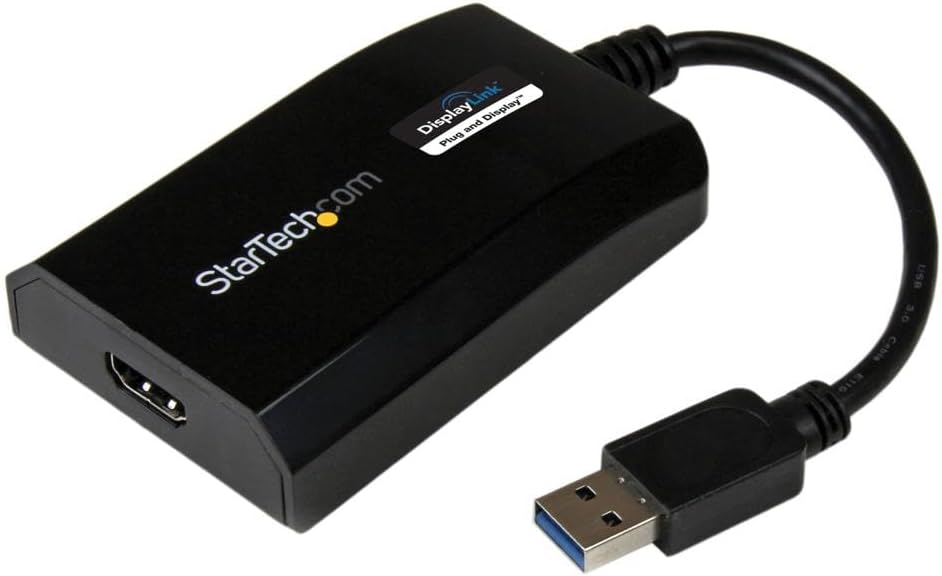
The StarTech.com USB 3.0 to HDMI Adapter is a DisplayLink certified external video card that transforms any USB-A port into a high-definition HDMI output. Supporting up to 1920x1200 resolution and 5.1 channel audio, it enables seamless multi-monitor setups without extra power supplies. Compatible with Windows and Mac, it features automatic driver installation for hassle-free use, making it an essential productivity booster for professionals seeking sleek, efficient workspace expansion.


| ASIN | B00O6G5ZGI |
| Best Sellers Rank | #29 in USB-to-VGA Adapters |
| Brand | StarTech.com |
| Built-In Media | User manual, cable or connector. |
| Color | Black |
| Compatible Devices | Audio/Video Device, Computer, Laptop, Monitor, Projector, Ultrabook, Workstation |
| Connector Type | HDMI, USB Type A |
| Current Rating | 1 Amps |
| Customer Reviews | 4.3 4.3 out of 5 stars (585) |
| External Testing Certification | CE, FCC, DisplayLink |
| Finish | Matte |
| Global Trade Identification Number | 00065030857505 |
| Input Voltage | 5 Volts (DC) |
| Item Dimensions | 3.5 x 2.2 x 0.8 inches |
| Item Type Name | A/V Cable |
| Item Weight | 0.14 Pounds |
| Manufacturer | StarTech.com |
| Model Number | USB32HDPRO |
| Number of Items | 1 |
| Number of Ports | 1 |
| Package Quantity | 1 |
| Power Plug Type | No Plug |
| Specific Uses For Product | Monitor,Projector |
| UPC | 065030857505 |
| Unit Count | 1.0 Count |
| Warranty Description | 2 Year |
| Warranty Type | Extended |
R**N
Star Tech
Works great for what I need.
J**R
PERFECT! Plug and go!
I went through a few of these to try and extend a 3rd monitor from my HP laptop. None of the USB-C versions worked on it. Not even the expensive docking station for HP! So I tried this USB-A one and I just plugged it in and boom, screen on! Did not create any drag on my system nor any flickering which I have experienced with other laptops with screen extensions. Very satisfied!
B**C
It worked with my MacBook Air 2015
I wanted to attach two extended displays to my MacBook Air 2015 (running Monterey) and had a terrible time finding a solution until I came across a YouTube video that directed me to this product. One display was already plugged in to the mini-DVI port. I bought this to plug my 2nd monitor (HDMI output) to my laptop's USB port. My monitor has a VGA output too but I decided on the HDMI because it was cheaper with faster shipping. I bought an HDMI cable too. It arrived fast and took me about 15 minutes to set up. I followed the directions and easily downloaded the appropriate driver from the StarTech website. It didn't work immediately even after I rebooted my laptop which made me worry it wasn't going to work at all. I then tried opening up the DisplayLink driver file directly from my applications folder. Once I did that, it prompted me to adjust a security setting giving permission for the adapter to access my computer's video (or something like that). Once I changed the security setting, it immediately worked. The adapter is expensive but I am so happy to finally have two displays!!
K**9
Third Screen: Works Like a Champ!
Bought the StarTech USB32HDPRO to add a third screen to a MacBook Air 2014 running Mojave 10.14.1. Connecting one screen (27 inch Samsung) to the Thunderbolt port of the MacBook I used the StarTech to connect the second Samsung monitor (and third screen). Download of drivers and installation software from StarTech site was a breeze, selecting the set for my operating system. I messed up the final step of the installation by not allowing MacBook security access to the drivers... 1 wrong click...my bad. StarTech technical support patiently walked me through the correction process and assisted with the screen configuration. (Tech support gets a separate 5 star rating, no long wait, clear instructions and very patient). It really makes a huge difference to be able to work with the larger screens and this device makes it really simple...very pleased.
D**E
This Device Breaks your Computer
I've tried this on 3 computers, two running Windows 10 and one running Windows 7. On each of these computers the initial install of the DisplayLink drivers and software completes successfully. No rebooting needed, the second screen works and all seems well. After rebooting it still seems fine, you are presented with the Windows login screen. Now when you sign-in, you are left with a black screen that just sits there indefinitely. You can't do anything except power off the computer and boot into safe mode to remove the DisplayLink drivers and software. All three computers I've tried this on exhibit the same behavior. Driver updates make no difference.
J**T
Great
I just got this n today & will update this review IF something goes wrong. Opened the box & saw a installation cd & thought great, I don't haaaave a cd driver, but thought about going to the StarTech website to download the drivers. On the website, I looked up the model number & the drivers were right there. (They're r several to choose from but they're alllll labeled as to which one they're for. Windows 11 is the first one.) Downloaded the driver & then had to extract it. (It maaaaaay have just ran out but it recommended extracting them so I did.) After they extracted I clicked on it again & selected run. Hooked up the adapter AFTER all of that. (It MIGHT have worked just hooking it up but didn't want to take a chance. Installation is a pain n the butt IF u HAVE to do all this. It miiiiight b plug & play?, but I did it this way. U can try that if u want, i didn't want to try that.) The picture quality is BEAUTIFUL. Response time has NO lag, it's just like it is on the laptop screen. Overall I'm happy about it. Wish it was simpler plug & play. Wish it didn't cost soooo much but as much as I spent buying cheaper ones with 4.5 star reviews, (that crapped out AFTER Amazon's 30 day return window, (that's not right n my opinion, it should b 1 yr or at LEAST 3 to 6 months). Arrived faster then it originally said so I'm REAL happy about that. All I can say for now is I'm THRILLED about the product itself just not the PRICE.
S**G
Test this under heavy load if you want to return it before return window close
Pros: Win 10 found driver, no problem. I got the second monitor over USB 3. Worked with USB 2 even through USB HUB. Cons: Win 7 required drivers. Included disk had outdated drivers. After installation, had to update drivers for both Win 10 and Win 7 to get audio through adapter. There is visible delay on screen connected with this adapter ( no matter if it's connected to USB3 or USB2. If mouse hovering over desktop application there's no delay, but if you go over simple internet page, mouse pointer just keep sticking from spot to spot, especially, when it hovers over any link. This doesn't happen with the same co conditions, but when monitor connected directly to HDMI laptop output. There is no delays in that case. The most annoying thing is when monitor, connected through startech adapte,r could not wake up after sleep unless I physically reconnect it. There was delay at first week or two aster sleep and now this. I would return it, but window of return is closed right a week later after last day of return. I wonder if this company survives on this no return window. I switched to "Cable matters" now. No problems with wake up so far. Screen delay is a bit less.
S**R
Working fine. If you connect it on USB 3 device it will work on Windows, Linux, Ubuntu 17.10 (Download latest driver from displaylink website). USB 2, currently it working only on Windows. Very good device. I have 3 monitor and my NUC has only 2 video outputs, this will help me to connect 3rd monitor.
D**S
I was having a challenge getting three screens in expand mode with my lap top as the main source. This was plug and play! Amazing.
P**K
Werkt perfect met samsung tablet samen met progamma DisplayLink app Om via hdmi naar monitor aansluiten
C**N
Consegna rapidissima e regolare, prodotto confezionato perfettamente. Prodotto eccellente che mi permette di utilizzare piattaforme di lavoro multi monitor senza dover acquistare un pc nuovo. Dispongo di un portatile con 1 sola uscita video (Hdmi) ed ora posso avere il desktop esteso al totale di 3 schermi: quello del portatile, quello in uscita Hdmi principale, e quello collegato all'adattatore USB di Startech. Installazione ad occhi chiusi in 3 passi (tempo richiesto: pochi secondi): inserito in usb, controllato che update di windows (win) caricasse i driver, collegato il monitor all'uscita hdmi. Consigliatissimo a chi come me ha l'esigenza di più spazio desktop senza per questo dover cambiare scheda video o pc completo. Grazie Amazon e grazie Startech.
J**H
Bought this to add an old 23" 1920x1200px Cinema HD display as an extra screen for my 13" Macbook Pro M1. I already have an external monitor attached via USB-C, so this was the only way to add an additional monitor. I had to download the drivers from the StarTech website. Install was simple, you then have to allow it access to Screen Recording. Reboot the computer. Connect the adaptor (I had it connected to a USB dongle). At this stage I thought it may not be working, as the help manual doesn't state anything other than going in to the Display settings. I had read other reviews that you would need to start the DisplayLink software, so I did that, which opened in the menu bar, and the extra screen started working. There are limited options in this, but I ticked "start on login" to save having to manually do this each time. I also tested it in Windows 10, in Windows it just recognises it automatically and you don't need to install or configure anything (I assume you will need an administrator account though). In use I have found it to work as expected. I can play YouTube videos on it without any issue, not sure on any protected content as I don't have Netflix etc. I don't expect these will work on this. Latency seems fine for day to day office work, I can drag items across screens as normal. One thing I have found, you can't calibrate the display as you normally would, both in Windows and macOS, any changes you make don't make a difference on the screen, so you will need to calibrate using the display itself.
Trustpilot
3 weeks ago
3 weeks ago