Buy anything from 5,000+ international stores. One checkout price. No surprise fees. Join 2M+ shoppers on Desertcart.
Desertcart purchases this item on your behalf and handles shipping, customs, and support to Thailand.
๐ Elevate your network game with silent speed and smart flexibility!
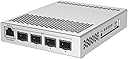
The MikroTik CRS305-1G-4S+in is a compact, fanless managed switch featuring four 10G SFP+ ports and a 1G Ethernet management port. Its dual DC power inputs ensure redundancy, while the dual boot system lets you choose between RouterOS for advanced Layer 3 routing or SwOS for simplified switching. Housed in a sleek metal case, it delivers powerful, quiet performance ideal for professional millennial managers seeking reliable, high-speed networking with flexible OS options.
| ASIN | B07LFKGP1L |
| Best Sellers Rank | #148 in Computer Networking Switches |
| Brand | MikroTik |
| Built-In Media | 2 DC jacks |
| Case Material Type | Metal |
| Color | white |
| Compatible Devices | Desktop |
| Customer Reviews | 4.7 out of 5 stars 1,123 Reviews |
| Data Transfer Rate | 1000 Megabits Per Second |
| Global Trade Identification Number | 00680392660855, 05903148914527 |
| Included Components | 2 DC jacks |
| Interface | SFP+, RJ45 |
| Item Dimensions L x W x H | 5.55"L x 4.53"W x 1.1"H |
| Item Type Name | Network Switches |
| Item Weight | 16 ounces |
| Manufacturer | Mikrotik |
| Mfr Part Number | CRS305-1G-4S+IN |
| Model Number | CRS305-1G-4S+IN |
| Number of Ports | 5 |
| Product Dimensions | 5.55"L x 4.53"W x 1.1"H |
| Switch Type | Flow Switch |
| UPC | 680392660855 |
| Voltage | 57 Volts |
J**E
Great Value!
The MikroTik 5-Port Desktop Switch is a compact yet highly effective addition to any network setup, especially when integrated into a Ubiquiti network environment. Despite its small size, this switch offers reliable performance with five Gigabit Ethernet ports, ensuring fast and efficient data transfer for connected devices. Its straightforward design makes it easy to deploy in various settings, from home offices to small businesses. The switch operates quietly and delivers stable connectivity, complementing Ubiquiti's robust network equipment seamlessly. While it lacks advanced features like VLAN support or PoE, it serves its purpose well by providing reliable network expansion with minimal fuss. For users already invested in a Ubiquiti ecosystem, the MikroTik switch is a practical and cost-effective choice for expanding network ports.
A**R
Wonderful little powerhouse of a switch
First off, if you are looking for a router: look elsewhere. While this can run routerOS, consider it an in-extremis stopgap solution. The CPU on this thing is a little single core clocked at 800mhz. for a small 100M router, it would be fine, but you will redline it and get well below 1G speeds. If your actual router gets struck by lightning and blows up, this will make do in a pinch, but its not what it's designed for. As a switch however, this thing is fantastic, and the cpu is more than plenty to give you a management interface to configure all the bells and whistles you might expect from a smart switch. For the price(~$150), it can't be beat. Its so cheap, that it is competitive with simple media converters for the speed (and gives extra ports on either end as well). I had one running as a switch for a while, and recently figured out you can split the ports with the port isolation to turn it into a 2 channel media converter with an extra gigabit side tap. Its just a remarkably versatile and useful little device.
M**X
Simply blown away. Unbelievable product.
I don';t really know where to start, but if I had a way to be the main sales guy for this company in the US, I'd be in good shape/happy! There simply isn't anything even close to this available on the US market right now when you are on a tight budget but still want to have the best 10GBit LAN setup at home or in your small office. I work in a rather large company and have dealt with high level products for many, many years. Switching over to 10Gbe is still quite the undertaking/hurdle for companies (or home network nerds like me) due to price. This device enabled me to create the perfect, load balanced, 10GBe backbone between my NAS, my ESXi development server as well as my gaming rig. - The initial setup is working fine and easy to set up right out of the box, but to get all the features, there is a, still manageable, learning curve. - The RouterOS ROM that comes with the router is amazing ! You'll have a COMPLETELY managed switch/router/bridge with this device, where you can configure everything just how you';d like it. Incl. Firewall, routes, VLANs, OpenVPN Server, NAT, ACL and much more.. whatever you might reasonably want really. - And all of this with a superb GUI as well as SSH enabled command line. I can't really express enough how impressed I am with this device... really keeping in mind how much I paid for it. For the 10GBe PCIe NICs (dual port) I actually went to ebay and bought some used HP cards, which worked perfectly with my NAS vendor as well as my VMware DEV server. Cost me about $30 each. Could not be happier, which I'd have bought the 6/8 port version.
T**7
Great value
The GUI and CLI are a little more complex than other gear, but it works. Great value for the price.
T**K
Four ports of 10Gb goodness
This is a very interesting device. I needed a few 10GbE ports for my VMware and NAS lab at home. This one fit the bill since I could use the existing 1GbE ports as backup. I powered the device using a PoE injector because I already had one in place to run my WiFi access points and cabled the ports up with twinax SFP+ cabling. The RouterOS interface and options were intimidating, even for someone with 25 years in IT. Documentation is kinda all over the place on MicroTik's site. This switch looks like more of project kit sometimes especially when reading the docs. I found the place in the UI to boot to SwOS since I only needed Layer 2 and things got going from there. The switch MTU is set for jumbos and comes that way by default. After poking around in the docs for a while, I finally figured that out. SNMP works fine but doesn't support v3. There's no HTTPS on the management web UI. No SSH. All these are a little disappointing but the config is easy and it has been solid so far. There's no competition in this price point for 10GbE ports. I'm going to continue powering it from that PoE injector just because it's cool. It loses a star for documentation.
O**7
4 years and still running
I got this 4 years ago to connect to one port on a NAS. Now 4 years later I have 4 10GB fiber connections plus 1 GB cable connection. It was a pain in the neck to setup as I remember, for one I didn't understand the device but at the end of the day it was running and hasn't failed. It's connected to other fiber ports from 1 ft away, a switch, then a PC 6 feet away, a NAS 10 feet away and another NAS about 150 feet away. No problems, nice and fast. Just make sure you have AIR space around it for cooling. Good device. It's a winner so far. Would be nice to see one with more SFP+ ports. Update: It's still running good 5 yrs later. Still runs hotter then I care for.
X**R
Fantastic value
I needed a low cost and _quiet_ 10gig capable switch for solution development. I was familiar with Mikrotik as most of my home network is RouterBoard hardware, and at the price point of this switch there is very little out there. My top requirement was having 10gig SFP+ and being quiet, where most 10gig switches aren't designed for home use and belong in a datacenter as they are rather noisy. I plugged this switch in with a couple of budget cost 10gig SFP+ DAC cables, also purchased from Amazon, into my Intel X722 NICs and immediately got link at 10gig: NIC Link is Up, 10 Gbps Full Duplex, Flow Control: None. The RJ45 gigabit port is perfect to connect to the rest of my network. VLAN tagging is working as expected, once you get accustomed to how Mikrotik does things it isn't too difficult to manage VLANs and other advanced settings. You you can manage the device using WinBox, CLI via SSH, or their WebFig in a browser. Out of the box your easiest bet is to use WinBox as it can discover and talk to the device directly by MAC address, rather than the default IP subnet of 192.168.88.1. Once you are connected, you can add DHCP support so that it can be managed on your network. Go into the IP -> DHCP Client section. Click the "plus", set the Interface field to "bridge", and click OK. The OS will now start using DHCP to set an IP address on the bridge interface. If you want the management interface to be on a specific VLAN, you need to add the VLAN into the Interfaces with the desired VLAN ID list first and then repeat the DHCP client settings but with the name you selected for your VLAN interface.
A**X
Great device, with some heat management issues with 10Gb copper SFP+ modules.
This is an awesome, well built device. It supports extremely fast 10Gbit speeds and routes traffic like a boss. The one big negative is heat. SFP+ 10Gb over copper modules get *HOT*. Fill this thing up and it's going to run pretty close to overheating all the time. Put it in an non-climate controlled space and it will over heat and start rebooting. I had to strap a PC case fan to mine to keep it running through the summer.
D**W
Works just fine as a switch, bit complicated & underpowered for anything else
Bought two of these, using one as a router and the other as a simple switch for in-home 10G runs over fibre. The switch was simple to setup, essentially upgrade to the latest firmware and take the defaults as a bridge. Configuring one as a router on the other hand was anything but simple. Finding answers without having to trawl through YouTube was driving me crazy. This little box is a powerhouse, but needs someone with more patience and time to learn than I do. To get my router setup, I followed the example found on GoWifi's website, which was a godsend (I obviously ignored the wifi parts as they were unnecessary here). If you're in the same boat, Google the following: gowifi beginners guide Mikrotik router I don't own a PC, only Mac's so had no choice but to install Wine, and run Winbox.exe to get this done (at one point, you'll have to connect to the device using the MAC address and not the IP address, which is why you need to use Winbox). Other than not understanding where my backups got saved, it now works. Performance wise, as a switch it works great. A router on the other hand isn't recommended for anything except light (real world 330Mbps max throughput) workloads or for temporary use. If it's a router you need, I'd suggest connecting this to the RB5009UG+S+IN instead.
M**S
Switching on steriods
Switching made fast on 10Gbs. Very complete control
F**O
Ottimo prodotto
Arrivato e montato, bisogna collegare il cavo di rete e colllegarlo a un pc su rete 192.168.88.x , con il browser si accede alla pagina di configurazione 192.168.88.1, per iniziare basta assegnare all'interfaccia di gestione un IP della propria rete o usare il DHCP passo successivo update firmware, fa il download installa e riavvia con nuovo IP. Provato con SFP+ 10Gtek AXS85-192-M3-Cisco2 sul MkroTik e Scheda 10G Intel X520 e SFP+ Ipolex AXS85-192-M3-Intel, collegamento 10G senza problemi. Temperatura in funzionamento 38ยฐ (scalda come Cisco)
C**.
A great way to get started with 10GBe at home
It really is a tiny little box that makes it easy to get started with 10GBe at home. If you have a small network or Homelab and wish to get them all networked at speeds you will be grateful for if you do a lot of data transfers. NIC's and SFP+ copper is affordable on eBay or other online shopping places. Doing it for an entire home would be a lot more work but not impossible. Just depends on if you like exposed cabling or your place has false ceilings or places to route hidden away.
A**N
Good 10g for ur lan
I liked the product. For this price there is no other 10g switch in market
Trustpilot
3 weeks ago
2 weeks ago