๐ฏ Own the game, not the bulk โ power meets portability in the Razer Blade 14
The Razer Blade 14-inch gaming laptop combines a powerful Intel Core i7 quad-core processor with a dedicated NVIDIA GeForce GTX 765M GPU, housed in an ultra-slim, lightweight chassis. Featuring 8 GB DDR3L RAM and a 256 GB SSD, it delivers fast, smooth gaming and video editing performance. Its 14-inch HD+ LED display offers sharp visuals, while the laptopโs design ensures no throttling during battery-powered gaming sessions, making it the perfect blend of portability and power for professionals and gamers alike.
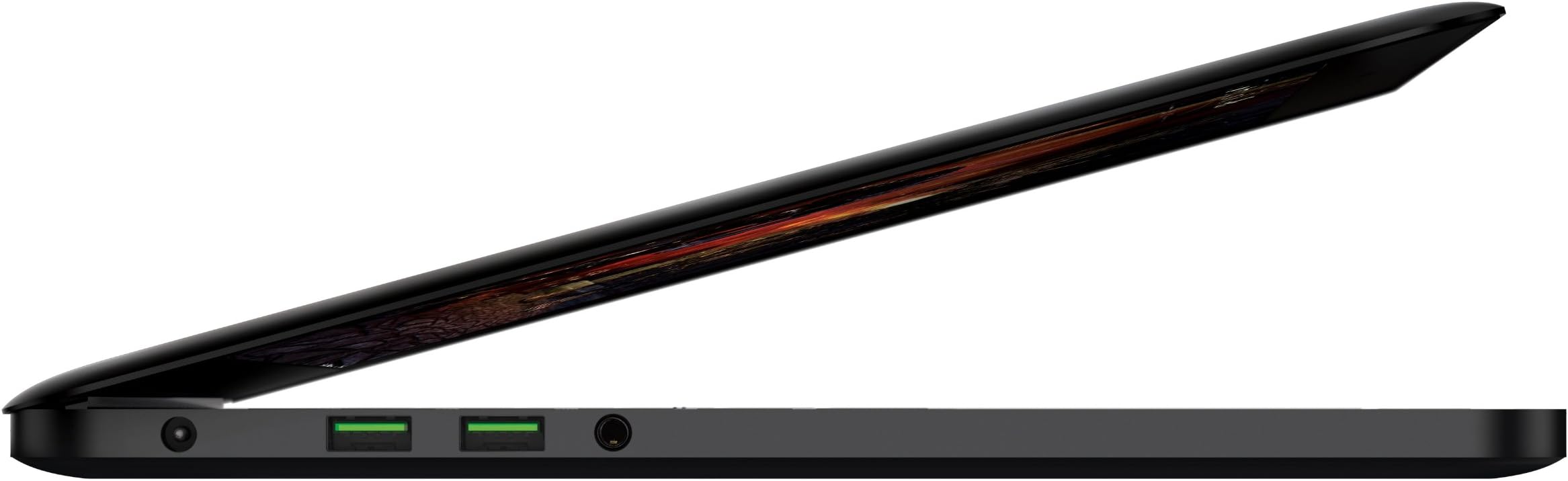
| ASIN | B00CZ8J592 |
| Audio Output Type | Headset |
| Brand | Razer |
| Built-In Media | Charger |
| CPU Model | Core i7 2.2 GHz |
| CPU Model Generation | 4 |
| CPU Model Number | Core i7-4702HQ |
| CPU Model Speed Maximum | 3.2 GHz |
| Color | Black |
| Compatible Devices | External displays, Mice, Keyboards, Storage devices, Printers |
| Connectivity Technology | Wireless |
| Control Method | Touch |
| Customer Reviews | 3.8 out of 5 stars 139 Reviews |
| Display Resolution Maximum | 1600x900 Pixels |
| Display Technology | LED |
| Display Type | LED |
| Form Factor | Laptop |
| Front Photo Sensor Resolution | 1.3 MP |
| Graphics Card Ram | 2000 MB |
| Graphics Coprocessor | NVIDIA GeForce GTX 765M |
| Graphics Description | Dedicated |
| Hard Disk Description | mSATA |
| Hard Disk Rotational Speed | 1 RPM |
| Hard Disk Size | 256 GB |
| Hard-Drive Size | 256 GB |
| Hardware Interface | Solid State Drive |
| Human-Interface Input | Keyboard |
| Item Weight | 4.1 Pounds |
| Keyboard Description | Gaming |
| Lithium-Battery Energy Content | 70 Watt Hours |
| Manufacturer | Razer Inc. |
| Memory Clock Speed | 3.2 GHz |
| Memory Speed | 1600 MHz |
| Model Name | Blade |
| Model Number | RZ09-01020101-R3U1 |
| Native Resolution | 1920 x 1080 pixels |
| Number of Ports | 1 |
| Operating System | Windows 8 |
| Processor Brand | Intel |
| Processor Count | 4 |
| Processor Series | Core i7 2.2 GHz |
| Processor Speed | 2.2 GHz |
| RAM Memory Installed | 8 GB |
| RAM Memory Technology | DDR3L SDRAM |
| RAM Type | SDRAM |
| Ram Memory Maximum Size | 8 GB |
| Resolution | 1080p |
| Screen Size | 14 Inches |
| Specific Uses For Product | Gaming |
| Total Number of HDMI Ports | 1 |
| UPC | 879862007850 |
| Video Processor | NVIDIA |
| Voltage | 240 Volts |
| Wireless Compability | 802.11n |
| Wireless Technology | Bluetooth |
A**I
Good Gaming Laptop, but Razer does not have full international support coverage
I got my almost one year already and I've been using it every day basically. READ ALL REVIEW ESPECIALLY IF YOU ARE FROM OUTSIDE THE U.S. Pros: - Great overall performance for both gaming and video editing. I played games that did not require high graphics, but it ran Sony Vegas pretty smooth. Video processing in HD was much faster than my old notebooks. A 10min Full HD video was rendered under 30 minutes, which is quite good. - Itโs very light compared to others gaming notebooks, which makes it quite portable. Plus the power supply is also pretty slim, which is also a great portability factor. - Loved the keyboard feeling. Keys are โsoftโ to press which is good for any typing activity. Cons: - The fan was sometimes a bit loud and the notebook did get hot sometimes. - It has only 3 USB ports and one of mine worked for only a couple of months. I had to buy a USB hub to replace it. - For some reason, whenever I was using a double screen with a Monitor or TV, I had to adjust the scale of my secondary screen (usually a monitor) plugged through HDMI. And also the sound sometimes were awkward when using a LED TV as my secondary monitor and I had to unplug and plug the HDMI cable again to fix. Maybe thatโs a Windows issue, but it only happened with this notebook (got two other notebooks). - I had an accident with my microphone stand and it damaged the notebook screen. Since Iโm from Brazil I sent an e-mail to Razer Support. They told me that they could fix everything but they would charge me around 600 dollars for new components and labor hours. Plus I had to send it to U.S. and pay all shipping fees, even though my notebook had less than a year (still on warranty). Thatโs when they told me that ANY WARRANTY IS CANCELLED if you take your notebook outside the U.S. Thatโs very disappointing since I would have to pay a total of a thousand dollars including international shipping fees and taxes. Just as a comparison stand point: I used Logitech support and theyโve sent me a new mouse for free even though I was in Brazil.
N**N
A good laptop for a power user or any user (with or without a need for the graphics card)
Update 12/7/17 So I love this computer, still great! I use an external monitor at home frequently and it still runs great for the casual gamer I am. That said, last night flames came out of the vent and the power cut out. Haven't tried booting and sent a message to Razer. If they respond well, then perfect I love Razer! If not, well I might just be building my own desktop. Not marking down starts because I do love the computer, but I expect more than 4 years out of a laptop. UPDATED 7/27/2015 I don't know if people read these updates, but I'm happy enough with this laptop to keep updating this review anyway. Just because it's old, doesn't mean it is at all outdated. The haswell architecture is phenomenal for power and battery life when set correctly. Battery: I use this laptop daily, often as a sort of desktop replacement, I usually leave it unplugged during general internet/word processing (still getting ~6 hours on balance no problem) and plug it in when doing any demanding tasks. I recently tried a program which reads battery SMBUS data, it said my battery had 8% wear. Seems accurate because I do not notice a difference from the day I bought it. I'm very very VERY happy with this battery. I had come to the conclusion that if this laptop was still good in 2 years I'd have no problem paying to have a new battery put in, but I'm even more impressed that this laptop runs great and the battery is still great! I do wish I had some way to have the battery (which is internal) stop charging at say 50%. Can't have it all I guess. Wear: As far as visual imperfections, my cheap ass laptop lock has exposed some aluminum around the lock hole, no way razers fault cause the lock sucks and I hated myself when I saw it, but it's not a lot. I frequently use USB ports (for ethernet in my dorm), and the finish is still perfect around the ports. I had begun to worry about the build up of finger oils making the keyboard 'shinny' when I last reviewed. Well there's a reason they include a kick ass microfiber cloth with the computer. It works great. I did use a small amount of rubbing alcohol and now its as good as new! Once again extremely happy. Power: I had previously used this laptop for games, but more recently I've had the chance to use this laptop for virtualization (running SAS) and for intensive Excel use. By intensive I mean VBA scripts on state gross receipt tax at my job and on 1.2 TRILLION cells of data in a single file using power pivot. The strange part to me, the CPU rarely needs to go above 50% for these. Of course the laptop comes with an mSATA drive, and I set my page file to 32GB... These are massive tabulations. The mSATA prove the bottle neck, I believe, as I still get a sustained over 200MB/s read/write time from these during those scripts. (I installed a second mSATA originally via microsoft storage space, now as a second drive [I'm afraid to use the raid card and lose the operating system]). This thing is better than my work computer with the a Xeon E3 and a professional graphics card (its ~2800$ machine). While I don't want to suggest to anyone to void their warranty opening up the unit, it's easy with a very small torx driver. (means it's impossable to stip these screws if you're careful, but a small amount of black finish wears off, its also the bottom so its pssh) Even though yes it voids your warranty, I suggest opening up and blowing the dust out of this case 2x a year. It's just good for the small form factor and it's surprising the dust that gets in, despite the very good design(inevitable with any air cooled system so not at all a con). MY CURRENT FEELING ABOUT MY BABY <3 If I was looking at this PC to buy used today (seems like you right?), I would pay up to $1,100.(adjust for size, this is 256, and I put in another msata for $150). This is coming from someone who is still incredibly happy with his purchase, which was closer to 1700 after tax w/ msata upgrade. (Everyone online said this pc was a year old and outdated, still plays new games and crunches numbers fast). That being said, I look at specs on new computers, and I'm not compelled to sell this and get anything else, despite the ability to. Sure some new specs are good, and the new nvidia cards make me smile, as does the idea of 4K. I plan on keeping this pc as my main computer for the next 2+ year, barring it still boots; in the future I hope to make this my work on the go laptop and build a desktop. I think this laptop as it comes down in price due to age, is perfect for a college student, or someone looking for a computer with good battery life and zippy operation without breaking the bank. It will last 4 to 6 years still if taken care of (and be useful for games just as well if not better than a console you buy today). To kind of put it in perspective, I probably wouldn't sell this laptop for $1,000. I would highly consider it, but I do not feel like anything else I can buy for that price comes close to what I have here. Sorry, another note cause I love this thing, the sound is A+. I have been interested in lossless media and bit perfect playback and while I've thought about an external DAC, I compare the graph of the soundcard this has with those and I save my money. Another comment, my power adapter used to do the weird clicking thing, not anymore. I don't know when it stopped but it did after being taken to work a couple times. This was recently, like last 2 months I just never noticed it ever. Just buy the damn thing! Purchased: May 2014 (Open box via amazon warehouse deals) Just because it's a year old doesn't mean it's not insanely powerful. Nearly every review I read online about this laptop faulted the screen, but I see no problems. It's bright and it's a screen. I moved from a 17 inch laptop with the same resolution and find this perfect. Text is readable, and all that extra space is filled with content. I like how portable this laptop is and was one requirement I had for a laptop. This laptop is a perfect candidate for amazon's 14 inch laptop sleeve which provides piece of mind and fingerprint protection, which is one I guess downside to having the best looking laptop around. Don't get me wrong I love the look of this rig, but your grandparents will treat you like you're 3 again. I guess it's the glowing green snake. I just want to say before going on however that I didn't buy this laptop because It rocks games. Here's my list of incentives: battery life 30%, Portability 20%, Power under the hood 25%, Gaming potential 15%, Looks 5%, last 5% comes down to other things such how put together and reliable the system is. I try to not make the same assumptions as many online review sites do and I wouldn't have bought this laptop If I did. Now this laptop is now nearly a year old and technology changes rapidly. This is actually why I think it's such a good deal right now. The processor is extremely powerful and the mSATA drive is the new standard for speed. These things aren't going to change in the next couple of years so drastically that this computer won't stack up. 8GB of ram sounds so little compared to other gaming laptops (read bricks) but the only time I use it all is when I'm doing a virus scan. Webcam is ehh. I opened the app on accident and it was grainy but I have an Iphone if i want to see you. A few other things people will mention about why this laptop isn't worth it is that the new one is so much better, but the new one has even greater heating issues (not necessarily bad, but noticeable in this one and I wouldn't want it much hotter), and the new screen as beautiful as it looks, can't be fully utilized while gaming and maintaining frame rates. Battery life suffers too. If a touch screen is your thing then go for it. Windows is now much nicer with touch, and I am starting to understand now all the windows 8 hate. Available ports is often mentioned as lacking too, but think about it. When is the last time you used a DVD? Or plugged into ethernet? A VGA projector plug further adds bulk without function. I'm glad to have a smaller laptop without these unnecessary plugs. You can get an external DVD drive for ~30$ or an ethernet plug for ~10$. The laptop sleeve you're going to buy will fit it. ---Get the 14 inch amazon basic one. I have not felt the razer sleeves I bet they're amazing, but for 10$ the amazon sleave more than fits expectations.----- Just buy this laptop. If you've come far enough to actually read this review and actually consider this laptop then you're ready to actually experience what the Razer 14 has to offer. From the games I've played, both Civ 5 and Skyrim play on maxed out settings amazingly well, with the fan only kicking up to levels you can hear when fighting alot, just turn up the sound, it runs very quite. (metro is killer, and it's a very demanding game btw). I think windows 8.1 is this computers biggest fault, but I'll get used to it. I've just basically turned off Start and it's mostly exactly like windows 7. I bought this from amazon's warehouse deals. The 1,000 price difference over this years model made my decision easy. Anything you buy from amazon warehouse has been inspected and it's condition listed. Mine simply didn't come in the original box, but everything was present. Probably just an open box and it saved be $$$, it's definitely worth looking into. UPDATE: I've been using this laptop for a year now, as such I am updating this to anyone considering this laptop an honest opinion. I am still very happy with my choice of this laptop. For those of you worried about battery life in causal settings, I achieve 6-8 hours of real usage with the balanced powerplan and screen brightness low. For gaming it's closer to 2-3 hours, but I don't game away from my dorm room (I'm in college). One 'upgrade' I did make is purchasing a 1080p touch screen monitor (Got a dell, actually love it ~150$ on amazon warehouse deals) along with a monitor stand. The pair fit comfortably on my dorm desk and I get a cool dual monitor setup. The 765M is more than powerful enough to play games at full HD resolution, although some tweaking in the settings makes it much more enjoyable. Set the graphics to high performance in the Nvidea control panel! I do notice from time to time that the keyboard has grease stains on it. I don't know what else to call it, it's just from daily use. The touchpad still rocks! I had previously said how I opened up and installed a second 250GB msata, a decision I still am happy with. It is cheaper than buying the 500GB model. The Blade has a dedicated RAID card but required formating both hard drives and I was hesitant and instead used microsoft storage space, which works well! The 500GB provides plenty of space for 3-4 large games, matlab (which utilizes the GPU great!), and 20GB of music (lossless files sound great through the headphone port) and I still have plenty of room leftover! (~200GB) Battery still holds up great, although I'm unsure if i'd ever be able to replace it on my own, or want to, if it was necessary. Good computer, holding up well and definity eyeing a Razer again in the future, but this baby still has alot of life left in it.
S**C
so close...
Amazing looks, quality, performance, and even battery life (considering the components used). Absolutely horrible screen. Which makes it utterly useless for its intended purpose.
V**T
Edit... Stopped working on 4th day. Sending back :(
Edit: I did not note it crashed three times since I got in my original review. I figured it was just rolling out updates. It crashed again today twice and now is a loop. It says `We could not update your computer. Please do not turn off'. It sits there for a few minutes and then the screen goes off but the key board stays lit. I will move to 3 stars. I have requested to return for a refund. When it was working it was a great computer. I left my original review below. Seems Amazon may have a bad batch. I am new to PC gaming. I researched everything I could find over the last two months. It was sparked by the the ps4. Everything was locked and expensive. No more USB flash drive for media and no dlna. I looked at the Xbox One. Basically the same thing. I had been given a nvidia shield for my birthday and from there I started reviewing my options. I found the Blade due to the GPU requirements for game streaming with the shield. It was super slim and had a long battery life. Plus it weighs the same as a macbook pro. The reviews of the blade warned of the screen and heat. I have had it for just a week. I have played F1 2013, GTA IV, Tomb Raider and BioShock Infinite with no issues. The heat is noticeable but not worrisome. Keep in mind. I do not know what I do not know. Meaning I have never seen a 2000$ desktop blaze at ultra settings so I can't compare what is possible in PC gaming. I will say it plays games in 1080 as fast and detailed as my old ps4 if that means anything. I'm getting 5 to 6 hours of business use with it. Streaming spotify and multiple web sites up. A note on the screen. If your laptop screen is your primary screen then this blade is not for you in my opinion. It really is something from 2007. My company issued dell looks better. It is tolerable for short periods but begins to hurt my eyes after a couple of hours. 40 married with children Best time to game is at the hotel after work Canceled the MSI gs60 pro and new Blade for the 1500$ deal amazon ran last week.
J**L
Dangerous volume malfunctions. One problem after another.
I'm rating this one star as a combination for the customer service, and issues with my machine. The computer worked great at first, but there have been several issues that popped up, one even resulting in physical harm to myself. Very shortly after buying it I began to hear a weird buzzing from the fan. At first only at certain angles, though this was problematic when I wanted to use it on my lap in bed. It would buzz if it wasn't laying flat. Shortly after it started buzzing no matter what as the fan powered up and down indefinitely. I took a video of it when making my warranty claim which can be seen here: https://www.youtube.com/watch?v=yh1HWjRyMrE. They processed my claim, and though I had to buy very specific packaging (they only paid for the shipping label), I was satisfied for the moment. HOWEVER turns out they shipped my laptop to the wrong location. They even admitted to it when I got pushy asking why the repair was taking so long. I had to wait an entire extra week while my laptop was bounced between their offices. Finally I got my laptop back, and I went to use it again. I plugged it in. The charger emitted a weird chirping/buzzing noise. I immediately contacted Razer again who said they would send a replacement. The replacement sounded even worse. I got a third one which I still use, though it buzzes from time to time as well. So after functioning alright for a couple of weeks, I realize I can hear the fan powering up and down rapidly again. There is relatively little noise this time but now the whole system rattles whenever the fan is powering up, and it does so every other second (one second ramp up, one second down) even when on a very light processor load. It's very annoying and distracting while I am trying to work. I contacted Razer about the issue and they told me that it may be happening because I have moved the laptop without shutting it down first. They claimed that "Laptops are meant to be off and closed when being moved." Utterly ridiculous. As though I need to shut my laptop down every time I decide to pick it up from my desk and take it into another room. The real icing on the cake though came when I was listening to music with headphones on at a very low volume and used the volume up button to move it up a tick. I hit the button only one time and the function stuck (even though the button did not), jacking up the volume to 100. I yanked my headphones out in pain but not quickly enough. I've had a ringing in my ears the past four days as of writing this. In describing this event to Razer I received no sympathy. I use this laptop for work (as well as gaming) and was asking them if there was anything they could do to send me a new one and allow me to return this one once I get the new one. I know that is unorthodox, but I only have one computer and I can't just go through a work week without one. I thought that considering the circumstances of my situation, Razer might have been able to make an exception, as I certainly don't want to trust in their repairs (which already failed once) on a laptop that may randomly blast me with dangerous volume levels. Overall I'd say this is one of the most dissatisfying experiences I've ever had in buying a product. For the price I expect much better. Update 10/6/2014 I've finally received a new laptop from them and straight out of the box, the keyboard lighting is defective. I had to wait an entire week even though they assured me that I would be given overnight shipping, and this is what I got. I am contacting them about getting another replacement.
L**Y
Rough start
I picked up this laptop from Amazon Warehouse Deals for a considerable discount. It was rated as Very-Good so i had high hopes, thinking I had found the deal I was looking for. It showed up the day after I ordered it and in even better packaging than I had hoped. Everything was as if it had come from the factory. Everything was sealed. I carefully removed all the accessories and the laptop itself and plugged it in, after reading the quick start guide. The power brick whirred to life and shone a green light indicating all was well. I plugged the laptop itself to the AC adapter only to find that the laptop was completely BRICKED. The orange LED battery indicator light would not appear, even after leaving it plugged in for quite some time. The battery was at 0%, would not turn on, and would not accept any AC adaptor. (I tried 3 chargers, which I had tested on 2 other laptops successfully.) I am terribly disappointed in the quality of the Warehouse items and the customer service. I will be returning this item if I do not figure something out in the next few days. Buyer's beware: You are taking a risk when buying open box, refurbished, repackaged, etc. EDIT: Product is now working. It was "frozen" during the 8 hours it spent in the UPS truck in this terrible Ohio weather. It needed to be literally warmed overnight in order to function normally. I have been using it ever since for a variety of functions. All is well and this product is excellent (now that it works.)
J**5
Greatest laptop I've ever owned
UPDATE!!: As of 09/18/14 this laptop has been running perfectly so far. Also I've have had no heat issues at all browsing the web or typing up papers and doing research and its actually able to be put on my lap without burning off my testicles. It appears to only get hot when running games, installing software or doing other intensive software work I've only heard the fans come on once after 2 hours of playing F1 2012. My only 2 small problem so far had been that webcam video issue which causes the video at low light conditions to flash a green hue repeatedly. I contacted razer support through their webpage and they responded within a day asking me to call them and download a remote desktop tool (team viewer you're probably familiar with that) I was connected within a minute to the person in charge of my issue and he fixed it by installing a new webcam firmware that specifically has to be installed by them because it can easily brick the laptop. Their customer support was absolutely awesome and my issue was fixed easily. If you have the webcam issue where it flashes green video sometimes, you must contact razer support they will install the firmware for you then delete it because it's too much of a risk to have the end user do it. The support is very responsive. Also secondly this beautifully designed laptop chassis is a fingerprint magnet, the only way I've been able to get rid of the fingerprints has involved using unscented Lysol disinfecting wipes (http://www.staples.com/Lysol-Disinfecting-Wipes/product_SS1027012) to remove the finger oils. If you are using a cooling pad with a fan make sure you clean underneath as well because dust likes this aluminum chassis as well.Overall very pleased with this investment as of one month! Will definitely take another plunge in 4-5 years after college in a newer razer device for sure. This is literally the greatest laptop I've ever owned, I don't even game that much if not at all and decided on this being my notebook for college because the specs are essentially future proof for the next 4 years worth of software I might have to run. I'll explain this laptop in pros and cons- Pros: 1)Exterior/chassis: It is extremely well built, and the chassis is very similar to a mac-book pro except for the fact it's mostly aluminum and feels very very well built. It does attract fingerprints though. It has two small fans that I have yet to hear go on underneath behind some sort of screening and it also has a wide rubber feet running across the bottom so it grips tables well. It's also very light and thin as advertised and you can tell the people at razer took some serious engineering to make this powerhouse function well in this form factor. 2) Keyboard: Feels incredibly responsive and has some nice feedback to it, in case you're wondering is also a very mac like chiclet style keyboard and their are no gripes here with that, also the back light for them comes stock at max brightness, I chose to turn them off which is easy because you simply have to go into Razer Synapse 2.0 to turn them off, I turned them off because the green keys are easy to see anyway and I feel it uses battery life more. 3) The Touch pad: For me it wasn't a problem as I used a mouse, and used the touch pad for a very short period of time and had no gripes with it that other reviewers had mentioned both the left and right "click" has very nice mechanical feedback to them 4) The HARDWARE!: This is a big part if not the main reason you buy this laptop, the slim form factor and power it fits within. It has some serious hardware behind the beautifully designed chassis, and while playing Kerbal Space Program, Crysis 1 and 2 and G-Mod, I experienced no lag or frame rate issues. Downloading and moving files onto the SSD they were super fast as is helped by that powerful i7 processor, which while I was using it so far has stayed at a clock of 2.9 GHz the entire time. Also RAM used stayed at 1.8-3.2 GB depending on what I was doing. 5) The Power supply/power brick adapter: It's actually as small as Razer says it is and it's a whopping 150W power supply! It's about 1/2 the size of my Galaxy SIII phone in width, and as long as my phone length wise, too and I can't help but think they actually had to do some serious engineering to get that to work properly, also I noted it got quite warm while running as well during the first boot after charging the razer from a totally dead battery up to full charge. 6) "Killer WiFi": One of the few hardware and software things that come with the razer, it actually is very useful in creating priority of what should use the most bandwidth on its own or you decide, and actually makes browsing and downloading super quick. Cons: 1) Temperature/Heat levels: As people have said there are some serious hot points on this computer due to the aluminum body transferring heat so well but almost all the "uncomfortable" feeling heat is contained to below the screen hinge where the power button is located, and I originally thought people were complaining to much when I first heard about it, but in person it's actually extremely warm after 6 hours of straight running while I first installed all my programs for in on first boot. Although you'd never need to put your finger there while using the laptop, I couldn't hold my finger there for more than 5-10 seconds without it becoming uncomfortable. Every where else stayed a comfortable using temperature 2) Also keeping in mind the above this isn't really a "laptop" as putting it on your lap will cause some interesting sensations ;) but more a notebook that requires a table for hard-gaming or other use, and it allows those two fans a good amount of air flow 3) Razer Synapse 2.0 requires you to create an account to just turn off all the lights and things and use the macro features, which seems like a nuisance at first but the functionality of it outweighs the problem setting it up, and to be able to get the manufacturer warranty set up its easier to do it through razer synapse as well 4) The power brick gets warm after some time of hard running and almost a similar temp to below the hinge, and because this power brick is so slim/light and proprietary, if it breaks in the future you can only get a replacement from Razer which is a $130 adapter, which I feel with the constant high heat/cooling cycles will go bad after 3-5 years 5) The RAM and Hard Drive: Although the RAM and Hard drive on this notebook are extremely good and ample for any gaming situation, they aren't really upgradeable, but let me elaborate. -The 8 GB DDR3L SDRAM are soldered to the motherboard so if you plan on doing anything that requires more RAM than that (doubtful) you're out of luck - The hard drive can be upgraded as there are 2 msata ports and one is empty, however if you do so the warranty becomes voided All in all I would seriously recommend this laptop, I didn't even have to pay full price and got a totally new one for $1410 by searching through the "Other sellers on amazon" list for a used-like new one with the original packaging that means it hasn't been opened yet but the packaging had some slight damage. Also I highly recommend a warranty for it because this is a serious investment.
M**R
powerful laptop but it has one problem
hello guys so i bought this razer for two things are the most important for me 1-its the thinnest I've found when 2014-feb and Incredibly lightweight 2- simply can run any game you think of :) but the ONLY problem i disliked about this laptop is the SCREEN why ? the Viewing angles are terrible but when i set on desktop and work or play i guess you wont have any issue with the angles lemme see what els.. the KEYBOARD really good even with the long playin your hand dont get tired HEAT? well it gets pretty hot above the keyboard where the hot air comes out but it doesnt give any problem for sure ! for any other answers follow me up on [...] [...]
A**N
Great Gaming Laptop, Defiantly a good investment
This laptop is one of the best I have seen in its class, yes it is expensive however the notion that you get what you pay for comes to mind. I was very surprised how actually thin and light it was when I first opened it considering that it packs a 4th gen I7 and a GTX 765M. It runs fairly quite as well, the one thing I will say is that the top area above the keyboard gets pretty warm to the touch when running in high demand, but I generally dont notice to often. I think that it is definatly worth the money to upgrade to the 256Gb or the 512Gb SSD's I coudnt imagine using the 128Gb (with a ~40Gb windows install that only leaves room for 2 or 3 games before your running low). Good product, defiantly worth considering if your in the market for a gaming system.
W**G
Overall good laptop but HORRIBLE customer service
Great laptop. Fast, thin and light. The only problem is that it heats up a lot . Not sure about the side effects of that in the long term so you should research a little. Horrible horrible customer service. Had one of the keys on the keyboard fall off. "The $100 is a diagnostic fee, this would need a new keyboard $50.13, and labor is $130.00. " Key fell off because it was faulty not because of what I did. $280.13 to fix my delete key? Really? Great laptop, horrible customer service.
P**O
Very nice, i love it!
The computer is really nice. Thin as f and run games perfectly. 2000$ is worth only if you want a computer that looks good
Trustpilot
2 weeks ago
2 weeks ago