Buy anything from 5,000+ international stores. One checkout price. No surprise fees. Join 2M+ shoppers on Desertcart.
Desertcart purchases this item on your behalf and handles shipping, customs, and support to Thailand.
🔥 Unlock Vintage Tech Power with Modern PCIe Speed!
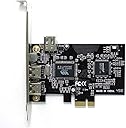
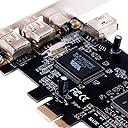
The ELIATER PCIe FireWire Card delivers high-performance IEEE 1394a connectivity with 4 ports (3x 6-pin, 1x 4-pin) supporting 100/200/400Mbps speeds. Compatible with Windows 98 through Windows 10 and Mac OS, it requires no additional drivers thanks to built-in OS support. Its low profile bracket and included cable make it an ideal upgrade for professionals digitizing legacy media or connecting specialized AV devices, ensuring seamless plug-and-play operation and broad device compatibility.


| ASIN | B07N2WQZTS |
| Best Sellers Rank | #2 in Internal FireWire Port Cards |
| Brand | ELIATER |
| Compatible Devices | Personal Computer, Laptop, DV camcorders, disk recorders, digital cameras, CD-ROM, DVD-ROM Drive, audio capture cards, audio devices, printers, scanners, digital video recorders, video editing cards, data acquisition cards [MORE] Compatible Devices Personal Computer, Laptop, DV camcorders, disk recorders, digital cameras, CD-ROM, DVD-ROM Drive, audio capture cards, audio devices, printers, scanners, digital video recorders, video editing cards, data acquisition cards [MORE] See more |
| Customer Reviews | 4.2 out of 5 stars 417 Reviews |
| Hardware Interface | Express Card, FireWire 400, PCIE x 1, PCIE x 16, PCIE x 4, PCIE x 8 |
| Item Weight | 115 Grams |
| Manufacturer | ELIATER |
| Mfr Part Number | 742939345004 |
| Model Number | 8541587525 |
| Operating System | Mac OS, Windows 7/8/8.1/10, Windows 98SE/ME/2000/Server 2003, Windows Vista 32-bit/Vista-64bit, Windows XP-32ibt/Xp-64bit |
| Style | Classic |
| Style Name | Classic |
| UPC | 742939345004 |
| Unit Count | 4.8 Ounce |
C**O
Get your desktop Firewire going.
Worked right OOB, no drivers needed, and enabled me to pull a few old DV recording off a camcorder with no issues. I may never use it again, but I love something that does what I asked it to do the first time.
1**E
Saved me big bucks for DIY video to digital transfer
Wanted to transfer about 15 MiniDV tapes from an old Sony DV handycam to digital to preserve the family memories spanning the past 22 years. A video transfer service wanted hundreds of $$$ to do the job I knew with time and a capable home computer, I could pretty easily do this myself. PC/laptops these days no longer have FireWire 400 ports, so this PCI express card was exactly what I needed. If your desktop PC has a spare PCI express port, this card will work for you. It installed quickly and easily (if you know your way around the interior of your desktop PC) and worked immediately after powering up. Just know that transferring video to digital file is a long manual process depending on how much video you have recorded. It also requires the right software application to process the video, but this can be found free and easily with a Google search. It's not a drag and drop operation. One must play the video in real time while the computer captures the footage to the hard drive. To make it easier, I would run the job before bed or if done during the day, start it and walk away for a while. The process took about a week with the amount of miniDV tapes I have.
Y**P
Worked for Samsung MiniDV download
I found some 20 year old MiniDV tapes and my Samsung SCD103 camcorder with firmware download port. This card installed into an HP Windowx 10 PC with no problems and no need to download drivers. Used Amcap software, with Type-1 firmware download to retrieve video -- which is free to use with 15 minute limit for clips. On thing to be careful with is to make sure you understand Capture versus Record in software, as the Record button means Record camera video and over write the tape. Capture shows video on tape and copies it on to computer hard drive. A Cap a little buggy but works, requires restart of software often, as it drops connection to camera.
O**N
Works great in adding firewire to a Windows 11 PC.
This card worked well in adding firewire to my Windows 11 PC. I use this in combination with 2023 version of Adobe Premiere to capture my legacy Video8 and Digital Video tapes: piping the Video8 camera through the DV camera's firewire connection. The window is closing on the operability of these older technologies, both hardware and software, so it was great getting this rather inexpensive device and getting hundreds of old family memories capture to modern technology. Recommended for those with the need.
D**E
Performs reliably with at least one port
Immediately worked in Windows 11, no fiddling with alternate drivers or anything. Works great with all of my DV equipment. However, on my system, Windows is only able to see devices connected to Port 1 on this card (as labeled on the PCB). I'm not sure if this is a software issue, driver problem, or hardware fault. But, I don't have this problem when I swap an older card into the same system. At any rate, this is an excellent, inexpensive option if you only need to connect one device at a time. And, since I can't identify exactly what's going wrong, you may have better luck than me on the other ports.
P**7
Unstable miniDV Camcorder Connection
Installation under Windows 11 is somewhat tricky. Card didn't negotiate PCIe speed with my Lenovo P330 and after installation kept the PC from starting up. Had to remove the card and manually in BIOS set PCIe speed to GEN 1 after which the PC started up again. After i connected my old miniDV Canon camcorder to transfer DV tapes to my PC but the card did seem to be able to keep a stable connection to the camera. Especially sound was choppy. Bought a newer 1394b card that was backward compatible and allowed for a 1394a support and everything worked as expected.
M**E
It works but??
I bought this capture card after reading most positive reviews, to save some old memories from my DV camcorder tapes, it installed very easy on my windows 11 fast machine, it was recognized with no problems no need to download driver, windows automatically took care of it, i plugged in the camcorder via the cable that came with it, and opened my favorite program Vegas 18, to capture videos, I can see the video in the program and start capturing, but every 10 seconds or so sometimes 2 seconds, it gets disconnected for no apparent reason, I had to unplug and plug the cable to start recording again, but again it kept losing connection every couple seconds, I did hours of agonizing research online, I unnstalled, and reinstall the part, tried different programs, with no avail, I almost gave up, then I thought to change the cable as a last thing, luckily a new cable solved the problem, the cable that came with it was defective but not totally I wish it was totally defective, I would've changed it right away, now with the new good cable it works perfect, without the defective cable I would've gave it 5 stars, so always check the cable first.
Z**K
Works with Canon HV20 miniDV camcorder!
I have old footages recorded HD back in 2007-2009 on my Canon HV20 that I wanted to grab. I'm running this card on Windows 11 machine. The install was straightforward. No need for drivers. I used HDV Split 0.77 beta for the software that's free download and directly recorded to have the m2t file output. The rest is easy as I can use my Davinci Resolve to edit but it was very easy to get it going. On a side note, the software detects any changes to the recording and will split those in individual files while recording automatically which is a really nice feature. The first port seemed a little finicky with the connection and not sure if it's the card or my HV20 but used the second port and recorded at least two hours worth of media onto my PC. It's painfully slow to re-rerecord these miniDVs but it is what it is. I'm either case, it works well and glad this product worked as intended!
E**H
Working condition
Did not work at all
P**G
Works great with ADVC-300 to capture video. Plug and play. Instantly recognized by desktop. deo
Installed in my desktop and was recognized and then worked. Used with a ADVC-300 to capture video from camcorders and all worked fine. Exactly as advertised and exactly what I wanted for my project. Price was decent. Very happy with purchase.
G**F
alles sehr gut
schnelle Lieferung alles ok
畑**.
Windows 11 Pro でちゃんと認識しました。
仕事で必要だったので、注文しました。到着予定より、割と早く届きました。
A**ー
Win10で使用
2,000年製のSONYのデジタルハンディカムで録画した35本分のminiDVをデスクトップPCで取り込むために購入しました。15年前の2,010年に購入したWin7のPCをWin10にして今も現役で使い続けているシロモノです。取りけして最初はカードを認可しなくて困りましたが、3回目の付け直しで突然認識して使用可能となりました。おそらく1回目と2回目のカードの差し込み方が少し甘くてダメだったのでは?と思っています。 Win10環境での使用はとても簡単で、i-linkケーブルでビデオとPCを接続してビデオカメラの電源を入れるとWin10が反応して動画を取り込む画面が出てきて、簡単な操作をすれば勝手にaviファイルを作ってくれます。60分のminiDVは12~13GBのaviファイルになります。自分の場合、キャプチャーソフトとか特に購入する必要もなく、Winが勝手にキャプチャーして取り込んでくれたので助かりました。おかげで、35本のminiDVの取り込みも無事終了できましたよ。 あえて難を言うなら、注文してから届くまで2週間以上(中国本土からの発送のため税関通過に時間を要するのかも?)かかったことと、取説無しの部品のみなので少し心配だったことぐらいですかね。
Trustpilot
3 days ago
2 weeks ago