🚀 Elevate Your Data Game!
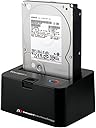
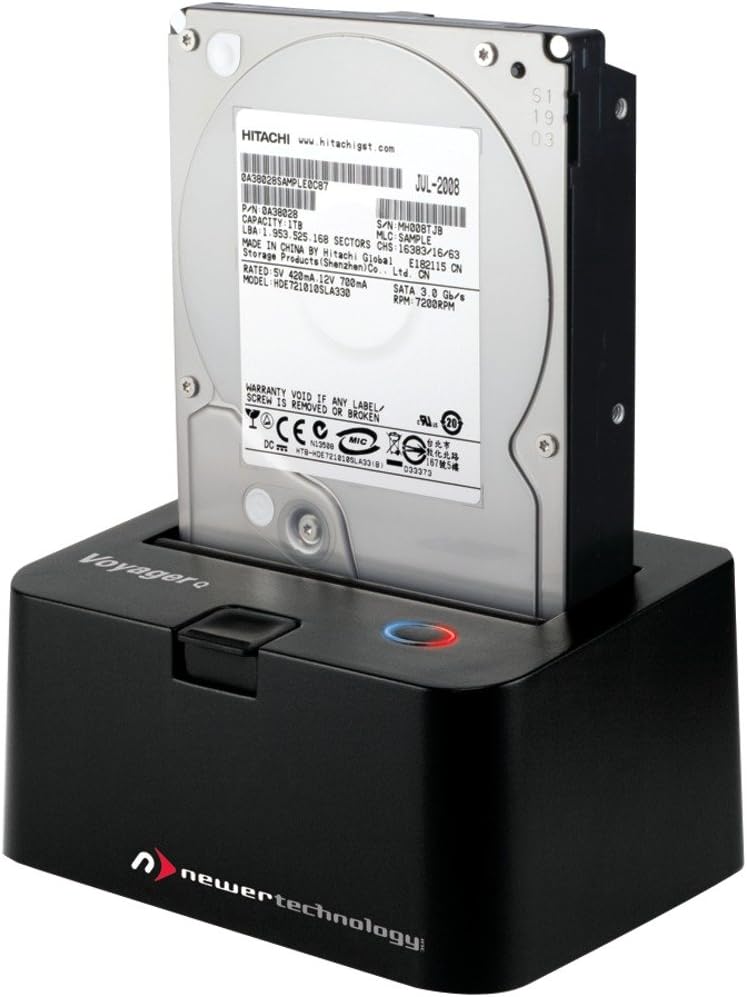
The Newer Technology Voyager Q Quad-Interface Drive Dock is a versatile solution for managing your 2.5" and 3.5" SATA drives, offering seamless compatibility, rapid data transfer rates, and user-friendly features like hot-swapping and push-button ejection—all in a compact and stylish design.
| ASIN | B0026S7HP0 |
| Best Sellers Rank | #2,853 in Enclosures |
| Compatible Devices | Laptop |
| Connectivity Technology | Firewire, SATA, USB, eSATA |
| Customer Reviews | 4.0 4.0 out of 5 stars (131) |
| Data Transfer Rate | 5000 Megabytes Per Second |
| Date First Available | March 18, 2011 |
| Global Trade Identification Number | 00811643011601 |
| Hard Disk Form Factor | 3.5 Inches |
| Hard Drive Interface | USB |
| Is Discontinued By Manufacturer | No |
| Item Dimensions LxWxH | 6.25 x 4.25 x 6.75 inches |
| Item Weight | 2.4 ounces |
| Item model number | NWTFWU3ES2HDK |
| Manufacturer | NEWER TECH |
| Max Number of Supported Devices | 1 |
| Product Dimensions | 6.25 x 4.25 x 6.75 inches |
| UPC | 011411372341 611102281114 811643011601 801029674629 079531641464 807320297321 |
| Voltage | 12 Volts |
P**.
Not sure about long term but Day one is good
I just received my Newer Technology Voyager q. The price was higher then I wanted to pay but all in all I think it's a decent value considering all the cables included and forward compatibility with USB3.0. I plugged it in using firewire 800. I made sure to follow the printed instructions exactly as I was leery of the product since others have reviewed it poorly. I inserted the drive then turned the power on just as the instructions stated and proceeded to back up my iPhoto library - 72.75 GB. I watched Activity monitor as it started to copy and for the first 20 seconds or so I thought the drive was going to have to go back as it's transfer rates were in the single digits. But by the time I was able to google "slow firewire 800 mac" I saw the transfer rates jump up to between ~50 and 73 MB/sec. I'm very pleased with this as the theoretical maximum for fire wire 800 (800Mb/Sec) is 100MB/Sec and of course I expect some data management overhead and also I'm not in a lab environment so I'm sure the conditions are not the same as when the standard's max. was ascertained. At the end of the file transfer, perhaps the last 20 seconds, the transfer rate fell to below 10MB/Sec just like when it first started. My configuration: Late 2009 iMac with 2.6 ghz quad core i5. I have upgraded the internal HDD to a WD caviar black 2TB w/64MB cache assembled 23 Feb 2011. The drive I'm backing up to is a 1TB WD green power 32MB cache assembled 14 Jan 2008. Total time for 72.75GB transfer on my setup was ~22 minutes. If I did my math right that's just over 33 MB/Sec or about 1/3 faster then I had been able to achieve with USB2.0. I didn't calculate down to the second but I think I'm +/- less then 5%. When browsing the drive there seems to be an aggressive power management scheme in place as if I wait more then a minute to click on something the drive spins down - this could be due to the green drive I'm using but I'm not sure. EDIT: I decided to do a slightly more through review and test a second HDD. I have an old WD Raptor 10,000 RPM drive from 5 Dec 2004. It's only a 74GB drive So I decided to try a smaller clutch of files - this time 1.18GB of music. It took 17 seconds to transfer - an average of 69.4 MB/Sec. IMO that's very good. Now to see how well it holds up over time. EDIT again, 10/2012: I have a Mac Book Air now with USB 3.0. USB 3.0 does not work with this device, the supplied cable, and the Mac. I think this is a pretty serious short coming since there is no native USB 2.0 port. Using an old USB 2.0 hub I was able to get the interface to work and I have found on the official apple forum there are a number of people with this issue on the MBAir. If you have a MBAir and intend to use the USB 3.0 port this device will not work as USB 3.0, but it will work as firewire or USB2.0. I've left the rating at 5 stars because I believe the problem is with MAC. The device otherwise works as described. I've had it for a year now and had used it on my iMac as a regular HDD, left it on all the time. The power savings mode worked perfectly and it was a good device to use for keeping my Aperture and iTunes library on.
M**.
Amazon (and OWC) Voyager Hard Drive Dock
The Voyager Quad Interface is great in that it has 4 ports: eSATA, firewire800/400 + USB 3.0 so it works with my old machine a MAC G5 and my new one Mac Pro ).It is good for backing up data, not for running overly fat programs like the Adobe CS Photoshop etc. directly. You can, however, make a boot drive for emergencies. It works seamlessly: just pop (carefully an HD in and there it is on your desktop. It is NOT something you throw in a backpack and haul around by itself without padding etc. If it is going to travel, re-pack it in its' box. Mine just sits on the top of my tower, out of the way, and I don't move it. The drives just slide in and there is a 'toaster' type lever to eject it which does require a little pressure. I use two hands to remove the drive, one for the lever and the other to steady the Drive as it comes up. I learned the hard way about treating drives a tad too roughly when swapping them in and out of the bays in my computer. This lets me do backups and check what's on old drives etc. very easily. It is Brilliant. It also has a decent warranty. The vendor is also wonderful--Other World Computing--I have used them for years and they really stand behind their products. I got this through Amazon because they offered free shipping, for the same price as the product at OWC directly. Packed beautifully, arrived ahead of time etc ***** Kudos Amazon + OWC!! MB
T**N
Good device with plenty of options.
This is a good device, very handy for those of us who have many bare drives that we don't want in difficult enclosures. I have bought 4 of these in the last couple years. I see that a few people had difficulties - maybe it was a bad batch, maybe it was quality control from the suppliers, and maybe it was user error. NewerTech has a good reputation, I wouldn't worry that things have changed. I now have 3 that I work with (2 at work, one at home) and have given another as a gift. I would recommend buying some cheap cases to keep the drives in when you aren't using them and to provide 'minimal' protection should you drop one while carting it around. (I bought these a while ago - but they were cheaper then too http://www.amazon.com/gp/product/B000YNVSMW/ref=oh_o04_s00_i00_details ) Keep in mind; if you use a drive continuously and intensively, you might want to point a fan at it... heat kills. If I did a lot of video work (or computational) where the drive was accessed continuously, I would definitely have a fan moving air. (And chances are, if you don't know the answer to how much you access your drive, you are probably a 'typical user' and don't need to worry...)
Trustpilot
2 months ago
4 days ago