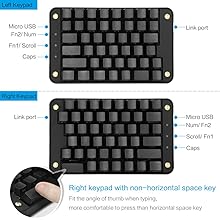
Elevate Your Game & Workflow! 🎮✨
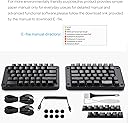
The Koolertron Programmable Split Mechanical Keyboard features 89 programmable keys and 8 macro keys, designed for gamers, designers, and video editors alike. With OEM Gateron Black switches and a split ergonomic design, it ensures comfort and precision, making it a versatile tool for any professional.




| ASIN | B07PVJ1TJQ |
| Additional Features | Travel |
| Antenna Location | Office |
| Brand | Koolertron |
| Built-In Media | USB Cable |
| Button Quantity | 89 |
| Color | Black |
| Compatible Devices | PC |
| Connectivity Technology | USB |
| Customer Reviews | 3.8 out of 5 stars 41 Reviews |
| Enclosure Material | Acrylonitrile Butadiene Styrene |
| Hand Orientation | Ambidextrous |
| Is Electric | Yes |
| Item Dimensions L x W x H | 7.7"L x 4.7"W x 0.7"H |
| Keyboard Description | Programmable Ergonomic Mechanical Keyboard |
| Keyboard Layout | Colemak |
| Manufacturer | Koolertron |
| Mechanical Keyboard Switch Model | Gateron Black |
| Model Name | SMKD62 |
| Model Number | SMKD62 |
| Number of Keys | 89 |
| Power Source | Corded Electric |
| Recommended Uses For Product | Office |
| Series Number | 886085659667 |
| Special Feature | Travel |
| Switch Type | Linear |
| UPC | 886085659667 |
D**Z
6 key on the right side, yeah!!!
Nice mechanical keys. This is the most affordable ergonomic or split keyboard I found that has the key 6 on the right side. I'm a touch typist and those split ergonomic keyboards with 6 on the left have been confusing my brain for years. It never got better, so I had to do some research and buy this. Several other good models are way over $300, so this one is my first choice and it feels and looks promising. I like the fact that it's split so I can keep my desktop microphone in between. That didn't matter earlier, but matters a lot to me now with telework and frequent video meetings. It took me some time to figure out the F11 and F12 toggle patterns with scroll lock and numlock, but after that my typing is great. It is a bit more noisy than I'm used to, and although the mechanical key sound gives impression of a very sturdy design, I may have to pay attention not to type too fast during video conferences. Hopefully setting my Blue Yeti microphone to low gain (as it should be) and to cardioid mode so it records only in front and not the sounds behind or to the side of it will eliminate any concern. Still, since my mic is muted during most of my meetings, and since I usually don't type and talk at the same time, with a bit of awareness I won't distract my coworkers.
J**R
Comfortable keyboard. Poor programming instructions
***UPDATE*** June 2019 The seller has been very good about contacting me to help me program the keyboard. I was able to figure some basic programming. The product will be improved if they can provide a few step by step examples. But they can be commended for trying to add value by providing follow up assistance. Also, a few of my co-workers have tried out the keyboard and really like it for the reasons I discussed in my original review. At least one person I work with is likely to purchase the keyboard based on testing mine out. I have only had the keyboard for a week but am already pretty comfortable using it. But I am stuck with the default configuration because I do not understand the programming instructions. Every time I read the instructions I feel like I am reading a foreign language. As though I missed the basic vocabulary introduction that is necessary to understand HOW to do any programming. But back to the board being ergonomic...it feels very comfortable to be able to type with my hands shoulder width apart due to the split keyboard. I will probably find a way to tilt the front, bottom of board upward so my hands can rest in an even more egro position. I purchased this because it was one of the cheaper split mechanical alternatives. I can see that I will prefer this board to an old fashioned ergo board but I can also now understand why there are popular $300 split ergo keyboards.
W**R
It stopped working after 2 months
Update: OK. After they told me to try another type-c cable, the keyboard worked again. Still, they should improve the quality of the cables, because these cable are too easy to fail and doesn't match the quality of the keyboard. Got the same issue as described in this review: https://www.amazon.com/gp/customer-reviews/R1MOQL6LS7G2DC/ It seems this is a general issue for this product. Also, it seems fragile. Random key popup sound came out all the time. Not sure what gets stuck inside it. I tried to push some side of the keyboard a little bit, amd I can hear a big noise of the plastic framework. If I give a little bit more pressure, I am you will be broken into pieces.
A**Y
Annoying keyboard don't buy
I would recommend not to buy this. The top arrow key is stupidly laid out on the left side, unlike literally every other keyboard. A lot of extremely annoying factory features as F11 turns on Numpad mode which is useless and quite interfering. I'm actually typing this review using my laptop keyboard because my keys got frozen again on this piece of art. I can't reprogram any keys I guess I need a computer science degree to do it. Thx for the user-friendliness. Yes, I tried google.
T**E
Glorious for ALL Technical Folks + Artists
The pros are exactly what you'd expect from a keyboard like this. The cons: - The arrow keys, as someone who mainly relays on navigating large subsets of data, going up a line, down a line, moving between characters weren't as convenient due to a fairly decent learning curve. My unit came with a faulty micro usb cable and that's super disappointing since I do not live in the States which makes returning and even receiving this keyboard a massive headache. If it was capacitive switches then I would've given this 6/5 stars and bought two. I can imagine this would be excellent for all technical artists, you can program your tools to layer 2 so it can all be at fingers reach on one hand without dropping your stylus. Best part is that you don't need to fight over surface area, you can split the keyboard to be on both sides of the tablet or behind it-- That's assuming you're a touch typist. This can be an excellent addition to any workflow with a lot of patience and practice!
A**.
Comfortable keys, fully programmable
I purchased this for ergonomic purposes. It's comfortable to type on, lightweight, and backlit. The two separate pieces can move a good distance apart. A problem that many people have with split keyboards is that the b is located on the left side. If you're used to typing b with your left hand, it can be really difficult to get used to. This keyboard has an extra key next to the n that you can program into a b so you can type it with your right hand. Programming is not intuitive. You have to download an application for programming, and unless your computer already has an application for running .rar files, you'll need to download another application just to open it. It takes a little while to figure out. In contrast to other programmable keyboards, however, this one doesn't randomly lose its programming and you'll only have to do it once. One unfortunate design feature is the arrow placement. The up arrow isn't above the down arrow. Instead, it's next to the left arrow. You can't really reprogram the key above the down arrow to be the up arrow because that's the question mark key and you need that where it is. It's kind of difficult to get used to having the up arrow in a different place from where it is on most keyboards.
T**.
Best-priced split keyboard around.
I got this because I don't type the way most ergonomic keyboards are laid out. For instance, I sometimes hit the "B" or "Y" keys with either hand depending on what word I'm typing. But with most ergonomic keyboards, you only have one hand that can do it without reaching over. This keyboard has several extra keys which are programmable (all the keys are programmable) so I was able to duplicate the "B" and "Y" keys so I can hit them with either hand. It's a little tricky to set up - gotta follow the directions carefully and use some trial and error. But once I got it done, I was happy as a clam. I've been using it for a couple months now and I'm still happy.
L**Y
Not so ergonomic.
Because of the height of the keyboard and no built in wrist support, this keyboard is actually not as ergonomic as I wanted it to be. The lack of switch options and Mac support is also less than ideal. It also does not come with usb c connectors but rather connects over mini USB
Trustpilot
1 day ago
2 months ago