

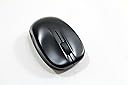

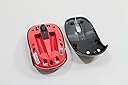
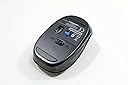
Motorola 89519N Bluetooth Mouse
Product ID: 1218601
Buy anything from 5,000+ international stores. One checkout price. No surprise fees. Join 2M+ shoppers on Desertcart.
Desertcart purchases this item on your behalf and handles shipping, customs, and support to Thailand.
D**Y
and it performs great! It paired immediately with my Samsung Galaxy Tab ...
I've had this a few weeks now, and it performs great! It paired immediately with my Samsung Galaxy Tab 10.1, and has no lag or interruptions. It also works from most surfaces - I set it on the mattress sheet as I am sitting in bed - no mouse pad needed. I never thought I would be able to use a mouse on my tablet because it doesn't have a USB port, but now it's possible for any tablet that is Blue Tooth enabled. I strongly recommend this particular mouse for the Galaxy Tab 10.1, and would recommend giving it a try with other Android tablets. I also have a Blue Tooth keyboard that also works really well, so my tablet is set up pretty well, except its processor is slower than I like.UPDATE May 21, 2015: This mouse began to lose its Bluetooth connection to the above mentioned Galaxy tablet after 8-12 months. I bought a slim profile mouse (I forgot the brand), which works fine. I gave the tablet and new mouse to my grandaughter. The original Motorola mouse went into the garbage.
A**.
Stopped working after a year
This Bluetooth mouse started working fine and was easy to setup. It had ok battery-life usage, but after a year the laser stopped working and is now e-waste. Of course it stopped working a month after the warranty expired!
W**E
Nice inexpensive mouse
I've used this mouse for about a month, and find it to work well. In the short term, I'm not experiencing the battery life issues others cite, but I turn it off when it's not going to be used for a while (say, overnight). Long term, the buttons are part of the entire top of the housing, and I'm curious to see how those hold up over the long haul. Still, for the price, I found it to be a good buy.
H**D
Basic and Functional
I bought this for a Samsung Galaxy Tab Pro 8.4.It was effortless to pair it with my tablet. It's small enough to fit in a pocket. The "Right Click" function is more of a back button function in the Android world. You can get your right click features often by pressing and holding the left button. But that's always a question of the coding in the Android app, not the mouse.It runs off two AAA batteries, not a built in LI-Ion battery. This is actually probably more convenient as it won't be automatically useless as it would when built-in LI-Ion batts die. You just need to keep batteries handy if you think the ones you have might not last.I've only been using it one night. I'll update if I experience any issues. But given the "who knows?" when it came to this product and Galaxy Tab Pro compatibilitywhen I ordered it - I'm happy to report it seems perfect.
A**T
a waste of money
Bought it because it was cheap and I was tired of wasting my usb slots on a bluetooth usb dongle when I had internal bluetooth on my laptop.Problem is, it works for a couple hours, but then loosing its connection. And ever time I restart my computer, it's not connected. And this isn't a case of needing to turn the mouse on. This is a case of have to go into my bluetooth preferences, delete the device, add the device, wait for it to find it, then connect it. If I attempt to do anything in the background during this 2 minute process, it won't find the device at all and I have to restart my computer. The appeal of adding the device gets lost the 10th time you have to do it in a day.Bottom line, the mouse is cheap. You get what you pay for. In this case, a waste of money.
A**N
It works great but looks a little cheap for a Motorola product
I bought this because my old droid 4 can't connect to a mouse through USB on the go. This mouse solved that problem. It works great but looks a little cheap for a Motorola product.
J**S
... the same size as my Ihome mouse not as good fill to is as my logitech 470 but the ...
Mouse will an hard to work the same size as my Ihome mouse not as good fill to is as my logitech 470 but the logitech was 89 $ and Motorola 89519N shipped under 30 $ . Tracking just as good as the logitech I got it to replace my logitech as the left button is going out . OUT side of that not bad at all . So you know I spent years with logitech and years with mice and track balls and so on IF I say it not bad it comes from some one that knows the good the bad and the just ok . I not nit pick over small things like how to put batters in . so for 30 or so you get an good mouse BUT if you think your going to get 89 dollars of mouse for 30 $ your nuts. That is why one cost 89 and one cost 30 and to my ihome mouse 15 $ cheep ok mouse . and the 30 $ was shipped NOW ! shipping. If your like me you have at least 3 an cheep just ok one for on the go an lets work one and an touch it and I will have to hurt you one . The Motorola 89519n is my new just get to work mouse I still need an new hi end mouse .
S**E
Batteries Only Last 3 Days. Paired with Ease. Comfortable, Easy to use.
I love everything about this Bluetooth mouse except its sensitivity levels. If you are used to a high DPI mouse, you will find this mouse slightly lacking in precision. However, it should be fine for almost anyone except hard core gamers. I did get used to the lower sensitivity in about an hour and hardly notice it anymore. Well worth the price.**UPDATE TO REVIEW**I wrote this initial review when I first used this mouse. However I've since learned that you need to keep a large package of batteries on your desk next to your mouse. I replace the batteries every three or four days. It's absolutely outrageous. Many people say that it died after a few days. What I found out is that it doesn't actually die. It simply drains the batteries exceptionally quickly. I've never used another mouse in my life that goes through two or three sets of batteries every week. I also thought it was dead three days after using it. However, after putting new batteries in it, it worked fine.
Trustpilot
2 weeks ago
2 weeks ago