Buy anything from 5,000+ international stores. One checkout price. No surprise fees. Join 2M+ shoppers on Desertcart.
Desertcart purchases this item on your behalf and handles shipping, customs, and support to Thailand.
๐ Unlock your PCโs full storage potentialโbecause running out of ports is so last decade.
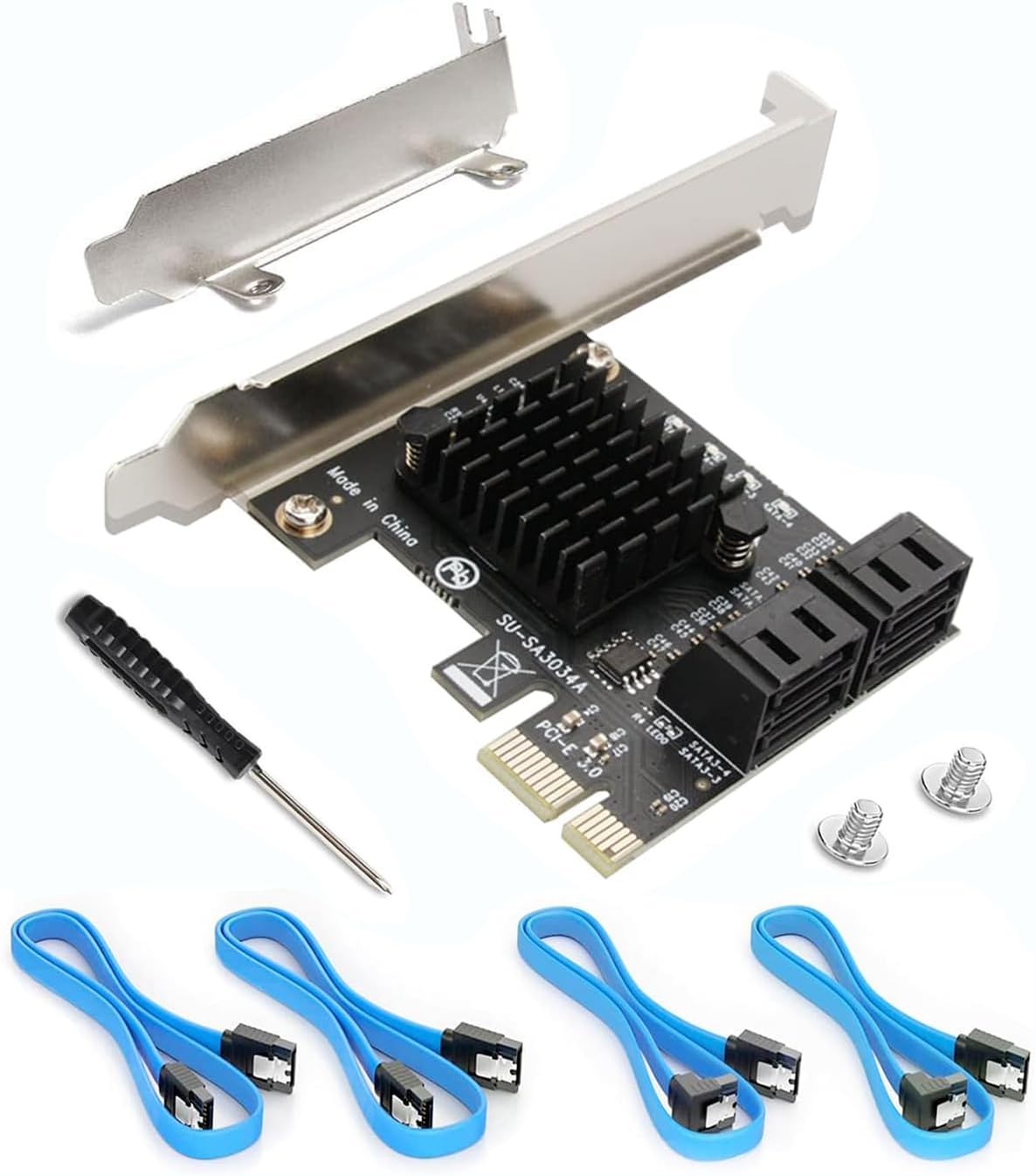
The Ziyituod SATA PCIe 3.0 expansion card delivers 4 additional 6Gb/s SATA ports with included cables and a low-profile bracket, enabling bootable system disk support without RAID. Powered by the stable Asmedia1064 chipset, it fits 99% of PC cases and supports major operating systems including Windows, Mac, Linux, and NAS. Ideal for professionals needing reliable, hassle-free storage expansion.


| ASIN | B07SZDK6CZ |
| Brand | Ziyituod |
| Compatible Devices | Personal Computer, Laptop |
| Customer Reviews | 4.5 out of 5 stars 927 Reviews |
| Hardware Interface | PCI, PCI Express x1, PCIE x 4 |
| Item Weight | 0.22 Pounds |
| Manufacturer | Ziyituod |
| Mfr Part Number | ZYT-SA3014 |
| Model Number | ZYT-SA3014 |
| Operating System | Linux |
| UPC | 753594509335 |
| Unit Count | 1 Count |
E**S
Rock-Solid SATA Expansion That Just Works
Rock-Solid SATA Expansion That Just Works This PCIe SATA expansion card is one of those upgrades that instantly makes a system feel more capable. I installed it in a mid-tower build that was running out of SATA ports, and it picked up my extra SSDs and HDDs without any fuss. The included cables and low-profile bracket were a nice touchโno need to buy extras or hunt around for the right fit. Performance has been steady. Drives are recognized immediately at boot, and transfer speeds are right where they should be for SATA 3.0. Iโve even tested it as a boot device with an SSD, and it worked flawlessly, which isnโt always the case with lower-end cards. The build quality is solid, and nothing about it feels cheap or flimsy. One thing to keep in mind is that while this is non-RAID (which is exactly what I wanted), itโs purely for adding portsโdonโt expect fancy RAID management or enterprise-level features. Also, airflow in smaller cases might get tight with the extra cabling, so plan your layout. Bottom line: A reliable, straightforward way to expand SATA connectivity without headaches. For home builds or small office setups, itโs a plug-and-play solution that delivers exactly what it promises.
A**Y
Great device because it works and needs no extra drivers
I had an 8-port SATA 3.0 card. It came with drivers but didn't explain which version of the two sets of drives that came on the CD. Anyway, Windows 10 found some drivers for it and it worked for the most part. I still had an issue with the fact that all of the hard drives on this card showed up in Windows 10 as removable/portable drives, which was a pain. Each one could be ejected even though they were installed inside my PC. However, my motherboard as 10 sata ports on it and two sata controllers, which two ports on the second sata controller. Those two port also showed up as removable/portable drives, even though they are installed inside the PC. After a lot of searching on the internet for a solution, I finally found a registry mod that would allow those drives to be set to not show up as portable in Windows 10. That worked for the ports on the card, but the two ports on the motherboard didn't work. So, for those, I tried to update the BIOS in the computer. Unfortunately, after doing that, they computer would not longer boot up with the 8-port sata card installed. That lead to me getting two of these 4-port cards. My computer boots fine with these and I know have 8 extra sata drives installed in addition to the 10 sata drives on the motherboard (only 8 of these are hard drives, the other two are the boot SSD and a Blu-ray player). What I like about this one this that no driver is needed. I will install a third one today and stop using those two sata ports on the motherboard that result in the two drives showing up an portable, ejectable drives in Windows 10. For anyone having similar problems with Windows 10 Pro showing your sata drives as portable/ejectable drives, there is the solution I found on the internet: I had the same problem but only had one drive. I found this in another forum and decided to save it. If Kbird's solution does not work try navigating to HKEY_LOCAL_MACHINE\SYSTEM\ControlSet001\Services\storahci\Parameters\Device in the registry. Once you are on the Device Key, In the right hand plane, right click and create a new Multi-String Value Name the new value TreatAsInternalPort Double click the new value to edit it. In the Value Data section, start with 0 then 1 2 3 depending on how many ports you have. The trick here is they must be numbered vertically. The value data section will look like this: 0 1 2 3 4 5 6 7 8 9 10 11 The example will work for twelve ports. It is important that you add a separate line for each port. This what I 'm using on Windows 10 Pro version 1809. Also, this is a registry edit so DO NOT DO THIS if you are not comfortable doing registry edits as this kind of thing could potentially trash your computer. Backups should be made first. Obviously, someone with nearly 20 SATA devices is probably not going to be a computer rookie. :)
J**S
Nice expansion card
Works as expected. Had to purchase this for my new pc build as my motherboard didnt have all the sata ports I needed. Ive had mine for a couple years and its still working great. But I dont use it for any boot drives just extra storage HDD's. Comes with several extra cables. Its small and allows for good airflow around it and my video card. Never had any issues with it recognizing any hard drives
S**R
Great card with a few caveats...
Easy install and worked 'Plug and Play' as a secondary card. Performance for single drive use is great (the PCIe 1x interface becomes a bottle neck when using multiple drives simultaneously). Had some compatibility issues trying to make this a boot device which I assume is down to my motherboard having onboard Marvel SATA & SAS controllers. - BIOS would recognize this card and its attached drives fine, and I could set the boot order of drives as expected ... BUT the boot order would be ignored unless I selected the bios's 'manual boot device selection' on every reboot. Eventually worked around this by forcing disable boot on all other internal drives. Have not reduced my rating because of this as I believe its more of an issue with my ASUS Motherboard/BIOS, than of this card. The -1 star is because when I boot from a drive connected to this controller, it shows in Windows 10 as an HDD not an SSD (so no TRIM available). I have a multi OS/Boot system, and what's strange is if I boot from Windows 10 on a drive not connected to this controller, then the drive's on this controller DO show as SSD and TRIM works! (Both same builds of Windows 10).
A**R
Great Add-on Card for Expanding your Hard Drives!
I was originally looking for a RAID controller as I've been building up a backup server/workstation solution for my apartment. but at the time I was still shopping around. In my search I ended up coming across this little SATA 4 port expansion card for a very reasonable price. Since then I eventually picked up some LSI RAID Controller card and attempted to install the thing but ended up hitting a brick wall due to it having issues with utilizing PCI slots that happen to be allocated for GPUs. So what to do instead? I remembered the little SATA card I'd purchased first and through that bad boy in this old case. Pros - Worked without any type of drivers or software. Instant success and access to my drives. Cons - The fact that its not a RAID Controller, but I knew that from the get-go. Sometimes I'm hesitant about buying from completely unknown companies I find on Amazon, however I know everything is manufactured overseas so its very common to find absolutely unknown brands from time to time and with this, I found a nice little gem. I may end up checking out their other products because I'm sure they'll probably fill some hidden niche need i may have expansion wise or didn't even know I needed yet! If your motherboard is lacking enough SATA ports and you're tired of adding external solutions? Definitely try to this SATA add on card solution.
N**N
Plug n Play
Plug and play worked with no fuss. I see complaints that it doesn't work easily as a boot device but I can at least assure you it worked flawlessly on Windows 11 for my extra storage drives.
M**.
Performance on Par, but most importantly, IT WORKS
I bought this unit from Ziyituod to replace another SATA controller that I purchased from a different manufacturer and after all the headache, this one JUST WORKS. The other SATA controller was using a different chipset(Asmedia) which I'm not saying that's the reason it didn't work, I'm just putting it out there as this one from Ziyituod is running a Marvell 9215. Back story, I needed a SATA controller to expand my storage capabilities on my custom built Ubuntu machine running on an Mini-ITX board. Tried to save space as this machine is serving both my private cloud(Nextcloud) as well as providing VPN and HTPC capabilities. A small physical unit but a small MONSTER that needed more SATA ports to allow me expansion for more drives. The board had a PCI x16 slot unused, and I hate wasting space, so I thought utilizing it was a great idea. This is where my search for a SATA controller on PCIe comes in. With that out there, like I said earlier I tried another unit (2-port Asmedia chipset) and that was a nightmare due its outdated drivers, incompatible drivers, buggy drivers, BSOD-causing drivers...you see where I'm going here? In the end, I knew that unit was not ideal to work with and I wasted ALOT of time on it unfortunately. Fortunately this unit came onto my Amazon search results. It was definitely a bit more pricey but at this point of my frustration stemming from the last one, I figure I should give it a chance. It also received a lot of great reviews so I pulled the trigger. Wow what a difference. Replaced the SATA controller with this one, connected my drives and IMMEDIATELY saw the difference. I forgot that this one had 4 ports so I surprised myself without even trying. Beyond that, it POST'd and did not give me ANY trouble in terms of drivers, SMART, etc. I highly recommend this controller to anyone that needs more SATA ports. However, it is NOT a RAID controller and simply a SATA port multiplier so buy accordingly.
B**E
8TB HDD
Works perfectly, with no issues, and an easy installation.
Trustpilot
2 weeks ago
1 month ago