⚡ Power up your smart home effortlessly—control, save, and automate like a pro!
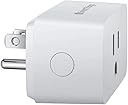
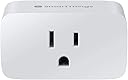
The Samsung SmartThings Wi-Fi Plug is a compact, Energy Star-certified smart outlet that supports 15A/1800W devices. It connects directly to 2.4 GHz Wi-Fi, enabling app and voice control via Alexa, Google Assistant, and Bixby without requiring a hub. Designed for easy stacking and energy monitoring, it empowers users to automate and optimize their home electronics with seamless setup and reliable performance.


| ASIN | B07PY4YPTF |
| Batteries Included? | No |
| Batteries Required? | No |
| Best Sellers Rank | #1,861,925 in Tools & Home Improvement ( See Top 100 in Tools & Home Improvement ) #4,570 in Electric Plugs |
| Certification | Energy Star |
| Color | White |
| Customer Reviews | 4.4 4.4 out of 5 stars (1,800) |
| Date First Available | May 12, 2019 |
| Included Components | QSG, HSG |
| Item Package Quantity | 1 |
| Item Weight | 4 ounces |
| Item model number | GP-WOU019BBAWU |
| Manufacturer | Samsung HI |
| Material | Polycarbonate |
| Mounting Type | Plug-In Mount |
| Part Number | GP-WOU019BBAWU |
| Plug Format | Type A |
| Product Dimensions | 1.5 x 2.68 x 2.12 inches |
| Style | Smart Plug |
| Voltage | 120 Volts |
| Warranty Description | 1 Year Manufacturer |
J**P
Directions For Set Up - hard to initiate but works great after set up
The hardest smart plug to initial connection. I emailed support and they were quick with their responses. Below is my what worked for me, below that is what they emailed with but this is what I did for it to work. Once I got it connected to my SmartThings hub, it works great, tells me the wattage being used and works just as good as Samsung’s $35 smartplug... •Plug in Near the WiFi router •press and hold the power button to reset it. I held it for 30 sec. •On your smart phone (I’m using iPhone XSMax 13.3.1), turn off your cell data and turn on airplane mode •Keep your phone inches away from the smart plug! This is important, every time I walked away with my phone, it would fail at 98% 😐 •Start the pairing process and keep the phone next to the switch. It should pair... •Confirm it’s connected, named and working. •Unplug and place are desired outlet. •Turn off airplane mode and turn on you cellular data. If you have trouble, leave it plugged in for some time, it will keep blinking slowly and try again. The directions above worked for me. Notes from support below~ While adding the outlet please confirm if you are able to connect to the plug AP with the 1111122222 passwords and send a screenshot of the plug AP you are connecting to from your phone. Also, make sure that your Wi-Fi network has a unique SSID and Password. The Wi-Fi outlet may not connect to an open network. SmartThings Wifi Smart Plug didn't connect, it may need to be reset. To do this: Press and hold the Power button for 5 seconds The light on the front of the outlet will blink green when it is ready to connect
Z**N
Great tecnology
I purchased this because I was always in the market to purchase this. I have them for my bedroom to run off the lights (lamps). It is a great added tool and contributes to my laziness. Especially late at night when I am tired and need to turn off the lights. Although it is compatible with Alexa, I have a Samsung phone, so I set it up with the Samsung Smartthings app and it the connection was seamless. It was very easy to set up, a 5-year-old could do it providing how much he/she can read. I do plan to purchase more to set up around the house. I also like the idea I can turn the lights on before I come home, especially at night, or if I am away I can turn the lights on and off to give the impression I am home.
A**R
Flawless - I do not understand any review less than 5 stars
UPDATE: These are the best smart plugs - bar none. Since my original purchase, I have bought another dozen or so. They connect to home Wi-Fi right away. The range is fantastic. I can control everything from my phone, Google Home or Amazon Alexa (yes, I bought both - I didn't know which would be better). My father-in-law has a golf cart at his beach house. It needs periodic charging to keep the batteries from completely draining. He was very skeptical when I told him I could control the plug from my phon no matter where we were. It took no time at all to set up a plug for it (and put it on a schedule). He was amazed when I was able to turn the charger on & off from 5 states away. (He was standing by the cart while I was at my home - he wanted to be sure). Now he is looking to add them to multiple places in his house. ________________________________________ I use both Alexa and Google Home (long story), and we have several household items integrated with home Wi-Fi (light bulbs, security cameras, garage door opener, door bells, etc.) I bought two (2) of these. The set up with home Wi-Fi worked the first time, without any issues. Adding them to both Google Home and to Alexa was done as easily as any other device I have added. If you already know how to add devices to Wi-Fi and then to Google Home/Alexa, you will not have any problem. The range on the plugs is better than the range on the hub I had to buy for light bulbs. These plugs are much cheaper than the specialty light bulbs I have to purchase for the 3rd-party hub-based system I currently use. I will eventually fade out the hub system and replace them with these plugs. I plan on buying many more in the future.
D**R
Setup flawed but post-setup is great
I bought these smart outlet devices to replace some other "off brand" smart outlets. Without naming names, the latter was hopeless from setup all the way through to being operationally abysmal. In any case, my review for this device is over two broad areas of these Samsung SmartThings outlets. First, I’ll comment on the operational performance since my experience has been awesome and is easy enough to explain. Plain and simple; they work - every time without fail. Indeed, operational success of 100% for any device is both unusual and admirable. Samsung does a great job with their overarching integration and these devices are no exception. Operationally, I give them five stars. Now, the setup process is another kettle of fish… The setup process starts off well, advances through several steps without issue and then fails miserably on the very last step of registering on the Samsung web site. The progress bar (a circle actually) spins all the way to 99% and sits there quietly for a minute or two and then fails with an opaque "15-300" error. While a unique/distinct error code beats the common and vague all too often "failed" messaging, Samsung falls short in that I wasn’t able to find any authoritative correlation from Samsung for that code. WTF? I’m sure there’s messaging behind the scenes and it’s a critical success failure not to give customers a way to determine the text behind the code. Now, maybe there is a way, but I couldn’t find it. Apparently, a lot of customers are encountering this error scenario. I saw numerous threads floating around, all to no avail. I think I found an answer to this error 15-300 issue... There are tiny - mostly worthless - help bubbles throughout the setup navigation, and although imbedded navigation help is rarely any help, I did notice in one of the help screens while trying to add my device, the mention that the syntax of your Wi-Fi SSID is important. I cannot remember the specific language but something to the effect that your Wi-Fi SSID can only contain letters and numbers. Although admittedly vague, I took a shot and tried the setup process again, this time using the Wi-Fi hotspot of an old phone instead of my home Wi-Fi router network. That did the trick! That SSID of my old phone was short and conformed to the naming syntax alluded to by the help I had seen. Still, the idea of dedicating an old phone as a fulltime hotspot just for these outlets didn’t really appeal to me. Truth be told, renaming my home router 2G Wi-Fi SSID did not really appeal to me either. In any case, it seemed that one or the other approach was mandated if I wanted to use these devices. Somewhat begrudgingly I went ahead and renamed my 2G network SSID on my home router. Originally it was 'MySpectrumWiFid9-2G' and I renamed it to A) shorten it and B) make sure it only had numbers and letters. I was able to successfully add my device. Of course, changing any Wi-Fi SSID is likely to have ramifications; especially if other already existing devices in your domain use the original name. Although unpleasant, AFIAC, if changing to SSID name to a syntax that supports all my devices is a solution, I am willing to go through the follow-up to adjust any devices that were using the old name in order to get these new SmartThings devices functioning. Another alternative - given that the 15-300 error code quite apparently means "invalid network name" - is for you to configure an old/spare phone to be a permanent hotspot in your home, and configuring your devices accordingly. This is not "something for everyone" but is absolutely an option. Again, keeping the hotspot SSID "short and sweet" and with only letters and numbers. Obviously, that means that hotspot phone becomes a permanent fixture in your domain. Lastly, as sort of an operational tangent, Alexa integration was duck-soup after the devices were configured inside the SmartThings app. So, bottom-line: operational is five stars, setup is one star, and a net rating of four stars (because the setup issue is a one-time thing while operational failures would plague you forever).
R**G
Turn Lights On and Off From Another Room or Another State
I don’t use Alexa, so can’t speak to that. I love these smart plugs. They are easy to use and very reliable. I have not had any issue with them going off line. I love that I can turn lights on and off remotely. If I leave for an overnight or extended time, I can turn lights on and off from wherever I am. I am also able to set a timer for on and off like the old switch timers. The great difference is being able to change the settings if so desired. I was away from home before and after the change from daylight savings time and was able to adjust the timers from my phone and not have to send someone to my house to change the settings. At the time I bought these the price made it affordable to get several.
M**E
Easy to use
Very easy to set up. Integration with Smart things was super easy and the configuration is straightforward and easy to understand. No smartthings huh required, but if you have one it's easy to connect. At the current price I would recommend this of you're looking for a simple way to control a small appliance or light. We use it to control our old coffee maker so a fresh pot is ready when we wake up in the morning. Cheaper than buying a new coffee maker and it works great.
E**N
They are difficult to get connected to a WIFI and completely unreliable
I have 7 and all of them have the same problem. My WIFI is a rock solid Linksys VELOP. All devices connected to it stay connected reliably and when there is an interruption (power blip), all my devices reconnect in very short order...except these smart outlets. Getting them to connected initially to the WIFI is very difficult and it can takes hours per each. Then after connected, they will drop off the WIFI, and may reconnect after hours, or never at all. After working with Samsung for weeks trying all types of remedies, getting them data for their developers, etc., they still can't offer any solutions other than it must be my WIFI, my ISP, or get this, the coronavirus. I wanted Samsung to refund my money but since I bought them through Amazon, I need to work through them. Not holding my breathe...Do not buy them.
B**Y
Excellent price for Smartthings wall plug!
Bought this to setup Smartthings lightings in my bedroom. It was very easy to setup. I can't really comment on the Wifi signal issues people are talking about because I have a router and range extender that cover my house well. It wouldn't setup with Smartthings Classic app and it only works with the new updated Smartthings app. Once you set it up with the new app, it will show up in Classic app as well. Easy to pair and setup with Google Home for routines. When I go to bed at night, I simply talk to GH goodnight, and it will turn off lights and tell me about tomorrow's weather forecast. Love it!
E**I
Buen producto
Buena relación calidad-precio (Recuerden que solo funciona con en el hub de smartthings)
C**A
Supero mis espectativas
Puedo apagar mi enfriador de agua durante la noche y encenderlo fuera de mi casa
Trustpilot
5 days ago
3 days ago