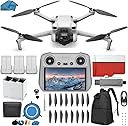
🚀 Elevate Your Vision, Own the Sky
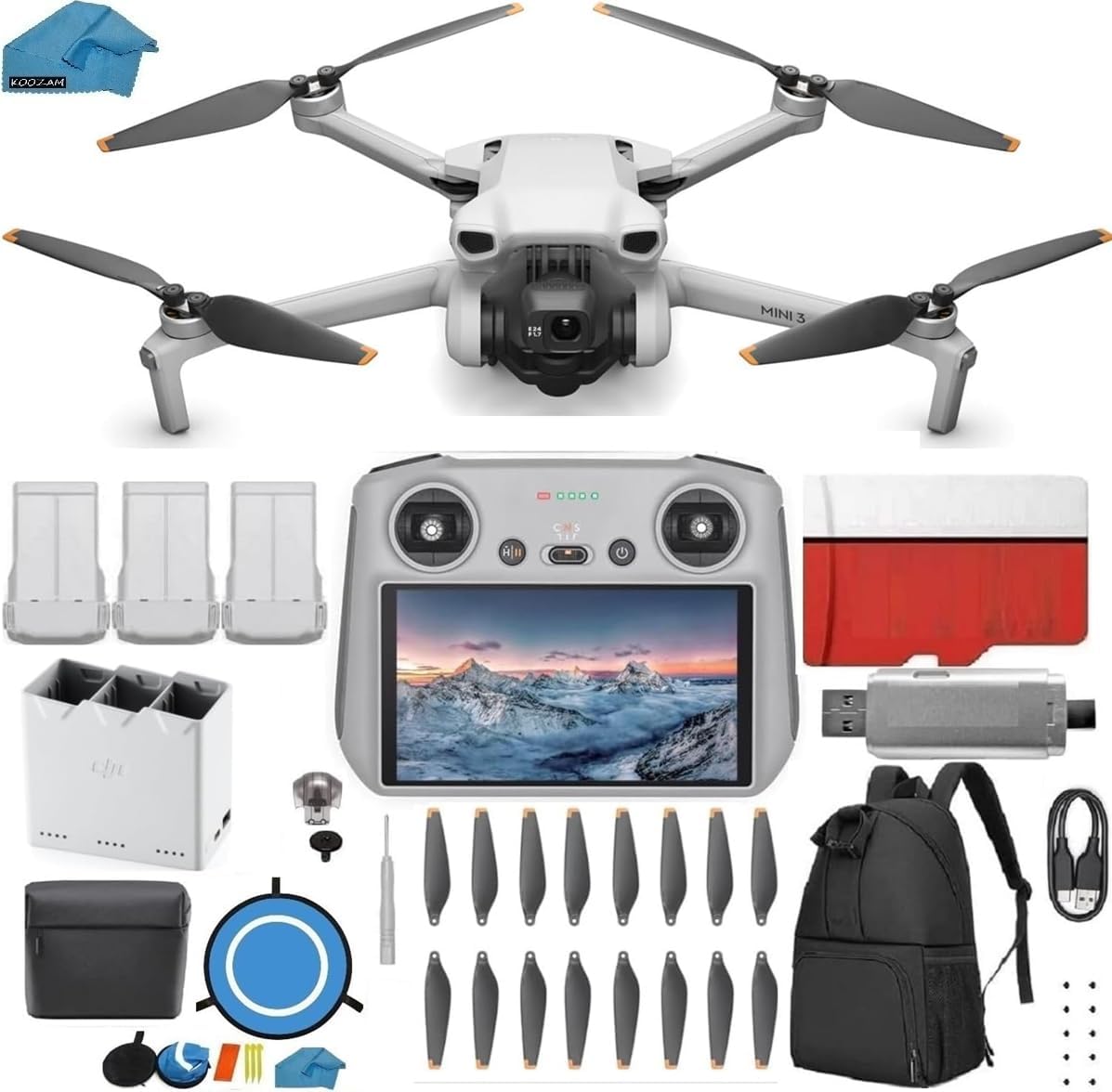
The DJI Mini 3 Drone (DJI RC) Fly More Kit is a lightweight, foldable drone designed for professionals and enthusiasts alike. It features a powerful 48MP camera capable of 4K/60fps video, a 34-minute flight time, and advanced obstacle sensing for safe flying. The bundle includes a built-in monitor remote controller, 128GB SD card, USB 3.0 card reader, landing pad, backpack, and multiple batteries, making it a comprehensive, ready-to-fly package perfect for capturing stunning aerial content anytime, anywhere.
| ASIN | B00ED8IYIA |
| Age Range (Description) | Adult |
| Age Range Description | Adult |
| Are batteries included? | Yes |
| Battery Cell Composition | Lithium Ion |
| Brand | DJI |
| Brand Name | DJI |
| Color | Mini 3 |
| Connectivity Technology | Wi-Fi |
| Control Type | Remote Control |
| Customer Reviews | 4.5 out of 5 stars 184 Reviews |
| Effective Still Resolution | 48 MP |
| Included Components | all |
| Includes Rechargeable Battery | Yes |
| Includes Remote? | Yes |
| Item Dimensions L x W x H | 6"L x 5"W x 4"H |
| Manufacturer | DJI |
| Material | Plastic |
| Maximum Range | 32800 Feet |
| Media Type | SD |
| Model Name | MINI 3 |
| Model Number | mini 3 pro plus |
| Optical Sensor Technology | CMOS |
| Part Number | mini 3 pro plus |
| Remote Control Technology | Wi-Fi |
| Supported Image Format | JPEG |
| UPC | 611098841651 |
| Video Capture Format | MP4 |
| Video Capture Resolution | 4K |
| Video Output Resolution | 4K |
| Warranty Description | 1 year |
| Wireless Communication Technology | Wi-Fi |
K**R
Good quality drone.
High performance Drone.
S**G
This Is, Indeed, the Newest Version of the DJI Phantom [I]
There are now two distinct flavors of the DJI Phantom. The original Phantom [I] and an upgraded model introduced in Oct. 2013, known as the Phantom 2. As the price suggests, this kit contains the original Phantom [I]. In the box I received from Kazoom was a version 1.1.1 model, which is, indeed, the newest iteration of the Phantom [I]. The main advantages of version 1.1.1 over first Phantom [I] (which is known as version 1.2.1) are an upgraded controller and self-locking props. It also arrived from Kazoom with the current controller firmware [version 4.x.x] pre-installed, which means this kit truly is about as close to "plug and play" as you'll find in the world of RC Quadcopters. As is widely recommended online, I downloaded and attempted to read the Phantom manuals (they appear to be machine translations from the original Mandarin and are for the most part unintelligible) and viewed many You Tube tutorials before the DJI Phantom actually arrived. Even after 20+ hours of prep-time, there were a couple of newbie near-misses that almost crashed my first flight. 1. When charging the LIFO battery for the first time, unless you match the polarity of the banana plugs to the charger jacks, your charger will go up in smoke. Make sure you have red to red and black to black. 2. The Phantom's GPS controller is dependent upon a small magnet that is attached to the landing gear. If you accidentally touch the compass with a magnetically charged phillips screwdriver while installing the landing gear, camera mount or prop guards, your Phantom will behave strangely after takeoff. 3. Once you've calibrated the compass and waited through the blinking LED pre-flight initialization, if you don't get the steady blinking green after several minutes, check the GPS/ATT switch on the transmitter. It must be set to GPS, not ATT. 4. Finally, after you get the blinking green LED and are ready to take off for the first time, don't be surprised if nothing happens when you ease the throttle forward. It turns out the you first have to start the motors by simultaneously pulling the left joy stick to the 7 O'Clcock position and the right joy stick to 5 O'Clock. Something that's probably so basic to flying RC models that I never once saw it explained online or in the manual -- except for one tiny illustration in the middle of the two-page Pre-Flight Flow Chart. As for Pros and Cons, if like me, you are purchasing a DJI Phantom because of the stunning aerial Go Pro footage you've seen online, beware that while amazing still photos are relatively easy to achieve, there's nothing "plug and play" about getting professional quality video with the Phantom. The anti-jello mount is a good start, but smooth and dramatic footage will eventually involve adding a brushless gimbal, not to mention many, many hours of practice flying. The biggest advantage of the Phantom is that in GPS mode, the quadcopter practically flies itself. Release the joy sticks and the Phantom hovers in place -- which is an amazing accomplishment. The GPS mode even manages to compensate for the effects of a fairly strong breeze. My first flight was in a fairly steady 12-15 knot wind, but whenever I let go of the joy sticks, the Phantom would stop and hover in a fixed position. While hovering in GPS mode, however, the Phantom is far from motionless. Rather, it undergoes a series of constant corrections that show up on your video as sharp jerks. It's child's play to fly the Phantom in GPS mode, but don't expect to get much in the way of worthwhile video footage. That requires near calm conditions and flying in the more difficult to master ATT mode, in which GPS corrections are far less pronounced. The biggest advantage of the Phantom, of course, is the fun factor. A couple decades ago I made my living doing aerial photography from a real helicopter. The Phantom is almost as much fun, and infinitely safer.
J**.
Great deal Koozam
This by fare the best deal I have been watching the DJI Phantom for a month or so "shopping" . You get 2 batteries , 4 prop guards , 12 props , GoPro mount , charger , usb wire . It is the latest version 1.1.1 with 2 antennas the controller is center and has the lever on back for a gimbal … This thing is really easy to fly I do have blade Cx 2 and a Cp pro 2 so I'm use to flying a little but the Phantom is so easy to fly it has been really windy since I got it took her out anyway (new toy gota play) and had really no problems I could not fly my blades in this weather and could not use my GoPro with them The Phantom is great . The extra 4 props (DJI gives you 8) are not twist on you will need nuts for them but thats not a problem by the time you get use to flying you will be looking to up grade I'm waiting till the 12 I got with the package are shot . when installing the twist on props arrows must match the unlock direction you'll see if she don't lift off you need to switch them around . 2 things I would add to this package is a hard case and a battery check . Witch are both on the way .I ordered the better hard case for the room it has only thing is none of the hard cases out will take the prop guards installed just have to take them off and toss them in the case get a good little tool kit too . Thanks Koozam !
A**Y
Fast, fun and easy
I got this as a Christmas present for myself. Its been a rough winter and I have only flown this eight times. I had zero RC aircraft experience. Let me tell you, this is such a high performance craft its scary. Fun scary. Fun, fast and "I can't even see it" scary. Its pretty foolproof if you follow directions. I've done most of my flying as a test pilot...testing the return home failsafe, altitude limits, speed, and even temperature and wind limits. I got it to approx. 1000 ft in under a minute in 14 degree temps. This particular package from Koozam is a great deal with everything you need. I received everything at the same time, and putting it together was easy. My extra battery turned out to be bad, but one email and a week later, I had a replacement. Super customer service. I use a GOPRO HD(1) with a lens protector, and if I take my time I get fantastic video footage. I am in the air flying very aggressively, for ten and a half minutes when the low battery light starts flashing. I am super thrilled with my purchase from Koozam. Can't wait for milder weather, I'll be flying everyday. I have four batteries now, and honestly, I'm ready to take a break after three, but its addicting.Do not hesitate to make this purchase, and if you can follow simple safety instructions you will not lose your aircraft in a fly away, or low battery landing. Most of the complainers have problems related to Operator Error. UPDATE: 2/3/14: Just crashed my Phantom. Because I did not have a sufficiently clear area for take off and landing. While coming in for a landing during failsafe mode, a gust of wind pushed my Phantom into a tree branch approx. 30 feet from the ground. The craft barrel rolled to the ground, hitting the pavement with such force that it knocked the camera off the anti-jello mount, and immediately went airborne. It tried to return to the 20 meter hover, but became tangled in the tree. I climbed up and retrieved it. Damage report: Lens protector worked, but gave its life doing so. Camera survived, but SD card was ejected before it could write the crash footage. Anti-jello mount was repaired easily. The Phantom itself suffered only a slight scuff to one of the blades. The crash looked like somebody spiked the thing into the ground. I couldn't believe it actually went back in the air trying to resume its failsafe program. This thing is tough. Please follow the rules of flight. I'm still shaking.
Z**N
This thing is awesome! Works as advertised! Great bundle!
I was really skeptical about the Phantom overall from reading some of the reviews out there. A lot of people talk about it randomly flying away, crashing, or having some other kind of error that was fatal to their Phantom and go pro. Even with all of that to consider, I still took the risk and am super happy I did. After several successful flights, I'm confident that 98% of user reported issues are a result of pilot error/not setting it up properly. After spending a lot of time learning about the various components of the Phantom, it was easy to tell if all the components were working properly during the firmware upgrade/before first take off. Everything seemed to calibrate/update fine and sure enough, it flies great. The return to home feature works as advertised too. I do feel DJI could update their documentation about the setup process and they could definitely try to clear up the differences in their models. For instance, this package comes with the Phantom version 1.1.1 which has the NAZA M V2 (a great thing) and already has the tilt control installed on the transmitter for a gimbal (a good thing) while most other packages come with the original phantom (older NAZA, more config needed for gimbal). Now they have 3 other Phantom models on the market as well (the Phantom Vision, the Phantom 2, and the Phantom FC40), the Phantom 2 seems like the best buy in my opinion but if you're looking for this particular version, this package is most likely the best deal.
D**N
My phantom flew fine after this and no damage to the compass was ...
This review is for the 1.1.1 phantom quadcopter with the auto-centering throttle stick. I have owned this quadcopter for several months now and I have had no issues with it aside from having a few firmware issues in the beginning that I was able to resolve without too much hassle. When I bought this I was worried about flyaways or interference but I haven't experienced any problems in that regard. I have probably flown the phantom for 50+ battery discharges in which each discharge lasts about 10-15 minutes (500-750 minutes total flight time). I have crashed this a few times because of pilot error, most often because I lose orientation of which direction the craft is facing and fly into a tree. One of my crashes were strong enough to have the quadcopter bounce off the ground and flip once. With that being said I have not had to replace any parts or make any repairs to either the phantom or my gopro camera. I have operated this device in a wide range of temperates from 10ºF to 90ºF without any issues. It is a very durable device. Some things to note: Do not rest your quadcopter on anything that has magnetic components. I sat my quadcopter on top of my desktop computer tower and did an IMU calibration and the quadcopter started yelling at me with beeps and everything. After setting it on the ground and doing all the calibrations again it was fixed. There are magnetic components in computers (harddisc, fans) that can mess up calibrations. My phantom flew fine after this and no damage to the compass was apparent. Also make sure to tighten all 8 landing strut screws to the phantom. I got some vibrations (aka jello effect) when I got lazy and put only 1 screw on per landing strut. My only complaints: The battery door is sometimes hard to securely shut and it makes me nervous that it will pop out and the battery will fall out. It hasn't happened to me but there is a youtube video out there somewhere where it did happen to someone else. Consider purchasing a velcrow strap that can you adhere to the sides of the door.
A**N
PROP GUARD WARNING!!! READ!!
This package was shipped to me fast. It was packed well and I was happy enough. I was tired of buying crappy little drones that the motors would fail on me in days or weeks and was ready for real drone. They served the purpose though as I was able to learn to fly on them. I strongly recommend you buy a husban cheapy first and kill it learning to fly. I have no complaints about this package or the company that sold it to me. Its a solid deal. The drone is responsive and flys great. Its tons of fun. With that being said... One exception, HEAR THIS WARNING.......In this package are prop guards. Like many, I installed them as I was learning. As time went on I became a very good pilot and decided to remove the prop guards. What ever you do DO NOT PUT THE PROP GUARD SCREWS BACK ON THE DRONE AFTER REMOVING THE GUARDS. SAVE THE ORIGINAL SCREWS! The prop guard screws are slightly longer. If you use them after you remove the prop guards they will screw into the motor and damage them permanently. I have to buy 4 new motors due to this. NOWHERE did I receive a warning for this. Not in the prop guard package or anywhere in the manual. This is the same case regardless where you buy this drone in regards of the prop guard screws damaging the motors. After looking this up online I found 100s of folks that did the same thing. DJI should really warn people about this. Im telling you so you dont have to learn the hard way. I hope this helps someone. DJI may have added a warning (hopefully) by now but this unit did not warn about it anywhere. Also be aware that the landing gear is a bit small and unstable. DO upgrade to a wider set. They are not that much and very, very needed. Good luck and fly responsibly!
D**N
Best deal with extra batteries and charger
I have had ZERO problems with this drone package. I never had a drone before and was a little nervous about spending the money on something that I figured I'd crash and brake the first time out. This thing almost flies itself! I did watch a lot of youtube videos before venturing out and changed some of the settings to some recommended settings. I'm really having fun with this and the fly more kit is the way to go. The extra batteries and multi-battery charger are perfect. I haven't had to use any extra parts yet, as I have not crashed or had anything go wrong.
Trustpilot
1 week ago
2 weeks ago