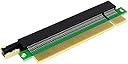
🚀 Elevate your rig, unlock full power — PCIe freedom in tight spaces!
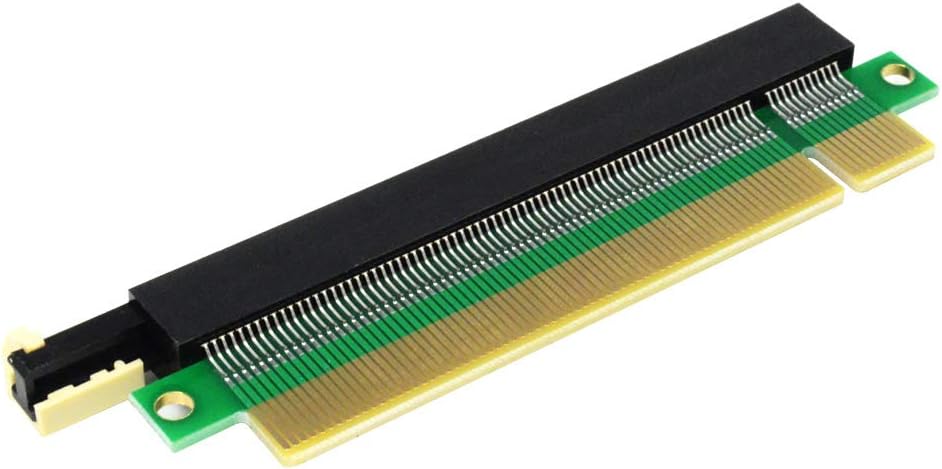
The GODSHARK PCI-E 164 pin 16X Riser Card is a gold-plated, EMI-protected PCI-Express extension designed for 1U and 2U server cases. Supporting up to 256 GT/s across sixteen lanes, it enables full x16 bandwidth for GPUs and other PCIe cards, improving performance and flexibility in compact builds without requiring specialized drivers.
| ASIN | B07RWRK2L6 |
| Best Sellers Rank | #311 in Computer Graphics Cards |
| Brand | GODSHARK |
| Customer Reviews | 3.7 3.7 out of 5 stars (55) |
| Date First Available | May 15, 2019 |
| Item Weight | 0.81 ounces |
| Item model number | GODSHARK PCI-E 164 16X |
| Manufacturer | GODSHARK |
| Operating System | Windows, macOS, Linux |
| Package Dimensions | 6.4 x 2.7 x 0.6 inches |
C**O
So far so good!
A few years ago I bought a GTX 1080 external video card (the only way i was able to get a good video card without buying from a scalper) and when I disassembled it to put the card inside my desktop computer, I discovered the fan on the card was too big and wouldn't operate if I put the card in my motherboard's 16x slot. I settled for putting it into the bottom pcie slot on my board which was only 4x. Now with this riser, it gave my card the clearance to go into the 16x slot. The overall result is about 8% better with the move from the 4x to 16x slot. Note if you're looking just to raise the card a bit off the motherboard like I did here, make sure you have a way to secure the card to the case. I used 2 standoff screws and while that works, it's not ideal.
R**B
Does what it should, but doesn't lock to MB
I needed to find a solution after buying an new GPU that was just a bit too long for the space in my existing mid-tower. Less than a 10th of an inch. Hell, I measured 3 times too. Anyway, a 90 degree riser (no way or space to mount the GPU) to the or a port extender with ribbon cable (access to the DVI/HDMI outputs would be blocked) wouldn't either. This is a simpler solution than having to snip the metal HD cage in the tower to provide the clearance needed. Pros: - works out of the box, no drivers/software needed - inexpensive solution Cons: - The GPU is not locked to the MB. If I remember correctly, the riser locks to this MB, but the GPU doesn't lock to the riser. Probably just need to cut a standoff to give the GPU support. Not a big deal, but one that should be called out. - May block an output port (DVI, HDMI, etc.) since the GPU is now higher than normal. Depends on your layout on the back of your GPU.
S**8
They came bent over
Expanders arrived bent, the box that came with them seems good, but as you can see they are just that folded that the video card doesn't even fit into the slot.
D**N
Exactly what I needed for an HP 570-P017C mini tower case
I was gifted a full sized graphics card (Nvidia GTX 1650) and wanted to put it in my pre-built HP 570-P017C mini tower case. Everything is smashed into a tiny case which leaves little room for upgrades. I had to remove my DVD-RW drive because it wouldn't fit with the card in. Because of the arrangement of the cabling from the motherboard to the power supply (which also had to be upgraded to 450W), the video card couldn't be fully inserted into the PCI-E slot. The GODSHARK riser card helped solve this issue by allowing the card to sit just a little bit higher but not too high, such that the back of the card wouldn't fit the back of the case. It would have been better if the riser card would have locked into the mobo but given that the card was screwed into the case, it should remain solid. This tiny little riser card allowed me to not have to buy a new mobo or computer to use this video card. I also upgraded to a SSD M.2 card, which sits awkwardly behind the PCI E video card ... and so my 6 year old computer is flying again. ***Fully recommend*** this riser card for anyone in the same spot as me.
D**R
Freed up a port.
I installed a second graphics card in my computer. Unfortunately, it blocked my second USB 3 header and I needed it. I purchased this riser and a 90degree USB 3 header (it took the use of both) and I have a second GPU and USB 3 header. All works great. No lose in bandwidth that I can tell.
L**R
Good item, but use carefully.
If used carefully this is very useful, but does not lock the card down.
M**T
When your card is just a tad to close to the mobo
Had a pcie card on the bottom slot interfering with the motherboard fan connections and this spaced the card out just enough to clear everything.
F**S
Defective
Be careful, the black female bar was warped. Can destroy the pins on your card.
S**N
It doesn't lock onto the motherboard. As we know motherboards mostly sit on their sides and this can therefore fall out easily.
A**N
Bought 2 to use with my 1080tis in SLI. needed extra clearance. Were fairly sturdy given the situation. good product.
M**Y
Sure it would be better if it locked in on the board but it works great for what it is. I bought my first riser because I needed some clearance for a 2nd GPU to clear some connectors on the motherboard. It gives around 2cm of additional height which was more than enough for my needs but not excessive. I bought the second one so that my 2 GPUs will be the same height allowing to make use of a nvlink bridge. Works great; 5* if it locked in and 6* if it included longer screws and a spacer to mount it to the case as well
Trustpilot
5 days ago
2 weeks ago