Buy anything from 5,000+ international stores. One checkout price. No surprise fees. Join 2M+ shoppers on Desertcart.
Desertcart purchases this item on your behalf and handles shipping, customs, and support to Thailand.
🏁 Own the Track, Not Just the Game
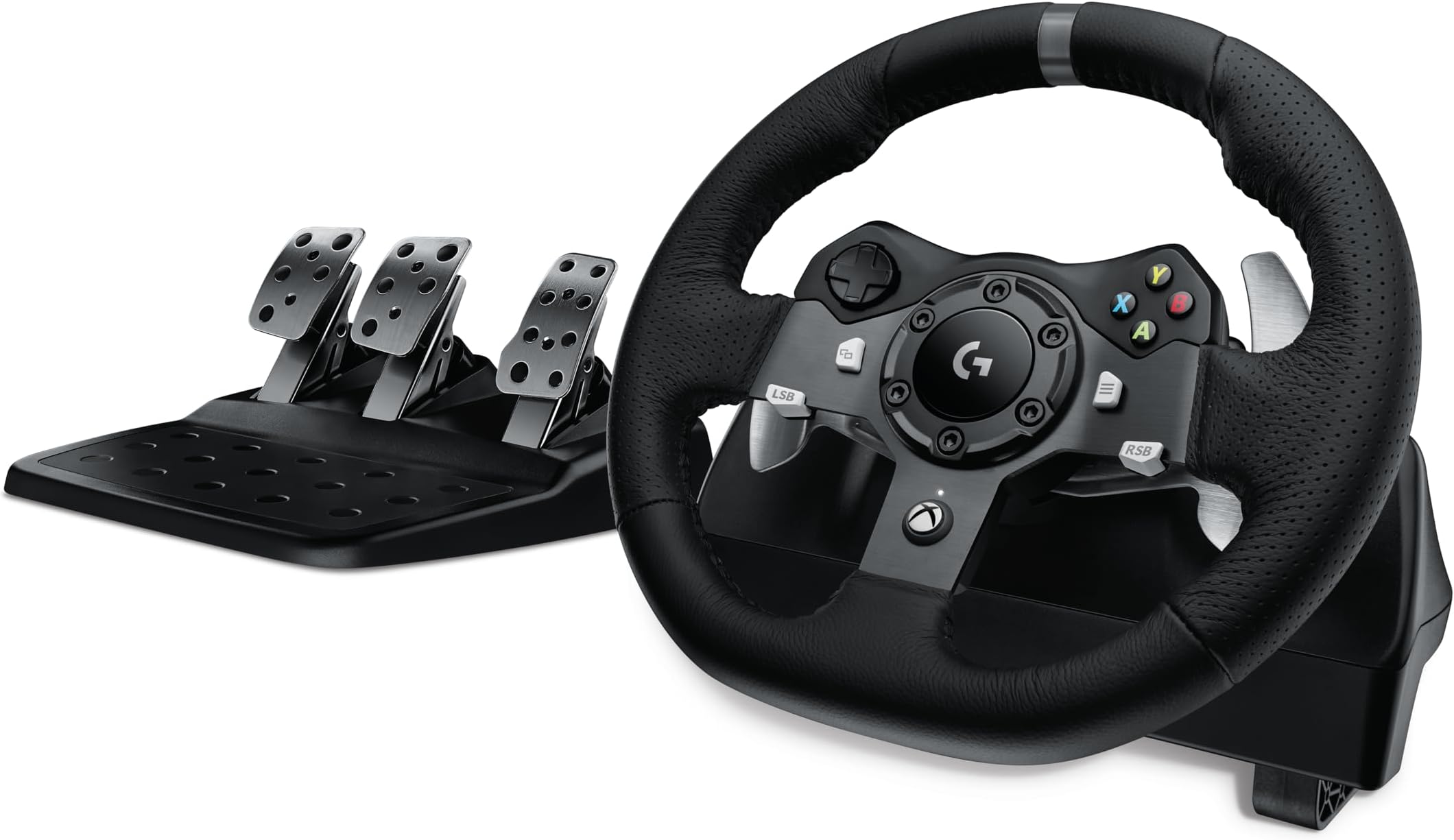
The Logitech G920 Driving Force Racing Wheel and Floor Pedals deliver an unparalleled racing simulation experience with dual-motor force feedback, 900-degree rotation, and pressure-sensitive pedals. Designed for Xbox Series X|S, Xbox One, and PC, it features premium hand-stitched leather, stainless steel paddle shifters, and customizable pedal faces. Built for serious gamers craving authentic control and immersive gameplay, the G920 transforms your setup into a professional-grade racing cockpit.


| ASIN | B00Z0UWV98 |
| Additional Features | Ergonomic |
| Best Sellers Rank | #153 in Video Games ( See Top 100 in Video Games ) #1 in PC Game Racing Wheels #1 in Xbox One Game Racing Wheels |
| Brand Name | Logitech G |
| Button Quantity | 16 |
| Color | Wheel Kit - Black |
| Compatible Devices | PC, Xbox One, Xbox Series S, Xbox Series X |
| Compatible Video Game Console Models | Microsoft Xbox One, Microsoft Xbox One S, Microsoft Xbox One X |
| Connectivity Technology | Cable |
| Controller Type | Paddle, Pedals, Steering Wheel |
| Customer Reviews | 4.6 4.6 out of 5 stars (22,092) |
| Global Trade Identification Number | 00097855114693 |
| Hardware Platform | pc |
| Item Dimensions | 10.24 x 10.94 x 10.63 inches |
| Item Dimensions D x W x H | 16.87"D x 17.5"W x 6.57"H |
| Item Weight | 4.96 Pounds |
| Manufacturer | Logitech |
| Manufacturer Part Number | 941-000121 |
| Model Name | Logitech G920 |
| Model Number | 941-000121 |
| Package Quantity | 1 |
| Power Source | Battery Powered |
| UPC | 097855114693 |
| Unit Count | 20.64 Ounce |
| Warranty Description | Yes |
I**A
I’m Very Surprised
I’m genuinely impressed with this purchase. The steering wheel feels very high quality, especially for 2026 standards, and it exceeded my expectations right out of the box. The calibration process is a bit noisy at first, but it’s brief and not overly loud. The force feedback feels smooth and responsive, which really adds to the experience. It also arrived in excellent condition, and the setup was quick and straightforward, taking only a couple of minutes. Overall, a great product that I’d definitely recommend.
L**E
First time race sim player, and this made all the difference for me
Alright, I'll preface this by saying I'm not a racing sim person. Never have been. I'd gotten an earlier version of Forza for the Xbox 360 out of curiosity, and my son enjoyed it a bit, but neither of us really got into it, being into first person shooters instead on the consoles... But in April I grabbed an Oculus Rift, and of course one of the things I ultimately had to try was a racing game, and it really turned it into a different experience. Enough that I decided I needed to try a wheel and pedals to control it, not just the Xbox controller. So I did some digging, and this was the one that seemed to hit the right price point and was supported in the Project Cars game I have on the Oculus system. Setting up couldn't be much easier - I was clamping it to my PC stand (https://smile.amazon.com/gp/product/B001BBKNI6/ref=oh_aui_detailpage_o02_s01?ie=UTF8&psc=1) and that actually worked quite well, but I did end up just ordering an actual racing wheel stand this evening to improve the experience. The only thing I would've wanted them to change is to have some kind of plate or bar on the bottom to help hold all the cables in place as you're getting things set up. There are small channels underneath this, where they run, so they're recessed and this sits flat on the surface you're clamping it to. But I had issues with a short cable getting pulled out the first time I was setting things up. Having something that slid over that to help keep them in place would've been nice. But it's a minor annoyance, wasn't even worth dropping a star. So once you get things plugged into this, you can connect it to power, but don't plug into the PC until you've installed the software, which will then prompt you to connect the USB cable. I did this on Windows 10, and had no issues. There was a firmware update right away, so I ran that as well. Then it was time to play. Project Cars in the Oculus had support for this, so that's what I tried first, and then realized that this is apparently a game that reverses the pedals by default, so I had to go into the options and remap all three pedals to get it to work. But once I did that, I was quite blown away by the experience. Having never used a racing wheel before, I didn't expect the force holding the wheel in place. I expected force feedback as things happened, but I didn't realize how firmly this wheel was going to hold the center position. But it's awesome since it really helps keep you stable. Most of the video reviews and such talked about how it takes time to convert from a controller to a wheel, and that you can expect to "relearn" since it's a whole different experience. I didn't have that issue, since my racing sim gaming was so minimal. I took to it quite quickly, and inside of about three or four races, I had a good feel for it, and my performance soared compared to the hand held controller. Many people complain about the bright light on the wheel above the Xbox button. For me, not an issue since I have a headset on for the VR system, but I can see how that would be annoying if you're using monitors. Nothing a bit of tape wouldn't solve, but I think the least they could have done is had an option in the software settings to turn the light off altogether. Button placement is alright, I wish they had been a little closer to the wheel's edges to make it easier to hit, but they're not hard to get at as they are, just not quite as ergonomic as I would've hoped. Unit is pretty quiet as well. I see a lot of people complain about the brake pedal being stiff, and it certainly is, compared to the others, but for me it isn't an issue. I may not know enough about these though to have the "right feel" for how it SHOULD be, and that may be why it doesn't bother me. But as a total racing sim tyro, it's not causing me any issues at all. For me, this really became a "Wow, I'm sure glad I got this!" kind of an item the first day I had it. With the VR headset, this really completes the immersion. And when it's on this desk I'm using right now, and I"m on the bench in front of the setup, my hands are EXACTLY where they show up in the Oculus, so the illusion is complete for me. Feels great, love the resistance in turns since that really helps me keep on track and not spin out as much, and while the price seems steep to me, I didn't have many options considering I'm on a Windows 10 PC and may use it on the Xbox One as well at some point. But while the price was steep, I'm looking at it as one of those, "You get what you pay for" things. It completes the illusion of actually racing, and that made the price point less of an issue for me.
M**Y
Husband is obsessed!
I surprised my husband with this entire set up for his Xbox series X. He’s all about Forza (I’m all about Gran Turismo) haha this arrived and he was thrilled! He says it works great and it’s like driving a car. I agree when I tried it out. Great product! Looks and feels great! Grata value for the money! Thank you!
A**N
Brakes too stiff, otherwise great
The pedals are good quality but the brake is FAR too stiff. If you get this i recommend taking the rubber bit out from the brake pedal. That requires you to disassemble the pedal housing and that’s annoying. The wheel is good but it’s a bit loud and can be jerky or rattle at times. The buttons on the wheel are good feeling and it is nice to drive. Good starter kit
N**E
Only Wheel I've Ever Used, But a Good One.
I never liked trying to play a racing game with the standard Xbox controller, but I put up with it for years, not wanting to spend the money on a wheel. Well, I finally took the plunge and after first buying the wrong one (the PS version) I got this one when it was on sale around Christmas. At first, I made a crude stand for it using two plastic sawhorses and 3/4" plywood. It worked ok, but wasn't ideal. Plus, we were finishing the room it was in and that setup wasn't going to fly. So, I bought an adjustable wheel stand. The G920 mounted to it pretty easily and it's stable enough to handle the most aggressive driving. As for the G920 itself, it's been great. I did learn quickly that you have to adjust it within the games or it can be more difficult to handle than the controller. I had constant oversteer in corners of Forza Horizon games until I looked up some tips on what input variables to adjust. Now, it works great. I've ordered the shifter. I know that manual shifting is dying out in real vehicles, but I still enjoy it and look forward to that addition in the near future. My only complaint is that the USB cable isn't long enough. In my setup, it's hanging in the air when the wheel stand is in its position and its plugged into the Xbox. I guess I can get an extender, but haven't done so yet. The wheel and pedals are pretty well made and feel fairly solid. The paddle shifters work well and the force feedback is pretty strong. It has taken some adjustment on my part as when I used the standard controller, I accepted that it was a video game and wouldn't feel like driving a real car or truck. With the wheel, I kind of expected it to feel EXACTLY like a real car, but there is a bit of numbness--even though the wheel tries to transmit some road feel. As this is the only wheel/pedal setup I've ever used, I can't compare it to others, but I've been extremely happy with it so far and the addition of the shifter is sure to make it even more enjoyable.
M**L
Best driving wheel out there!
I’ve had this for a little over a year now. The buttons work well, the wheel is super durable. I feel like I got good value for the money I spent. I’m having a ton of fun with this, and I’ve been playing Forza Horizon 5 with this and it connects to my PC super easy. Plus storing it has been super easy and it fits in my closet for easy storage! Hope this helps you out.
J**R
Great for Forza and GTA V
Fully compatible with Xbox Series X. Very stylish. Great Logitech quality. Great accessory
V**I
It is nice,but logitech can make the device more compatible with other games,not only the new versions of games,but older versions of the same game. Overall,this product is nice,so i reccomend to buy it, especially car lovers!
L**A
輸入仕様でしたが電源プラグは日本仕様でしたので、追加品不要でそのまま使用できました。 これまでPS3用でG27を使用しており、故障もなく耐久性が高かったのでLogitechを信用して こちらを購入させていただきました。
Y**L
Hello, this is my reviews of Logitech G920 Driving Force Racing Wheel and pedals. Firstly, here’s a little background before we get into the review. I’ve just started playing Sim racing game et Sim Trucking, and after a lot of research I’ve decided to purchase the Logitech G920 Driving Force Racing Wheels and Pedals. I was looking for a good entry point wheel, since I wasn’t sure I much I would like SIM racing or sim Trucking. I bought the G920 and the shifter in a combo deal through Amazon.ca! Received the product inside two Amazon Boxes which contained the Logitech Wheels and pedals inside Xbox green box and the shifter inside It’s on box.. All the parts were in plastic bags. I firstly noticed the quality material used for the construction, I was blown away by the hand-stitched leather covering the steering wheel. To a point that It smelled like in a brand new car! The and the design was way better looking then in pictures, That Same leather matching with the anodized aluminium and the center cap give an awesome look to the wheel And Not the forget the brushed stainless steel on the pedals also make this look and feel great Since I don’t have a Sim rig, I’ve mounted the steering consol to my desk using the provided Logitech clamping system. Honestly, it’s not as perfect like if it would secured it to a Rig or cockpit but works fine for non-heavy uses. Meaning you can’t pull it too hard. But it still works fine .. I already had the Logitech G HUB program installed, and was automatically detected by my computer (windows 10) and I had not a single driver to install. But, once everything installed, when actually came the time to try this beauty, I couldn’t believe the amount of force required to use the brake pedal! Then it all came back to me, all those reviews I saw on amazon, on the web, in YouTube videos, when I was saying bah, it can’t be that bad. Well it is ! First of all, trying to apply enough force to brake, and my chair started to go backward .. then I tried compensating by gripping the wheel and it unclamped from my desk .. Even changed chair, using one without wheels and on flat wooden floors. The chair, and the pedal set where slipping. I found that for me, using it while on a carpet gave more grip. And later on I’ve made a wood frame to secure everything. *I know some people use the rig mounting system to secure it to their desk, but I didn’t want to drill in my desk knowing I would get a racing cockpit later on. *Update: I’ve been using this unit for over a month, I’ve settled my games setting and now it’s now ok, getting use to the amount of force needed . Now let me talk about all the Pros , Switching from a keyboard or controller to this was a life changer, It so much more immersive. You can feel the bumps on the road or even if your wheels are starting to slip in a curve and which allows you to react and get better times laps. The button layout is great, and you’re able to remap the button inside games to suite your likings. You can change the force feedback setting in the Ghub program, or inside most games. I personally didn’t adjust it much. In American Truck Simulator I adjusted the brake to give it more braking power which reduced the amount of force require in general. It think that the button layout is good, but the middle button are harder to reach while gaming, so I map the button accordingly. Being new with the force feedback, man that made my gaming, racing expérience a brand new world, it’s so much more immersive. I really like the hand-stitched real leather finish which dosent give you that cheap plastic design. The finish of the wheel is awesome. the Anodized steering wheel spoke matched with the leather finish makes this wheel Looks and feel premium. In conclusion. I believe that this is a really great product! I actually think that you’re getting more then what you have paid for ! The design, the looks and feels, and the upgraded immersion driving experience, makes this a solid starting choice ! I totally recommend this to you!
N**.
El volante llego antes de tiempo y en perfectas condiciones. Es el primer volante y por el precio creo que es una gran compra, se siente de excelente calidad y muy durable. Puedes poner el volante en una mesa y quedará muy firme, los soportes hacen muy buen trabajo en mantener el volante en lugar, también puedes atornillar el volante a alguna superficie si deseas. Los pedales por otro lado son un poco difíciles pues al frenar se irán moviendo poco a poco a media que vas frenando si es que solo los pones en el suelo, tendrás que pensar en algo para que no se muevan, pero también tienen la opción de atornillarlos a una superficie si es que tienes algo como un racing seat. Es sumamente divertido jugar con el. Si eres fan de los juegos de coches entonces lo recomiendo mucho, lo considero mucho más divertido que jugar con un control. El forcefeedback es muy bueno, sentirás como el volante se pone rígido al dar una curva o como vibra al pasar sobre un piano. De las pocas cosas que podrían decir que no me gustan es que el pedal de freno esta algo duro, pero te vas acostumbrando y también puedes cambiar la sensibilidad de freno en el juego. Otra cosa es que los cables que salen del volante quedan en una posición en donde se doblan mucho, tenía el temor que se dañaran los cables pero hasta ahora han probado ser muy buenos y resistentes.
A**R
The Logitech G920 wheel controller is a steering wheel controller that is compatible with Xbox and PC gaming systems (the equivalent wheel for Playstation systems is the G29). Both wheels are identical in function, but the Playstation wheel contains a couple of additional controls that are not present on the Xbox wheel. The G920 consists of two major hardware modules; the wheel console itself, and a separate 3 pedal floor console which provide gas, brake and clutch functionality. Both units are made of a very sturdy plastic, with a soft leather-like material covering the steering wheel, and steel pedals on the floor controller. All the standard Xbox game buttons are present on the controller wheel, and a couple of steel lever controllers are attached just behind the wheel, on either side; these can be mapped to different functions in different games, anything from gear shifting to signal lights. A third component is the Logitech gaming software, available as a free download; this software provides a dizzying amount of compatibility and configuration options for the G920 controller. Although it is much more than just a driver, it does include driver functionality, and must be installed in order to use the controller. The wheel console is fastened to the edge of a desk using built in clamps that are tightened from the top; the inclusion of a couple of removable spacers provide for a wide variation in the surface thickness that the controller can be clamped to. There are also a couple of pre-threaded holes that allow the unit to be permanently bolted to a suitable surface. The floor pedal console is pretty solid and seems to stay in place no matter what surface it’s placed on, carpet or laminate. The console controller is powered by a universal transformer, which will accept 100 – 240 volts at 50 – 60 Hz. My unit was supplied with 3 different types of adapter cords, which allows use on both US and European power systems. The transformer sends its power to the wheel console through a light DC cable; all the cables wind up here, entering the back of the console, where there is a bit of cable storage space and a loom on which to wind excess cable. There is provision for 4 cables; input from the floor console, power in, output to a USB or Xbox controller input, and input from the optional Logitech shift knob (available as a separate purchase). In use, the wheel controller incorporates force feedback, which – depending on the game being played – can provide for a very realistic feel when entering corners at speed, or when driving over rough surfaces. The controller – like all powered controllers – makes a small amount of noise; in regular use this noise is totally drowned out by game sounds, such as engines and brakes. The wheel is coupled to twin drive motors using helical gears, which are a more robust and positive connection than the rubber belts used in other controllers. I’ve found the controller to be very well made, and that it really enhances the playability of my driving games. I did find that, despite tightening the wheel to my desk very securely, the wheel console had a tendency to slip; some soft anti slip rubber on the clamping surface would probably solve this, and it’s something that Logitech might consider adding. I also wish that the extra buttons on the Playstation unit had been included on the Xbox unit; why Logitech would go to the extra expense of engineering a custom, separate wheel in order to eliminate a couple of buttons is mystifying. Trust me; one can never have enough buttons. I did not have any problems with the unit itself, but I did have some problems getting one of my games – Scania truck driving simulator – to work properly with the unit. Given that the G920 works well with other games, I feel that the problem is on the software side, not with the Logitech unit. In conclusion, I like the controller very much. It is solid, well built, and well thought out. For hardcore driving game enthusiasts who seek the very best in controllers, I feel the Logitech G920 is it, and can give it my solid recommendation. Five stars.
Trustpilot
2 weeks ago
3 weeks ago