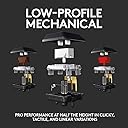
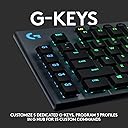
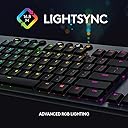
โจ๏ธ Elevate your desk game with the ultimate low-profile RGB powerhouse!
The Logitech G815 LIGHTSYNC RGB Mechanical Gaming Keyboard combines ultra-thin, aircraft-grade aluminum construction with high-performance low-profile GL tactile switches. Featuring per-key customizable RGB lighting, 5 programmable macro keys, dedicated media controls with a precision volume wheel, and dual wireless connectivity (Bluetooth and Lightspeed), it delivers a premium typing and gaming experience tailored for professionals and enthusiasts who demand style, speed, and versatility.


| Antenna Location | Gaming |
| Asin | B07P1DHN65 |
| Best Sellers Rank | #5,486 in Video Games (See Top 100 in Video Games) #432 in PC Gaming Keyboards |
| Brand | Logitech G |
| Built In Media | USB Cable |
| Button Quantity | 19 |
| Color | Black |
| Compatible Devices | Gaming Console |
| Compatible Operating System Family | MacOS, Windows |
| Connectivity Technology | usb, usb_2_0 |
| Customer Reviews | 4.4 4.4 out of 5 stars (1,120) 4.4 out of 5 stars |
| Enclosure Material | Aluminum |
| Global Trade Identification Number | 00097855150790 |
| Hand Orientation | Ambidextrous |
| Item Dimensions L X W X H | 18.7"L x 5.9"W x 0.97"H |
| Item Type Name | Keyboard |
| Item Weight | 1595 g |
| Keyboard Backlighting Color Support | RGB |
| Keyboard Description | Gaming |
| Keyboard Layout | QWERTY |
| Keyboard Plate Material | Aluminum |
| Manufacturer | Logitech |
| Mfr Part Number | 920-009176 |
| Model Name | G815 RGB Mechanical Gaming Keyboard (Tactile) - Amazon |
| Model Number | 920-009176 |
| Number Of Items | 1 |
| Number Of Keys | 104 |
| Number Of Packs | 1 |
| Number Of Sections | 5 |
| Power Source | DC power supply |
| Series Number | 920 |
| Style Name | G815 |
| Switch Type | Tactile |
| Theme | Gaming |
| Total Usb 2 0 Ports | 1 |
| Unit Count | 1 Count |
| Upc | 097855150790 |
| Warranty Description | 2 Year Limited Hardware Warranty |
User
Great keyboard, with a justifyable pricetag
This is a really great keyboard. I will do my best to write a review that addresses any concerns or questions a counsumer like myself may have to help make your decision on whats best for you.TLDR; Great low profile keyboard with a justifyable pricetag.I will break down my unboxing and usage experience as best I could. First off, the item is packaged very well, it has a nice looking box, and there are satisfying moments as soon as you open the package. The board is heavy! You can feel its heft immediatly and you can tell this is unlike any other keyboard you've used in the past if you havent bought a $200+ keyboard before. The full aluminum frame is very attractive and it has a nice brushed finish. The flip down feet at the top corners of the rear of the keyboard can give you a slight pitch, if that is what you prefer.KeysThe keys feel like they are made of the same material, but they may be plastic. The tactile keys have a slight click when pushed in which you can hear and feel. Its worth noting here this is not a particularly loud click and the feel is miniscule as well. If you are looking for a silent press, this is not that keyboard nor is it a loud keyboard if you want that, either.LightingThe lighting of the keys is superb. It is bright and clear. To adjust the colors use the G Hub app. It's a very easy app to use and really well designed. The app has several preset effects like most RBG do nowadays (i.e. rainbow) and there are a few Logitech only settings. I like the ease of use, and per key lighting assignment is dope! The G logo in the top left gives a nice design touch to it. I normally do not like logos on things but it looks good up there and you can easily change that light or have it match the rest of your board.Auxillary keysThe most useful key here, in my opinion, is the "Game mode" (joystick looking) key. This will disable the Windows key so you will never minimize your game when you have a missed keystroke! With this key, in the app, you can assign any other keys to disable when engaged as well. The G keys are essentially F1-9 and they are changed from default in the app as well. The media control keys are self explanitory, as are the other round keys, and the volume wheel is large, responsive and has the same premium feel the entire keyboard has, as well. The round keys are a rubber or silicone with a slight concave feel, also nice.Battery and connectivityI've had no issues with either of these thus far. It is worth noting I do occasionally charge the board, before the battery status goes low. Also I have only used the lightspeed connection and my keyboard is less than 2 feet away from my micro PC. Battery status is displayed in the app, and the connectivity is shown there as well.AppOne of the better designed apps i've used for this sort of thing. You can tell they put a lot of time into this to make your experience as easy and pleasant as possible.ComplaintsI really only have one, and its a personal thing. This is a low profile keyboard. The keys are also low profile and they have like a flat feel to them. If you use low pro keybaords this is a non issue. However, if you are like myself and have only used standard style keyboards in the past it will take some getting used to.SummaryThis is an expensive keyboard, you don't need me to tell you that. I will tell you that the pricetag is fair because of the feel and finish of this item. You immediately feel a difference if you've never used a high end keyboard before, like myself. That being said it wont make you any better at gaming, and will not improve your typing. As far as I am concerned, no keyboard can do that. It will 100% improve your experience and satisfaction while using it, though. If you can swing it financially to splurge on this luxury item, then go for it. If not there are many keyboards that perform the same basic funtions for much less. I hope this review helps if you are on the fence or just browsing.
User
My favorite keyboard
Iโm using the 815 so I donโt have to worry about the battery, and Iโve been using it for 2 years now. Also Iโm a hard core PC gamer (FPS mostly) so thatโs my primary use. I build my own PCs so G Hub was easy for me to figure out.Now that you know how long Iโve used it for before writing a review, what I use it for and my comfort level I will give my impressions. In short out of all the keyboards Iโve used (too numerous to recollectโฆ especially if I factor work into the equation) it is not only my favorite it is by far my favorite.Itโs not perfect by any means. I wish the secondary keys were also lit up (my biggest gripe). I do wish G Hub was better but itโs not like any comparable software by other companies are anything Iโd actually compliment either. It does the job and it does get maintained. It is obtuse in some ways like how profiles are managed especially with onboard memory and setting up or deleting multiple DPIs. But at the end of the day I still figured what I needed to do in one session including setting up my own rotating color profile.PBT key caps would be nice but honestly I really like using this keyboard. It feels great so I guess the ABS key caps do the job just fine. I use the Tactile version as I dislike extremely clicky keys, but if it helps give you an idea I go for cherry Mx brown switches on those types of keyboards. Tactile on this keyboard may feel more subtle for some people depending on which keyboards theyโve previously used. Though regardless of that Iโd say the feedback feels good and didnโt take me long at all to get used to.I really and I mean really appreciate how they came up with a small form factor keyboard (even the full size version) that packs as much functionality that it has while also feeling like a solid product. Itโs pretty hefty for its size which is great because it does NOT move around. As a gamer this is important. Iโm also very big into music so I greatly appreciate the media keys. Not only the fact they exist or that they still fit in this small form factor but also because they did them justice. They donโt feel like a last second decision add on.The complaints I do have are overshadowed by the strengths. That is my opinion after 2 years of using it.
User
Great Keyboard
I wanted to replace my aging Microsoft (Razer) Reclusa with something newer. It still worked but keys were starting to wear off to be unreadable, etc.I wasn't specifically looking for a mechanical keyboard, but with the other features I wanted, this one ended up being at the top of my list.I can't speak to long term reliability as I've only been using it about a month and a half, but it's a joy to type on. I went with the GL Tactile switches, as I was concerned about noise. They feel great to me, who is far from an expert, and aren't overly loud. Just satisfying click clack and feel.The backlight only lights up the numbers, not the symbols, which is a slight downside, but I didn't think it was a big enough deal to knock a full star off the review. I think some other keyboards light only the symbols, so this seemed a better situation if both can't be lit.
User
D key broken - FIXED
I actually really like this keyboard, but I can't in good faith give it more than one star at the moment. As this is a gaming keyboard, the "WASD" keys are essential, but my "D" key hasn't worked since day one of use. Often times the key will get activated multiple times upon a single press. I mostly play Overwatch with this keyboardd, consequently, I've found that my movement to the right gets stuttered. I've recently sent a complaint to Logitech customer support, and I'll change my review to be more positive if all goes well with that endeavor. As I saidd, I really like this keyboard, but the one badd exception is fairly ddamning on a gaming keyboard.P.S. I've kept many of the double activations of the "D" key to demonstrate the frequency of the issue.UPDATE: After contacting Logitech, they sent me a new keyboard. As you can see, the "d" key is no longer getting activated on a single press, and now I feel I can boost the rating to 4/5 stars. I'm tempted to give it 5/5 (especially after the positive experience I had with Logitech support), but I feel I can't do that for few minor reasons:1) The price is pretty high: Though the keyboard is built really well and feels great to type and game on, the price is still pretty steep.2) No textured keys for gaming: My previous keyboard had textured WASD keys, which I now realize I severely underestimated. The textured keys make it easy to find your way back to WASD after moving your hands for whatever reason. The ability to change the color of the lights certainly helps, but I'd appreciate some textured keys to go along with that.3) There's still the small issue your keyboard might be defective when you receive it. Although Logitech's support was fantastic, this rating is based on my personal experience. I would have preferred to not have to contact support in the first place.It may seem like I'm kind of nitpicking here, but please realize that these three negatives brought it down one star for me. The keyboard is fantastic otherwise, and if you can afford the steep price, you won't regret it. The keyboard is sleek, heavy, and really well built. The design of it is phenomenal, and even if yours arrives defective, you should have no problem returning it for a new one. Thanks again to Logitech support!
User
Great keyboard; not compatible on a hub
The keyboard is great! The low profile keys feel more like a laptop keyboard, but definitely has a durable, quality feel. I was able to physically touch this keyboard along with others before buying it. I always preferred the feel of this keyboard compared to the others even before I realized what the brand and model was.All mechanical keyboards seem to make a lot of noise regardless of the switch type. This keyboard produces less noise from the key presses, but still creates some noise as opposed to a membrane keyboard.One area that creates a challenge for me personally is that this keyboard can't be plugged into a USB hub or docking station. I have a gaming laptop, and I have multiple workspaces that I plug into. When plugged into my KVM switch in one workspace, or my docking station in another, the keyboard ends up with lag, stuck key presses, and missed key presses when plugged into something other than the machine itself. It led me to some frustration troubleshooting and testing various configurations before I just gave up and plugged it in directly.There's no wrist rest, which is standard on the SteelSeries keyboards, but it's a low enough profile, and I keep the keyboard on an extra large mouse pad that covers my whole desktop. So I don't see the need for the wrist rest.
User
Superb Feel Keyboard!
I work and occasionally game on my computer. My wireless scissor keyboard (go wireless elite) was becoming an impediment to gaming as key presses didnโt create consistent press durations which is important for precision games like cs go and rocket league. So it was time to switch.Iโve always been a scissor switch keyboard guy. I know Iโm in the minority but I love laptop style keyboards because I could just rest my wrist on the desktop and type away without awkwardly bending my wrist upward in order to clear the height of the keyboard.Unfortunately there are no gaming grade offerings in this domain so I got this keyboard and tested it against all the other low profile mechanicals.Logitech as always delivers high quality. I love the brown switches. They have a slight tactile bump but they arenโt loud and annoying like blues and unnoticeable like reds.Of all the low profile keyboards out there this is leagues above the rest. It beats Tesoro, Drevo and cooler master.Especially because the keys are slightly beveled allowing your finger tips to comfortably know where they are relative to the curvature they feel. A flat key doesnโt give you this kind of feedback.The volume wheel feels great. Itโs has an expensive weight and feel to it that really exemplifies the level of quality of the w tire keyboard. It really shows how much attention Logitech pays to the feel of things which when it come to mechanicals is everything.My only gripe about this keyboard is I would do away with the macro bar. I just donโt need it. I donโt like that extra width on the keyboard. That being said it doesnโt add that much extra width and itโs not that big a deal breaker considering the actual tactile experience of the keyboard is second to none.10/10
User
I love this keyboard.
Granted I've only had it for 2 days. I love that I can customize the color and the G keys. I got the tactile keyboard because I didn't want a super clicks sounding one, but not a super quiet one either. It's still very quiet in my opinion. I had the G413 and it was soooo loud. This one is perfect. The keys feel so velvety. Good quality. They aren't super high up, like the G413. I definitely prefer this one. The lighting is bright and the buttons work great. I got the wired version. If anything changes, I will update my review.
User
Hardware is fine - Software is beyong garbage.
Phyically there is nothing wrong with the keyboard. It was perfect. I really loved the sound settings.The G.D. GHub SUCKS. This is the software to set the lights, the macros, etc. It took two days to connect to the board. Then it took two more days to get it to set some lights that were not flipping out all the time. I thought I had finally gotten to a place of acceptance, that I'd never get the macro buttons to work or be able to change the colors from the keyboard buttons. But I like the feel and the volume control's that worked 80% of time so I figured I could live with it. I got it set to something that wasn't making me crazy. Sure I couldn't change it on a whim. And sure I paid for macro buttons hat I will never use. And sure the volume up/down control every so often just decided to go all the way up or all the way down. And sure every sixth or eleventh button press I had to hit two or three times to get the button press to registrar that I had pressed something....but I was willing to live with this abuse.And then I launched a game I wanted to play... and the keyboard went back into flipping out. Green pinwheeling NON STOP. UN-usable. Totally distracting. Migraine inducing. ABSOLUTELY GARBAGE. I looked up how to fix it. I tired several things before I decided I deserved better and I'm sending this shitty software packing along with the board.Logitech. You need to do better. I won't be buying from you again.
User
Premium Material
This keyboard is perfect for programmers and writers, its switches sound is not so loudthe only cons I found is there are no Arabic characters printed on it.
User
This keyboard is sexy af!
Been looking for a low profile keyboard for ages... turns out the Logitech G815 is that keyboard! I'm coming off a few years on a chonky Razer BlackWidow Elite, which was a decently annoying keyboard for me all around. I picked up the tactile version of the G815, it has a good feel while being pretty quiet. The light features are bright and look great, the software is stable (unlike Razors) and easy to deal with. Setting up macros for the M keys was easy, and the G502 mouse works great with it. I love the look and feel of this thing all around, the aluminum casing, the keys and the switches... really nice.The only negative for some might be the soft rubber buttons along the top... but it doesn't really bug me. Also some people have mentioned clicking the M keys by mistake, I haven't had that issue, but you can always deactivate them if that becomes an issue.At the end of the day, this keyboard is easy to type on, perfect for gaming and it looks cool on your desktop, works for me, wish I'd discovered it sooner!
User
Best keyboard I've owned! Upgraded from G710+
First of all, the reviewers that have complained about the board being warped... it's not a defect.One of the most important things in my keyboard search as a gamer, was having a keyboard that helped with cable management for my headphones. Having the cord flop around dangling on my arms or generally getting in the way doesn't fly with me, and the Logitech G710+ had a dedicated groove that a cord would fit in, keeping it right of my left hand while on the WASD keys. The curvature of the board is not a manufacturer defect... it's meant to give you enough clearance to fit your headphone/mic cable under it. And it's perfect.On to the rest: I bought the tactile brown switch version as I'm used to the Cherry MX Browns. These new low profile keys are better. Far, far, far better. I can't really describe it but if you like cherry browns, you'll like these more. The build quality of the board is very high-end. It feels very solid, it stays in place, the media / function keys are nice soft touch rubberized, and the lighting is top-notch. I especially like the "Echo Press" setting where the keys stay all one colour, then when pressed change colour and slowly fade off. The "game mode" key disables the Windows key so you aren't dropping out of games.The ONLY negative I can say so far is that the volume wheel has no tactility at all. It should have been designed with slightly more friction or "bumpy feedback" but it doesn't feel cheap at all. Just different than I've been accustomed to. And I guess the macro keys... I never used them before and probably will never use them. I'm sure they're useful, but I've gone without using macro keys since Starsiege Tribes, so I don't see myself changing any time soon. So it would be nice to have a Logitech board option with a smaller footprint aka no extra macro keys but still have a numpad and media controls.I wanted to get into the hype with all the custom keyboards out there but trying to find one that had dedicated media control keys, a numpad, a volume wheel, tasteful font, back lighting, etc etc etc... brought me back to Logitech. The last one lasted me 6 or 7 years. Why change?
User
Great quality and super responsive
I bought this for my son's birthday, he is heavily into computer gaming. I wanted to wait a few months to see how this keyboard held up and if it still made him happy after some time had passed. His response after I questioned him a few days ago was this "I like the build quality and the tactile aspects of the keyboard and I am very happy with it" He is still using it and it is working perfectly.
User
Pretty good, but black finish on keys doesn't hold up
I've had this keyboard since April and overall, it's pretty good! It's lower than my last keyboard so that took some getting used to, but that wasn't a problem. I like the sound the keys make when typing. It's still clicky, but not super loud, which is my preference. Oh! I also really like having the G keys on the left of the keyboard that allow me quick access to frequently used commands. However, it's now mid-July (roughly three months after I got the keyboard) and the black on two of the keys (D, M) is fading away. I don't use this keyboard for gaming, though I do use it for my remote job. It's a bummer that the keys haven't held up to a few months worth of typing. Nothing I can do, I guess, but look for replacement keys or something, but given the price tag of the keyboard, I expected the finish on the keys to hold up way better than it has.
Trustpilot
4 days ago
3 weeks ago