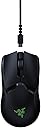
🎮 Own the Game with Wireless Precision & Speed
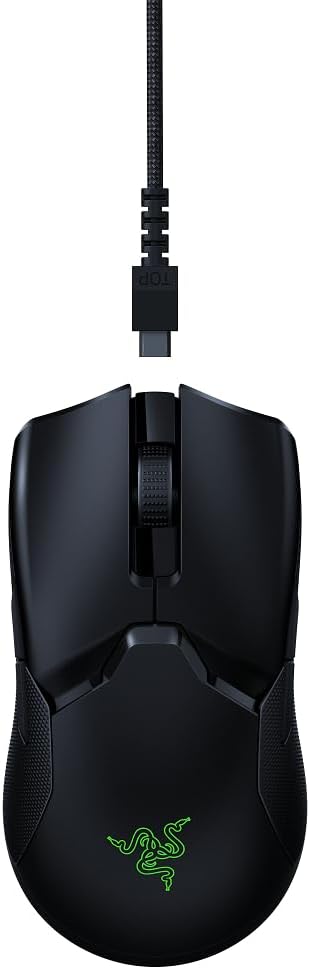
The Razer Viper Ultimate is a cutting-edge ambidextrous esports gaming mouse featuring HyperSpeed wireless technology for ultra-low latency, a Focus+ 20K DPI optical sensor for exceptional accuracy, and a lightweight 74g design for swift, fatigue-free control. With up to 70 hours of battery life and an included charging dock, it’s engineered for serious gamers seeking top-tier performance and convenience.


| ASIN | B07Y8M4BCW |
| Antenna Location | Gaming |
| Are Batteries Included? | Yes |
| Are Batteries Required | No |
| Battery Average Life | 70 Hours |
| Best Sellers Rank | 449 in PC & Video Games ( See Top 100 in PC & Video Games ) 21 in PC Gaming Mice |
| Box Contents | Razer Viper ultimate gaming mouse • Razer mouse dock • USB wireless dongle • charging cable • product information guide |
| Brand | Razer |
| Brand Name | Razer |
| Button Quantity | 8 |
| Colour | Black |
| Compatible Devices | Gaming Console, Laptop, Personal Computer |
| Connectivity technology | USB |
| Customer Reviews | 4.5 out of 5 stars 7,674 Reviews |
| Embellishment Feature | Logo |
| Enclosure Material | Plastic |
| Global Trade Identification Number | 08886419332688 |
| Hand Orientation | Ambidextrous |
| Hardware Platform | Gaming Console |
| Item Dimensions L x W | 12.7L x 6.6W centimetres |
| Item Weight | 2.61 Ounces |
| Manufacturer | Razer |
| Manufacturer Part Number | RZ01-03050100-R3G1 |
| Model Name | Viper Ultimate & Mouse Dock |
| Model Number | RZ01-03050100-R3G1 |
| Mouse Maximum Sensitivity | 20000 Dots per Inch |
| Movement Detection | Optical |
| Movement detection technology | Optical |
| Network Connectivity Technology | USB |
| Number of Batteries | 1 AAA batteries required. (included) |
| Number of buttons | 8 |
| Operating System | Linux, Windows 7, Windows XP |
| Pattern | Single |
| Power Source | Battery Powered |
| Product Features | Wireless |
| Product Finish Type | Smooth |
| Product Warranty | 24 months manufacturer warranty |
| Range | 10.0 meters |
| Special feature | Wireless |
| Style Name | Viper Ultimate + Charging Dock |
| Theme | Gaming |
| Unit Count | 1 unidad |
B**E
The Brand speaks for itself
Razer is a brand that i have come to love and trust with my pc gaming It arrives in the branded box shown and on removing from the box your meet with a well made (as expected) mouse and docking station, Docking station is well made and the wire is woven material and is well made, the dock is lightweight nice shape, the bottom of the dock has rubber bottom this is great as it stops it sliding all over the desk, inside the dock is the space where you plug in the 2,4hz dongle if your using the dock (the dongle is stored in the underneath of the mouse. The mouse is impressive its lightweight and is simple perfect in my hand is small than my Razer Basilisk X Hyperspeed which is the main reason i choose it. The optical sensor is amazing it boasts a tracking speed of up to 650 IPS (inches per second) which for me when im gaming is perfect, and when used with the right mouse Matt (see my other reviews) is gaming changing, The Viper Ultimate is also loaded with Razer’s HyperSpeed Wireless transmission tech, which in essence gives it the same latencies as a wired version. This mouse is an ambidextrous mouse, and you switch the left and right click commands with a simple toggle in Razer Synapse (Software) The mouse only has two programmable buttons on each side, one set for right-handers, one for left-handers, plus a click-in scroll wheel, which for gamers mmmmm. The battery life is really great and will last for long periods (Razer claim 70 hours) but I don’t think i will be playing that long straight through ( mmmmm or will i new call of duty on the horizon 😂) I have now been using for a few months, playing Warzone, MSFS, and Hell let Loose and it still feels as good and responsive as the day i got it. Very happy and happy to recommend
L**L
Best mouse I've ever owned up to this point
I bought the viper ultimate back in April 2021 with the charging dock. First things first, don't think about the dock. The metal contacts on the base of my mouse (where it connects to the dock) got dirty and/or rusted within a few months rendering the dock effectively useless to me. I also have friends with this mouse who experienced the same issue. Charging with the cable isn't a big deal to me. The mouse itself is great. I play with a strange hybrid between fingertip and claw grip and its perfect for me. My hand only contacts the mouse via my fingertips and then the rear left of the mouse makes some contact with my palm for stability. The shape of this mouse is perfect for this grip as I'm able to move the mouse around a large amount horizontally/vertically with just my fingertips due to its small height. I've tried other mice such as the G PRO Superlight and found that the back of the mouse was too tall and bulky and therefore made too much contact with my hand for my grip style which reduced effective movement. The mouse clicks are great, light enough to be easily spammable with no effort while also being heavy enough to never mis-click. There is no noticeable post or pre travel to these clicks so they feel super snappy. Side buttons are ok I guess, I don't have enough experience with other mice to talk about placement, but they are fine for me. They feel good and you can definitely tell when you've clicked them so no uncertainty. One thing I wasn't a fan of was the rubber grips that come with the mouse. After a few months I ended up replacing my side grips with my own ones, before ultimately tearing them off entirely. I find that the raw plastic underneath the side grips is perfectly grippy and allows for a slightly closer grip which I really prefer. If you're in the market for a fingertip/claw grip mouse that allows for a lot of fingertip adjustment then this mouse is great. If you can get the Viper V2 pro for the same/slightly more expensive then I'd recommend that as afaik its just a lighter variant with some improvements. That said, if you can get this mouse for <100 pounds then its great in my opinion.
B**K
Perfect shaped mouse
Before this mouse, I was using a much larger and heavier gaming mouse almost twice the weight. The switch to this was night and day. The shape is a neutral one, and I believe would fit most hand shapes and sizes. That being said, I have small hands and grip this with my full hand (palm grip) and have no troubles. The weight is a nice weight in my opinion at around 70 grams, and feels premium. The skates feel fast, and the mouse feels super responsive. In terms of actual gaming, the mouse has a great sensor and tracking has not been an issue. It has been comfortable to use for hours, and the grips on the side have a nice texture making it nice to hold in the hand. The 2 mouse buttons are very clicky, making them feel responsive. This mouse might not be for those who are after super lightweight mice, for that I’d suggest xtrfy or pulsar, or even the viper mini. There’s tons of lighter mice out there and this isn’t for you if you prefer lighter mice. That being said, I prefer this weight, makes it feel more premium and less like I’m about to crush it. It’s also got a nice feeling and glide that creates a sense of control, even on faster pads - whilst still being extremely fast. Super good feeling using it in high paced shooters or battle royales. In terms of lighting, chroma remains the best. It’s extremely bright, so much so that I’ve set it to 30% and it’s still very bright. The dock has a very nice diffused glow aswell and produces very accurate colours. Chroma has a lot of effects you can use, and they all work very well. Chroma also offers the ability to link lighting between all chroma supported devices which can create a nice unison between all devices of a setup, and helps clean up the aesthetic of a setup. For those that don’t like rgb, when turned off, the razer logo isn’t even visible - it just looks like a plain black mouse which I’m a fan of - you can take this around with you and not be stared at for having a gaming mouse with huge branding all over it. Overall, a great fun mouse to use for those looking for a middle ground between heavy and lightweight mice, perfect for fast paced games and slower ones too - offers great control and speed.
J**E
Better than a g pro. (update... i went back to the g pro)
Awesome mouse, i have gone from a logitech g pro wireless to this and that might seem a strange thing to do but heres the thing, my g pro wireless has started double clicking, normally i wouldnt be too bothered and just get it replaced but before the g pro wireless i had a g903, another high end logitech mouse and the exact same problem with that aswell only that was out of warranty. Luckily for me the g pro is still in warranty but i have no doubt the switch problem will happen again and ill probably be out of said warranty so here we are i decided to get away from omron switches completely and get the viper ultimate, the g pro can go back for warranty repair/replace and ill sell it when its back and new again, i wont be getting another logi mouse while they use these switches. Anyway what can i say about the viper, very light, very fast, the switches dont feel quite as quick to press as the g pro admittedly but its super close, the texture is not as smooth either which makes it less slippy but less pleasant feeling, the side buttons are nice, a bit too recessed but i think i prefer that. The g pro wireless really was a masterpeice of simplicity and got so much right but most reviews dont mention the chewing gum switches that never get close to the rated lifespan, its all great at first but 12 months later your very likely to get iffy clicks and its unacceptable in a mouse this price. My advice would be dont underestimate the optical switches on this mouse, theres much more to it than outright response times most people dont notice, the viper also has longer battery life, is lighter overall and just... Just, a step ahead. Would never have given up on the g pro though had it never outright failed... Again. EDIT: after a month or so of using the viper ultimate it became apparent the battery life didnt quite last as long as the g pro wireless, the switches didnt feel as good as the g pro, like they needed just a bit more force with less pleasing click, the side buttons are too recessed meaning i squeeze the mouse a little harder to activate them causing me to click the buttons on the opposite side which became irritating since i couldnt remove them like the g pro. the razer viper ultimate is also shallower than the g pro, im typically a palm gripper so the added touch of height on the g pro fit my hand much nicer and i prefer the feel of the g pro shell. logitech did indeed send me a replacement g pro wireless so i was left with the tough choice of which mouse to keep and ultimately ive stuck with the g pro even with that risk the switches may fail again, for me it just feels better to use and so the viper is on its way back... its an amazing mouse technically speaking, but its not quite there yet.
J**S
Better than the g703 for gaming, and design is better than the deathadder.
Let me start by comparing this to the Razor Deathadder. The Deathadder is incredibly comfortable to hold, with well placed buttons. The problem the deathadder has is the reliability. All mouses that seem to shield 1 sheet of plastic from the base down to the mouse buttons on the front seem to suffer from double-clicking, or not clicking, or something wrong with the buttons on the front over time. If you go back 20 years you will find mouse's were designed with separated sheets of plastic for both the left and right buttons, and these mouses lasted for decades, literally (examples were the intelli mouse explorer 3, and the Microsoft 3-Button optical mouse). So I'm glad to see the separated front mouse buttons. This mouse is also far better than the Logitech G703 for gaming. The G703 suffers from being excessively tall, causing you to arch your palm over the mouse in order for it to feel comfortable. The problem with an arched hand is that your precision on aiming is diminished, and the side-buttons are more awkward to use quickly. The base of your hand needs to sit on the pad, with your fingertips on the buttons ready to go to react as accurately and quickly as possible (something I couldn't achieve with the G703, but can with this mouse). As a past pro-level CS1.6 player, and a excessive CSGO player, I've gone through more than my fair share of mouses so I hope that adds some merit to the review. I still have very small gripes with the mouse in that it is slightly too light and the up-scroll is noisy. The RGB lighting on the docking station is also too bright. However these are very minor, and I'm not knocking any points off for those, because the functionality, comfort ability, and the design is very good.
J**M
It's the best, but the most expensive.
You get what you pay for. It's an incredible mouse, haven't used it for too long but I definitely feel confident in recommending the house to anyone with medium sized hands, my hands are on the larger side of things and I have absolutely no issues with getting a strong grip on it. For a true ambidextrous mouse, potential customers might be worried about the side buttons on the other side of the mouse accidentally being pressed, I have never accidentally hit them. In fact I use one of them to active hypershift and it turns my mouse into a multimedia peripheral while I hold it (e.g. hold the button and left click to play/pause music and use the scroll wheel for volume up/down) which is done through synapse with setting that up taking a couple minutes at most. Synapse isn't needed, and the mouse is just plug and play but with that you have no control over the RGB on the mouse or dock. Battery life is amazing, with RGB maxed out I left it on for 2 days straight without putting the mouse on charge at all, and on the third day I checked the battery; ~35%. The battery is amazing. The mouse feet glide nicely (I believe they're 99% PTFE, if that means nothing to you then it basically means smooth af) and paired with the ridiculous weight of the mouse at 74g... This thing flies on a decent mousemat. The sensor (razer's focus plus sensor) is brilliant. 0 issues at all, I used to own a mamba TE which had issues with the sensor refusing to track when it was picked up but there's no such issues here. Oh and it's rated for 20,000 DPI, if you feel inclined to set it up as a dpi setting to spin round and round a million times when you move an inch in game, the DPI changing button is found on the bottom of the mouse with a little triangular led to show you which setting it's on. There's also a power switch and a place to store the wireless receiver there (nice and useful for travelling if that's your thing). All round it's a brilliant mouse, and as for the dock... It's not a must have but it makes life so much easier it's worth buying outright, you will not regret it if you buy the mouse, you may aswell spend the little extra on the dock. It's as close to the perfect mouse or there right now, but you're paying for it. Hope this helps!
L**S
Great mouse and reasonably priced on Amazon
Old mouse stopped consistently clicking so I finally decided to buy something decent (and wireless). Been using this for a little while now for both gaming and work, and I'm in love. I'm not generally a fan of lightweight mice but luckily this feels nice and stable even with a lower weight than my old one. It does feel a little small, but this may be just because my old one was pretty large. If you have quite large hands I would recommend looking elsewhere. Would recommend buying with the docking station, it provides a simple and easy way to charge the mouse when not in use. The battery life is pretty good anyway but arguably could be better from constant use. Though, you can just unplug the dock, move the cable to the mouse, and use it wired for a bit to charge it up. I would also highly recommend buying the grip tape to go with, your fingers will stay stable and almost feel attached to the main mouse buttons. Can't really comment on the 4 side buttons yet as I've not had the full chance to utilise them. Still hard to believe that the price of this here is £50 cheaper than from the Razer website, but the product is genuine so who cares. A solid 9/10 from me.
C**O
End game wireless mouse for now.
This is an amazing mouse for gaming and casual browsing. Pros: There is a very nice tactile feeling on the left and right mouse buttons for precise & super fast clicks. Rubber on the left and right side make for great gripping. It is ambidextrous and the buttons are low profile but easy to click without miss clicks. Scroll wheel is nice and subtle. Charging dock is a very nice charging alternative. Razer software works surprisingly well with the mouse with a lot of customisability. The gliders on the bottom make it a lot smoother to use than mice from competitors. Cons: It is quite a low design, so if you have larger hands it may be difficult to use for long periods without cramping up, if this is you the g pro wireless is a great alternative with a higher hump. Battery life is good, but could be better. Charging dock can become inconsistent so you will need to regularly clean the contact points and it just doesn’t charge the mouse fast enough, you can leave it on charge if you are afk for a while but the wire charges it a lot more faster. All in all the mouse is amazing, it feels fast and smooth, never had any issues with the mouse and I have been using it for a few months now. If you want a wireless mouse for gaming this is it chief. Also don’t think that because it’s wireless you’ll get connectivity issues, sometimes I feel like it’s faster than my previous wired mouse ;)
A**D
Love it!
Worth the buy, best mouse out there for gamers. ⭐️⭐️⭐️⭐️⭐️
E**R
Muito preciso
Mouse espetacular com uma precisão muito boa e sem atraso por ser um mouse top de linha deveria ter RAZER HYPERSPEED MULTI‑DEVICE SUPPORT FORA ISSO O MOUSE E EXCELENTE
J**E
very nice but high price
it's very nice mouse, colour, rechargable, light weight, just expensive.
O**R
"Selon moi", la meilleure souris
Etant un aficionados des souris gaming, j'ai eu l'occasion d'en tester et d'en avoir un paquet : G502 lightspeed, roccat kain ou kova, razer basilisk, corsair M65, G703, glorious model O... Cette souris, est pour moi, de loin la meilleure que j'ai pu avoir, et ce, pour plusieurs raisons. -La légèreté. Quoi que beaucoup puissent en penser, pour les fps, il faut une souris légère. L'inertie est meilleure, c'est bien plus agréable lorsque vous êtes en low DPI (ce qui est préférable si vous voulez de la précision) et que vous devez faire des mouvements plus amples afin de recentrer votre mulot au centre du tapis. Si vous préférez qu'elle soit plus lourde (coucou G502), c'est peut être juste une question d'habitude. -L'ergonomie/confort. Toutes les prises en main sont envisageables, quelque soit la taille de votre main. Les grips sur les tranches sont très agréables. Après plusieurs heures de manipulation, on ne fatigue pas ! Bonus : si vous êtes gauchers, c'est parfait, étant donné que c'est une souris ambidextre. -La glisse, grâce aux patins en ptfe, est parfaite. -Les clicks, grâce aux capteurs optiques, sont très agréables. Ils sont souples et ne sont pas trop audibles. Autre avantage de cette technologie : vous pouvez dire adieu aux problèmes de double clicks que l'on rencontre parfois sur des souris qui embarquent une technologie mécanique, telles que celles de chez logitech par exemple. Les boutons sur les tranches sont très bien placer. Pas la peine de faire des mouvements du poignet afin de les atteindre. -Aucun soucis avec le capteur non plus. Mais ce ne doit pas être un critère dans votre recherche étant donné que tous les constructeurs possèdent aujourd'hui d'excellents capteurs. A condition que ce ne soit pas du cheap à moins de 10 non plus... Même chose du côté de la latence. Il n'y en a pas. C'est comme si vous jouiez en filaire. -L'autonomie de la batterie est top. Une semaine en jouant et en travaillant sans avoir à recharger. Et même si ce n'était pas le cas, vous n'aurez aucun soucis à ce niveau là non plus, étant donné la présence de la station de recharge, qui est vraiment très pratique. -Enfin, un petit mot en ce qui concerne le RGB. Je ne suis pas un fan. Je préfère l'éteindre pour économiser la batterie. Cela dit, je note deux points positifs. SI vous l'éteignez, aucune trace de logo Razer sur la souris. Et la bande led qui se situe tout autour de la base de la station de recharge est plutôt bien pensée. Vous pourrez l'accorder avec le reste de votre setup et elle vous servira d'indicateur sur le niveau de votre batterie en recharge. -Seul point négatif à mon sens : le prix. Chez Razer, c'est cher. Au moins, maintenant, la qualité est présente, ce qui n'a pas été toujours le cas chez eux... Elle est plus chère que la g pro wireless de chez Logitech, mais je trouve cela logique. Vous gagnez en sérénité avec la technologie des capteurs optiques et vous avez une station de recharge vraiment très pratique. Alors bien sûr, vous n'aurez pas de tapis qui recharge automatiquement votre souris, mais ce dernier vaut actuellement 120 euros... Pour conclure : j'aimais changer de souris régulièrement... plus maintenant ! Si ce com' a pu vous aider à faire un choix... Au plaisir !
R**I
Mysz ze stacją
Myszka do komputera. Dobra jakość wraz ze stacją nie trzeba się martwić o ładowanie
Trustpilot
3 weeks ago
2 weeks ago