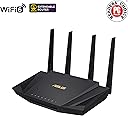
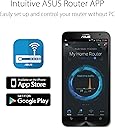
🚀 Upgrade to ASUS RT-AX58U V2 — Because buffering is so last decade!
The ASUS RT-AX58U V2 is a cutting-edge Wi-Fi 6 AX3000 dual-band router designed for professionals craving fast, reliable, and secure home networking. Featuring AiProtection Pro security, Adaptive QoS, and extendable AiMesh technology, it delivers seamless coverage and prioritizes your most important devices and applications. Easy to set up with mobile tethering support, this router transforms your home or office into a high-performance digital hub, eliminating dead zones and lag for good.


| ASIN | B07YZXMRJD |
| Antenna Location | Gaming, Home |
| Antenna Type | Fixed |
| Best Sellers Rank | 38,408 in Computers & Accessories ( See Top 100 in Computers & Accessories ) 331 in Routers |
| Box Contents | Router |
| Brand | ASUS |
| Brand Name | ASUS |
| Colour | Black |
| Compatible Devices | Laptop, Personal Computer, Smart Television, Smartphone, Tablet |
| Compatible devices | Laptop, Personal Computer, Smart Television, Smartphone, Tablet |
| Connectivity Protocol | Wi-Fi |
| Connectivity Technology | Wi-Fi |
| Control Method | App |
| Controller Type | Switch |
| Coverage | 3,000 square feet |
| Customer Reviews | 4.5 out of 5 stars 452 Reviews |
| Data Transfer Rate | 3000 Megabits Per Second |
| Frequency | 5 GHz |
| Frequency Band Class | Dual-Band |
| Frequency band class | Dual-Band |
| Has Internet Connectivity | Yes |
| Has Security Updates | Yes |
| Is Modem Compatible | No |
| Item Dimensions L x W x H | 15.4L x 16W x 22.4H centimetres |
| Item Weight | 538 Grams |
| LAN Port Bandwidth | 1000 Mbps |
| Manufacturer | ASUS |
| Manufacturer Part Number | 90IG06Q0-MU9B00 |
| Maximum Upstream Data Transfer Rate | 2402 Megabits Per Second |
| Model Name | RT-AX58U |
| Model Number | 90IG06Q0-MU9B00 |
| Model name | RT-AX58U |
| Number of Antennas | 2 |
| Number of Ports | 4 |
| Operating System | ASUSWRT |
| Other Special Features of the Product | Internet Security, QoS |
| Router Firewall Security Level | High |
| Router Network Type | wireless |
| Security Protocol | WPA3 |
| Special feature | Internet Security, QoS |
| UPC | 192876485323 |
| Unit Count | 1.0 count |
| Wi-Fi Generation | Wi-Fi 6 |
| Wireless Compability | 802.11ax |
| Wireless communication standard | 802.11ax |
R**-
Amazing router - completely different level to others at the same price range
Really a fantastic item. I had assumed most products at this price range (mid range / wifi 6, budget around £100-£150) would be the same, but I was wrong. This is my third router since I got FTTP installed. First was TP-Link - wifi speed seemed fine (~250Mbps), but there was no way in the interface to open an inbound ipv6 connection. Next I got a Linksys. This also had very minimal interface, but I could open ipv6. Wireless speed was the same. But ipv6 was very unstable (would stop working after a few hours until reboot) and ipv4 NAT port forwards were only looped back from the wifi interface, not over internet. Again there was no setting to control that behaviour so that went back. This Asus router is so much better compared to my recent experience with both of these I can't believe it doesn't cost twice as much. Management interface is much more responsive and allows to configure anything I would want in a straightforward way. Ipv6 works perfect. It's much faster, wifi is at least twice as fast as both as the other too (I have never seen 600Mbps over wifi before). I even like the feature to turn off the lights. Could not be happier and will be looking to Asus for other hardware items in the future. I am looking to replace some Samsung monitors which are absolute junk (have 3 which all give a high pitch voltage whine if the brightness if off 100%). Anyway excellent router, A+++++, highly recommended
S**U
Perfect for Sky FTTP
I had read reviews that said this router worked well with Sky Broadband (FTTP), but needed a little tinkering to get it to work. Imagine my surprise when I plugged the router in and it started to work instantly, no tinkering or complicated set up required. Once turned on and connected to the ONT, the router set itself up with no problems using the Asus app. One great feature is that you set up the name and password for the network as part of the set up process, really handy if you're replacing an existing router. All our devices connected immediately and we're yet to see any drop outs. The speed on the Wi-Fi is dramatically improved, and the range is so much better that we don't need any mesh extenders anymore.
D**D
Costly for small quality of life improvements; luxury item?
Comes neatly packed with both eu and U.K. plug attachments which is nice. The antennas aren’t removable from the back which couldve been a nice feature. The device feels solid and well built, small and compact the materials doesn’t feel cheap which is nice for a £200 product. Compared to the Virgin super hub 3, the signal quality is much better with significant improvement to connection integrity without dropping out within a reasonable range. With The super hub 3 I often have buffer screen and sometimes freezes in connection, even dropping out within a reasonable range. Compared to super hub 3, the range improves by about 20% but connection is flaky on the outer edges as expected, but I would’ve expected more for £200. Data carried across connection improved as well, though I’d say can be better. Setting it up was alittle bothersome without very clear instructions. Basically you have to set Virgin super hub to modem mode, then attach WAN to WAN on super hub and the ASUS router. Turn ASUS router on and set it up via app or Ethernet (the app didn’t work for me). Turn both super hub and router off, then turn router on and wait for 3 minutes for initialisation then Virgin super hub back on. Then it should work. It’s a hassle if you don’t know the particular order and had me scratching my head for about an hour frustrated as any different order would result in failure to setup. Overall it’s a nice device, but I expected more from it due to the hefty price tag; the range can be better and maybe a larger data transfer rate, also better setup procedure. I would recommend getting this only on a decent discount or if you have money to throw
S**H
Decent router, especially to replace ISP hub
Works with the Virgin Hub 3 in modem mode. A big thank you to the previous reviewer who mentioned rebooting the Virgin hub after connecting it to this router - this was the step I was missing on my first attempt, and had no internet until I did this. Otherwise, setup very straight forward. Using WPA3 so all the Apple devices in the house stop moaning about our old insecure WiFi which is a plus. No dropouts at all with this, and is working well with some TP Link powerline adapters (using for older devices, not due to WiFi issues). I set it to our original SSIDs/passwords from the previous router, however this had some unexpected side effects so I would recommend taking the time to just go round every WiFi device, forgetting the old network and then rejoining this new one. The only device that threw a strop was a Nokia 6 Android phone - it took a full factory reset to get it to connect to the new WiFi for the first time (it would save the connection but not connect, no error message either) but now it's fine. Get really good download/upload speeds, and only a slight difference in latency between the WiFi and LAN. The interface in the browser is much better than our old router, lots more info and settings if you like to dabble. Not using the advanced security software as the privacy statement didn't sit well with me, so can't rate that. Hopefully this has future-proofed our network for some time to come! I bought this used and apart from it needing a factory reset, it was a bargain - looks brand new. Haven't thought about it since it was setup, surely a good sign.
C**K
Great router, works well with Virgin Hub
This router works great and provides better coverage to the whole house. I have a virgin super hub 3 and had consistent drops outs in certain areas of the house. We have multiple devices running simultaneous and knew it was a bandwidth issue and the poor signal coverage from the hub as our speed (200mb) is sufficient for our needs. Installation of the device is relatively straightforward, even for non-techies. Put the virgin hub in modem mode and connect the WAN from the hub to the router (use the top 1 of the 4 wan ports on the hub). Set up the wifi (easier via desktop) and you're pretty much good to go. Has load of features on the router interface, which is quite useful. I now get 200mb in the attic via Wifi (up from 50mb) and no drop outs in the conservatory. The AI protection features are nice but through a third party. Not keen on that at all, native features are fine but transmission of data to other parties to utilise certain features is the only drawback. Really happy with the router and would have been reluctant to purchase at the RRP price so good value in the cyber deals.
P**N
Art of ASUS
This is simply a piece of technological marvel, curated over the years to perfection. I remember having older model years ago, I liked it but it could be better. Few years down the line and it is better, nearly perfect. Finally get full control over what my kids can access, set up per each PC or a phone. Accessible with the mobile app. If you are patient enough anyone can set it up. You look like a geek with this modem, so easy to set up. If you are onn firbre setup your router as PPP, username and password are probably your internet providers name. Easy!
A**R
Great coverage, small footprint, feature-rich
After years of accepting the limitations of the ISP-provided hubs/routers/modems, and an unsatisfactory try of powerline products, I decided to get a router. The setup was simple, just logged onto my ISP router and changed to modem mode then connected the RT-AX58U. Followed the easy quick start guide and connected to the router in a browser. Everything is straight forward and self explanatory. The wi-fi signal reaches all corners of an extended semi-detached house and I haven't placed the router particularly centrally (in fact it's in a cabinet with metal mesh doors.) I only have about a dozen devices connected at the moment, including phones, laptops, consoles, and TV. There has been no lag on anything since installation, a change from waiting for a page to load on my phone. Some big pluses about this router: Manage device access and times they are allowed to connect; in-built online protection; guest network; wifi6; the phone app is useful for a quick glance at the settings and usage. There are many more that I am yet to try out but I'll be making the most of the features. All in all, happy with this addition to my home network.
D**S
Terrible consistency
Bought to replace a standard WiFi contact router which was a nova mesh system. Mostly to help the load with the amount of smart tech I have. Although the speed is there I have SO much signal drop out, not even when far away from the router. Just simply stuff like a smart light that had no problems before or since switch back, can often lose connection to this trash router.
F**I
AMAZING AND RELIABLE
1st of all, easy to configure you can do it withing 3 minutes, there is various videos in YouTube to guide you step by step. 2nd part you will notice the difference with no time, many features comes along when you use the official app, I'm trying to configure my HDD to be used as cloud storage, I like it Picasso 👌🏼
A**.
The Asus RT-AX58U is a fast and affordable Wi-Fi 6 router
The Asus RT-AX58U gets all the basics right, combining fast, dual-band Wi-Fi 6 performance with a competitive price. It’s easy to use, with good parental controls and other features, and also offers a web browser interface for more advanced users. Pros +Strong Wi-Fi 6 performance. +Simple set-up. +Good parental controls. +Competitive price for a Wi-Fi 6 router +USB 3.1 port for sharing/streaming via USB storage devices on your home network. +Setup and Configure Asus RT-AX58U Router as a OpenVPN Server and IPvanish VPN. Cons -Dual-band only.
A**I
Good
Amazing speeds
M**R
Solid Wi-Fi router for Apartment
It was easy to set up and allowed us to use our Deco M5 units as access points allowing for better signal strength over our apartment. Definitely recommend this router for its utility and low cost.
M**D
رائع بكل المقاييس
كمتخصص في تقنية المعلومات.. وجدت أن هذا الجهاز رائع بكل المقاييس.. وسأشتري النسخة التي تدعم سرعة 3000
Trustpilot
1 day ago
5 days ago