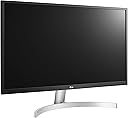
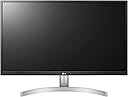
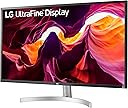
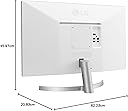
🎨 Elevate your workspace with color-true 4K brilliance — don’t just work, create in style!
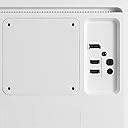
The LG 27UL500 is a 27-inch 4K UHD monitor featuring HDR10 and an IPS panel with wide 178° viewing angles. It delivers professional-grade color accuracy with 99% sRGB and 1.07 billion colors, ideal for design and video editing. Connectivity includes 2 HDMI ports, DisplayPort, and headphone out, complemented by AMD FreeSync for smooth visuals. Its ergonomic stand and VESA mount support ensure flexible setups, backed by a 3-year warranty for peace of mind.


| ASIN | B07PGL2WVS |
| Adaptive Sync | FreeSync |
| Aspect Ratio | 16:9 |
| Best Sellers Rank | #3,219 in Computers & Accessories ( See Top 100 in Computers & Accessories ) #85 in Monitors (Computers & Accessories) |
| Box Contents | Monitor, Stand, Power Cord, Connectivity Cables |
| Brand | LG |
| Brand Name | LG |
| Color Gamut | 98 |
| Colour | White |
| Compatible Devices | Monitors |
| Contrast Ratio | 2000:1 |
| Customer Reviews | 4.2 out of 5 stars 3,492 Reviews |
| Display Technology | LCD |
| Display Type | LED |
| Global Trade Identification Number | 00719192629813, 08806098420438 |
| Hardware Connectivity | DisplayPort, HDMI |
| Has Color Screen | Yes |
| Image Brightness | 300 cd / m² |
| Image Contrast Ratio | 2000:1 |
| Importer Contact Information | LG ELECTRONICS INDIA PVT.LTD. A-24/6,MOHAN COOPERATIVE INDUSTRIAL ESTATE,MATHURA ROAD,NEW DELHI-110044 |
| Is Electric | Yes |
| Item Dimensions D x W x H | 20.9D x 62.3W x 46H Centimeters |
| Item Type Name | Monitor |
| Item Weight | 5.1 Kilograms |
| Manufacturer | LG ELECTRONICS INDIA PVT.LTD. A-24/6,MOHAN COOPERATIVE INDUSTRIAL ESTATE,MATHURA ROAD,NEW DELHI-110044, LG Electronics |
| Manufacturer Contact Information | LG ELECTRONICS INDIA PVT.LTD. A-24/6,MOHAN COOPERATIVE INDUSTRIAL ESTATE,MATHURA ROAD,NEW DELHI-110044 |
| Maximum Display Resolution | 3840 x 2160 |
| Model Name | Ultrafine |
| Model Number | 27UL500-W |
| Mounting Type | VESA MIS-E |
| Native Resolution | 3840 x 2160 |
| Network Connectivity Technology | DisplayPort, HDMI |
| Packer Contact Information | LG Electronics Nanjing New Technology Co.,Ltd ,NO.346, YAOXIN ROAD ECONOMIC & TECHNICAL DEVELOPMENT ZONE, NANJING, 210038, PEOPLE'S REPUBLIC OF CHINA NANJING,China-210038 |
| Picture Quality Enhancement Technology | IPS Panel |
| Pixel Pitch | 0.1554 |
| Power Consumption | 41 Watts |
| Processor Count | 1 |
| Product Features | Anti Glare Screen, Flicker-Free, Tilt Adjustment, Wall Mountable |
| Refresh Rate | 60 |
| Resolution | 4K UHD 2160p |
| Response Time | 5 Milliseconds |
| Screen Finish Type | Flat |
| Screen Size | 27 Inches |
| Screen Surface Description | Flat |
| Shape | Rectangular |
| Specific Uses For Product | Gaming |
| Total HDMI Port | 2 |
| Total Video Out Ports | 3 |
| UPC | 719192629813 |
| Unit Count | 4 Piece |
| Viewing Angle | 178 Degrees |
| Voltage | 230 Volts |
| Warranty Description | 3 yr |
| Warranty Type | 3 Years Manufacturer Warranty |
I**E
The perfect monitor for daily use
Reviewing after 3-4 weeks of use for work Pros: 1. Comes with HDMI and Display Port cable - Not all products come with display port cable so this is an added advantage 2. The LG software makes it easy to change settings 3. 4K resolution with HDR at this price is definitely an advantage 4. The surface area of the stand is very minimal 5. Did not have any bleeding issues 6. Monitor was pre-calibrated in factory 7. Packaging was absolutely perfect Cons: 1. Comes with an earphone out port and does not have in-built speakers 2. The height is not adjustable 3. The LG onscreen control software is very buggy To me the pros outweigh the cons so I would definitely recommend this monitor.
M**I
Quality is OK, but thick frames look weird.
The 4K quality panel gives crystal clear text, images, etc., But the frames look weird like Stone Age model. Not a modern design.
P**V
The best monitors for macs
This is the best monitor I’ve ever received. It has a high PPI, though significantly below the Apple Pro Display, which has 218 PPI compared to this monitor’s 163 PPI. The text and image quality look sharp. I have another monitor, an LG FullHD UltraWide, and I can see a big difference with the 4K monitor. I highly recommend it for Mac users.
K**Y
LG is amazing.
This is my first monitor and I got a 4k monitor. The product is amazing. I am lucky I got a new package and 1 days delivery. The good thing with LG is it provides multiple cables including HDMI, DPI. Earlier I purchased a Acer 32" 2k monitor. It was too big and eyes were paining to read text in such a big monitor which is not 4K. So, I decided to get 27" and I chose LG. I felt the difference. You can read all day long with 4K display without discomfort to your eyes and watching movies on this display is amazing. I use it with my MacBook Air 2017 model. You should buy a miniDPI to DPI port cable. I spent another 1000 rupees for it but it worked well. Thank you, team Amazon! I will update after 2 months about the life of this monitor.
R**.
Beware of LG's Online Purchases: Damaged Products and Horrible Customer Support
Avoid purchasing this product online, as LG has a history of delivering damaged goods that are made to look new, only to break down within six months. I purchased an LG 27-inch 4K UHD monitor (68 cm, 3840 x 2160 resolution) online for INR 23,800 (HSN: 85284900). Unfortunately, my monitor has experienced the same issue—screen damage, with a split screen. The odd part is that it hasn’t been dropped or subjected to any physical impact over the past six months, so I can’t understand how this happened. I suspect there may be a system in place where damaged products are resold as new, only for them to fail shortly after delivery. I contacted LG’s online support for assistance, but their response was that the product is deemed damaged and therefore not covered by warranty. When I inquired about possible solutions, they offered a repair cost of INR 33,000 (excluding GST) for the same model. Keep in mind, I originally bought it for INR 23,800 (including GST). I’ve now asked the technician to leave and told them not to waste my time, as I won’t be paying that steep price. A word of caution to anyone purchasing large items online—LG's support services are, at best, frustrating and, at worst, a complete rip-off.
A**A
Good for the price
This monitor is okay, its decent, since its a IPS display colors are good. 4k resolution at 27 inch looks very sharp. We dont have much options at the price range of 30K, So here is what i think about pros and cons Pros : - Decent Monitor for under 30K - Great Colors - Superb Response Time - Great Viewing Angles - Freesync support , lot of color preset options - 2 hdmi 2.0 and 1 display port with a great stand - Very good size to resolution ratio, perfect for 4k gaming on consoled and pc Cons - HDR is just a checklist checked, Very poor HDR since it is a 8 bit+FRC panel - HDR just makes everything grayish and pinkish and looks dull . Tried all settings and compared it with a sony hdr tv. This monitor has a very poor HDR implemenation . - Poor Contrast Ratio , Dark Scenes dont look good. But there are no VA panels at this price as well - Not a 10 bit panel , thats a bummer ... - Under 400 nits of brightness is another reason for poor HDR , though 400 nits is bright enough when u sit upclose. What could have made it great... ? If LG can pull a 10 bit panel with a good contrast ratio over 1000:1 and retain all Pros i mentioned , this monitor would be a steal at 30K. Though for HDR local dimming zones , high brightness over 600 nits is essential, a 10 bit panel would have made this monitor look great in HDR. If you are fine with poor HDR , and hdmi 2.1 monitors are still years away, this would still a great a buy for your consoles and pc.
P**R
Great purchase for IT folks
Week1: I am using it as a monitor for macbook pro/HP laptop interchangeably and it works like a charm. Used display port based integration from MacBook and using extended display option. I use a Dell adapter which converts c type to display port.i din't experience any lag as such and works perfectly fine. -the package comes with HDMI and display port. -easy setup and installation. -small tilt angles are there, which is good - screw mounts were so easy to install. Cons: -It would have been better if inbuilt speaker was there. -The rear side is pure white, not silver as I misunderstood seeing the picture. But no issues as such. - a provision for remote would have been better as well.
A**R
Very good entry level 4k.
First of all, I am not a professional. I use this monitor only for movies, videos and office. Very occasionally amateur photo editing. Did not use it for gaming. I used this monitor with mac mini(2018) and hp spectre. I did a lot of research before making this purchase. To sum up what I found out and my personal experience: This is an entry level 4k monitor. There are some 4k monitors which are cheaper than this, but they come with TN panel. The picture quality is great no doubt, but I found a few things a bit disappointing - Only 300 nits. For this price I feel atleast 350, if not 400 would be great. A little bit of glare. And finally, HDR. In my research I came to understand that this monitor 'supports' HDR, but it is not VESA certified DisplayHDR. You can find the list of HDR certified products online. In fact a different model 27UL600 has DisplayHDR 400 certification. I did play some HDR content that I have and I was disappointed a bit. But the resolution is excellent. I felt that the response time is a bit slow when I use this with mac mini. Anyway overall, very satisfied. If your budget allows, prefer the next models like 27UK650 or 27UL600, as they are HDR certified and have some international recognition.
R**A
Excelente monitor.
Estaba buscando un monitor con adecuadas prestaciones, que fuera compatible con una MacBook Air con el nuevo chip M1. Actualmente lo utilizo conectado a la MacBook Air mediante un adaptador de HDMI, dando una excelente respuesta. Inicialmente, tenía sentimientos encontrados porque el panel me daba unos colores y saturación un poco alejado a lo que estaba acostumbrado a la pantalla del Mac; sin embargo, al hacer unas modificaciones en el monitor, en la configuración en la imagen y demás, he logrado obtener unos resultados óptimos y bastante agradables a la vista. A pesar de ser un panel IPS, sus colores negros son bastante buenos (y si ajustas la gama de colores es probable que encuentres el tono más agradable para ti). También lo he utilizado para jugar Nintendo Switch y se ve increíble (y eso que el Nintendo Switch da por mucho 1080p) así también con un PS4, y los juegos se ven bastante bien y fluido (ojo, si quisieras jugar más allá de 60Hz, es mejor que busques otras opciones, quizá no en 4K, pero sí a mayor cantidad de tasa de refresco). Pros: + Monitor bonito y agradable a la vista. + Buen panel y buena reproducción de colores (aunque tienes que ajustar un poco la ganancia y demás opciones). + Buen rescatado en consolas y buena respuesta. + Excelente precio. Contras: - Base no es ajustable, por lo que es probable que debas conseguirte un soporte VESA. - No tiene bocinas (pero, bueno... hoy en día creo que la mayoría usamos bocinas externas). En términos generales, estoy muy pero muy satisfecho y feliz con mi compra. *** ACTUALIZACIÓN*** Para mejores resultados con la MacBook Air es aconsejable utilizar un cable USB-C a Display Port, verás qué hay disminución de lag y todo irá más fluido. Lo recomiendo totalmente.
F**O
NO ES CURVO
el proveedor indica error en la transcripción, lo de curvo se refiere a la peana, pero no se responsabiliza y no me facilita otro monitor curvo a precio parecido
B**B
Really nice high definition screen
great for photo editing, great resolution, good quality product
N**B
Computer screen
For the price, this is right for me.
K**.
Not as easy as plug it in and bask in its full glory but very satisfying anyway.
I didn't rate this for gaming because I don't have a video card to drive a 4K monitor at a good speed yet, but for everything else, it looks brilliant for the money. I'm a working stiff these days, so I don't have the free time I'd like to have to play around and get everything set up just so, and I found that there are little hurdles and speed bumps along the way with these newer displays if you want to actually USE all of the fancy marketing buzzwords like HDR or Freesync or G-Sync or high frame rates or FALD (full array local dimming). I haven't gotten those all figured out just yet and the documentation and user interface aren't quite intuitive if you've never had to set those up and get them actually enabled and working correctly in real life before. They're not just "plug it in and bask in the full glory" easy yet-- you have to make sure you have the right combinations of hardware, cables, drivers, and settings between all the devices and peripherals to take full advantage of those newer features. But 4K crystal clear beautiful brilliance does pretty much work right out of the box, and at this price, even just that is worth having. It takes very little adjusting to get very realistic colors compared to my old calibrated Dell setup. I didn't even have to delve into the color calibration tool in Windows to get it fairly close to what I prefer in my lighting environment and get my pictures to look almost exactly like they looked in real life when I originally took the pictures. I don't even feel bad quite yet about not pulling out a hardware calibration tool. So while I haven't put together all of those pieces in a way that lets me enjoy all the features and functionality of this monitor yet, I am already satisfied with my purchase even if I never take the time to make it all work at peak performance. This is a pretty darn good buy. I've even considered picking up another one or two to replace my old 1080P monitor and at least one of my work monitors at the office because of the price to performance ratio. The only reason I haven't is because I may get my work to buy one or two for me for that, and at home I'm planning to buy one of the top of the line 4K G-Sync quantum dot monitors as my main/gaming monitor once I've upgraded my rig to push 4K really well, and it seems silly to me to buy a perfectly good monitor to only use for a few months. These are too good to waste and I don't have room on my desk for a triple monitor setup, unfortunately, or it'd be a no-brainer.
Trustpilot
2 days ago
2 weeks ago