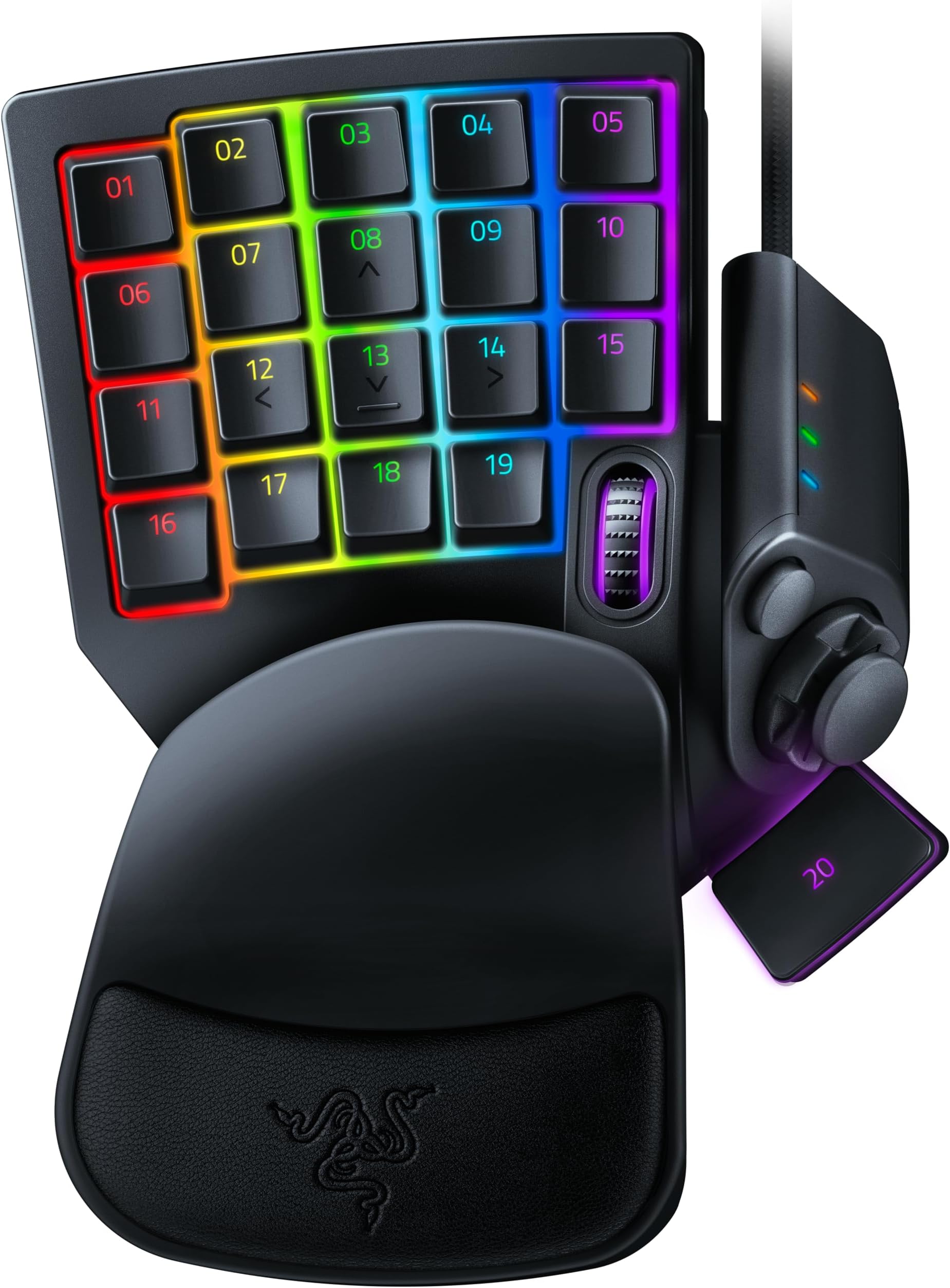
🎯 Dominate Every Game with Precision and Speed – The Tartarus Pro Advantage
The Razer Tartarus Pro is a cutting-edge gaming keypad featuring 32 programmable keys, Razer’s Analog Optical Switches with adjustable actuation (1.5-3.6mm), and rapid trigger mode for ultra-fast inputs. It supports 8 quick-toggle profiles and unlimited macro storage, enabling highly customizable gameplay. Designed for serious gamers seeking precision, speed, and ergonomic comfort, it transforms your PC gaming experience with controller-like analog control and dual-step actuation for twice the input functionality.


| ASIN | B07YV8TY52 |
| Antenna Location | Gaming |
| Best Sellers Rank | 538 in PC & Video Games ( See Top 100 in PC & Video Games ) 33 in PC Gaming Keyboards |
| Box Contents | Manual, Razer Tartarus Pro, USB Cable |
| Brand | Razer |
| Brand Name | Razer |
| Button Quantity | 32 |
| Colour | Black |
| Compatible Devices | Laptop, PC |
| Compatible devices | Laptop, PC |
| Connectivity Technology | USB-C |
| Connectivity technology | USB-C |
| Country of Origin | China |
| Customer Reviews | 4.2 out of 5 stars 1,416 Reviews |
| EU Spare Part Availability Duration | 2 Years |
| Enclosure Material | Plastic |
| Generation | 1st Generation |
| Global Trade Identification Number | 08886419360193 |
| Hand Orientation | Ambidextrous |
| Item Dimensions L x W x H | 20.2L x 15.1W x 6.4H centimetres |
| Item Weight | 362 Grams |
| Keyboard Backlighting Color Support | RGB |
| Keyboard Description | AZERTY |
| Keyboard Layout | AZERTY |
| Keyboard description | AZERTY |
| Language | English, English, English, English, English |
| Manufacturer | Razer |
| Mechanical Keyboard Switch Model | razer_analog_optical |
| Model Name | Tartarus Pro |
| Model Number | RZ07-03110100-R3M1 |
| Number of Keys | 32 |
| Number of Sections | 1 |
| Power Source | Battery Powered |
| Processor Count | 1 |
| Product Features | Backlit, Programmable Keys |
| Product Warranty | 2 Years |
| Recommended uses for product | Gaming |
| Special feature | Backlit, Programmable Keys |
| Style Name | Tartarus Pro |
| Switch Type | Optical |
| Theme | gaming |
| UPC | 811659035301 |
| Unit Count | 1.0 count |
| Water Resistance Level | Not Water Resistant |
J**H
Fantastic Gaming Keypad, Comfortable and Highly Customisable
The Razer Tartarus Pro has completely changed my gaming setup. The build quality is excellent. It feels solid and well made but is still comfortable to use for long sessions. The keys are responsive and the analog-mechanical switches give a really smooth and precise feel that’s hard to beat. The customisation options are brilliant. I’ve been able to map all my most used commands and macros exactly how I want, and the Razer Synapse software is straightforward and easy to use. The adjustable wrist rest is also a nice touch and makes long gaming sessions much more comfortable. It’s compact enough to keep on the desk without taking up too much space, but still has plenty of keys for all the commands I need. The build, feel, and responsiveness all come together to make it a really premium experience. If you’re looking for a gaming keypad that’s high quality, highly customisable, and comfortable to use, the Tartarus Pro is a brilliant choice. It’s easily one of the best gaming peripherals I’ve owned.
S**Y
Good replacement for my orbweaver.
Got this as a replacement for my orbweaver and was worried how long it would get used to. Took less than a day for it to fit like a glove.
O**.
Not perfect but oh my god...My gaming just go so much better!!!
I've had this item for over a week now, and my gaming/movement in CoD:Warzone is soooo much better, mostly because I now use the Joystick for movement. Literally won 15 Resurgence Games just yesterday when I used to win 2-3 at most. There is definitely a steep learning curve, and yes, I am still making mistakes trying to do things as I did previously when I used normal keyboard, but hey, I think its worth it! Now lets get real shall we? The product is BY NO MEANS perfect.... not even close! So I will just mention a few downsides that I see in it. 1. The layout: I don't know what monkey of a person did they have there on Razer that thought, YEAH!!! LETS PUT THE 4 KEYS OF THE BOTTOM AT A DIFFERENT LEVEL AND LETS MISALIGN THE ENTIRE LEFT COLUMN KEYS!!! THEY WILL LOVE THAT!!! Now, whilst those 4 bottom keys are not a particular problem for me since I only use the 15 keys above that, I do need to say that the intended place of the WASD keys (08,12,13,14) is tooo close to the palm/whatever rest, so when I first started using it like that I got cramps because my hand was in like a significant claw like position for long time... For that reason I ended up remapping some of the stuff I did to the level above (basically 1st and 2nd rows, rather than 2nd and 3rd....) And since I was going to learn new ways of doing stuff anyways, everything that I had on the number keys (1-2-3-4, etc), I put elsewhere, and now I've practically got used to it.... That is not to forget that I don't use WASD for movement anymore, so again, I kind of rearranged everything.... I now place my index, middle and ring on keys 07,08,09 and access all the surrounding ones with those 3 fingers, ocassionally 16 with pinky for crouching (the only key I am using from the bottom layer)... What I am getting at is that they should have just kept it equal everywhere.. the left column aligned and the bottom keys not at different level. 2. Sticking D-Pad: Yes, it is true! Your D-Pad will most likely stick from time to time, but I read that is actually not a hardware issue but a software issue related to Synapse, so supposedly if your don't use Synapse, you should not get it.... I myself was getting it for days and quite often that it became annoying to play with, but then I closed Synapse and haven't got it since for a few days now.... if it does come back, I might be asking for a replacement or something. Of course this would mean that you lose all the Synapse benefits there like analog keys, hypershift, macros, etc. .... so if it does impact you, then beware! 3. Thumbsticks: I've used Xbox controllers with various kinds of kontrol freeks and performance thumbsticks and obviously standard Xbox thumbsticks and I have to say, the thumstick in this thing is the most horrible thing ever... and the worst part is that I haven't found any suitable replacement.... That is not to mention that it does make me have my hand slightly more widely open than I would like to.... so yeah, beware with that.... 4. Slipping: I don't know if this is the case for everyone but in my case the gaming pad is constantly but very slowly slipping, as in changing its position, which requires me to often have to reposition it. In my case is mostly forward since I am always pressing the joystick forward to move. I should mention that I have my pad placed on top of an Endgame MPC 1200 Cordura, so it might be that other surfaces perform better, but like I said, in my case it slips!!! =( I will try to find a solution for it, but just wanted to put this as another negative point that might happen to you... Other than that, the product is very solid. Overall I am happy with my purchase and will definitely keep it, but will be on the look for those couple of things that might just make it so much better (Update in Synapse for Sticking and Thumbsticks :) 4/5 for this product for me... Good luck with your decision.
G**E
Compact, customizable, and comfy—Tartarus Pro is a macro beast for serious gamers and streamers.
The Tartarus Pro is a one-handed gaming keypad built for MMO players, streamers, and macro lovers. With 32 programmable inputs, analog optical switches, and adjustable actuation points, it’s designed to give you controller-like finesse with keyboard-level control. ✅ Pros: Analog optical switches: Smooth, linear feel with adjustable actuation 32 customizable inputs: Keys, scroll wheel, D-pad, and thumb cluster Compact design: Saves desk space and keeps hands close for mouse-heavy setups Great for macros: Ideal for productivity and multi-profile setups Comfortable wrist rest: Magnetic and padded for long sessions ⚠️ Cons: Steep learning curve: Not intuitive for casual gamers Software bugs: Razer Synapse can be glitchy1 Some keys hard to reach: Layout isn’t perfect for all hand sizes2 Pricey for niche use: Not essential unless you’re deep into MMOs3
J**A
Can't imagine gaming without it anymore
This, my friends, is one of the GOATs. Especially pairing with a Razer mouse, utilising hypershift to double your key capacity without lifting your hand, and customisation galore for comfort and your own feeling of what key should be where, and that's BEFORE utilising profiles on the go. Takes a little to get used to, and a lot to customise, but once you do, you'll never want to go back.
V**O
Average product with cheap thumb stick build
Average product. I wouldn’t buy it again. The thumb stick is made of smooth hard plastic providing very poor grip. Barely usable for me. I’ll have to go look for a 3d printed replacement or a cover to adapt to make it usable. Disappointing for that price tag
S**S
Razer Tartarus Pro - Absolutely Terrible
I rarely write reviews, but I feel compelled to share my experience with the Razer Tartarus Pro. Honestly, this is one of the worst gaming peripherals I’ve ever had the misfortune to use. First off, setting it up was an absolute nightmare. The instructions were unclear, and it took far longer than it should have to get it up and running. Once it was finally set up, I was greeted with the disappointing realisation that the experience was just as frustrating as the setup process. The build quality feels cheap and flimsy – certainly not what you’d expect from a brand like Razer. The keys are unresponsive, and the overall feel is very poor. It doesn’t offer the premium experience that the price tag suggests. Every press feels dull, and the feedback is almost nonexistent, making it difficult to type or game effectively. Most frustrating of all, it simply doesn’t add any value. If you already have a decent keyboard, do yourself a favour and stick with it. The Tartarus Pro offers no improvements or unique features that make it worth the investment. In fact, it feels like a downgrade compared to what you probably already have. Overall, I regret purchasing this device. It’s just not worth it. Save your money and look for something better. Razer should be embarrassed by this product.
N**N
Excellent (but you need to know)
It is honestly Fantastic, customisable, comfortable. If you are one handed keyboard person like myself, you will love this. However, here is what you need to know. It acts a gamepad input and so certain games will think it’s a controller. What does that mean ? Any games that you use a controller for will now have to choose between it and your controller and it can cause issues. Some games will use mouse still but change the keyboard input so you are playing with a weird hybrid split. Basically a bunch of game issues in terms of controls. Never fear you can solve all of this by disabling the in game controller function from its properties. This will cause it to stop functioning as a gamepad and only as a keyboard. This means you loose joystick functionality but can still map everything you need. I didn’t know any of this before buying and thought I had wasted my money. Now it’s all sorted, I would recommend this 100%
Trustpilot
1 month ago
2 weeks ago