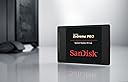
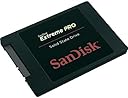
💨 Upgrade to speed and silence — because your workflow deserves the Extreme Pro edge!
The SanDisk Extreme PRO 480GB SSD delivers top-tier SATA III performance with sequential read speeds up to 550MB/s and write speeds up to 515MB/s. Its compact 2.5-inch form factor fits seamlessly into laptops and desktops, offering a reliable, energy-efficient storage solution backed by a 10-year warranty. Ideal for professionals seeking faster boot times, smooth multitasking, and durable storage, this SSD transforms your computing experience with silent operation and robust endurance.
| ASIN | B00KHRYRLY |
| Best Sellers Rank | #1,230 in Internal Solid State Drives |
| Brand | Sandisk |
| Color | Black |
| Customer Reviews | 4.4 4.4 out of 5 stars (2,061) |
| Date First Available | June 2, 2014 |
| Flash Memory Size | 480 GB |
| Hard Drive | 480 GB 1x480GB |
| Hard Drive Interface | Serial ATA-600 |
| Hardware Platform | PC |
| Is Discontinued By Manufacturer | No |
| Item Dimensions LxWxH | 0.28 x 3.96 x 2.75 inches |
| Item Weight | 1.92 ounces |
| Item model number | SDSSDXPS-480G-G25 |
| Manufacturer | Sandisk |
| Product Dimensions | 0.28 x 3.96 x 2.75 inches |
| Series | Extreme Pro |
R**D
Replacing Old HDD's with SDD's has become a No Brainer
I took the plunge and replaced my hdd on my Asus S400C laptop with a Crucial MX100 and it went flawlessly. I then decided to go for broke and replaced the 1 Tb hdd on my Acer TC-605 with the Sandisk Extreme Pro 960 Gb. I love how my computers are no longer clicking away all the time with the poor hard disks seeming to work their little hearts out. I am sure there is a good reason why after a few months, Windows computers just seem to keep working harder and harder and get slower and slower. I know it is because of all the stuff we put into them, but I have always kept my computers cleaned up and it still seems to happen. I am hoping that changing to ssd drives in both my computers will remove some of that issue; right now it seems to be working. I just replaced the hdd on my desktop last night and used Farstone's DriveClone 11 Free Version (http://www.farstone.com/software/drive-clone.php). This software is easier for the non-geek because it does one thing exceeding well--clone your disk. It also has a "fast" mode which I used to back up my ~700 Gb of files in only about an hour. The only thing I had trouble with was getting the computer to recognize the ssd simply because I am not really into this stuff. I did a bit of googling and found how-to sites on how to use disk manager to assign a new drive letter and then I was fine. Another issue I had was in physically installing the ssd in the computer. I went to a computer store and a guy simply gave me a plastic 2.5" to 3.5" chassis. This was helpful but Acer bolts the hdd up against the side of the case and doesn't use the traditional horizontal stacked configuration any more. I ended up installing the ssd on the plastic chassis and then simply using wire ties to hold the whole configuration in the slot where the old "massive" 3.5" hdd had been. As this computer just sits and never moves, I think that will be just fine. If the idea of doing that bothers you, then you may wish to open up your computer and see if you can find the correct 2.5" to 3.5" adapter. I scoured Amazon and could find nothing that had the correct configuration of drilled and tapped holes to mount in my Acer. (I needed to be able to mount to the bottom of the ssd adapter.) If you are contemplating replacing your hdd in either a laptop or desktop, the time has come. Prices have gotten reasonable and the technology is mature. I can sit in my home office in complete silence, no longer listening to that annoying hard drive always working away--it is amazing how nice silence can be. In summary here is what you need: 1. Find a ssd you like. I recommend a name brand with a large installed base so that you can capitalize on others experiences. I have a Crucial in my laptop and a Sandisk in the desktop and am pleased with both. I went a little more budget on the laptop but stepped up on the desktop and got the best: the Sandisk Extreme Pro. You can't beat a 10 year warranty. Computer years are like dog years so a 10 year warranty is like a "lifetime". Also, get the largest capacity you can afford. 2. Get the ssd enclosure. You will need this enclosure because you have to have a way to connect the computer to the new ssd in order to transfer the system from one hard drive to another. In other words, you put the new ssd in the enclosure, transfer all your stuff to the ssd via the usb port on your computer, and then remove your old hdd and replace it with the new ssd. I got a Sabrent and it was fine. I didn't even bother to put the cover on as all you really need is the usb adapter. Search Amazon for "hdd enclosure 2.5 inch". 3. Get the migration software. Again, I used the free Farstone DriveClone 11 and was really pleased. I downloaded others but the Farstone is easiest for non-geeks if all you are doing is cloning. 4. Set aside some time and take the plunge. While pricey, making the change removes a huge annoyance (noise) for those of us who live on our computers and it also speeds up booting and working with large files. My computers are fairly new so if you have older computers, you may want to do more research. I so love the silence. The speed is nice too!
J**A
Very fast SSD, great for OS or software partition!
Pros: Fast out-of-the-box, reliable, warrantied, decent amount of space Cons: Slows under "real" conditions, no cable included I ordered this on January 8, 2016 from Amazon.com LLC after my previous SSD, a Kingston Digital 120GB SSDNow V300 SATA 3 2.5 (7mm height) Solid State Drive (SV300S37A/120G) , started becoming corrupted due to some sort of fault. After installing Windows 10 on this hard drive, I was blown away by the speed. Though I was previously using a SSD, I was surprised to discover how much faster this one was. Since I'm using this in a desktop, installation was as simple as mounting it to my drive brackets, plugging it in, and installing my OS on it. I didn't need the included spacer but am glad they're providing one for users who might need it. The speeds on a fresh install were exactly as advertised, though they've slowed down a bit over time due to installing and running new programs on the drive. I've included a screenshot of the drive's speeds under 30% capacity with a few programs running. Aside from that, the only other con is the lack of an included SATA cable since I like to pair my new drives with new cables. The machine I'm running this drive on is primarily used for gaming, editing and rendering videos, and programming. It's done a great job so far handling all of these tasks with speed. I do keep most of my programs on a separate SSD and my files on a separate SATA storage drive, using this SanDisk drive for my OS and core programs. For reference, here's my system specs: »Rampage IV Black Edition Motherboard »Intel i7 4930k @ 4.5GHz »64GB Dominator Platinum RAM @ 2133MHz »EVGA nVidia GTX 970 SSC ACX 2.0+ @ 1190 MHz Core Clock Overall, my experience with this SanDisk Extreme Pro SSD is positive. I haven't used any of the SanDisk management software and can't comment on that, but the SSD itself works very well. The 10-year warranty offers some great peace-of-mind after having my previous Kingston SSD fail after its warranty ran out. If you have any questions about this SSD, please leave a comment to my review and I'll get back to you.
C**N
Compré este disco duro hace seis meses para un macbook pro de 2012 y estoy muy contenta. Tarda mucho menos en reactivarse cuando está en reposo o se acaba la batería. No hace ruido y el ordenador se calienta mucho menos. La única pega es que a veces se cuelga el Finder cuando eliminas muchos archivos a la vez. También se nota la velocidad al pasar archivos a un disco duro externo o renderizar. Una buena compra.
H**G
Very happy so far. Haven't owned it long enough to comment on reliability, but ease of install and overall performance has me pleased. My computer already has an SSD for the operating system, so I replaced the HDD and I'm using the Sandisk SSD as a secondary data drive. I don't know how involved it would be to transfer an operating system from an existing hard drive, but it would be worth the effort if you are looking to increase the performance of a computer that currently boots from a traditional hard drive. A couple of things to note: 1. ships only with SSD, a few mounting screws, and an adapter plate used to adjust the thickness of the drive for installation in certain laptops. There are no cables, software, or mounting brackets included. You will need to determine if you need a 3.5" mounting bracket, SATA cables, etc., for your particular install. 2. Installation was simple. (my install was in a desktop computer) Physically install the drive. Turn on the computer and access the BIOS setup, my computer is fairly new and BIOS automatically recognized the drive, exit and save. Restart computer and go into Windows disk management to mount and format the drive. The 10 year warranty suggests the manufacture has considerable confidence in this SSD. I definitely recommend an SSD upgrade for additional storage or to boost boot performance in computers running traditional HDD.
F**S
Poner este disco ha sido la solución a no tener que cambiar el pc de sobremesa con w7 de 8 años que tengo actualmente. He conseguido que arranque en menos de 1 minuto y es mucho más rápido en todas las funciones como acceso a internet y abrir aplicaciones. En el disco duro se almacenan temporalmente todas las acciones del ordenador si no tienes excesiva memoria ram. Lo recomiendo a quien tenga dudas, pensar que yo no le saco el máximo provecho ya que trabaja a 6 GB con SATA III y yo lo estoy utilizando a 1,5 GB con SATA y aún así lo recomiendo.
D**N
Very fast, I have been using it for 5 months, it is blazing fast, I used to have a hdd with cache ssd, the extreme pro boots much more faster and opens heavy applications like photoshop and illustration even maya within 1-3 seconds.
S**I
First thing first : Drive is very good, i choose this drive over samsung because of Warranty issues. I checked and found that samsung drive is very hard to get warranty. Their customer support is very very bad in India especially. Actually every company except few having very worse service in india. i don't know how they are managing with government law. So choose SanDisk: Heard reviews checked benchmark. They are using marvel controller in PRO drives so it is as fast as other samsung and crucial drives. I had hard time to clone this drive with HDD. I was having issue with dynamic partition. If you have simple C drive Acronis WD authorised software is enough. I tried all ( acronis, AOMEI backupper, Macrium) but no software will help you with dynamic partition. you have to use dynamic disk converter to convert the dynamic disc to basic disk. After that any you tube video can you help you with easy cloning methods of any software. But i really like MACRIUM. it is amazing software and AOMEI dynamic disk converter. I did not run my bench mark. but my PC boot time was 12-15 minutes. right now it is just 20 seconds. can you believe that....ufffffffff. installing software is blazingly fast. In between sometime i got mouse stuck issue. it is not as smooth as samsung drive. But after few boots and making SSD as complete C drive now no problem. But soon i m going to install the fresh OS into it. then check again the speed. i don't trust my 6 years old HDD sectors condition. i make this fresh copy and use other HDD as RAID for backup. BUT believe me SSD is much worth it than HDD as operating system.
Trustpilot
3 weeks ago
1 month ago