Desertcart purchases this item on your behalf and handles shipping, customs, and support to Thailand.
🚀 Power your smart projects with the ultimate mini WiFi dev board!
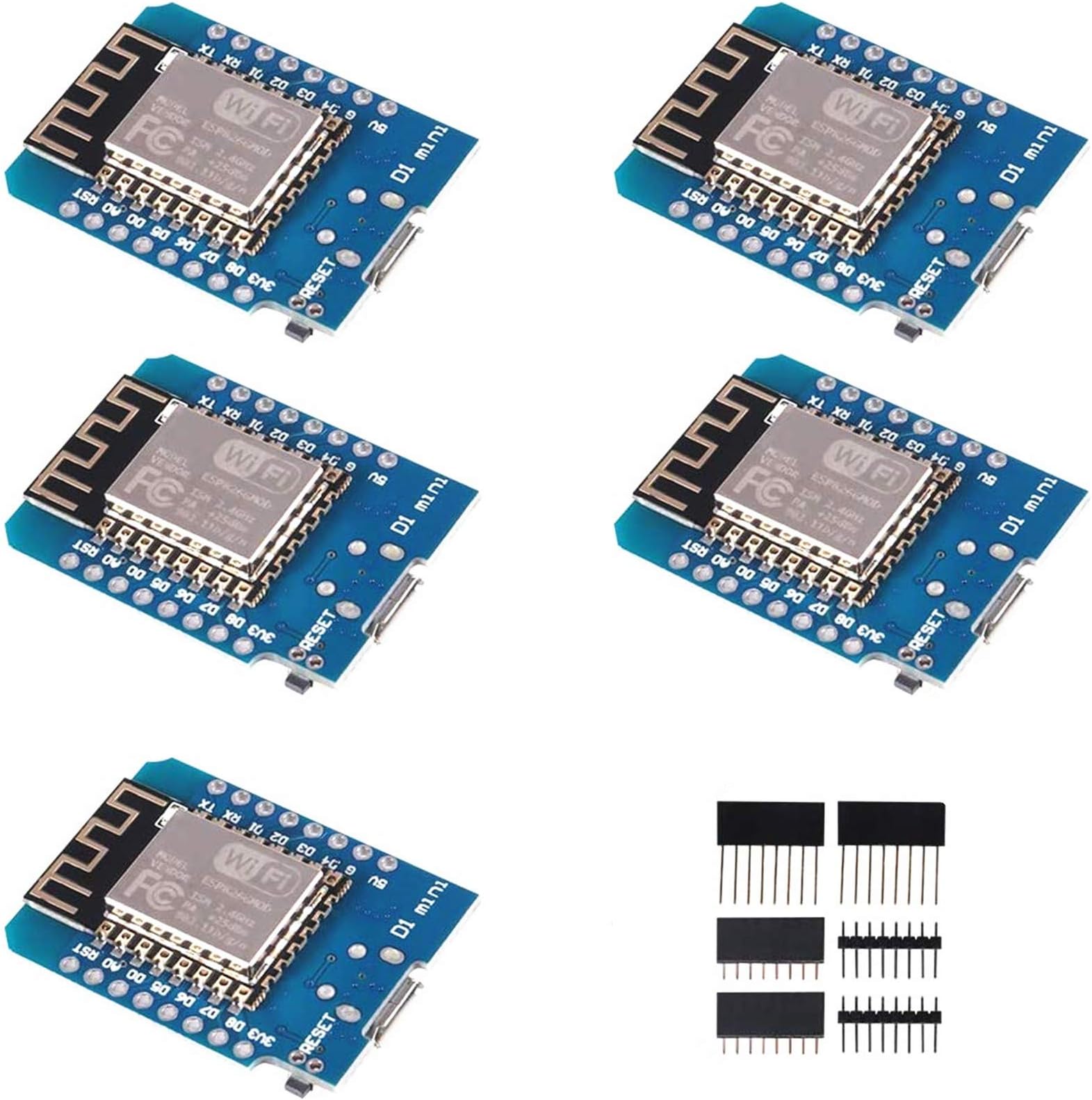
The 5pcs ESP8266 ESP-12/ESP-12F NodeMcu Mini D1 Modules are compact, Arduino-compatible WiFi development boards featuring 4MB flash memory, 11 digital I/O pins with PWM/I2C/interrupt support, and a micro USB interface. Ideal for professional makers and IoT developers, these boards deliver reliable 802.11 b/g/n/ac wireless connectivity with built-in power protection, enabling rapid prototyping of connected devices.


| ASIN | B081PX9YFV |
| Best Sellers Rank | #221 in Single Board Computers (Computers & Accessories) |
| Brand | ACEIRMC |
| Built-In Media | esp8266 d1mini |
| Compatible Devices | Arduino, WeMos |
| Connectivity Technology | I2C, USB, WLAN, Wi-Fi |
| Customer Reviews | 4.5 out of 5 stars 776 Reviews |
| Included Components | esp8266 d1mini |
| Item Highlight | WLAN WiFi Internet Development Board Base on ESP8266 ESP-12F for Arduino,Compatible with WeMos D1 Mini |
| Manufacturer | ACEIRMC |
| Memory Storage Capacity | 4 MB |
| Mfr Part Number | 10550 |
| Model Name | D1 Mini |
| Number of Items | 5 |
| Operating System | Linux |
| Processor Count | 1 |
| RAM Memory Installed | 4 MB |
| RAM Memory Technology | LPDDR3 |
| Ram Memory Installed Size | 4 MB |
| Total Usb Ports | 1 |
| UPC | 701715431645 |
| Warranty Description | 1 |
| Wireless Compability | 802.11a/b/g/n/ac |
M**E
Executes the timed deep sleep instruction reliably
I needed a new ESP8266 module that would reliably execute the timed deep sleep instruction. I use the Arduino IDE for programming and followed the instructions in some of the reviews and on the sale page itself under Product description. Three points: 1. Initially I was not able to upload a sketch to the device. I'd followed all the instructions including the board selection of either the LOL(WEMOS) D1 R2&mini or the NodeMCU 1.0 (ESP-12E Module) - neither worked. Maybe because this module is an "F" not and "E". So, I selected the NodeMCU 0.9 (ESP-12 Module) and it worked and now uploads ever time. 2. My previous ESPP8266 module's A/D input was limited to 1.0 volt; this one allows 3.1 volts on the A/D input. 3. I tested the timed deep sleep instruction over a 24-hour period (with D0 wired to the reset pin), and it functioned properly every time. I have used only one of the 5 modules received, so I haven't verified they all work, but the first one is working nicely.
D**I
Might be an older chip but they work well for a lot of use cases!
I love these chips. They are very useful and I have used them for a few things now and though they don't have a ton of memory and their processing speed is lower than things like the ESP32, I still prefer them for certain applications. Built a few WiFi enabled thermometers with these. They sit in various rooms of my house and sense the temperature and I can hit a little webpage I coded into the device to see what the temperature is where they are located. So basically, they are acting as remotely readable temp/humidity sensors. Also, I used these to build a controllable outlet where I can log into a webpage on it over the network and control the on/off state of an outlet. Then I modified the code so it would reach out to the remote thermometers I mentioned to get the temp and turn on/off the outlet based on the temp. This way they control a heater in my shed to keep the temperature stable through the winter. It has been working great!
D**D
8266 is a great chip, but the CH340G USB is hit or miss
Editing and adding two stars. The last batch I got performed flawlessly with MicroPython 1.19 firmware. These are wonderful and cheap little 8266 boards, but the CH340G USB to UART bridge really drags them down. Can't get the thing to flash? Try a different USB cable. Got garbage characters on your serial output? Try a different USB cable. Yeah, really. The USB cable can make a difference. I don't know if it's the CH340G or the CH340G driver for Windows, but something is not quite right. My experience using the same USB cables with NodeMCU and Adafruit Huzzah32 (and their CP2102 USB to UART bridges) is stable and working consistently. These were a great price, but not worth the headaches. Stick with a CP2102 equipped device.
D**N
Great for the price
Most of these work great, however, one of the five arrived non-functional. The ones that did arrive worked great for some simple ESPHome projects in Home Assistant. These don't have bluetooth, since only the ESP32s have that, but if you don't need it and you just need a little microcontroller for a project here and there, I absolutely recommend it for that.
T**Y
Great deal on a sweet product.
Received the product in a few days with each chip packaged in anti static bags. A nice added bonus is the extra I/O pins that can be soldered based on your application. For a little over $3 ea, I think this is the most versatile of the 8266 chips. I’m just getting started back into electronics (I’m 70) and these are so easy to apply into IOT projects with a huge support community. I was able to put together a temp humid web server in a matter of a couple hours. Highly recommend this seller as he also reached out to me after the sale to insure all was ok, and an email address if I should have questions. I’ve received no free products or incentive to write this review.
S**O
They work
Some arduino products (based on NINA wifi) simply don't work reliably. This seems to work perfectly. Note: this isn't the board's fault, but the Arduino IDE takes some setup to talk to these, and the latest version (3.1.0) of the board manager package does not work. You get an incomprehensible error message about time_ns and things fail to compile. Drop back to 3.0.2 and all is well. This sort of thing isn't atypical with Arduino projects, which seems to be very much the wild west in terms of software,
J**E
Simple WiFi connectivity for tinkerers
This works fine! I was worried that the tools setup would be a chore, but just go to the ESP8266 project on GitHub, which tells you where to put in a board manager link in the Arduino IDE, and then select the WeMos R2 & Mini board in the setup menu, and you're good to go! If you're not already familiar with programming at the C level in general, and/or Arduino-type programming, getting started on this particular board will probably be rough, though -- it's not as "easy on-ramp" for beginners as the plain Arduino, or the Teensy series, but that's not what I was looking for, so that's fine. Two things to watch out for: 1) The pinout in the pictures of this listing are FROM THE UNDERSIDE of the board. If you solder on the connectors as if that was the overside, you'll end up with a board whose pins are mirrored from what all tutorials and symbols on the web expect. 2) You'll probably want to double-clock the CPU to 160 MHz; there's an option for this in the board setup menu. This wasn't clear in most of the setup instructions, but it works better, connects faster, can do HTTPS / SSL better, and so on, with that option turned on. Beware that it draws up to 200 milliamps from the 3.3V rail when actually connected and transmitting, so if you want to battery power it, you need a big battery or some way to only occasionally turn this on (or both.)
R**E
Code+Wifi in a package the sized of a coin
What an amazing little thing. For a few bucks, you can write some code and get one of these on the network without jumping through hoops. While I have lost no love for the Raspberry Pi, the WeMos Mini has some advantages when it comes to size and functionality. Yes, you can get a Pi ZeroW for a a few bucks, but you still need to get an sdcard to go along with it. The WeMos costs about as much as that sdcard, and has it all in one package. Yes, they're going to shine in different areas. Each has its own advantage. But it's worth having some of these on hand, for those projects where it makes sense.
Trustpilot
2 days ago
4 days ago