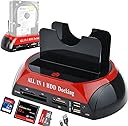
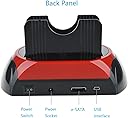
💼 Unlock your data’s potential with dual-drive power and universal access!
The Microware Hard Drive Docking Station offers dual slots supporting IDE and SATA 2.5"/3.5" drives, with up to 8TB capacity for SATA and 1TB for IDE. Featuring USB 2.0 connectivity at 480 MB/s and an integrated multi-format card reader, it ensures broad compatibility across Windows and Mac OS platforms. Its compact design suits professionals needing versatile, portable storage solutions.


| ASIN | B07D7LQPJ4 |
| Are Batteries Included | No |
| Best Sellers Rank | #69,952 in Computers & Accessories ( See Top 100 in Computers & Accessories ) #27 in Hard Drive Docking Stations |
| Compatible Devices | Personal Computer |
| Customer Reviews | 3.3 3.3 out of 5 stars (22) |
| Data Transfer Rate | 480 Megabytes Per Second |
| Date First Available | 11 June 2018 |
| Form Factor | 3.5 Inch |
| Hard Disk Form Factor | 3.5 Inches |
| Hard Drive Size | 1 TB |
| Item Dimensions LxWxH | 15.7 x 12.2 x 11.4 Centimeters |
| Item Height | 4.5 Inches |
| Item Weight | 286 g |
| Item Width | 4.8 Inches |
| Manufacturer | Microware Multimedia Private Limited |
| Max Number of Supported Devices | 2 |
| Memory Storage Capacity | 8 TB |
| Number of HDMI Ports | 2 |
| Product Dimensions | 15.75 x 12.19 x 11.43 cm; 285.76 g |
| Series | FAT 32 |
| UPC | 682838988790 |
S**S
Nice
Good
B**K
It disconnects when copying items to drive
It looks sturdy but the main function is to detect the drives. It’s not stable while copying files, as the drive keeps disappearing.
I**D
Software link
I need support on software,It is not working effectively,I do not wheater it is write software application
L**E
I bought this to add put a secondary drive to the Windows 10 PC since there is very little space inside the PC. It worked right away when I connected it.
J**M
WORKS SO SO
S**S
I use a variety of memory media, so something that could encompass all forms in one device would be great. This unit arrived already broken. It has two support slats that sit upright behind the slots to support the hard disks. The front one was broken off the base. Still, as that item wouldn't be directly affecting the data transfer, I wasn't sure it would be a main problem, so I decided to test the unit to see if it worked otherwise. The first attempt was with a Compact Flash Card. It took several attempts to get the card to fit. WARNING: you are going to bend one or more of the pins. There's no way around it. Finally, I got the card seated and it did show up on my computer. So I tried another compact card. Same difficulty trying to get it in. When I finally did.... it didn't read. I tried another card. Didn't read. I returned to the original card that it had read first. Now it didn't read. I switch to a SD card to see if it would read. It didn't. I then attempted a SONY Memory Stick. It didn't read. In all these cases, I used the on/off switch to reset the card connections and tried using a different USB slot on my computer. Nothing mattered. Obviously, at this point, it was useless for me to test the other slots for hard disks or other cards. I am sending it back for a refund.
K**Q
It seems a little slow, but I was transfering some very large files. Getting the disks in was a bit tricky, not a pain in the ass. Getting it set up was easy, just plug & play, the instuction book, being from china, was not very good. All in all, it's a good product. Ken
A**N
It is a good tool
Trustpilot
3 weeks ago
2 months ago