Buy anything from 5,000+ international stores. One checkout price. No surprise fees. Join 2M+ shoppers on Desertcart.
Desertcart purchases this item on your behalf and handles shipping, customs, and support to Thailand.
🚴♂️ Ride Smarter, Not Harder — The Sensor That Keeps Up With You
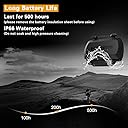
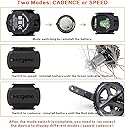
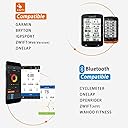
The Magene S3+ Outdoor/Indoor Speed/Cadence Sensor is a lightweight, IP66-rated cycling accessory that wirelessly transmits accurate RPM data via Bluetooth and ANT+. Designed for road and spinning bikes, it offers easy mode switching between speed and cadence with a simple battery toggle. Compatible with leading fitness apps and devices, it features smart power-saving hibernation and a compact form factor that blends seamlessly into your ride setup.


| Asin | B08252X8VS |
| Battery Type | Lithium Manganese Dioxide |
| Best Sellers Rank | #8,010 in Sports & Outdoors (See Top 100 in Sports & Outdoors) #5 in Cycling Computers |
| Brand Name | Magene |
| Color | Black |
| Connectivity Technology | Bluetooth |
| Customer Reviews | 4.0 4.0 out of 5 stars (4,794) 4.0 out of 5 stars |
| Display | LCD |
| Global Trade Identification Number | 08414775870867 |
| Human Interface Input | Buttons |
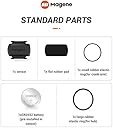
| Included Components | Battery, Magnet |
| International Protection Rating | IP66 |
| Item Dimensions L X W X H | 1.17"L x 0.33"W x 1.51"H |
| Item Weight | 9 Grams |
| Manufacturer | Magene |
| Manufacturer Part Number | S3 |
| Model Number | S3+ |
| Mounting Type | ['Stem Mount', 'Handlebar Mount'] |
| Sensor Type | Cadence Sensor, Speed Sensor |
| Unit Count | 1 Count |
User
High quality cadence or speed sensor for the price
Easy to use, functional, and relatively inexpensive. I like that it can measure either cadence or speed simply by removing/replacing the battery. Clever design that doesn’t require a switch or app.
User
Nice piece of kit!
Overview:I needed a speed sensor for my new bike computer, and started looking at the various ones around. I bought this one primarily because of the low cost. It installed easily via two rubber bands around the hub of my front wheel. It paired with my existing bike computer instantly, and supports both Bluetooth and ANT. The accuracy seems correct, and there is very little latency on a speed change and a display change.Pros:1. Price is great!2. It paired right up to my computer.3. Small.4. Easy to install on a hub.5. Low latency.Cons:Really, none...Conclusion:I have purchased a second one for Cadence, so I am happy with it. I would, and did buy a second one. What more can I say!
User
Endless struggles with the battery cover and getting the red/green led to flash consistently.
Sadly, I had no luck with this device ... and I never get as far as getting it installed on the bike. The older model had a notch extending out from the battery cover, making it relatively easy to slide the cover to then remove. This model has two indented notches pressed into the top of the battery cover so you'll have to use a coin or other similar tool to open the cover, not a major deal but super annoying when you end up having to fight with the cover repeatedly as I did. I struggled getting the battery cover to reseat properly into the unit, I tried seeing if there was a groove I needed to fit. The manual mentions to push the cover back on but that didn't work reliably for me. Perhaps most frustrating was the red/green light wasn't cycling as it was supposed to. This feature worked perfectly on my older sensor, take the cover off, take the battery out, put it back in, the LED flashes either red or green (depending upon what it was set to before). The light would not flash reliably on this model and more often then not it would flash red but was a struggle to get it to flash green. The frustration was magnified when it would finally flash green and then by the time I struggled to reseat the battery cover, the light would flash red again. I strugged with this for hours, wanting to believe it shouldn't be this difficult. Eventually I had to give up looking for consistency. One time, the unit finally flashed a green light and I was able to get the cover on...only for it to come off a short time later. I decided to return this. It's not worth the fight especially considering whenever the battery dies, I'd have to go through the same process all over again ... nope!
User
Great tech support seems to have resolved readings issues on two units
UPDATE: Magene reached out after seeing my original review (below) and provided more specific advice. Namely, to reposition the sensor close to the spindle rather than midway along the crank arm where it had been. That position leads to less signal distortion in some cases, they said. In my case, that was true, and the original sensor began sending realistic cadence readings again from both of my bikes. I have yet to test the replacement sensor, which had both issues around its readings and a problem sending data simultaneously to both my Apple Watch and Garmin bike computer, but I will test it when I can. The support from Magene was unexpected and very thorough — no canned AI messages but actual human beings who know their product.They describe my Apple/Garmin scenario as a minority use case, so if you have a similar setup try moving the sensor nearest possible to the spindle. All I can suggest is that there be better online support/instructions for various setups so both customers and Magene can avoid the hassle of returns.ORIGINAL REVIEW: This sensor worked well for about a year, then its readings became highly inaccurate, often reporting about double actual RPMs for the last few months. The seller kindly sent a replacement unit this month even though I bought the original 18 months ago. Sadly, it is even less reliable than the original one I bought — the sensor readings continue to be significantly inaccurate much of the time and a new problem is that even though it connects via both Bluetooth (to my Apple Watch) and ANT (to my Garmin bike computer) simultaneously, it sends data to only one device in each ride, registering 0rpm on the other. Some rides the bike computer gets the rpm data, some rides the watch does. The original one sent data to both devices. Clearly, Magene has lost control of its product quality and is shipping junk these days.For the original, it was also very difficult to replace the cover after opening the battery such as to replace it or to get the battery contact re-enabled. Over time, the unit has begun turning off more and more even with a fresh battery, and the internal battery holder seems to have gotten loose and so falls out of contact. The replacement unit has the same design so I suspect the same battery contact issues will occur in the future, but at least they have now put the alignment markings in white so you can see them when removing and reinstalling the battery; the previous one was all in black ad nearly impossible to discern.It was reliable for a year, but no longer is.
User
Good value sensor
Love this for the price. No problems syncing with my Garmin. Accuracy seems good enough. Very small, tucks easily away on the back side of the crank arm. The bands that hold it on are generic enough that you could find a replacement at a hardware store or just zip tie it on if necessary.It has two modes so make sure you select the correct one when installing it. Red blink means cadence and green means speed. Change the modes by removing and reinstalling the battery. Red and green blink means the battery needs replacing. I had both modes show up while pairing over ant+, so make sure you choose the right one.Don’t forget to remove the transparent plastic disc between the battery and the sensor when you first get it. The battery cover tool is a nice addition that I noticed after I pulled the battery off easily by hand.
User
Sensor and Wahoo app aren’t compatible, but Magene made good (as well as they could)
Update: Magene did (actually some time ago) offer to make good on this based on my review (money back or credit), so I can’t hold a grudge there. I’ve been through Wahoo app updates and sensor firmware updates since then hoping that this problem would resolve, but it has not. The device itself and the Wahoo app are not fully compatible. But if you find yourself in this spot, Magene will support you.Originally submitted a question, but perhaps better as review. Sensor arrived quickly, was easy to install and pair to phone per instructions. Using Wahoo fitness app in iOS, the sensor appears to give good data for cadence...but the app then no longer acquires speed and distance data...what happened? If I have to choose, I want speed and distance. To be clear, I understand that the sensor can only send speed OR cadence data...the issue is that collecting cadence data from the the sensor is somehow disabling the speed/distance data that the app normally gets from phone gps.Upon further review, the Wahoo app sees this sensor as a speed AND cadence sensor and is looking for two signals. Obviously, the sensor sends only one, and in cadence mode, the Wahoo is looking for speed, too. This causes speed and distance data to be n/a during the ride, even though gps data are collected in the background and available for review later. Don’t know how to remedy this...In further dialog with both Magene and Wahoo, they are pointing fingers. Magene says it’s an app problem and Wahoo’s solution is to buy their more expensive and single-function sensor. Ugh.
User
Works but cannot do speed and cadence together
Arrives fast and works but there are several issues. Battery cover is cheap plastic and the tab tore off on one of my sensors. It still works but hard to remove battery cover now and it is no longer waterproof. I bought two of these and they both work for speed or cadence but my iPhone will only connect to one sensor or the other. I would like to have both speed and cadence and have been able to do this with other sensors but not these. One of my batteries went bad in a few weeks. I am not sure if this was a battery issue or if the device didn't sleep. The rubber bands are fairly thin and I am not sure if they will last.
User
Works exactly as advertised
Why did you pick this product vs others?:Sensor is great, easy to install, easy to use, and made my workouts on spin bike that much better because I know if I am going hard enough now. Instead of watching the video and trying too match their speed I can see right where I am at. Functionality:Basically put it on the pedal crank, start the app, use the super cycle app to monitor the sensor, and away I go.
User
Nickel !
Fait le boulot !Pas trop cher et précis !
User
Ótimo sensor
Instalei na bike de spinning, funcionou bem fixando perto do eixo, na roda não mediu direito. Usei abraçadeira de velcro e fixou perfeito, minha bike tem uma roda de 19kg.Já a entrega, comprei o produto que não informava que se tratava de uma compra internacional, Amazon deveria cuidar melhor disso, eu não teria comprado desse vendedor se tivesse a informação de compra do exterior.
User
Excellent
Excellent accuracy. Sync this to wahoo fitness app easily.
User
Cumple lo que promete
El objetivo era tener controlado un poco más el entrenamiento en ciclismo a falta de un potenciómetro. Su instalación fue sencilla el manual pues indica cómo poderlo usar en mi caso era para la detección de la cadencia lo cual lo instalé en una biela. Y lo conecté a un reloj garmin y sin problema vía a ANT+. En cuanto a las mediciones de cadencia se ajustan mucho a la sensación a la que uno va sin problema recomendable para el uso de entrenamiento.
User
Speed or cadence
It is important to remember that first power application puts it into speed sensor mode and you need to remove the battery and reinstall it a second time to put it into cadence sensor mode. The supplied tool is handy for this.
Trustpilot
3 weeks ago
1 week ago