Buy anything from 5,000+ international stores. One checkout price. No surprise fees. Join 2M+ shoppers on Desertcart.
Desertcart purchases this item on your behalf and handles shipping, customs, and support to Thailand.
🚀 Boost Your WiFi, Boost Your Life — Never Miss a Beat!
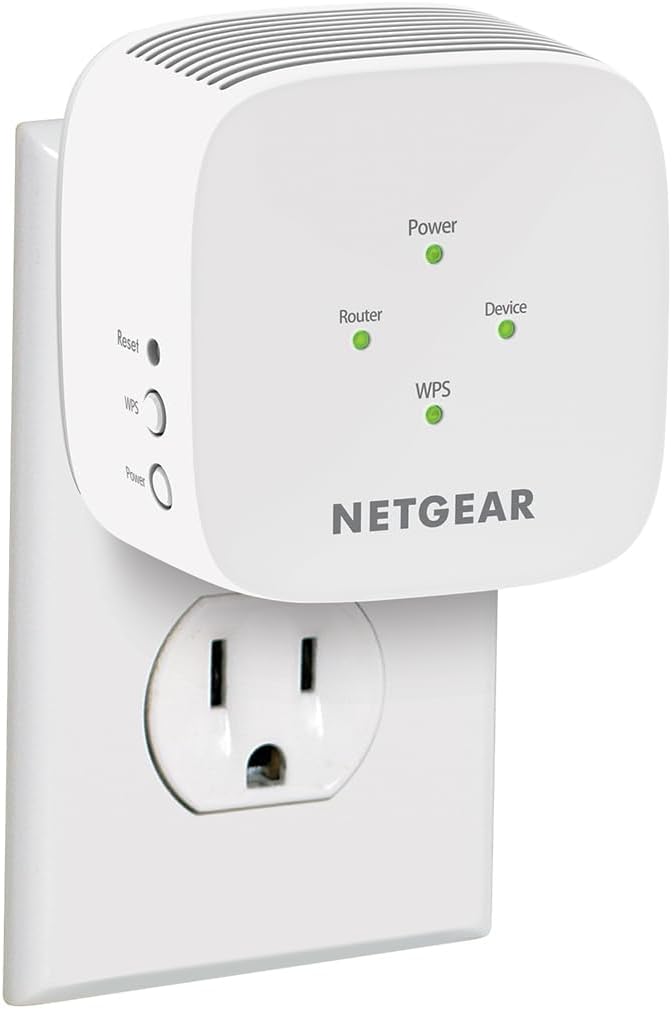
The NETGEAR EX5000 WiFi Mesh Range Extender delivers robust AC1200 dual-band speeds up to 1200 Mbps, covering up to 1,000 sq.ft. and supporting 15 devices simultaneously. Its compact wall-plug design ensures easy installation, while universal compatibility and quick setup make it the perfect upgrade for seamless HD streaming, gaming, and smart home connectivity.


| ASIN | B083R46CV8 |
| Best Sellers Rank | #9 in Repeaters |
| Brand | NETGEAR |
| Built-In Media | Quick start guide, WiFi Mesh Extender (EX5000) |
| Color | White,Grey |
| Compatible Devices | Router |
| Connector Type | RJ45 |
| Customer Reviews | 4.0 4.0 out of 5 stars (16,458) |
| Data Transfer Rate | 1200 Megabits Per Second |
| Frequency Band Class | Dual-Band |
| Frequency Bands Supported | 2.4 GHz, 5 GHz |
| Global Trade Identification Number | 00606449146677 |
| Item Dimensions D x W x H | 2.55"D x 2.85"W x 2.85"H |
| Item Weight | 5.44 ounces |
| Manufacturer | NETGEAR |
| Mfr Part Number | EX5000-1AZNAS |
| Model Number | EX5000-1AZNAS |
| Range | 1000.0 square_feet |
| Smart Home Compatibility | Not Smart Home Compatible |
| Special Features | High speed |
| UPC | 606449146677 |
| Unit Count | 1.0 Count |
| Warranty Description | 1 year warranty |
| Wireless Compability | 802.11ac |
P**S
Solid product
For something that doesn’t cost very much this works great. I put it in my detached garage (which is about 35 feet from my gateway/modem) so that I could stream on my tv that’s in there. No problems whatsoever. Setup took less than 2 minutes. I’m not sure what the speed is but the 4 WiFi bars on my phone and tv are always at the max when I’m out there.
C**Y
Works as expected
The Extender works great but it was left in front of my gate where any one could have taken it.
R**E
Fixed
Will not stay connected to router. Keeps dropping the router then reconnects. It was approximately 15-20' away from router. Don't waste your time its not worth the aggravation. After hours of searching for more information its now working. Had to do factory reset twice to fix it. All do to not having information needed to setup right the first time. This is all on netgear. If you just follow the prompts you will actually be setting up a new (2nd) connection. Too actually setup a extended connection you will actually have to remove some info they add on to the existing connection. Im sorry BUT this is ass backwards!!! NETGEAR YOU MAKE SETUP WAY HARDER THAN NEEDS BE!!! Upgrade one star to 4 star
A**R
No customer service
No customer service. When trying to set this up, first problem was it has you go to a website that doesn't exist. It just kept circling around for you to open your browser and enter the same website. Then when I went to netgear, it had listings of models to set up and it did not list this model. Then it wants you to download a install program which once again didn't work. Decided to call and the first thing, the automated voice asks if you are over 50 because you could get a discount. I thought, what the heck, lets see what that is. BIG MISTAKE! It was a pitch for a life alert type device and, you can't get out of it. I kept saying no an all that did was send me to another automated voice saying the will set me up with this thing. Hung up and called back, said no to the over 50 question, still got the same pitch. Called from ou land line and, still got the pitch. Decided to use the chat option. At least they didn't pitch me. They wanted a picture of what lights were on, on the extender. I was working on my desktop and didn't want to drag out and plug in my camera so, I told them I could just tell them what lights were on. One green , not a big deal. At that point nothing else was said and my conversation was rejected. Promptly boxed up the extender, processed my return to Amazon and, ordered a different brand, which I had setup in maybe 5 minutes.
A**R
Four stars for the device, -5 stars for the setup instructions
Does this extend my Wi-Fi range? Yes. Does it have some of the most god-awful instructions/setup menus I've ever contended with? Also yes. If your existing router does not have a WPS button, you will need to download an app that you cannot access without the administrator username and password that you set up when you first bought your router. Once there, you can set up the device via the app-- kind of. It will redirect you to numerous web pages, and some of those web pages have essential, but broken, links. Ultimately, I got extended wifi connected to my exterior security cameras, which was all I wanted this device for. However, it took me three and a half hours, and quite frankly, something this simple should have taken less than an hour, if that. If your budget is low but your weekend is long, go for it. If not, keep in mind that you get what you pay for...
C**.
If you use the nighthawk app this is not compatible. However you Can use WPS to Connect
it took a couple tries because I didn't have the extender close enough to the router when I tried to enable the WPS. I have a NetGear R7000P that uses the NightHawk app, However this NetGear extender is not compatible or supported by the app. So if you have a router that uses the NightHawk App I highly recommend you connect Via WPS or it will simply confuse you to use the NetGear installation assistant. Attempting with the connection assistant: It took forever to load the web page and when it finally did even though my device was connected to the Extender it said my device was not connected to the extender, even though I double checked multiple times and my device was in fact connected to the extender and not my actual Wi-Fi network. Using the WPS connection method it will automatically have the same password you set and use with your normal Wi-Fi login and it will add your Wi-Fi name with: _2GEXT and _5GEXT. If you want to set up a guest network you would need to log into your Wi-Fi router not the extender to set up the guest network. This has been the easiest method and I highly recommend it as it took less than 5 minutes once I got the extender in the correct range of my router for the initial connection. I live in a brick apartment building and my extender is now 2 rooms away from my router and still holding a very strong connection. Hope this helps anyone having troubles or wondering how well it might work for them!
J**E
Wish I'd had this years ago
Just got it and yes, it literally only took 5 minutes to set up. I did have to do it on my laptop because our network doesn't do WPS (whatever that is, I don't really care). The instructions were simple and pretty clear. Just be sure to connect your laptop to the network FIRST, before trying to go to the Netgear installation assistant. The instructions say that, but I was in a hurry and overlooked it. Took me a minute (and lots of swearing) to figure it out, then realized it was my error. I was dreading buying a new range extender because our current one was so technical and such a pain if we needed to move it (had to go through the whole set up process every time!), I just didn't want to go through that again. But this thing is magic. And if you want to move it, you JUST UNPLUG IT AND MOVE IT. And then it just works! Takes up no room at all. I will update if we have any issues once we've been using it for a while. Update: 4 months and one pandemic later, this extender has chugged along under heavy use while we have all been trapped in the house together. No dropped signals, have never had to reboot it or pay any attention to it all. This extender and Netflix are the only reasons we haven't murdered each other.
M**A
Fácil de instalar y ayuda a ampliar el alcance de la red
S**L
Funciona excelente, buen alcance en señal.
E**E
Improves range!
F**A
Es fácil de conectar y la coneccion es rápida pero el alcanze es muy poco.
A**S
Funciona muy bien. Batallé para configurar un poco al inicio pero creo que fue mi error.
Trustpilot
2 weeks ago
2 weeks ago