Desertcart purchases this item on your behalf and handles shipping, customs, and support to Thailand.
🎯 Unlock your GPU’s hidden power with a plug that’s smarter than your monitor.
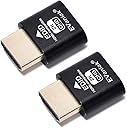
The EVanlak HDMI Dummy Plug is a premium aluminum virtual display emulator that creates a 1920x1080@60Hz dummy monitor signal, enabling headless PC setups to maintain active GPU output. Ideal for remote desktop access, cryptocurrency mining rigs, and VNC services, it requires no software installation and supports seamless plug-and-play operation to keep your GPU fully engaged without a physical monitor.


| Asin | B07YKGGQTJ |
| Best Sellers Rank | 5,711 in Computers & Accessories (See Top 100 in Computers & Accessories) 4,385 in Accessories (Computers & Accessories) |
| Brand Name | EVanlak |
| Colour | 2K-1P |
| Compatible Devices | Monitor, PC, server |
| Connector Type | HDMI |
| Country Of Origin | China |
| Current Rating | 1.5 Amps |
| Customer Reviews | 4.6 4.6 out of 5 stars (1,187) 4.6 out of 5 stars |
| Item Dimensions | 25 x 20 x 8 millimetres |
| Item Weight | 0.1 Grams |
| Manufacturer | EVanlak |
| Manufacturer Part Number | 1920*1080 |
| Model Number | 1920*1080 |
| Number Of Items | 1 |
| Number Of Ports | 1 |
| Package Quantity | 1 |
| Power Plug Type | No Plug |
| Product Finish Type | Aluminum |
| Specific Uses For Product | create a virtual second screen, trick the GPU into thinking there is a monitor attached, use a GPU for cryptocurrency mining or BOINC work unit crunching, get 1080p video via a VNC service, run a computer headless |
| Upc | 752498099454 |
User
⭐️⭐️⭐️⭐️⭐️ Keeps My PC Awake - Simple Fix That Just Works
I bought this HDMI dummy plug to keep my PC awake even when the monitor’s turned off - and it worked perfectly. No more sleep interruptions or remote desktop disconnects. It tricks the system into thinking a display is connected, which is exactly what I needed.Beyond that, it’s useful for:- Remote access setups (e.g. TeamViewer, Parsec, AnyDesk) - enables full resolution and GPU acceleration.- Headless mining rigs or servers - keeps the GPU active for performance monitoring or rendering.- Streaming or capture cards - ensures a stable video signal when no physical monitor is present.- Multi-monitor emulation - handy for virtual desktops or testing display layouts.Solid build, plug-and-play, and a great little tool for anyone running headless or semi-headless systems.
User
EVanlak HDMI Dummy Plug
I purchased the EVanlak HDMI Dummy Plug primarily to run my headless server more efficiently. It does exactly what it's supposed to do without any fuss. Plugging it in was as simple as connecting a regular HDMI cable, and immediately my system recognized a display. This has allowed me to utilize my hardware resources more effectively without needing a physical monitor attached.The build quality feels decent for such a small and relatively inexpensive device. It's compact and doesn't get in the way. I was initially a little unsure if it would actually work, but it was recognized instantly by my operating system. If you're looking for a straightforward solution to simulate a display for remote access or other headless applications, the EVanlak HDMI Dummy Plug is a reliable and affordable option.
User
Works great for headless remote access
Same use case as other dummy plugs I've used — lets me remote into a headless server without any issues. Decent size and quality for what it is.
User
Works as expected. Useful for remote desktop purposes
I use this as I have 2 computers. One of which is in a different location so I use my main PC to remote desktop into my second one. For applications like VNC viewer, this is a must-get as you cannot use their remote desktop as a headless PC. This dongle enables you to do that as it mimics a display being connected. Also helps even with programs like Parsec that have virtual display adapter built in. Just helps with keeping the machine running properly once you disconnect.
User
Works, first time, as described
Absolutely fine; plugged it in, it works perfectly (Ubuntu 24.04.3 LTS on an "elderly" Mac Mini). Prior to this VNC viewer would not work without a monitor attached - so less than the price of a pint and 20 seconds of effort... what's not to like!
User
Does what it is supposed to and more.
I got these to solve a problem with a micro PC that is tucked away. Every time I dialled in to it the screen resolution would be stuck at 1024x768 which meant some of the programs in use would not display properly leading to issues.These plug in units solve that issue. Just plug it in and it is recognised as a HDMI 2k display, giving the option to choose any screen resolution You would want. Strange thing is though I could even choose 4K and it still works.Plug in the unit, a little blue light glows on it to show it's working and that's it. Now whatever resolution I set it to will be there when I next dial in.Saves Expense of a monitor that would not get used, saves on electricity on having a monitor as it's not needed just to set a resolution, and saves on space as it's tiny and I don't have to find any extra room for where the micro pc's are stored.Good value for money.
User
Very useful
I use these for few AMD mini pcs , i use as homebrew game servers. Nowadays, you can get eight cores 16 threads 64gb of ram so cheaply , my go chip is the R7 5700U when ever it drops below £200 . I add 64GB of ram and I can host so many games servers and it takes like one shelf to have 5 of them so far , they use so little power each consumes 35 W but they can do so much. I don’t charge my friends for the servers, but they do pay for the hardware cost and monthly broadband pill. The hdmi dummies means i can remote to them using my RustDesk server, which is like TeamViewer but self hosted and free. I can remote to them and treat them almost like desktops but with no real screen attached.
User
Works as stated
Works perfectly in head less Ubuntu server.
User
Si quieres tener un 'stack' de notebooks, esta es la solución.
En un centro de cómputos instalamos un notebook con un software de prueba.Al acceder remotamente al equipo todo marchaba bien...salvo cuando uno cierra la tapa del notebook.En ese caso, la pantalla se desactiva y no hay imagen (!).La solución es conectar el notebook a una pantalla externa o bien usar este pequeño dispositivo HDMI.Este conector resuelve el problema de tener notebooks apilados uno encima del otro con la intención de minimizar el espacio disponible (se necesitará un conector por notebook).El funcionamiento es simple y cumple su objetivo. Tiene un agradable color azul indicando que está en operación (aunque desconozco si es posible controlar su apariencia, por ejemplo que parpadee o que se pueda apagar).Cuidado con las entregas: el primer pedido que hice se perdió en la inmensidad del espacio. Nunca me llegó, por más que reclamé a Amazon, que archivó el pedido e ignoró mis quejas. Si no llega en tiempo y forma, iniciar un reclamo, porque son dispositivos diminutos y quizá no se le da la importancia que tienen.
User
Para los que no tenemos monitor conectado al PC
Tengo un mini PC sin monitor, al que accedo de manera remota y el formato y resolución de pantalla cambiaba haciendo imposible interactuar con él. UN amigo me habló de este producto y por ello me decidí a adquirir este producto.Al conectarlo a la clavija HDMI, emula y hace creer al PC que tiene un monitor conectado, evitando el cambio de resolución.Excelente relación calidad precio y perfecta funcionalidad.
User
Für Linux top
Hab es für ein Linuxsystem benötigt, damit ich per Teamviewer auf einen Remoterechner zugreifen kann. Funktioniert unter Mint tadellos, vorallem per Plug an Play.
User
Unverzichtbar für Headless Server und Remote-Arbeiter!
Als IT-Profi und Heimserver-Enthusiast bin ich begeistert von den EVanlak HDMI Headless Display Emulatoren. Diese kleinen, aber mächtigen Geräte haben meine Remote-Arbeit und Server-Verwaltung revolutioniert. Hier sind die Gründe, warum ich sie jedem empfehle, der mit Headless-Systemen arbeitet:1. Zuverlässige Leistung:Diese Dummy Plugs simulieren zuverlässig einen angeschlossenen Monitor mit 1920x1080 Auflösung bei 60Hz. Meine Remote-Desktop-Verbindungen sind stabil und die Bildqualität ist hervorragend.2. Hochwertige Verarbeitung:Die Aluminiumgehäuse sind robust und sorgen für eine gute Wärmeableitung. Die Verarbeitung ist erstklassig und vermittelt ein Gefühl von Langlebigkeit.3. Plug-and-Play:Die Installation könnte nicht einfacher sein. Einfach einstecken und los geht's - keine zusätzliche Software oder Konfiguration erforderlich.4. Vielseitig einsetzbar:Ob für meinen Heimserver, Remote-Workstations oder sogar für Krypto-Mining-Rigs - diese Dummy Plugs funktionieren in verschiedensten Szenarien tadellos.5. Energieeffizient:Im Vergleich zum Anschließen eines echten Monitors sparen diese Plugs Energie und reduzieren die Wärmeentwicklung in meinem Serverraum.6. Kompatibilität:Sie funktionieren einwandfrei mit verschiedenen Betriebssystemen wie Windows, Linux und macOS. Ich hatte bisher keinerlei Kompatibilitätsprobleme.7. Platzsparend:In beengten Serverräumen oder Heimlaboren sind diese kompakten Plugs ideal, da sie keinen zusätzlichen Platz benötigen.8. 3er-Pack Vorteil:Das Set mit drei Stück ist perfekt für Multimonitor-Setups oder wenn man mehrere Geräte ausstatten möchte.9. Stabile Verbindung:Die Stecker sitzen fest in den HDMI-Ports und sorgen für eine zuverlässige Verbindung ohne Wackelkontakte.10. Kosteneffektiv:Im Vergleich zu echten Monitoren oder komplexeren Lösungen sind diese Dummy Plugs eine äußerst kostengünstige Option für Headless-Setups.Fazit:Die EVanlak HDMI Headless Display Emulatoren sind ein Muss für jeden, der mit Headless-Servern oder Remote-Desktops arbeitet. Sie lösen elegant das Problem der GPU-Erkennung und ermöglichen reibungslose Remote-Verbindungen ohne den Bedarf eines physischen Monitors.Seit ich diese Dummy Plugs verwende, konnte ich meine Arbeitsabläufe optimieren und die Verwaltung meiner Headless-Systeme vereinfachen. Die Bildqualität und Leistung sind beeindruckend, und die robuste Bauweise gibt mir das Vertrauen, dass sie lange halten werden.Ob Sie ein IT-Profi sind, der mehrere Server verwaltet, ein Heimanwender mit einem NAS-System oder ein Remote-Arbeiter, der auf leistungsstarke Workstations zugreifen muss - diese HDMI-Emulatoren werden Ihre Arbeit erheblich erleichtern.Für den Preis und die gebotene Leistung sind die EVanlak HDMI Plugs eine ausgezeichnete Investition. Sie haben meine Erwartungen übertroffen und ich kann sie ohne Einschränkung empfehlen. Ein unverzichtbares Werkzeug für jeden, der mit Headless-Systemen arbeitet!
User
Super!
Just works.
Trustpilot
2 weeks ago
2 months ago