Buy anything from 5,000+ international stores. One checkout price. No surprise fees. Join 2M+ shoppers on Desertcart.
Desertcart purchases this item on your behalf and handles shipping, customs, and support to Thailand.
🚀 Stay connected, stay ahead—your 4G internet powerhouse!
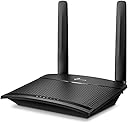
The TP-Link TL-MR100 is a sleek, black 4G LTE Wi-Fi router delivering up to 150 Mbps on the 2.4 GHz band. Designed for plug-and-play simplicity, it supports over 32 devices simultaneously with dual detachable LTE antennas for enhanced signal stability. Ideal for professionals and families alike, it offers flexible wired and wireless modes, robust parental controls, and guest network features, making it a reliable, portable internet solution across 100+ countries.


| ASIN | B085PFRFKX |
| Antenna Location | Home |
| Antenna Type | Internal |
| Best Sellers Rank | #553 in Computers & Accessories ( See Top 100 in Computers & Accessories ) #11 in Routers (Computers & Accessories) |
| Box Contents | 300 Mbps Wireless N 4G LTE TL-MR100, Power Adapter, RJ45 Ethernet Cable,Quick Installation Guide |
| Brand | TP-Link |
| Brand Name | TP-Link |
| Colour | Black |
| Compatible Devices | Laptop, Personal Computer, Smart Television, Smartphone, Tablet |
| Connectivity Protocol | 4G LTE |
| Connectivity Technology | Wireless |
| Control Method | App |
| Country of Origin | India |
| Coverage | Wide coverage for up to 32 devices, both indoors and outdoors |
| Customer Reviews | 4.0 out of 5 stars 8,256 Reviews |
| Data Transfer Rate | 150 Megabits Per Second |
| Frequency | 2.4 GHz |
| Frequency Band Class | Single-Band |
| Global Trade Identification Number | 06935364088804 |
| Importer Contact Information | TP-Link India Private Limited Office No.1, Tower 2, Level 2, Raiaskaran Tech Park, Andheri Kurla Road, M.V Road, Andheri East-400072 Contact: Toll Free 1800-209-4168, [email protected] |
| Is Electric | Yes |
| Is Modem Compatible | Yes |
| Item Dimensions L x W x H | 15.4L x 11.4W x 3.6H Centimeters |
| Item Type Name | Router |
| Item Weight Unit of Measure | 150 Grams |
| Manufacturer | TP-LINK CORPORATION LIMITED, TP-Link Systems Inc. 10 Mauchly, Irvine, CA 92618, USA or TP-Link India Private Limited Office No.1, Tower 2, Level 2, Raiaskaran Tech Park, Andheri Kurla Road, M.V Road, Andheri East-400072 |
| Manufacturer Contact Information | TP-Link Systems Inc. 10 Mauchly, Irvine, CA 92618, USA or TP-Link India Private Limited Office No.1, Tower 2, Level 2, Raiaskaran Tech Park, Andheri Kurla Road, M.V Road, Andheri East-400072 |
| Manufacturer Part Number | TL-MR100 |
| Maximum Upstream Data Transfer Rate | 150 Megabits Per Second |
| Model Name | Archer |
| Model Number | TL-MR100 |
| Number of Ports | 2 |
| Operating System | RouterOS |
| Other Special Features of the Product | Guest Mode, LED Indicator, Parental Control, Remote Access |
| Packer Contact Information | Pacific Technology Private Limited Survey No, 57/3/55, 57/2/56, 57/1/57, Silver Industrial Estate, village Bhimpore, Nani Daman, daman Dadra and Nagar Haveli and Damn and Diu, India 396210 |
| Security Protocol | 64/128-bit WEP, WPA/WPA2, WPA-PSK/WPA2-PSK encryptions |
| Special Feature | Guest Mode , LED Indicator, Parental Control, Remote Access |
| UPC | 753459226339 |
| Unit Count | 1 Count |
| Voltage | 9 Volts |
| Warranty Description | 3 Years Warranty |
| Wireless Communication Standard | 802.11b, 802.11g, 802.11n |
| Wireless Compability | 802.11b, 802.11g, 802.11n |
H**Y
A Reliable 4G Router with Room for Tweaking
I recently purchased the TP-Link MR-100 4G router, and it has been a great addition to travel internet setup. If you’re looking for a no-frills option to get reliable internet without broadband, this router is a solid pick. What I Like About It: Quick and Easy Setup: Just insert your 4G SIM, plug it in, and you’re ready to go—no technical expertise required. Reliable for Streaming and Browsing: Delivers steady speeds that are great for Netflix, YouTube, and even light gaming. Decent Range: 2.4Ghz - Covers my villa well, even with multiple walls in between. Wired Connectivity: Ethernet ports are a big plus for devices that work better with a stable wired connection. You can choose between 4G & Wireless mode (WAN port is also available) Portable and Lightweight: Perfect for travel or as a backup internet solution. Indian 4G Bands – Key to Better Speeds: The MR-100 supports major Indian LTE bands used by providers like BSNL, Jio, Airtel, and Vi. Here’s a quick breakdown: Example : (Varies by network operator) Band 40 (2300 MHz): Best for high-speed 4G in cities and urban areas. Band 3 (1800 MHz): A versatile band offering a balance of speed and coverage, suitable for semi-urban and rural areas. Band 5 (850 MHz): Perfect for rural areas or places with weak signals due to its excellent range and wall penetration. Pro Tip: For the best speeds, you might need to manually test and lock the router to specific bands. The router automatically switches between bands, but manually tweaking can make a big difference depending on your location and carrier. A Note About Speed Complaints: While researching, I noticed many people in the comments complained about slow speeds, likely because they didn’t understand how to manually tweak the bands. If you’re unfamiliar, look up guides or tutorials to help you configure the bands. It’s not difficult, and it’s definitely worth the effort to get optimal speeds. Final Thoughts: The TP-Link MR-100 is a great 4G router, especially for users who don’t want the hassle of broadband. It’s reliable, portable, and works well once you set it up correctly. Spend some time adjusting the bands for your area, and you’ll see the performance improve significantly. Highly recommended for both primary and backup internet needs! PS : I'm an expert in tweaking routers & setting good configurations. Please do understand how the bands work and network congestions before you start complaining something. Be realistic of urban vs rural internet speeds. Buying a MR-200 or upper models won't resolve the speed issues in your area. If you are having low speeds even after tweaking, it's only due to congestion/unavailability of superior bands in your area.
P**K
Network speed is good.
Good quality device. Easily portable and connectivity is also good WAN coverage is also good and value for money also.
R**R
Router is excellent but Not for Jio 5G sim
I have tested the router with Airtel 5G sim, Jio 5G sim and VI 5G sim. I observed that there is no problem when you use Airtel or VI 5G sim. The router automatically detect setting and gives you 4G speed as per signal strength in that area. In my case speed of Airtel and VI is excellent in Mumbai. But it is not true with Jio 5G sim.The router gives you wifi signal but without network. Whatever you do you can't use Jio 5G Sim in it. I have never tested Pure Jio 4G sim so I can't say about it. It is not fault of router but problem is with Jio 5G sim. Installation is super easy and coverage is also good. Manufacturing quality is also nice. It is really a value for money product if you are want to use Airtel and VI sim and if there is good signal strength in your area.
S**A
SIM Card not detected after a week
For some reason, this router starts showing SIM card error " SIM Card not detected " in just two weeks. The SIM is working find on my phone and the same SIM was working earlier. Tried multiple times and the result is same. I have to find how to repair this now :-( Lost the return window, now I am stuck with this. first time I have this poor experience. Expected basic functionality should be working fine... should be Manufacturing issue. SIIM connector Pin issue.
P**U
Good Product
Good product. Easy to Connect
M**7
Works fine, SMS feature did not work, support is unreachable
I had to use this as the smaller dongles or mobile hotspot were having trouble catching 4g signal for a sub urban city like Mysore. I had to find a good place to keep this, as the 4g signal was still weak in many parts of the home. :/ Product build quality is acceptable, but I think the antennas could be optimized for such places. Once fixed, it did improve the connection and general browsing was ok, however the conference calls on VoIP calls were occasionally flaky and in games like Battle For Wesnoth the addon downloads used to fail, when checked on forums and discord I was told this was due to flaky connection, which is true as on a broadband connection the addons downloaded just fine. Suitable for general usage, depending on 4g connection and strength youtube will work ok, otherwise except low quality and buffering, I don't expect this will work for heavy downloads though. I gave average rating as I could not reach the support for fixing SMS feature, it claims of this feature, but it did not work for me, UI is good and build quality is acceptable.
J**.
Reliable
It is working well. The speed is naturally based on the 4g speed. Unfortunately not compatible with 5g
A**2
Good but not great for Jio (TL-MR100/ '300 Mbps 4G LTE')
Overall good experience, first product delivered had one antenna socket missing but replacement delivered in 2 days was fine. India 4G LTE bands are LTE 850 (5), LTE 900 (8) LTE 1800 (3), LTE 2100 (1), LTE 2300 (40), LTE 2500 (41) - of which Jio uses bands 3, 5 and 40 in Maharashtra. Only the latest 2 products from Tp-link support all these bands, this product (TL-MR 100, labelled as style '300 Mbps 4G LTE') and the more powerful TP-Link Archer MR600 (labelled style ' AC1200 Mbps Dual Band | Cat6'). Did not get the Archer MR600 as it costs double the TL-MR100 and its key feature, carrier aggregation (4G+) doesn't work well as per reviews on Amazon. Setup was a bit tricky, had to create a new profile for Jio (see picture) which wasn't intuitive in the UI. I think it is better to set the band and network manually as the device will be placed in a fixed location. You can choose the best band by selecting each in turn and running speed tests - band 3 worked best for me in two locations - city and rural. Note the product accepts the nano SIM (same as that in Jio dongle) and not micro SIM (as per description). Placing the device near a window, preferably with line of sight to tower works best - speed reduced a bit if raining. The speed is better than that received from the Jio dongle and more stable as well - although no battery is a problem if you don't have an inverter. One feature not working with Jio is SMS - don't need to send SMS but need to receive OTP over SMS to login to Jio website. Folks have raised this in Tp-link forums but not fixed as yet. This is particularly needed to check daily usage is not over limit. On the wifi side, note that the external antenna is for the 4g lte signal - wifi antennas I think are internal to the device which explains the limited range (at most one wall) and reduced speed at distance. Testing speed next to device vs across one wall/ floor results in speed dropping by half. Could be improved by using a wifi extender or access point connected over LAN (not tried). LAN cable included is flimsy and short though. Could use 3 mobile phones to simultaneously watch Youtube at good quality (at least before the daily limit ran out!). One or two children can do online classes over MS Teams if well setup (near window, limited indoor wifi range)
Trustpilot
1 week ago
2 weeks ago