We remain fully operational. Our teams are working around the clock to ensure your deliveries continue safely.

DOWNLOAD THE APP


Customer Services
Copyright © 2025 Desertcart Holdings Limited
DOWNLOAD THE APP
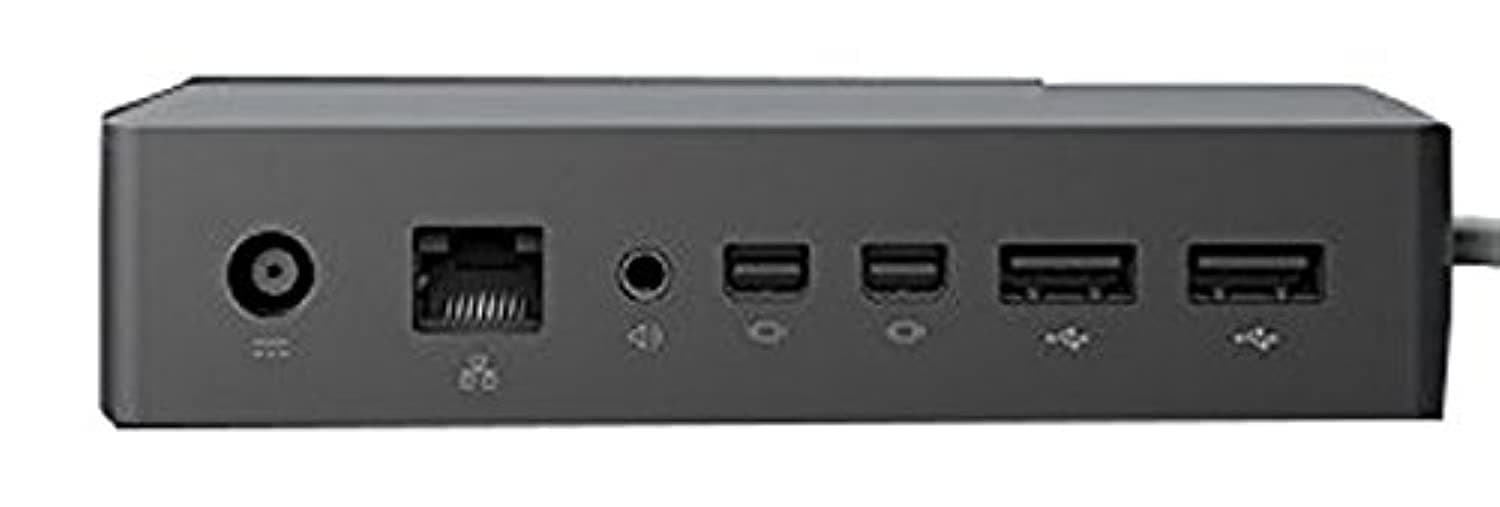
⚡ Power up your Surface, power up your productivity!
The Microsoft Surface Dock (Pd9-00003) is a sleek, black docking station designed to transform compatible Surface devices into desktop powerhouses. Featuring 9 total ports—including 4 USB 3.0, 2 Mini DisplayPorts, 1 Gigabit Ethernet, and an audio out port—this dock offers high-speed data transfer and reliable wired connectivity. Its magnetic Surface Connect cable ensures easy attachment, while the compact, non-slip design supports portability without sacrificing stability. Ideal for professionals seeking to maximize their Surface's potential both at the office and on the go.


| ASIN | B0163HP38W |
| Best Sellers Rank | #1,476 in Computers & Accessories ( See Top 100 in Computers & Accessories ) #164 in Laptop Docking Stations |
| Brand | Microsoft |
| Color | Black |
| Compatible Devices | Microsoft Surface Pro 3 |
| Customer Reviews | 4.4 out of 5 stars 4,464 Reviews |
| Global Trade Identification Number | 00885370996340 |
| Hardware Interface | Ethernet |
| Item Dimensions L x W x H | 5.12"L x 1.18"W x 2.36"H |
| Item Weight | 2.64 Pounds |
| Manufacturer | Microsoft |
| Number of Ports | 4 |
| Product Dimensions | 5.12"L x 1.18"W x 2.36"H |
| Total Number of HDMI Ports | 2 |
| Total USB Ports | 4 |
| Total Usb Ports | 4 |
| UPC | 885370996340 |
| Unit Count | 1.0 Count |
| Warranty Description | Limited Warranty |
K**E
Worth it!
Working amazing! I had a cheaper model and it stopped working after a week. Upgraded to this one and super happy! Should of gotten it sooner. Worth the money
A**.
Love it and I own the original Surface Pro 3 dock as well. Here's a brief comparison.
I will not repeat too much of what was already said but want to get my POV across. Full disclosure, I have a Surface Pro 3 and also have the original Surface Pro 3 dock, you know the one people are trying to sell at nearly double the price, so I feel like I can shed a tiny bit of light on the pros and cons of the two units. I really like both this and the original dock. The original dock or Surface Pro 3 dock has the advantage of stability that this dock does not offer. This dock also has 5 USB 3.0 versus 3 on the original dock. I personally will never us that many at once, or even 3, and find that USB dongles such as Logitech unifying receivers and Xbox 360 controllers do not need USB 3.0 so I don't see this as a plus so I'll just call it a perk. This dock can replace your original charger in a practical way meaning you could, in theory, take this to the library or coffee shop if you wanted and it would not be overly cumbersome. The original Surface Pro 3 dock is not portable which isn't me complaining because it was never meant to be. It was meant to pull the Surface into the realm of desktop replacement and it does that as nicely as it can. This dock has a couple of advantages that I love. First, the magnetic connector that plugs into the Surface Pro is WAY beefier and a good answer to the many reports of the original charger easily coming apart. Next, it has a nice rubbery coating on the bottom to keep it from slipping around and it does so very well. Also, I like that you can plug headphones into it instead of the Surface which keeps clutter away from it. Lastly, the biggest advantage, in my opinion, is that you aren't restricted to a single viewing angle like you were with the original dock. I use my Surface Pro 3 mostly for Microsoft Word and web browsing so I really like the stability of the original dock better for long typing sessions. However, I also use it for Adobe Sketchbook Pro and this is where this dock really shines for me allowing me to adjust my angle however I want. My summary is basically that I love this thing even though I already have the original dock. It is portable, although I won't lie it isn't light, which allows you to take your full Surface Pro experience with you and, as I said, shines when using the pen for drawing applications in my opinion. The hefty connector is awesome and, honestly, this thing has heft in general. Well made. If it was me, I would buy this for half of what people are charging now for the original dock. The original dock is an awesome piece of hardware but it also handcuffs the Surface Pro and sort of takes something away from the whole point of it. I'd like to mention that I have not hooked up external monitors to this so I can't speak to that because I see that is a big negative point in many reviews. I have a great desktop and my goals in purchasing a Surface Pro 3 was not to hook it up to a monitor at all. I'd simply use my desktop that already has two monitors. Basically, I find the original dock great for work since I'm typing a lot and enjoy the stability it adds. This dock, however, is slightly more versatile with the freedom of viewing angle and portability that allows you to have the most complete Surface Pro experience overall. Add that to what I feel is the spirit of the invention of the Surface Pro and I personally find the need to hook up a monitor at all, or several, completely moot and more of a perk.
M**G
For those of us who still use VGA monitors
First off, whew! I was so wary of getting the dock because of all the issues but I'm happy to say its working superbly and has improved by workflow. VGA monitor users? Read on! My setup: Surface Pro 4 connected to 2 Dell (kinda really oldish) monitors via miniDP to VGA. That's right, VGA (outstanding un-retina display of 1440x900) :) . I'm not aware of any "active" miniDP to VGA connectors so I am assuming my cables are passive, plus I got them dirt cheap anyway. I think I could also connect to a 3rd monitor via the Surface (or via WIDI) but that's an adventure for another day. I'm able to connect without issues, takes at most 2 seconds to recognize the two external monitors. Coming from sleep isn't an issue as well. The Ethernet is ok, as is all the ports (I have a mouse connected, as well as headset, and another cable that goes through the monitors (I forgot what its called but it powers up the monitor's USB so now I have so many free USB ports, almost a dozen!). I'm now able to move my surface around my desk (cos I write a lot via OneNote and Plumbago) and do tablet-y things, while still retaining my desktop workflow. Only issue I've encountered so far is that Windows 10 sometimes jumbles my apps around the screens after resuming from lock ex it puts my mail app in the 3rd screen, whereas I had it set to show on the 2nd screen. Very minor and more of an OS issue. Design wise I am wondering my the dock's cable connector is on its left side since the Surface Pro's power connector is on the right. That means the cable would need to cross over especially if you've got the dock right in the center of your two monitor setup. Weird. Thought about flipping the dock upside down so the cable is on the right side but only the bottom part has the grip (and protective matting). Also the cable from the dock to the surface is too short for my taste. I'd like to be able to move around my surface pro a bit further away from the dock, maybe a good 4-5 feet away, but understandably that might be asking for too much. The video that goes along with the review shows 3 videos simultaneously playing without a hitch (2 monitors + 1 Surface). Only thing is I had to play each video via different players (VLC, Windows Media and Movies & TV). :) Also note that in the video I had one of the cables connected to the surface itself as I was too excited to notice, but rest assured the dock outputs perfectly fine in 2 monitors. No refresh rate issues at all.
C**.
Perfect Solution
I absolutely struggled with this purchase-I hate wasting money on items that promise to work well but don't. In addition to the unit I had to buy a cable for "unit to monitor" and a new monitor to make this work well. However, I would buy this again because it works well and makes my life easy. I found that I needed a Mini Display port to Display Port cable to get the resolution and screen to match my Surface Pro. The Surface Pro uses 2736 X 1824 resolution witch is higher than HD 1920 X 1080. Will it work? yes, but the screens will not match and items can be distorted. After doing extensive research I decided on the Benq 28 inch 4K monitor with Display Port access and I am extremely happy with the results. It is plug and play for using the Surface Dock now. One plug to the Surface and every thing fires up and is ready to go as fast as using the Surface without the dock. The Monitor and cable added $450 to the over all cost but for me it was well worth the investment to make my work life easy. As a side note I bought and tried a Mini Display to HMDI but it did not produce the desired result. I would definitely buy this product again!
P**T
I guess it's fine. I'll probably keep it.
I have a single monitor, my speakers, keyboard, mouse, and a usb drive plugged into the dock which is connected to a Surface Book. Most of the time it works fine. Other times it mutes my audio and I have to disconnect and reconnect the dock. Sometimes when I hover over system tray icons the popup text is a very large size. When that happens I also tend to get extra large desktop icons. Not a major functional problem but it is obviously a strange glitch of some sort that I've seen constantly. Restarting my Surface while connected to the dock resolves this text and icon size problem. The dock itself is a quality product. It has a heft to it that allows it to weight itself very solidly upon my desk. The cord from the dock to the Surface is a very pliable and flexible cord different from the heavy duty cord that goes from the dock to the outlet. I want to like dock but the worst part of all is that occasionally my screen goes black for a second. Sometimes it doesn't happen all day, sometimes it goes black for a few times within a few minutes. It's definitely an issue with the dock because I've never had the issue on my Surface or with other computers connected to this monitor. I just don't know. The dock itself is great but there are so many software glitches that it's unbelievable. That being said, it works well enough that I don't want to return it because the glitches, as bad as they sound, are worth the convenience of the dock. I'm just going to hope MS pushes a few updates that solve my problems. Update on 9/9/16: Added a star because updates have improved the dock. I have no issues with text or icon sizing anymore and the audio glitches are gone as well. I also thought the blank screen glitch was gone but I had a thunderstorm last night that took out our power and for some reason after that happened I had the screen glitch constantly all night, however the issue seems to be gone once again since I didn't experience the issue at all today. The screen glitches made me realize that the dock has pretty much been working fine recently so I should probably update my review. As long as the screen glitches continue to happen only during storms that cause rapid power fluctuations I will be happy. But it's still not a 5 star product because I've never had such an issue before.
A**Y
Dual Monitors and an SP3
Works great with my SP3. I peant a lot of time researching it before buying and then more time researching how to make it work the way I needed it to. Perfectly. I wanted dual monitors attached (for a total of 3 with the surface screen) and both have only VGA and DVI connections for me to work with. If you want to attach dual monitors using DVI, buy two of these: "Cable Matters Active Mini DisplayPort to DVI Male to Female Adapter - Eyefinity Compatible" I did the research for you and am using it now. While using these adaptors with your Surface Dock, Windows 10 will retain your desired configurations after unplugging the SP3 and later plugging back in. For example: I have my two monitors set to be side-by-side, centered and above the surface screen while plugged into my Surface Dock. Both monitors are plugged into the Surface Dock using the adaptors mentioned above. If I unplug my Surface from the dock for a while, restart Windows 10, log in, use the surface in both mobile and desktop view modes (Windows 10), then plug Surface back into the dock, Windows 10 will return all three monitors to the way I left them before unplugging from the dock. There are times when the two monitors look all buggy. Like when I log into Windows 10 after waking up my SP3 from sleep mode while plugged into the dock. Disconnecting and reconnecting the magnetic and durable Surface Dock cable instantly fixes that problem. All USB and ethernet ports work fine. My only gripe is that the cable that connects the dock to my SP3 comes out of the wrong side of the dock. With the front of the dock facing you, the cable leaves the dock to the left and plugs into the right side of the Surface. Maybe I'm missing something here but this bizarre design choice wasted about half a foot of the main cable for me (if you turn the dock over, the non-slip rubberized underside will be up and the dock will slide around). If the cable came out of the right side of the dock I wouldn't have to work so close to the dock. Durpy Microsoft! Hope this review helps.
L**L
Horribly frustrating, doesn't work as advertised
This dock does not work as advertised, nothing in my power has been able to get it to work so I'm forced into returning it. I got this for my Surface Book, and now that laptop is pretty excellent. It's a shame that its official dock can't even perform simple functions such as feed a single external monitor. I've been trying, very patiently, to get the display ports on this thing to feed a single 4k monitor, the Samsung U28E590D. This model is clearly listed on Microsoft's page as a confirmed supported monitor. I also got the Microsoft recommended cables. This monitor works beautifully when plugged into the Surface Book's displayport out directly, it doesn't work at all when connected to the dock. It either can't turn the monitor on (display settings control panel gives an error that it can't save the configuration when I try to enable the monitor), or if the monitor does by chance turn on it ends up causing both itself and the surface book's display to turn on and off, on and off in a never ending loop. I've done everything on Microsoft's support page, from running their registry file to clear the display cache, ensuring the dock's firmware is up to date using the dock updater, and also tried out another surface dock all together. I can't get this thing to use my single Samsung monitor, and since I can't plug in the monitor to the surface book's displayport while the dock is connected I can't even use it as a usb hub. I really would like this thing to work, but that doesn't seem possible short of Microsoft applying firmware fixes for said dock. I see no reason why the displayports on this dock can't work the same as the port on the laptop itself, but they do and that is a shame.
T**L
Works and is a great value.
This product worked right out of the box. Great value!
Trustpilot
3 weeks ago
2 weeks ago