Desertcart purchases this item on your behalf and handles shipping, customs, and support to Thailand.
🚀 Elevate your home network to Wi-Fi 6 speed and coverage — because buffering is so last decade.
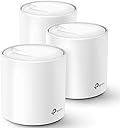
The TP-Link Deco X20 Mesh WiFi 6 System delivers next-gen AX1800 dual-band speeds and whole-home coverage up to 5800 sq.ft with a 3-pack setup. It supports up to 150 devices simultaneously, features 6 Gigabit Ethernet ports with wired backhaul for optimal performance, and offers intuitive app-based management plus parental controls. Ideal for modern homes demanding reliable, fast, and secure Wi-Fi everywhere.


| ASIN | B085Z35GY6 |
| Antenna Location | Home |
| Antenna Type | Internal |
| Best Sellers Rank | #87 in Computers & Accessories ( See Top 100 in Computers & Accessories ) #11 in Whole Home & Mesh Wi-Fi Systems |
| Brand | TP-Link |
| Built-In Media | 1 x Ethernet Cable, 1 x Quick Installation Guide, 3 x Deco X20 Units, 3 x Power supply unit |
| Color | White |
| Compatible Devices | All WiFi Enabled Devices |
| Connectivity Protocol | wi-fi |
| Connectivity Range | 5800 square_feet |
| Connectivity Technology | Ethernet, Wi-Fi |
| Control Method | App |
| Controller Type | App Control |
| Coverage | Whole home |
| Customer Reviews | 4.5 out of 5 stars 15,033 Reviews |
| Data Transfer Rate | 1800 megabits_per_second |
| Frequency | 5 |
| Frequency Band Class | Dual-Band |
| Global Trade Identification Number | 00840030700330 |
| Item Dimensions L x W x H | 4.33"L x 4.33"W x 4.49"H |
| Item Type Name | WiFi 6 Mesh WiFi |
| LAN Port Bandwidth | 10/100/1000 Mbps |
| Manufacturer | TP-Link |
| Maximum Upstream Data Transfer Rate | 1000 megabits_per_second |
| Mfr Part Number | Deco X20(3-pack) |
| Model Name | Deco X20(3-pack) |
| Model Number | Deco X20(3-pack) |
| Number of Antennas | 2 |
| Number of Items | 1 |
| Number of Packs | 3 |
| Number of Ports | 6 |
| Operating System | Android,Ios |
| Other Special Features of the Product | Parental Control |
| RAM Memory Installed | 512 MB |
| Router Firewall Security Level | high |
| Router Network Type | Home Network |
| Security Protocol | WPS |
| Special Feature | Parental Control |
| UPC | 840030700330 |
| Unit Count | 3 Count |
| Voltage | 240 volts |
| Warranty Description | 2 year manufacturer |
| Wi-Fi Generation | Wi-Fi 6 |
| Wireless Communication Standard | 802.11ac, 802.11ax, 802.11b, 802.11g, 802.11n |
| Wireless Compability | 802.11ac, 802.11ax, 802.11b, 802.11g, 802.11n |
D**.
Simple to setup and use, great coverage. A good buy.
To understand why we changed out our old system for TP-Link Deco WiFi 6 Mesh WiFi System will help. TLDR: Even with a two-year-old AC WiFi router, we had spotty coverage, dropped signals, added an internet extender, changed channels, and it still was irritating. Bought the Deco X20 system and it has been great with full, fast WiFi everywhere. We had a decent, two-year-old, brand name, AC WiFi router before these TP-Link mesh routers, but it could not cover the whole house in WiFi. Working from home or wanting to use a tablet in a bedroom or the basement just accented the existing issues. In our new home, we had placed our modem and router in our office as working from home was the priority. The office is a addition to our 1950s brick home and the interior walls in the rest of the house are plaster, likely having a wire lath creating a faraday cage, all of which makes WiFi spotty at best. I did not want to have our Internet company come out to rerun wires and have an ugly bunch of tech mounted high on our walls (especially the living room, kitchen, or dining room). There are rules in technology: Don't cover or hide it as it needs air for cooling; put it antennas up high for a better signal; it needs several dangling, twisted cords to make it work; it has to be black so it stands out against everything; and every device must have at least two bright LED search lights and at least one or more of those have to blink in crazy non-sequential patterns. At night, these lights must be able to be seen from space (I am looking at you, Oral-B toothbrushes and charging cables with tiny LED bulbs). Flashing bright lights on a prisoner is a form of torture. We do it willingly. I purchased a band name $50 mesh extender that would randomly disconnect glowing red, there were still dead zones, and the basement and back bedrooms were constantly having connection issues. WiFi is a bit like drifting air currents that flow in and out of an area, not the strong concentric rings radiating out as you see in diagrams. Our neighbor's WiFi could have been causing problems, so I downloaded software to measure my signal and channels. I watched my signals go from great to noting and back up again for no clear reason. Spectrum kept telling us that their modem and lines were great and it was our setup after their modem that made us get 6 Mbps (dial up speeds) to 65 Mbps rather than 100 Mbps, even when the computer was near the router. This all changed with this TP-Link Deco WiFi 6 Mesh WiFi System (Deco X20). The three white mesh towers are exactly the same; each are 4" in diameter and almost 5" tall, about the size of a 32 oz can, and they are attractive so it isn't a problem to have them out where they can be seen. If you buy the set, they are already configured to each other, so you plug in the power cord to the mesh towers (repeaters) where you want them and it is done. There are no dead zones in our house now and we get speeds of 60 Mbps (old phone) to 112 Mbps everywhere. I didn't rate the tech support as I haven't needed it. I have an older laptop at the far end of the house, to upgrade it, I bought a new USB mesh networking antenna, and even being in the same room didn't help my signal too much. I moved the TP-Link Deco mesh tower (wireless, not network wired) near my computer and used a network cable to connect it to my laptop. I just ran a speed test and I am getting 114 Mbps on a 100 Mbps internet connection. I can even set the times that the mesh towers show their LED lights, so one of these can even be in your bed room and not light up the night. Is TP-Link reliable? I know that was my concern. My brother was the Technology Director for a nationally known company. He used TP-Link equipment regularly, expecting it to last a short while, but they tended to outlast and perform as well as the far more expensive, bigger brand names. I am glad that I bought these. The fact they do not have google assistant or other verbal interface integration was a plus to me, as I do not want systems always listening. I think we are going to find these types of "servant" technologies being hacked or not working towards our best interests. The IOT is useful, but more often it is shorthand for idIOT.
S**E
I couldn't be happier with my choice! Setup easy, app really good, Ethernet backbone is killer
I'm an IT geek / software developer for a living. I know all about how this stuff works and I wanted fast, but I didn't need crazy expensive for my home and some of these mesh systems are way overpriced IMHO. Reality is you can have all the latest crazy standards but once you get 20ft from the access point all bets are off and you'll never see the speeds you see quoted so you need to mix practical with price. There seem to be sooo many mesh system options these days, that I was overwhelmed, but after some consideration I thought I would just go for this one which seemed reasonably priced, but still offered most of the latest standards (and thus speed limits) and also had free returns! In this case this config with 2 slave units was great for my ~4500 sq ft house, my previous single access point left some dead spots (like my Ring outside the house) just outside the range. But with this setup I can blanket the house and get pretty good speeds (>100-200Mb throughput) just about everywhere, and faster (400+ when you are reasonably close / line of sight to the access point) It's important to remember when thinking about laying these out in your house what and where you need the speed. If you need speed inside your house (say you are always streaming movies from a pc to another device) or if you need speed from a device to the internet. The slave access points can only provide as much throughput back to the main access point (which is probably directly plugged into your router/internet) as good as their own wireless connection is to EACH OTHER. eg: if you put the slave access points 50ft away they might "only" be able to get like 20Mb back to the internet, as your devices is going from device -> slave access point ->* main access point (next to your router/internet) and the * connection is the weak link. What was the killer feature for me on these is you can actually use ethernet as a backbone for the slave access points. My house is pre-wired with ethernet so I was able to put the slave access points pretty far but every slave is hardwired back to the main access point and thus has 100% of the throughput back to the internet so no matter which access point you connect to in the house each access point is as fast as the main one so the access point to access point speed drop is a non-issue if you can set it up like this. DO THIS IF AT ALL POSSIBLE! It's like having 3 "full speed" access points strategically dropped through your house. It wasn't obvious I could do this from the (very basic) docs for setup that came with it, but a quick search through the online docs showed you could this and it's brain dead, just plug your home network into the port on the back. Extra bonus feature, you can use the 2nd port on the back as a local hardwired port so if you have a single PC or "device" (like an xbox or something) next to the access point you can still plug it in directly and get full hard-wired speed without needing to buy an extra switch in the middle. Note: If you don't use the 1st port for the backbone, then you get 2 ports for local devices that will get at least Access Point -> Access Point speeds without one more wifi hop needed. I was pretty impressed with the iPhone app that you use to manage the setup, gone are the days of a webbrowser hitting a super slow admin page, the app is snappy and you can tweak all kinds of stuff. (favorite feature: One of the access points ended up in a kids room and they complained about the LED at night, guess what, turns out there's a "night mode" where it turns off the LED's during a timewindow in the settings pages!) The "mesh" part works really good too, from the app you can see your device move from access point to access point and what devices are on which and stuff. Super handy for initial setup troubleshooting and geeking out over how it's all working. I will admit, I was a little nervous since TP-Link is sort of a more bargain brand in my head, but I've had it going for about 8 weeks now in my house and it's been basically flawless. I'm sold, I'd TOTALLY buy this again or recommend it to a friend (or anyone reading this)!
I**N
Decos x20
So far I’ve been using them for 2 years. Pros: they are very easy to set up, great quality, they do not drop connection, very stable internet as long as you set them up right, the app allows you to label them, they work fine for connection up to 1Gb. Make sure you connect your main to your modern near an open space centralized and with an Ethernet cable cat 5 or higher. Each has a duel Internet port in case you want to hardwire into a device instead of wife. Cons: the app sometimes prevents them from working properly so sometimes you simply have to open up the app so it can reboot itself, after a reboot sometimes they don’t automatically start working (so you must unplug the power of those showing red, will quickly reboot and show green), my biggest issue, the app displays usually the wrong speed, sometimes showing mbps or kbps, speed fluctuates a lot, even when you perform a 3rd party speed test, not exactly sure why. Location is a must, you must make sure they are set as close to each other as possible while getting a strong signal ( must play round to find the sweet spot). Over all they are great if you set them up properly, they provide great internet, very easy to use and set up, requires no maintenance but updates, so far I’ve had no issues for the last 2 years. I would recommend the Decos.
Z**E
Works well, but some unexpected issues.
I purchased this mesh system to supplant/reinforce an AT&T Arris BGW 210 modem/router so I would have better coverage. The system was easy to install, once I got the TP-Link Deco app installed and an account set up, and I connected it directly to one of the gigabit ports on the router. (It's located about ten feet away from the router.) I set it for access point operation. I also connected one of the other units directly to a gigabit switch at the other end of the house that is directly wired to the AT&T router. Coverage is great and I have a strong signal throughout the house. Transitioning from one node to another as I move through the house is very smooth and seamless. However, after performing many speed tests (Google) in different configurations, I have concluded a couple things. First, the wireless connection upload speed through the Deco is still about 30% slower than connecting directly to the AT&T router using 5 GHz (AC) connections. That's to be expected, I guess, since the data is having to pass through the Deco node to the port on the router. However, I've also found that connecting directly to the second ethernet port on a node that is wired directly to the router is about 40% slower than connecting to the router directly. In other words, I lose about 40% of speed when I plug into a Deco than I do plugging into the router port used by the Deco. That's not good. Basically, if I run a cable from my router to a remote Deco, I'm much better off plugging that cable directly into my laptop than plugging my laptop into the Deco. The Deco is apparently not a very good substitute for a gigabit switch. I would be remiss if I didn't mention one of my favorite features: the LED controls. Yes, you can program the units so the LED on the front turns off at a certain time and then turns back on at another. In my house, they turn off at 11:00P and turn back on at 7:00P so they don't act as (very bright) nightlights. Definitely cool.
J**G
Tp-Link Deco X20
This Tp-Link X20 mesh Wi-Fi device is a must-have if you suffer from dead spots or a lot of buffering Wi-Fi. It literally increased my signal strength and boosted up my mpbs almost threefold and that is no joke. The price here on Amazon is amazing and let's put it this way this device on the box claims it will do a 5-6 bedroom house and it definitely will. I only have a three-bedroom house and this device can definitely work for a house almost twice my size. I have included pictures The first one that shows an HDTV is from the TP link app running speed on average which is definitely good enough for streaming 4K movies and the other is from my cell so you make the call but you would definitely not be disappointed with this. Long story short, my Wi-Fi router was only reaching about 300 ft and I believe that these devices can reach anywhere from 900 to a thousand feet per node and each one of these can work in series so you can expand your Wi-Fi coverage even further. Example some systems can expand your coverage but have to be connected directly to the router either utilizing it ethernet cable or Wi-Fi connected so it can expand your coverage but not this device you use one of the nodes for the new Wi-Fi router and it doesn't matter which one you use, use the included ethernet cable unplug your modem plug in your ethernet cable to either port on the back of the TP-Link node and the other on the back of the LAN port from your modem and then plug your TP link node into the wall receptacle along with your modem/modum router combo and then power them both up at the same time. Once done you have to download the app and there is a QR code and a website that you go to for either iOS or Play store and the app has instructions to follow step by step and once you're up and running you're good to go with that one and your new node connected acts as your new Wi-Fi router with faster and better coverage. All the other existing nodes that you have all you have to do is put it in a location where your signal is weak hopefully somewhere between the Wi-Fi router and that dead zone so you still have a little bit of Wi-Fi and it will shock you because the new TP-Link node actually reaches out a lot further than your Wi-Fi router so depending on what Wi-Fi device you're connected and how close you are you may actually have Wi-Fi coverage covering the area that used to be dead. But hooking up another node would definitely expand it at least through your whole house literally. I can't say enough about these I had one time or a show I think buffered for about 2 seconds and that was it did not buffer again and I believe that was at the very beginning before the show loaded on my TV but most of the time it is really responsive and does not cut out or buffer and reaches so far that it is unreal. The speed that you get with this remember it's also limited onto how much speed you're actually paying for through your internet provider so keep that in mind. It shipped really quickly and I definitely got it on time and Amazon has literally saved me from having to spend hundreds of dollars on a new mesh Wi-Fi router to do my whole home with this new mesh Wi-Fi router combo it makes it so simple to hook up and honestly I have never hooked up a Wi-Fi router and set it up in my life. The internet provider when they installed it they hooked it up and set it up and I've never had to mess with it until now. Something to think about but definitely definitely I cannot say that enough this is worth a try as you would not be disappointed. And as for people who do gaming I don't but my stepson does and when he comes over and brings his PS5 there is no lag the picture is so crystal clear he was actually shocked that this works a lot better than my original Wi-Fi router so something to think about and he's a young adult.
S**E
Deco X20 (3-pack) = High-Efficiency (HE), High-Value!
Our Installation: We subscribe to a 800 Mbps Comcast plan which actually tests at 900 Mbps. Our 1975 tinker toy construction (drywall/plywood) L-Shaped, single-story ranch 2300 sqft home has a crawl space under the footprint with an attached 3 car garage and backyard patio/swimming pool area. The 5800 sqft wi-fi coverage (overall average wi-fi data rates = 500 Mbps includes smartphones) is more than adequate for our needs (no gaming, 2 TVs (family room and garage) with 5 Alexa Plus/Echo Dots, roaming smartphones/GEN 6 laptop, desktop, multiple switches/plugs, Xfinity/Comcast owned Home Security router and irrigation controllers). We tested the Deco X-68 (2-pack) with dedicated 5GHz tri-band, finding the Home Security upgrade solicitations to be annoying vs the lifetime included Home Security bundled with the X-20 (very good). Since we have a crawl space, wiring backhaul CAT 7 cable (chosen if ISP plan ever exceeds 1 GIG) through a TP-Link unmanaged 5-Port switch made longer term usage/performance sense. Note: also connected TP-Link USB/Ethernet adapter to switch for HP Pavilion Desktop (ethernet adapter only 100 Mbps)...increased wi-fi data rate from 250 Mbps to wired 500 Mbps. Aside: The Mrs wasn't thrilled to call the local Fire Department because I was stuck trying to get out of the crawl space! 900-600-300-(50%) 900 = ISP subscription signal data rate directly from Arris SB8200 cable modem to desktop and laptop. ALERT: The cable modem has 2 1-Gigabit ports, but ONLY 1 is operational unless you upgrade your Comcast subscription plan (not knowing cost me a lot of time plus the Comcast technician during his visit didn't even comment on this condition..."we don't troubleshoot 3rd party equipment" Oh you don't? = I collected $250 in refunds FROM Comcast during this installation process) Suggestion: We put a book cover around cable modem on bookcase to hide it, but it's still accessible if we need to manually reboot (see photo). 600 = Signal loss (300 Mbps) connecting cable modem to Main Deco and backhaul ethernet cable wiring 2 nodes/satellites. Both our desktop and Lenovo Gen 6 laptop speed test at 600 Mbps by each Deco X-20 location. Note: Gen 6 laptop "wi-fi data rate" is also 600 Mbps at each location which implies the Gen 6 new standards firmware is performing well. Also smartphone Pixel 3A XL wi-fi roaming throughout house speed tests at 500 Mbps. 300 = Signal loss (300 Mbps) speed testing wi-fi on the Gen 6 laptop in remote areas: Garage & Patio areas performing at 300 Mbps 50% Loss Non-Wired Backhaul = Using the Deco X-20 routers to transmit ISP signal through its 4 antenna/radios vs backhaul wiring, decreases signal by 50% at all locations...ie signal in Garage by Android TV drops from 300 Mbps to 150Mbps (basically triggered decision to run ethernet cables or reinvestigate tri-band solutions) Deco APP = Extremely well designed, absolute piece O cake to use. Provides me all I need to manage the entire network (connected devices/mac addresses/connected frequency rate (2.4 vs 5)/locations/wired not wired) by online/offline plus separate listing by locations) Easily reboot All Decos, optimize network, turn on/off Guest Network (works well with Alexa skill) to include 2.4GHz and/or 5GHz signals+++ = Just terrific! TP Link Support = 24/7 phone support with very caring and generally very competent technical troubleshooting. I made a very costly set-up error by testing QoS (Quality of Service) by entering 100 Mbps download (I recommended to TP-Link about adding WARNING for this input) because it basically puts a governor on your real available data rates. Xfinity and I got tired proving I was getting the subscription rate we are paying for! Bottom Line = For our installation and needs, we couldn't be more ecstatic with the upgraded High-Efficiency/High-Value mesh routers for $220. Note: Switch, USB/Ethernet adapter, CAT 7 cables = $75 What triggered this entire project was our purchase of a Gen 6 enabled Lenovo laptop. Of note, BOTH your router and connected device need 802.11ax or Gen 6 chip sets to tap OFDMA (Orthogonal Frequency Division Multiple Access)/RU (Resource Units) efficiency and WPA3 security (160 MHz channels (not supported in X-20) and MU-MIMO (Multi-user, Multiple Input, Multiple Output = currently vaporware) adds nothing to our WLAN performance needs). I believe, although cannot unequivocally test, the Gen 6 enhanced data rates are performing extremely well. All other legacy devices are solid with the new available signal strength and strong data rates near the 3 APs (Access Points). Our Orbit hose/timer up the back hill tucked under the redwood trees receives 75 Mbps! 6E chip set devices will be rapidly appearing in the marketplace over the next few years. You need BOTH the router and device to include 6E chipsets to utilize the new 1200 MHz, 6Ghz "pristine spectrum". As we Long Term Evolve (LTE), our new Deco X-20 (3-pack) will easily last 3 years or longer as our devices are steadily upgraded to 6E. We highly recommend!
R**S
Whole House Coverage That Actually Means Whole House
Dead zones are a special kind of frustration. That one corner of the house where your video call freezes, the back bedroom where streaming buffers every few minutes, the garage where your phone gives up entirely. The Deco X20 exists to solve exactly that problem and it does so with a minimum of fuss. Setup is where this system immediately earns goodwill. The Deco app walks you through everything in plain language and the whole network was up and running in under fifteen minutes, which for networking hardware is practically unheard of. No cryptic router menus, no digging through settings pages that look like they were designed in 2003. Just a clean app experience that gets out of your way fast. WiFi 6 makes a tangible difference in a busy household. Multiple people streaming, gaming and on video calls simultaneously without anyone complaining about lag is the real world benchmark that matters, and the X20 handles it comfortably across 4000 square feet without breaking a sweat. Coverage is genuinely seamless as you move between rooms, with devices handing off between nodes so smoothly you never notice it happening. The units themselves are compact and understated enough to sit on a shelf or counter without looking like networking equipment someone forgot to hide. That sounds minor but in a living space it genuinely matters. For very large properties or extremely demanding multi gigabit needs there are more powerful options out there, but for the overwhelming majority of homes this system hits a sweet spot of performance, simplicity and value that is difficult to argue against.
S**R
Beware of older SONOFF TH10 and other smart switches
I just came back from the park. I brought an inverter to power the SONOFF TH10. I brought an Android 9 phone to pretend to be the Deco SSID. I use another Android 10 phone to pair the smart switch. This is my last resort to pair it. It worked and continue to work after I brought it home. I thought the Deco worked pretty well until I realized that the weather has been perfect for a few days. I had several TH10 to be temperature sensors for my HVAC system. They didn't connect and couldn't be paired again. I was panicking and pray for the weather to stay perfect. There are many reasons that it's very hard to pair again. And it's not only Deco. But I would call it iDeco in the same league as iDevices. And that with Apple in the way, the psychiatrist is never far away. There is something called Smart Connect that you are forced to use in the iDeco. You can have only one, single, uno, un, yi, SSID. The idea is that Deco will connect to the device in the best band, 2.4 GHz, and one of the two 5 GHz bands. Deco is not tri-band. It doesn't use both 5 GHz bands simultaneously. But how possibly does it work? I don't think it's a new standard. It's not up to Deco. The phone will scan and connect to the strongest signal even with the same SSID. The 2.4 GHz has the advantage. I almost returned it when I saw my phone connected to the lower band. But after some observations, it seems that all the 5 GHz capable devices all connect to the higher band, which should be the case as the interference at the 2.5 GHz band is terrible here. The 1st problem is those cheap smart things that use little bandwidth stay at the 2.4 GHz tech. All of my switches from different manufacturers only support 2.4. My phone will connect to 5. So the Sonoffs won't pair. I have no control over which band the phone connects to. You can have 2nd guest SSID but the guest network is isolated from the main network. The Deco replaced my three router tree that is increasingly difficult to pair new devices. The Sonoffs may be connected to the same SSID on different routers. I was hoping the Deco mesh appears to the Sonoffs as one router. Is that easy just to turn off the 5 GHz band during pairing? To my horror, you can't turn off any band. You are just turning off the broadcasting of the SSID. Any devices that already have the SSID can still connect. Of course, I can still connect to the 2 GHz band if I forget the SSID and reconnect. But the 2 GHz band here is jammed solid. I have to use two APs at the front and back of the house with an ethernet backhaul. All the APs are wired to the cable internet source. They not actually ethernet cables but modems turning unused TV cables in the house into ethernet. But the modems are limited to 100 Mbps from years ago. Now I am paying for 150 Mbps. Instead of upgrading that I opted for a wifi 6 mesh. My 3 Deco's are pretty good in putting a wifi shield around my house that no neighbors' signals can penetrate. Even the internet speed at 2 GHz is pretty fast and reliable instead of unusable before. But the Deco occupies two channels so that you can't do much from channel 1 to 8. And the rest are belong to my neighbors. You can't move it around. And I don't see how it can adapt when there are three Deco's subject to different interferences. Wifi pairing is always tricky because to be simple you have to give out your password to eWelink. For the Sonoff's newer quick pairing mode, the device is looking for a secret SSID, 12345678 with the password abcabcab. The app asks the phone to generate a hotspot with the SSID and the password so it can communicate with the device. After the device downloaded the normal login credentials, the app deletes the hotspot and connects to the normal SSID. But the iPhone would never have allowed that and you can't do that in Android 10 anymore. But that's the default mode when you power up the IoT device. Until the newer devices use BT pairing. Anyway, I don't think the 2 GHz from the phone here is good enough to finish pairing. The last resort is the old compatibility mode where the device becomes an AP in channel 7! It's always channel 7. I never saw it moves. Are you that lucky always? But this Sonoff AP always crashes with the Deco AP. If I have to add another AP to make another SSID to test things, I will be running out of clean bandwidth at 2 GHz. The only thing I can do is to wait until everybody sleeps and unplug all the Deco's. But I rather go to the park. I also think you have to delete the device from the app first before you pair it again as some info will be stored in the cloud. Maybe you can try the secret SSID first to unstuck some old bits. The quick pairing mode works in the park. You have absolutely no web-based control panel like DD-WRT. The one there is just for show. I stayed with the Deco because my problems are solved. Except that Smart Life doesn't allow me to edit any device from time to time. I have no idea. I read that some satellites limit the bandwidth to like 60% of the ISP bandwidth. Whereas my Deco's are about the same 130 Mbps (Netflix) vs 150 Mbps for the ISP. And also each Deco has two ethernet ports whereas some others have only one. So I need 3 mesh devices to give me one cable modem connection, one game connection, and one internet phone connection, and no more. Yes, I have plenty of old routers to split the ethernet ports but they are still in the 70's! Original review: I needed to upgrade. Speed isn't the main issue as I'm only willing to pay my ISP for a 150 Mbps connection, enough for more than one 4K streaming and many zooms. I considered a tri-band one because of the interference from neighbors. But wifi 6 cost extra less than going out for a meal. I'm not sure it's a better decision. But my current 5 GHz APs, D-Link AC750s, have dates in the 1970s because they are too old, the dates wrapping around. The Deco will see some new wifi 6 devices added to the house. Installation is easy. All Deco's are identical with a power socket and two ethernet sockets, identical and bi-directional. Each can be used as a satellite or the main router. Basically, you plug it in, open the app and give it the SSID, password, and security mode. Easy except that the hardware and software are more Apple-like than I prefer. I was distracted when I installed the main router. Then I couldn't find a way to install the 2nd Deco. After I exhausted the menus, I found that it's the + sign. Silly me, or is it? I was also distracted when I added the last Deco. The app said I didn't finish but the LED said yes. There's no way you can see how many Deco's you have in your network. Instead of being driven crazy often by Apple products, I let go. Hours later when I accidentally tapped on the globe icon, with a label saying internet, all my connected Deco's appeared. Silly me, or is it? The signal strength is a bit stronger. That's not the point as I can jack up the signal killing my neighbors'. It looks like that I can use only one Deco to replace my DIY mesh network, except for a room in the middle of the 2nd floor that is somewhat less than the ISP speed. I think if your house isn't that large, and your ISP speed isn't that great, you can just put a satellite Deco where you need speed. Because the max speed is much faster, like 1 Gbps, and the ISP connection is only 150 Mbps, the wireless Deco connections are as good as wired ethernet. You don't need to use an ethernet backhaul. I have speeds at the 5 GHz band from over 100 Mbps to 120 Mbps. Netflix says 130 Mbps. Surprisingly, you can only have one SSID for both bands. My phone automatically connects to the 2.4 GHz band that is much slower because of neighbors' interference. The only way out seems to set up a guest network for the 2.4 GHz band only and the main network for the 5 GHz only. Use a different SSID for each one so you can select. This Apple-like feature almost made me return it. I wasted my time using the guest network for a different SSID for a different band. The IoT switches work but they route via the internet. The guest network is isolated from the main. So I can't see the IP cameras on the 2.4 GHz band when my phone is normally connected to the 5 GHz band. When I searched further, this feature isn't uncommon. It's like a sort of handover between the two bands. You need both bands because the 2.4 GHz travels further while the 5 GHz band has much more bandwidth. But I don't think there is a standard protocol to select one of the bands. The Deco can't force a device to change bands. It depends on the device to pick the best band. When I have the same SSID on two different 2.4 GHz channels, the stronger one will be picked and it simply makes sense. But it's a disaster if any device picks one of the bands based on signal strength. Comparing the signal strength of the two bands is like comparing apples to oranges. I was alarmed when my phone connects to the 2.4 GHz band and I have no way of making it change. After observing the Deco for days, I conclude that devices that need fast data connect to the 5 GHz band. Most desktops, laptops, and phones connect to the 5 GHz band eventually. The conventional router settings are still there but a lot less. Perhaps you don't need to with the content filters and parental controls. To change the DNS server, you need to tap on the dynamic IP setting, and then edit it to see the DNS address. The content filters depend on the Trend Micro and the Deco database, which is not as reliable as the OpenDNS database. But you can add individual url's. As for parental control, there is a time limit on each device that is hard to program on older devices. There are also bedtime settings so it's rather enough for kids. For my classic RT-N16, with DD-WRT on you can program it as a Linux computer. I used to have a timetable for games and other fun sites when switching to different DNS filters automatically. With the automation feature of the Deco, it looks like it can do something like that. You can do something when some devices connect to the mesh or at a specific time, but there's nothing much to set. It's not easy to see what websites are connected to anymore. Though the top ones are listed on the monthly reports. If you want to know you need to set the DNS to something like OpenDNS so you can see the website logs. For the Deco, it's MAC-based filtering so you can easily tell which devices are connected and give them a meaningful name. The RT-N16 wasn't able to install a MAC filter so I have to set up a table of IP reservations manually and then setup filters on the static IP addresses. But my RT-N16 isn't reliable anymore. It crashes once in a few months and lost all data. I have to restore backups that aren't always updated. And the last time I thought I couldn't power it up anymore. Do I need that high speed? I think I can pay a lot less going for 50 Mbps at my ISP. But I need better wifi to deal with interference from my neighbors. I need either a good mesh or an ethernet backhaul. I did have an ethernet backhaul. All my wifi AP's are connected by ethernet. But it's not direct ethernet cables. They are TV cables with ethernet modems on both ends. I had them when the 5 GHz band began to be crowded. I had two to finally four AP or routers, ethernet connected via TV cable. But with wifi 6 mesh this good we can save a lot of money by sharing the ISP with neighbors. Each house only needs one Deco and we can share the 150 Mbps or higher among as many houses as we want. The TV cable modem adaptors I have are cheap and limited to 100 Mbps. The faster ones are not worthwhile until I have a gigabyte ISP connection. This is the main reason I go for better wifi to get my worth of the 150 Mbps ISP connection. Do I need a mesh? Probably not for an average 3 bedroom. The newer routers seem to handle interference well at the 5 GHz band. It's also better at 2.4 GHz. They use a wideband, 40 MHz instead of 20 MHz. But I always have a DIY mesh. You can actually use the same SSID on two different AP's. It works seamlessly on two different channels without overlapping. Though it's not a seamless handover, you have to disconnect manually and reconnect if it doesn't disconnect automatically due to poor signal. Though it's a lot easier for the kids instead of using different SSIDs depending on where they are. The front and back of the house are subject to different interfering signals. With only one AP I have to suffer all of them. With two AP and two channels, I suffer only half. It worked well until the 5 GHz channels are crowded too. I suppose the older AP's at 5 GHz doesn't work as well with newer AP's with newer devices. With a 3-Deco mesh at 2.4 GHz, I won't worry about dead zones for the IoT and outside cameras. They are a fraction of the ISP connection but very reliable now across the house. Maybe one or two can do it, but since I got three already, I don't bother to sell one of them.
A**9
Works well
I have not had any issues with this mesh since initial set up. The set up is easy to follow and straight forward. I did have a minor issue, but that was on my end and my service provider was able to give me the correct information needed to set up. It has been running now for about 4 months and we have had steady connection across all devices - computers, TVs, gaming systems, smart home and surveillance systems. The back room that was often a dead zone now gets a good strong signal. I like that I am able to hard wire certain devices into each unit if I want to. We currently have the main home computer connected to the second unit, and the Xbox and smart TV on the third unit. Not that any of these devices were experiencing any lag or connection issues on wifi. It also has the option to set specific devices to priority on wifi or to set a device to only connect to one unit rather than the mesh to maintain a steady connection on items that are stationary. The parental controls are also a great feature. You do need to pay to unlock everything, but the free features are enough for my needs. It allows to filter content, block websites, and set up screen limits. The only inconvenience on the free side is that you cant set multiple time limits for differentdays of the week. While I can set a bed time daily, if I want to give extra time on the weekend I do need to manually reset it every week. However, it is not a big deal with the app. Wifi to all devices you set to your child's profile will be turned off at the time you set, and not turn back on until a time you set. Bedtime routines have gotten smoother as they quickly learned there is no "just a minute". They now take note of the time and hurry to finish, save their progress and say goodbye to friends before the time runs out.
A**H
Excellent Coverage, easy set up
This has worked out really well for us. We live in a good sized 4 bed villa and had lots of places with weak or no wifi. We now get good coverage everywhere and in the garden too. It was pretty easy to set up using the app, I just haven't worked out how to switch my Alexa and Sonos over to the new network, I'll fix that when I have some time.
A**K
So far loving it - but do read TP link forums about issues with these and TP link RMA policy
I had a simple setup, which most of us have in our home a ISP router with a Wifi AP point installed in a central location. As I started adding more and more devices I started to have issues with the ISP setup and started looking for options. TP link was on sale and had read good things about the Mesh WiFi. No more dead spots and consistently get good speeds all around. Initially had a lot of trouble with the setup, contacted TP link support which I believe is still out of China. I had to undergo a lot of Troubleshooting with the TP link engineer which took two weeks and the final outcome was to RMA the devices. I have read forums and looks like some of these devices do have issues. TP link RMA policy is to ship the units back before they send a replacement. They do not pay for shipping. So if you have issues contact Amazon for replacements immediately. Pros:- 1.) Easy to setup. Deco app guides through the process of installation and also is less buggy. 2.) Homecare which comes by default for lifetime on the these devices is a good selling point 3.) Parental controls are good, at least I found them to be good for my purpose 4.) Have tested a 3 device setup with almost 60 devices turned on at a given time and it has worked as expected 5.) Have not had issues with smart devices which only use 2.4Ghz Cons :- 1.) Some of the new devices are plagues by issues which results in replacement of the entire unit. I had to replace 3 of my units 2.) TP link should be open about hardware revisions and what changes they bring in with such revisions 3.) RMA policy requires owners to bear shipping cost, not like Amazon return 4.) Turn around time to get a senior engineer at TP link to work on troubleshooting could take 2 weeks, since I believe engineers are in China.
C**N
Funciona
Muy bueno, solucionó el problema de rango en la casa, me compraré uno extra para completar el set de 3
M**H
ممتاز
مركب عندي بالبيت سابقا واخذت زيادة لتغطية كامل البيت .. ممتاز جدا
Trustpilot
3 weeks ago
1 week ago