We remain fully operational. Our teams are working around the clock to ensure your deliveries continue safely.

DOWNLOAD THE APP


Customer Services
Copyright © 2025 Desertcart Holdings Limited
DOWNLOAD THE APP
![Puredick A1494 A1618 Battery Only for (Mid 2015, Mid 2014, Late 2013) A1398 Replacement Battery for 15-inch A1398 - [Upgraded A1494/A1618 Universal Version]](/_next/image?url=https%3A%2F%2Fm.media-amazon.com%2Fimages%2FI%2F51m0rwvPkiL.jpg&w=3840&q=75)
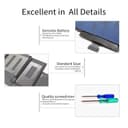
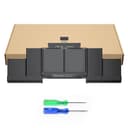
🔌 Power Up Your Productivity!
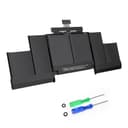
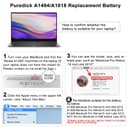
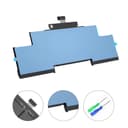
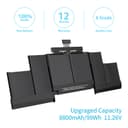
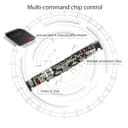
The Puredick A1494 A1618 Replacement Battery is designed for 15-inch MacBook Pro models from Late 2013 to Mid 2015, featuring a high capacity of 99Wh and a voltage of 11.26V. This upgraded battery ensures stable power supply with multi-command chip control and comes with a 12-month warranty, making it a reliable choice for professionals on the go.


| Item Dimensions | 12.8 x 4.53 x 0.24 inches |
| Battery Weight | 350 Grams |
| Unit Count | 1 Count |
| Battery Cell Type | Lithium |
| Recommended Uses For Product | Laptop |
| Reusability | Rechargeable |
| Battery Capacity | 8800 Milliampere Hour (mAh) |
| Voltage | 11.26 |
K**S
Good so far!
I install this in our Macbook Pro that had started to swell. I had to replace the keyboard so when I opened it and saw the battery condition I ordered this. Be extremely careful when replacing. Watch the videos on Youtube. I had to replace the touchpad after reinstalling as it quit working when I reassembled (you have to mess with the cable). I can't blame that on the battery though. The most difficult part was getting the battery out without tearing the cover (yes, it tore). I should have been more careful and proceeded more cautiously.This battery was for my older MacBook Pro, but I also replaced my wife's 13" 2015 MacBook Pro. So, bottom line is my wife's Mac is mostly functional. The onboard microphone isn't functional because the motherboard connector broke off during removal of the cable. To fix I would have to replace the motherboard and that isn't happening as they are hundreds of dollars while being used. My wife just uses a USB external mic. Mine survived better. Oh yes, best to order replace replacement screws for the back cover as they are locktite'd in and have a tendency for the head to strip. I had to dremel tool a slot in them (to use a flat blade screwdriver) on at least 5 between the two machines.So, Good luck, but for the cost of replacement of the Laptop versus the battery, it is worth it. I will update if anything changes.
B**C
Great battery! Easy enough DIY on MacBook Pro 11,3
I got this to replace my MacBook Pro 11,3 17” swollen battery. With the included screw drivers and the help of a YouTube video, to assist with the removal use some adhesive remover, I used Oops Off in the little metal can, a curved oral syringe (we got from the dentist when my kid had a tooth pulled), an old credit card and old gift card to pry the sections of the battery and keep it from sticking. We used an ice cube tray to keep track of the screws. Video advised putting a cloth between the keyboard and screen to protect from adhesive remover and scratches. It was pretty simple but it took a little force to get the old one out. We pulled out all the old adhesive strips with a little help from plastic razor blades. It was super easy putting the new battery in. It looked identical to the OEM. The battery was 70% once booted up and everything works great! It took us about 10-15 minutes to get it done. I saved $150 doing the replacement myself.
S**K
Died after 6 months, battery indicator in menu bar never worked right
At first it was holding the charge normally, but the battery indicator in the menu bar would always think the battery is very low, even when it was fully charged. This meant that sometimes I had to plug the laptop just to wake it up, otherwise it would show the dead battery indicator when waking it up. Once woken up it would function normally and actually hold the charge way longer than the menu indicator would indicate. I tried to calibrate but didn't work. With time it got worse and the battery completely died after about 6 months.
D**N
Good battery and customer service
The first battery I received was faulty, it worked while plugged in (how I use my laptop 90% of the time), but while unplugged it would work perfectly for a random amount of time, then shut down. I waited a long time to fix this, but eventually emailed the seller directly. They got back to me rather quickly and helped me troubleshoot. Unfortunately the troubleshooting didn’t work, so the seller sent me a new battery, which works perfectly. Sometimes problems happen, the seller made fixing the problem very easy and to me that makes up for the problem.
J**N
Works perfectly!
**** 3 Month Update ****The laptop suddenly changed the battery status to "Service Battery". I sent an email to the seller 4 days ago and they have not responded yet but claim they will respond within 24 hours.I followed some instructions online on how to fix the battery but it didn't work. I tried a second time and everything is back to normal. One site I found suggested you do the following after installing the new battery.1. Get the battery to 100% charged.2. Disable all of the power saving features.3. Disconnect the charger and keep using the laptop until the laptop shuts itself down. The battery will be at 1% charge.4. Leave it unplugged for 6+ hours and off.5. Plug in the charger and immediately start the computer.6. You should see that the battery is at 1% charge now and charging.7. Re-enable the power saving features.8. Keep charging until 100%.What I missed the first time was to turn on the computer with it at 1% charge. This seems to force the operating system to recalibrate the battery.*** Original Review ***This product works perfectly in my MacBook Pro (Retina, 15-inch, Mid 2015). My old battery was failing so it was swollen and the laptop rocked back and forth on a flat surface.Installation was super easy. I also purchased a flat plastic pry tool which worked very well at removing the double-sided tape from the back of the batteries.My only trouble was with the trackpad. My original trackpad was replaced by Apple and the cable on the replacement trackpad runs on top of the battery instead of under it. I trimmed a little bit of shrink wrap from the battery so that the cable could run as intended. This won't be an issue for you unless you had your trackpad replaced by Apple like me.The battery life is great and everything is working like new.The tools that are included work perfectly too. Don't be scared to do this job yourself. It is easy.
Trustpilot
2 weeks ago
2 weeks ago