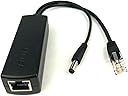
⚡ Power your smart workspace with precision and style!
The DC 5V 2.4A Active PoE Splitter by DSLRKIT converts 48V PoE input to a stable 5V DC output at 2.4A, supporting 10/100Mbps Ethernet and compliant with IEEE 802.3af standards. Its compact design and 2.5kV isolation make it ideal for powering smart home devices and IP cameras, streamlining your setup by reducing cable clutter while ensuring reliable power delivery.
| ASIN | B07ZH5V89T |
| Best Sellers Rank | 35,399 in Computers & Accessories ( See Top 100 in Computers & Accessories ) 220 in Network Switches |
| Guaranteed software updates until | unknown |
| Item model number | 5V-5.5*2.1 |
| Manufacturer | DSLRKIT |
| Product Dimensions | 8 x 2.7 x 2.2 cm; 50 g |
A**K
Hue PoE
Used to power Philips Hue Bridge from PoE, alongside a 5.5x2.1mm to 5.5x2.5mm adaptor - works great
T**S
Perfect for Simplifying My Setup
The DSLRKIT DC 5V 2.4A Active PoE Splitter is a great addition to my Philips Hue hub. It adds convenience by reducing the number of cables and streamlining my setup. Works flawlessly, providing reliable power while keeping things tidy. Highly recommended!
R**A
Perfect for running small internet connected devices
I use these POE splitters to power various small devices on my network, including a Philips HUE Router, my TADO heating router and a small crypto miner, they have been running faultlessly for about 2 years now with absolutely no issues. I have mine connect to a Netgear POE switch for power distribution.
W**D
Easy to use for my hue bridge
I got this for my Hue bridge, and it works really well. It's easy to use and is fantastic value for money. The speed is limited to 100Mb/s but that's neither here nor there if you just want to use it to manage something and to save a plug socket
S**R
Good for powering Hue hubs
Got a pair of these to power my Hue hubs so that I only had to have a LAN cable running to them without additional power cable. Not sure if I didn't scope it correctly, or that Philips use a slightly larger centre pin on the connector, but I had to widen the power connector on these a little to get them to fit. No big issue. I like these a lot. Freed up some wall power sockets and sit nicely on the side of the Hue hub. Would totally recommend.
H**T
Perfect PoE converter for Philips Hue bridge
I am on a quest to eliminate as many mains adapters as possible as they just waste mains outlets, so this did the job perfectly for my Hue bridge.
N**G
Works for Philips Hue Bridge
Perfect for powering a Hue bridge over PoE, just needs a 2.1 to 2.5mm adapter.
D**Y
😒
Didn't work
B**.
Perfekt geeignet um nicht PoE-fähige Geräte PoE-fähig zu machen. Verwende es zum Beispiel für homematic Accesspoints.
F**O
Abbinato ad uno switch PoE alimenta senza problemi una periferica posizionata a 50mt di distanza e all'esterno. Non proprio piccolo ma nella media. Prezzo un po' sopra la media. Ora vediamo la durata. Consigliato
M**L
Tal y como se describe, todo perfecto.
E**R
I recently picked up the DSLRKIT DC 5V 2.4A Active PoE Splitter (802.3af) to power my Philips Hue Bridge (Hue hub) via Power over Ethernet instead of using a separate power adapter. After a straightforward setup, it’s proven to be an incredibly handy addition to my smart home setup. Key Benefits Single-Cable Convenience By using this splitter, I can now run both data and power over a single Ethernet cable from my PoE switch to the Hue Bridge. This cuts down on clutter and frees up a wall outlet. Sufficient Power Output The splitter delivers a steady 5V at up to 2.4A, which comfortably meets the power requirements of the Hue Bridge (2A is typically recommended). I’ve experienced no dropouts, restarts, or connection issues since making the switch. 802.3af Compliant Since it’s 802.3af compliant, it works seamlessly with standard PoE switches. There’s no fuss with proprietary adapters—just plug it into a PoE-capable port, and the splitter handles the rest. Straightforward Installation Ethernet In: Connect the splitter to a PoE-enabled Ethernet port on your switch. Ethernet Out: Run a short Ethernet cable from the splitter to the Hue Bridge’s network port. Barrel Plug Out: The 5.5x2.1 mm barrel connector goes into the Hue Bridge’s power input. After plugging everything in, the Hue Bridge powered on immediately and maintained a solid network connection. Compact Design The splitter’s small form factor makes it easy to tuck away behind a cabinet or entertainment center. It doesn’t generate much heat, and there’s a small indicator LED that confirms it’s receiving power. Performance Stable Power: After several weeks of use, I haven’t experienced any flickering LEDs or dropped connections with my Hue lights. The Bridge stays powered 24/7 without a hitch. No Noticeable Latency: Moving power management off to the PoE splitter hasn’t added any lag or reduced responsiveness in the Hue app—everything remains snappy. Considerations PoE Switch or Injector Required: You’ll need an 802.3af-compliant PoE switch or injector. If you don’t already have PoE in your network setup, that’s an additional cost to factor in. Cable Management: While it does reduce a power brick in your setup, you’ll still have a small splitter and some short cables to deal with. Overall, though, it’s still more streamlined than using a separate AC adapter. Pros & Cons Pros Frees up a wall outlet by combining power and data into one cable. Delivers ample power (5V/2.4A) for the Philips Hue Bridge. Easy plug-and-play installation with a PoE switch. Compact and runs cool. Cons Requires 802.3af PoE source (additional hardware if not already present). You’ll still have a small box (the splitter) in your wiring path. Final Verdict The DSLRKIT DC 5V 2.4A Active PoE Splitter is a great solution if you want to power your Philips Hue Bridge via Power over Ethernet. It simplifies cable management, delivers reliable power, and reduces the need for an extra power adapter. If you already have a PoE-capable setup (or plan to add one), this splitter is a worthwhile upgrade to keep your smart home hub neatly integrated and always powered.
V**7
Très pratique pour alimenter tous les hub de domotique. Bien choisir son modèle en fonction de la puissance électrique nécessaire, de la vitesse réseau et du connecteur du hub.
Trustpilot
2 months ago
3 weeks ago