Desertcart purchases this item on your behalf and handles shipping, customs, and support to Thailand.
🖨️ Print smart, save big, and stay effortlessly connected!
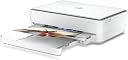
The HP ENVY 6020 All-in-One Printer is a versatile, eco-conscious device designed for home and small office use. Featuring fast wireless printing with self-healing Wi-Fi™, automatic duplexing, and borderless photo printing, it delivers professional-quality output at up to 10 ppm black and 7 ppm color. With a sleek design made from 20% recycled plastic and an included 3-month trial of HP Instant Ink, it ensures cost-effective, hassle-free ink management. Ideal for millennials balancing work, family, and sustainability.
| ASIN | B086LRTY7X |
| Additional Printer Functions | All In One |
| B&W Pages per Minute | 10 ppm |
| Best Sellers Rank | 73,323 in Computers & Accessories ( See Top 100 in Computers & Accessories ) 151 in All-In-One Printers |
| Box Contents | HP ENVY 6020 All-in-One Printer; HP 305 Setup Black Cartridge; HP 305 Setup Tri-Color Cartridge; Regulatory flyer; Setup guide; Reference guide; Power cord. |
| Brand | HP |
| Brand Name | HP |
| Color Depth | 24 bpp |
| Color Pages per Minute | 7 ppm |
| Colour | White/Dark Grey Heather |
| Compatible Devices | Smartphones |
| Connectivity technology | USB, Wi-Fi |
| Control Method | App |
| Controller Type | Android |
| Customer Reviews | 4.3 out of 5 stars 19,896 Reviews |
| Display Type | LCD or LED |
| Dual-sided printing | Yes |
| Duplex | Automatic |
| EU Spare Part Availability Duration | 2 Years |
| Hardware Interface | USB 2.0 |
| Ink Colour | Cyan, Magenta, Yellow, Black |
| Item Dimensions D x W x H | 14.2D x 17W x 5.2H centimetres |
| Item Type Name | Multifunction Printer |
| Item Weight | 11.51 Pounds |
| Manufacturer | HP |
| Maximum Copies Per Run | 8 |
| Maximum Copy Resolution Black and White | 600 x 600 dpi |
| Maximum Copy Resolution Color | 4800 x 1200 dpi or less |
| Maximum Copy Speed Black and White | 10 ppm |
| Maximum Print Resolution Black and White | 1200 dpi |
| Maximum Sheet Capacity | 100 |
| Maximum Supported Paper Size | 216 x 297 mm (DIN-A4) |
| Maximum print Resolution Color | 4800 x 1200 optimised dpi color |
| Model Name | HP ENVY All-in-One Printer |
| Model Number | 6020 |
| Model Series | 5 |
| Model name | HP ENVY All-in-One Printer |
| Network Connectivity Technology | USB, Wi-Fi |
| Number of Drivers | 2 |
| Number of Trays | 1 |
| Other Special Features of the Product | Borderless Printing, Contains more than 20% recycled plastic, Double-sided printing, Print speed 10/7 ppm (black/colour), Print. Copy. Scan. |
| Output sheet capacity | 100 |
| Paper Size | 8.5 inches |
| Power Consumption Size | 4 Watts |
| Print media | Paper (plain) |
| Printer Output Type | Colour |
| Printer Type | Thermal |
| Printing technology | Thermal |
| Processor Count | 1 |
| Product Warranty | 1 year |
| Resolution | Up to 1200 x 1200 rendered dpi (when printing from a computer); Colour (best): Up to 4800 x 1200 optimised dpi colour (when printing from a computer on selected HP photo papers and 1200 input dpi); |
| Scanner Type | Flatbed |
| Series Number | 5 |
| Special feature | Borderless Printing, Contains more than 20% recycled plastic, Double-sided printing, Print speed 10/7 ppm (black/colour), Print. Copy. Scan. Special feature Borderless Printing, Contains more than 20% recycled plastic, Double-sided printing, Print speed 10/7 ppm (black/colour), Print. Copy. Scan. See more |
| Specific Uses For Product | Home/Office, Photo Printing |
| Total USB Ports | 3 |
| UPC | 194721022028 |
| Warranty Type | Limited Warranty |
| Wattage | 6.4 watts |
A**R
straightforward, good looking and good job
I managed to install my new HP ENVY 6020 in a couple of minutes using my phone and subsequently my computer. I put the printer in the same room where the wireless hub was so there was no issue with connection. Start printing was extremely easy and even subscribing to the monthly ink service. The first three months are free so it's a good way to test it and see if it's worth it. When you link to the account it tells you how many prints you have done, when, and how much ink is left in the cartridges. Printing on normal paper is of very good quality both colour and black and white. Printing on special paper is of good quality. Finding the right Coulour Managment hasn't been easy but that's an issue also of the software you print from, not necessarily related to the printer. Scan is of very good quality and since it's a flat scan you are allowed to scan books. Copy is easy too I tried only one double side print so far and when the printer picked up the sheet to print it again it folded a corner a little bit, but besides that it worked perfectly fine. The printer is not so small, but it looks nice and has a pleasant light, which changes colour, coming out of it to show what's going on. It even plays a jingle when it has finished certain tasks. I think it's an ideal printer for the suggested 100-300 prints per month.
J**E
Back to HP !
Joy, after a terrible experience with a useless Epson printer returned to my senses and went back to HP. The only reason did not buy in the first place was I didn't want instant ink after a poor experience with my last printer - just want to buy a cartridge when I need it as tend to do quite a lot of printing then nothing for a while. Being watched by Big Brother Instant Ink is an unpleasant experience. As soon as took it out of the box could feel the difference in quality, well built, lids open properly; decent paper drawer etc. Set up: took all of 10 minutes from taking off the tape to printing the alignment sheet. Crisp clear print in black and colour and reasonable speed plus very quiet in operation. Tip - don't install an account when prompted and you won't be pestered about instant ink. After the Epson nightmare this is a joy. I dreaded having to print something but fortunately it died completely after less than a fortnight and I could return under warranty and buy a decent printer.Hope it lasts ! Am used to an interactive screen which this does not have - thought would miss that but no problem to date. If you are mulling over what to buy - don't hesitate for a decent, efficient printer, copier,scanner. This should suit any family or small business not doing really heavy amounts of printing. Neat dimensions mean you can easily tuck it away under a desk. It does pretty colours and a little tune to tell you print job finished - quirky and quaint.
A**N
Perfectly good, except for setup
As others have said, this is a pig to set up. I tried installing the app on my Android phone, then on an iPad. Wouldn't install on either for ages. Managed to get it installed on my phone eventually, so carried on with that. There's no information about what to do, just 'follow the app' but if that fails there's no help anywhere in the app. The way it works is that for setup the printer can connect to a device by Bluetooth, which didn't work at all, or you can get the printer to be a WiFi host and connect your phone to that. From there you can add the printer to your home WiFi using your phone. I couldn't connect the printer and phone using the printer's WiFi. I could find the HP WiFi listed as an available connection, but it wouldn't connect. Gave up, switched to my iPad. Managed to install the app after several more tries. This again found the printer's WiFi but was asking for a password to connect to the printer. What password? Gave up. Took my dog for a walk. Sully calmed my nerves and I came back with fresh enthusiasm. Did a bit of Googling and found advice to switch off mobile data on the Android phone before trying to connect to the printer WiFi. Success!! So, I'm up and running and could continue setup. Putting in some paper and the supplied ink was straightforward, following the app guidance. You have to pretty determined and all but crash out of the app if you don't want to sign up to their ink supply scheme. Print quality is good. Not stunning, but this is not a high end printer. It's certainly good enough for ordinary uses. The app makes it easy to scan, copy, etc. So, once it's set up, I'd say it's a great printer for its price.
M**C
Finally a WiFi printer that isn’t trash!
This is my fourth wi-fi printer and by this point I’d come to terms with the fact that they were unreliable and often unusable, so I was delighted to find that not only is this printer reliable, it’s actually a delight to use! The set up took maybe five minutes, following the steps on the HP app, all extremely straight forward and easy to follow, and then on to the instant ink sign up page. I’ll be getting my monies worth from included trial! So far I’ve mostly printed from iOS, where the integration is brilliant - simply click the share icon and select Print with HP Smart, then it’s coming out of the printer seconds later NB this option works better than the first general iOS Print option in the list, and gives you a few options when printing. Other than that, it looks good, it’s quiet and quick to print - I’m a big fan of the lights and sounds too
A**Y
Cats love it!
Some of the other reviews complained about the android app and not being able to set it up, however it was very straight forward. The printer came with a quick start guide with 3 simple steps that allowed me to print from my phone to paper after about 10 minutes. I did not connect this to a computer, but if you want to you will need your own type A USB cable as there is not one supplied. The box has 2 power supplies, 2 ink cartridges (black and colour) and a fair bit of useless documents in multiple languages. Remeber to buy some printing paper too when adding this to your basket. The product relies on thr customer being able to use QR codes, Bluetooth, and downloading apps (plus some kind of plug in app). Despite this, it was quite painless and HPs ink subscription service it keeps pushing to you is easily skipable. I did have to restart the printer after setup as it kept saying there was an ink jam. After rebooting it worked flawlessly. Would recommend! Also my kittens seem very interested in it, so doubles up as a distraction for a few minutes.
C**R
Decent printer but the set-up is absolutely awful and I would not recommend this to anyone.
Pros: it is affordable, prints decent quality pages and is fairly fast and compact. Cons: you have to set it up without throwing it and/or yourself out of a window. Just when you think you've got it working, it will randomly stop working again. It will disconnect from the internet mid print job. It will drive you to madness. I cannot emphasise how awful this thing was/is to set up. I have never had so much difficulty getting such a (in theory) straightforward piece of commonplace technology working. It has taken years off my life that I will never get back. I'm pretty sure I now have some grey hairs. This printer does not come with a USB cable to connect the printer to your computer. You must connect using Wi-Fi. This does not work. It would find the printer, then lose it, then find it and require me to add it via a WPS pin. This is the first time a WPS pin is mentioned, and there are no instructions on how to find out your WPS pin. It is not written down anywhere because it is procedurally generated and lasts 90 seconds before it expires and a new one needs to be generated. There are no buttons to view it or print it or instructions on how to print it. Your printer is supposed to print a page with it on, whereafter you enter it into the dialog box within two minutes. I have no idea how to make your printer do this but I managed to print the WPS one time through random button pushing. This two minutes includes the time HP Smart takes to find the printer and print the WPS pin page, which itself takes over two minutes making the entire process redundant. There is absolutely no reason for such a tiny amount of time to enter a security code for a pinter. HP Smart also has to re-find the printer every time this doesn't work, which is every time, and this takes a very long time considering both devices are right next to each other. When I eventually entered a pin within two minutes it would reject it anyway, saying the printer stopped waiting. It would do this even if I entered a code immediately. The online set up videos show a completely different set up process to the one I was faced with. Money was wasted on ink and paper printing dozens of printer information sheets trying to get it to work. The virtual assistant is useless; the instructions are useless; the online troubleshooting information and instructions are useless. They just say "follow the instructions on HP Smart" and move on. This, obviously, is not very helpful and provides no information relating to HP Smart setup issues. I even downloaded the drivers from the HP site and they wouldn't work either. All HP online help videos are non-specific and do not provide full instructions for each of the steps. Press wifi button on back to make the purple light come on to connect... ok... neither app can find the printer. Now what? EVENTUALLY after looking through troubleshooting pages I found and downloaded HP Print and Scan Doctor, and it all just started working midway through the device scan. So this is my recommended fix to anyone with similar problems. Unfortunately the printer stopped working again after a month and I had to go through all the above process again. If you already purchased this printer, I am sorry. If you designed this printer, may god help you. If you are looking to buy a printer, do not buy this one unless you like suffering at the hands of incomprehensible technology. Edit: I moved house, and got a new router. This caused me to have to repeat the above process as my printer did not like this at all. More hours of my life wasted; I'm still working on getting it working. Do not buy this product. Avoid HP printers.
A**H
Durable and Excellent Product
Excellent product. I have been using it since covid, when we couldn't really go out to the nearest library to get printing services. Print quality plus scan quality is quite good, professional. I changed jobs during this period, and all my documentation work was seamless. The price is also reasonable. It is Wifi linked, so no need to connect laptop separately with the device. Good ink quality, and lasts very long. I am still using my 1st cartridge after the trail cartridge.
J**G
Online service, quality print
Used for several years, a lot smarter than me, so not the friendliest of devices to operate. If there is a fault in delivery, it’s usually the operator not looking at online. Instructions/ fault finding.
G**S
Dont buy
It gives 15 prints and ink is over
G**E
Softlocks - don't buy
Du kan inte "bara skriva ut" med den här. Det er ett mjukvaruprodukt som vill att du loggar inn och betalar varje månad. Ganska krångligt att skriva ut även med HP konto. Den vill också gerna ladda upp ala data till molnen. Efter ca. 6 månader kunne den inte äns skriva ut i svart. Hadde användt den 2-3 gånger. Mistänker felaktig mjukvaru lås.
M**.
Buona stampante ad un prezzo contenuto.
Funziona bene sia da PC Windows 10 e sia da smartphone Android e ios. Molto utile la funzione di stampa fronte/retro.
A**O
Recibe la tinta a domicilio antes de que se agote!
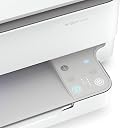
Llevo unos días probando la HP Envy 6020 y el servicio Instant Ink y no puedo estar más contento y satisfecho. Por un lado la impresora me ha sorprendido en cuanto al diseño; sus lineas son sencillas es muy compacta, con el papel en un compartimento cerrado evitando la acumulación de polvo y le han incorporado luces leds que le dan un toque muy moderno y además iluminan los controles que están totalmente integrados sin botones. Con la nueva HP Envy 6020 podemos escanear o digitalizar documentos, hacer fotocopias en blanco y negro o color y por supuesto imprimir fotos con una buena calidad y documentos a una velocidad sorprendente y a doble cara de manera automática. Una de las cosas que más me ha gustado es su conectividad Wifi que nos permite imprimir desde cualquier dispositivo sin cables y de manera rápida y sencilla. Sin duda esta posibilidad que evita cables y hace que con un solo click puedas imprimir desde tu móvil o tablet se vuelve indispensable ya que se convierte en una manera muy cómoda y ágil de operar. Uno de los puntos fuertes que ofrecen esta y otras impresoras conectadas HP es el servicio Instant Ink, de hecho la impresora en este caso venía con 6 meses de este servicio totalmente gratis. Se trata de varias opciones o planes de impresión que te ofrecen 10,50,300, 500... páginas al mes por una cuota mensual muy ajustada, en este caso yo escogí 300 paginas impresas al mes durante los próximos 6 meses totalemente gratis! Durante ese tiempo cuando la impresora detecta que algún cartucho se va a acabar los solicita de manera automática y llegan a tu casa sin ningún coste más que la cuota mensual correspondiente al plan escogido( cuota que como comentaba estos 6 meses me regalan). Si algún mes no llego a las 300 copias se me acumulan las que no he gastado y tendría más copias disponibles para meses sucesivos.Además pasados los 6 meses, o en cualquier momento realmente, puedes sin ningún coste escoger otro plan o darte de baja en cualquier momento. La verdad es que me recuerda a alguna plataforma de series en streaming, con ellas nos olvidamos de alquilar pelis, comprar pelis,... simplemente ves lo que quieres cuando quieres por una pequeña cuota y sin compromiso, pues así me siento; imprimo lo que quiero cuando quiero no me preocupa el gasto de tinta ni su reposición por lo que le doy más uso a diario y de manera mas natural a mi impresora sin todas las molestias que supone la reposición de la tinta. SIN DUDA ME DECLARO FAN DE INSTANT INK!
M**A
Ottimo
Il prodotto rispecchia esattamente la figura , perfettamente funzionante , consegna perfetta. Consiglio l'acquisto a chiunque sia interessato.
Trustpilot
2 months ago
1 week ago