

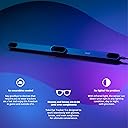
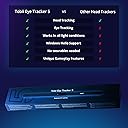


Tobii Tobii Eye Tracker 5 - Head & Eye Tracking Gaming Peripheral for PC
Product ID: 207553778
🌞Works in all light conditions
🎮Supports 170+ enhanced games
🧠Simultaneous head & eye tracking
Buy anything from 5,000+ international stores. One checkout price. No surprise fees. Join 2M+ shoppers on Desertcart.
Desertcart purchases this item on your behalf and handles shipping, customs, and support to Thailand.
👀 Level up your game with the ultimate eye & head tracking revolution!
The Tobii Eye Tracker 5 is a cutting-edge PC peripheral that combines precise eye and head tracking technology to deliver unmatched immersion across 170+ games. It works flawlessly in any lighting condition without requiring wearable devices, and also supports Windows Hello biometric security, making it a versatile tool for both gaming and productivity.



| ASIN | B0897GCBWW |
| Additional Features | Wireless |
| Best Sellers Rank | #1,493 in Video Games ( See Top 100 in Video Games ) #459 in PC Games & Accessories |
| Brand Name | Tobii |
| Button Quantity | 16 |
| Color | Black |
| Compatible Devices | PC, Windows |
| Connectivity Technology | USB |
| Controller Type | Eye & Head Tracking Device |
| Customer Reviews | 4.1 4.1 out of 5 stars (2,666) |
| Hardware Platform | pc |
| Item Dimensions | 15.94 x 1.77 x 3.27 inches |
| Item Weight | 97 Grams |
| Manufacturer | Tobii Tech AB |
| Model Name | Eye Tracker 5 |
| Package Quantity | 1 |
| Power Source | Corded Electric |
R**O
Breakpoint and Wildlands: Does Increase Immersion
I'm an older gamer and bought Tobii specifically for use in Ghost Recon Breakpoint and Ghost Recon Wildlands. If you can afford it and want a more immersive experience in these games, I do recommend it. HOWEVER... let me give you my take on what really matters when Tobii is used in these games and what is somewhat a novelty. I'll discuss both types. The core feature - the single most important and immersion enhancing feature - is what the combination of what head and eye tracking does. It smoothly scrolls the screen depending on where you are looking. In "real life", you may turn your head or your eyes, or both. If you turn your head (say right) and then look even more right with your eyes, you are probably wanting to see the most you can peripherally. That's the heart of what Tobii does. It knows and interprets the COMBINATION of head and eye movement and knows when it needs to accelerate and exaggerate the screen scrolling. Just using an "Old School" head tracker can not do this. You can still scroll the screen with a head tracker like TrackIR, but you can duplicate the intelligent addition of eye tracking. Bottom line is that as your head and eyes work together, the flat screen world in front of you makes an honest attempt to simulate the real world. Please note: Breakpoint and Wildlands have built-in Tobii support. But you will have to fiddle with eye and head tracking sliders to get it to work best for you. Just FYI. As far as the other features from Tobii in these games, most of them in my opinion are more or less "novelty" items (with one exception listed below). They may suit you. For example, in Wildlands, you can set it up so that if you look at where you normally have the mini-map, the map appears while you are looking at it. Also you can use your eyes to select an item (e.g., grenade) off the weapon wheel. These and several other available features, to me, are cute but not worth the effort to integrate into my established game play routine. There is one feature (in addition to screen scolling) that I have found makes on-going sense. And that is automatically swinging your weapon to somewhere near where your eyes are looking by just clicking on the right mouse button. This works well in a 3rd person game. In real life, for example, if you are outside and scanning for baddies, if you see any, you're gonna keep your eyes on them while you swing the weapon around towards them. The "Aim at Gaze" feature simulates this. Again, works best in a 3rd person game. (IN a 1st person game, where you have a scope, and you apply this, it can be visually disorientating. I use iron sights more because of this. Speaking of 1st person, I generally run Breakpoint and Wildlands each with their First Person mods. So here's my conclusion for you players out there. For Breakpoint and Wildlands, it does enhance immersion. It feels more real. And maybe some of the novelty settings might please you. Overall, the game is more enjoyable. Whether it is $300 more enjoyable depends on your situation. Note that Tobii works on many games. See their website for the list of supported games. Hope this helps!
K**T
Cool company, best tracker you can buy period.
I discovered Tobii on the first Alienware laptops they were installed on. Loved it from the moment it worked, thanks but goodbye Track IR goofy hat-headed easily sunlight-smitten wandering tracker. Earl on Tobii usually worked and months of satisfying semi-hovering the Huey in DCS were ahead but Lockheed’s Prepar3d was never certain with any add-ons and Windows updates would stop it sometimes so I emailed or called tech support prepared to wait a day or two. They were on the solution minutes later and it was clear they’d figure it out. They are the most knowledgeable, effective and undefeated tech support I’ve had the pleasure of working with on anything related to computers. 100% success rate even early on if it took half an hour for them to check Prepar3D (yes they knew it and taught us which files had to be where) review the tracker logs. And I learned the technology is being used to enable those with MS and other accessibility needs to control their computers, for speech and even if I remember correctly used remotely or locally for robotic surgery. Using it on a new MSI desktop now with our first RTX 4090 GPU’s and it just works flawlessly driving my 460 HP Kenworth through LA or cruise in a Cessna 404 Titan high above the stunning Rockies. Very immersive and realistic as it is rock solid and effortless to read gauges or glass cockpits (love just leaning forward to see closer) yet instantly tracks at my realtime head turning or gaze rate and customizable any response ratio in as far as I want to customize the software. Which I rarely ever had to do or do now. Reliable and as easy as sticking the adapter with thin magnetic strip on to attach under the curved 38” ultrawide LG monitor - or our 30”Dell Ultra Sharp, ASUS monitors. Tracking has zero issues with curved monitors and is easily recalibrated if I want to by looking at fixed dots on the screen for a few seconds. Haven’t had to do it again once it’s calibrated. Tips Probably just my OCD but the strips of heavy duty plastic Velcro have a distracting whitish glue & rough look on the sides of the strips - easily solved with a black Sharpie going around the sides of the strips a few times before sticking on and never see them now. Also add a small stick-on cable clip under or on the back of the monitor to secure the cable coming out of the tracker going to your USB port. If you move your monitor position this will help the mount keep then tracking bar stable and centered. Hope you enjoy it as much as we have. Thanks Tobii for years of outstanding service and products!
C**1
Great addition to any gaming setup, can not recommend more highly
This is an excellent product, I use it every time I game. It allows head and eye tracking for greater immersion and utility in your gaming. One thing of note, the adhesive strip that you can use to attach the tracker to your monitor is pretty weak, often falling off after only a few weeks to a month. Some 3M adhesive remedied the problem and I've had no issues since. The accuracy is not pinpoint, but unless you are trying to snipe someone, its eye tracking is pretty good.
A**R
Godawful, amateurish software
The Experience app will consistently freeze or crash altogether if you leave eye tracking disabled for any period of time, which you would think would be an important consideration for a product that shines IR lamps into your eyes that you don't need to use all the time. Once the program crashes, if you go through the troubleshooting steps, it will not be able to be restarted again until the entire PC is restarted - not as a bug, but by design. These problems have persisted across complete reformats of Windows and completely different systems. In response, their support staff gave me the extremely helpful advice that you can disable the eye tracking by right clicking on the tray icon and selecting "Disable Tobii Experience" Also, the software can make more API calls to Tobii's servers in a short period of time than an active Twitch stream, so it seems like it's harvesting as much of our data as it can get. Incredible experience all around.
T**R
A great way to fly (in Flight Simulator)
Been using this for about 3 months in Flight Simulator. Mounted it below a fairly large screen TV as the main display. The setup and calibration went pretty easily, no issues. Expect to spend time playing around with the settings, such as the relative balance between head tracking and eye tracking. Be sure to set up two key bindings to control it: I use F12 for 'recenter the view' and shift-F12 for 'turn on / off'. I normally fly with it turned on while in the air; it's wonderful to be able to look around and not take your hands off the controls. SO much better than trying to use the mouse, etc. I turn it off when aircraft is not moving (or sometimes when I pause in midair) - it's pretty hard to keep your head still while you are twisting your head around to find a control in the cockpit and then hit it with the mouse. Much easier to turn off tracking, using convention mouse movement and clicking such as to flip switches and move stuff like tailwheel lock - it's a lot easier because they don't 'jump around' like they do when tracking is on. Watch the better YouTube videos, you'll get a lot of useful tips on making it work in a way that pleases you. Don't expect to plug in and fly - your experience will be less than great, maybe even miserable - so do the setup and prep properly. It's not cheap, but to me it has been very worthwhile - makes flying so much more immersive. Recommended!
J**R
Hardware is great. Can't say that about the software
As strictly a piece of hardware, this device works great. No complaints there. The Tobii Tracker 5 solves all the hardware issues I ever had with TrackIR. The problem is, hardware is ALL THERE IS! Since ZERO instructions come with the tracker, you have to pretty much figure all this out on your own. Yes, they do install "Tobii Experience" and "Tobii Game Hub" but all those do is allow you to calibrate the device (Experience) and splash you with marketing hype. I ended up deleting Tobii Game Hub. I looked long and hard for the utility that allows you to configure the DOFs (which is beautifully done in TrackIR) but finally realized no such program exists. Tobii Tracker relies ENTIRELY on the software that uses it to set up eye and head movement sensitivities, etc. This is completely unacceptable, especially at $300!
R**A
Is now a solid performer for MSFS2020. See 1/ 6&7/22 Updates
Setup with msfs2020 is easy. Just turn on TrackIR in the app. Documentation could have been better. I had to do some searching for what I needed, but it wasn’t too hard to find. In msfs it works, but isn’t fast to respond. TrackIR5 is much more sensitive, which is not always good. Eye tracking seems hit and miss. In msfs there are no adjustments available. On the other hand, it doesn’t require a lot of tweaking like TIR5. It has a lot of potential. The biggest plus is that it is conpletely hands/head free. I am slowly getting used to using it. I hope to eventually be able to increase my rating. 1/7/22 Update: As promised I am adding a 4th star. Apparently the MSFS fix took care of the disconnect issue. Used it most of the day and had no issues with Tobii whatsoever. I am actually liking it a lot and don't miss the 6 degrees of movement that my other head tracker has (in MSFS Tobii is limited to 3 right now). In fact I find it easier to use without all the extra moving. It would be nice to be able to lower the sensitivity just a little, but overall it is now a solid operator in MSFS2020, once I got the positioning adjusted correctly. I did recalibrate a few times in the app, which may or may not have helped. Now I can definitely recommend it. 1/6/22 Update: Con- I am on the verge of returning it. Yesterday it kept disconnecting from MSFS2020. It stayed powered on, but MSFS turned it off in the game, and would not let me reactivate it (the software button would not move in the settings). I tried some troubleshooting tips from Tobii without success. So I started the refund process. Pro- Today MSFS2020 put out a big bug update. Among the fixes is mentioned TrackIR (they only use the Tobii in their software now- other trackers work outside of it). So far it is working, but I haven't run everything I ran before...yet. Prior to yesterday I found that raising my monitor height and adjusting the tilt on the Tobii sensor bar greatly increased the sensitivity. I have been pleased with how it works now (when it stays connected). I like it much better than my other name brand tracker. Conclusion- I am neither raising nor lowering my 3 star rating for now. If it continues to disconnect, I will still return it. If it stays connected and continues to be as responsive as it is now, I will give it another star. Time will tell. There are a lot of gamers who like it, and a lot who are having problems. Trying to stay optimistic!
J**A
Noticeable Improvement
I've been using Tobii eye trackers since 4, then 4c, now 5. I use it in gaming as well as through third party tools for accessibility. I bought the 5 within the first few days of learning about it. It has a new mount to finally attach to curved screens, better hardware size and weight, better head tracking, superior eye tracking and increased accuracy. The latter two are incredibly important to users like me and I immediately noticed. It has improved my gameplay. Now to be completely clear, I have used this with third party software called Project Iris for my needs. I can't recommend the software I use because it is very bug prone and zero support. If Tobii would ever make software that was similar I could be confident in its professional quality. The current supported games are growing but I honestly don't use that much. I did early on but my usage needs are extreme now so I create my own setups. Make sure you read the limitations such as 27 inch screens (for accuracy) must be sitting close to screen, not across a room, double check your USB version and drivers. It is reasonable to say if you have three monitors this product will definitely become an irritant if you are functioning across three, that should be fairly straightforward. The immediate and most important question is, should you upgrade now? I would say definitely if you are a power user. If you have a 4c and aren't a power user you may want to wait. If you have a 4, I would definitely consider upgrading. I like supporting Tobii especially because they are a class act, support has been fantastic and they continue to innovate eye tracking. This field holds hope for many people who are disabled and less abled.
J**Z
Ist sein Geld Wert, die Funktionen Super, Spielspaß garantiert
Mit Abstand die beste Investition die ich gemacht habe, Nach langer Recherche und Nachforschungen um das Spiel Erlebnis besser zu machen oder realistischer blieben für mich Zwei Optionen, 1 eine GamerBrille wie Oculus Rift oder ähnliche Produkte, oder eben einen Eye Tracker wie der von Tobii , letzteres entschied ich mich für den Eye Tracker, da er in der Anschaffung günstiger war, und man halt keine 10 Kilo schwere Brille auf dem Kopf hat, das thema " Motion Sickness " bleibt damit auch aus , oder das man plötzlich in den Bildschirm Springt. Tobii war von den Eye Trackern der sag ich mal bequemste, da man nicht i welche Kameras oder Stirnbänder tragen muss , hab diesen direkt unter dem Bildschirm installiert, ist alles mit dabei dafür. Lange Rede Kurzer Sinn , Es unterstützt bisher alle Spiele die ich so Spiele, einige mehr andere Weniger, aber die Funktion ist super, in z.B The Hunter Call of the Wild, ist der Bewegungsradius angenehm und weich, das große umsehen erfolgt nach wie vor mit der Maus , ABER wenn ich z.b etwas anschaue, ein baum, Tier, whatever und das Scope ansetzte ist dieses direkt auf dem Punkt wo ich hingeschaut habe , das folglich auch bei anderen Ego Shootern, vowriegend nutze ich es für EuroTruck und Amercian Truck Simulator ,Farming Simulator - gernell Simulatoren Spiele , das Fahrerlebnis im Eurotruck ist nun "realistischer" ich kann mit einen leichten kopfschwenk nach links direkt den von Links kommenden verkehr einsehen, anders herum das selbe ohne die Kamera zu wechseln oder Knopf zu drücken, einfach Kopf schwenken, zu dem fixieren die Augen, wenn ich in den Spiegel schaue auch diesen , bei Farming Simulator ist das "Feldabarbeiten" oftmals ... langwierig, mit dem umherschauen ist es ganz witzig mal nach hinten zu gucken, das geht binnen Sekunden, ohne Knopfdruck im Nexar ganz nett mit den umher schauen. Spiele die ich damit Spiele sind Euro Truck Simulator American Truck Simulator Farming Simulator Bau Simulator von Astragon, 2025 Seafarer The Ship Sim The Hunter Call of the Wild Space Marine 2 - Mega gut damit Aktuell auch " Far Cry 5 "
S**I
Best Eye tracker
Honestly with the debate between the Tobii and the trackerIR. Tobii takes the win it has a head and also eye tracker, it supports many games with it . I never had any issues with it. This was worth my money and I would highly recommend if you wanna step up your game.
M**N
Works with MSFS 2024!
It finally works great with Microsoft Flight Simulator 2024. It adds a whole other dimension to your flying without you having to deal with nausea från VR-headsets. With this you can see everything without having to move the mouse back and forth. Just turn your head and you'll see everything, whether it's inside or outside the cockpit.
D**X
Tobii Eye track
Pacco arrivato con un giorno in anticipo, imballo perfetto, lo sto testando e per ora prodotto molto buono e ottima esperienza sia di gioco che altro
J**L
Terrific tool
I heard about the Tobii Eye Tracker 5 from a Flight Simulation YouTuber, and was intrigued to enhance my own Flight Simulation experience by adding a bit of VR aspect, without needing anything attached to my head. I figured the Tobii Eye Tracker 5 was the best option for my needs, and I have not been disappointed. The product does a fantastic job at alleviating my frustrations of having to manually pan around the cockpit whenever I need to view an instrument, or scan out the window. There are many programmable features, and you can set it all up however you like. I would highly recommend this system to those wanting to avoid head attachments. Great item!
Trustpilot
2 months ago
2 weeks ago