Buy anything from 5,000+ international stores. One checkout price. No surprise fees. Join 2M+ shoppers on Desertcart.
Desertcart purchases this item on your behalf and handles shipping, customs, and support to Thailand.
🎯 Level up your PC gaming with wireless freedom and squad-ready power!
This CIPON-manufactured wireless adapter enables Xbox One controllers to connect seamlessly to Windows 7/8/8.1/10 PCs and tablets via USB 2.0/3.0. Supporting up to 8 controllers simultaneously and wired chat headsets on Windows 10, it delivers a near-official experience at a fraction of the cost. While requiring a brief driver download on first use and offering slightly reduced wireless range compared to the official Microsoft adapter, it remains a reliable, budget-friendly solution for wireless Xbox gaming on PC.


| ASIN | B08CY14VGD |
| Best Sellers Rank | #743 in Video Games ( See Top 100 in Video Games ) #3 in Xbox One Adapters |
| Brand | Cipon |
| Color | black |
| Compatible Devices | Headphone, Laptop, PC, Tablet |
| Connector Type | Micro USB |
| Current Rating | 2 Amps |
| Customer Reviews | 4.2 out of 5 stars 6,260 Reviews |
| Finish | Wireless |
| Item Dimensions | 1.97 x 0.63 x 0.31 inches |
| Item Weight | 1.13 ounces |
| Item dimensions L x W x H | 1.97 x 0.63 x 0.31 inches |
| Manufacturer | Cipon |
| Mfr Part Number | L9I8F7ERGP |
| Model Number | ACP77 |
| Number of Items | 1 |
| Number of Ports | 1 |
| Package Quantity | 1 |
| Power Plug Type | No Plug |
| Smart Home Compatibility | Not Smart Home Compatible |
| Specific Uses For Product | PC |
| Unit Count | 1 Count |
| Warranty Type | Limited |
M**V
It is a Cheap Knock Off, but it Works!
TL;DR: This is Definitely a Cheap knock off Product, but it works well for normal gaming scenarios where you are in the same room as the PC you are plugging it into. Make sure you have an internet connection so you can allow Windows Updates to install Drivers for it. 4 out of 5 stars, will be buying again. Long Form Review: I was extremely skeptical about this product, but at the time all of the Official XBox Wireless Dongles were either outrageously priced, or going to take weeks to be delivered, and I needed something within 2 days, so that a client could use the PC I just built to play games. They already had an XBox Controller, but at the last minute when I reminded them that he would need the Dongle to use his Controller on the PC wirelessly (Their Controllers were all lacking Bluetooth Support) they asked me to please get one for them. I unfortunately don't have any extra in my stock, and I wasn't about to give away the ones I use. So I went on Amazon to buy one, and found people asking outrageous prices for something that is normally a $20 Purchase. Of course the client doesn't know that, so I still would have paid $60 for it, if it meant I could get it in a day or 2, but there were no options at the time that could get the official one to me in 2 days. So I took a chance on this Knock off one. It has no branding, and is DEFINITELY NOT the Legitimate Microsoft Dongle. This is a cheap Chinese Knock off, and I was able to confirm this by taking my 2nd one apart and comparing it to the one I bought at Best Buy a year ago that got killed by a Coolant Leak I had (Long Story). However that said, what matters is whether or not it works. And I am happy to say that it works perfectly. There are 2 differences (other than the missing Logo and slightly different components inside) that I can find. 1) The Official XBox Dongle is always detected right away on a Windows 10 Machine, there is no need for a drivers update, you just plug it in, its detected and it works. With this one, your machine is unlikely to detect it right away. For most people this is a non issue, because most people don't know how to disable Windows Update, so Windows Update will automatically launch in the background and download the correct drivers, and you are up in running in minutes without having to do anything, so for most people they won't even notice this difference. However for some of us, we like to control the Updates our Machines get, and may be blocking WU by default, in which case this will not work. You have to connect to the internet and allow Windows Update to communicate with Microsoft's Server and allow it to download the Update before it will be recognized. This also may be an issue for those of you whom are in are in areas with bad internet coverage, and can't always connect to the internet. For those of you, just keep in mind that you will have to connect your PC to the internet for just a few minutes while it downloads and installs the driver. (Its literally less then half a megabyte, so it won't eat up any bandwidth, and even on the slowest internet connection that will only take a few seconds to a few minutes tops, but it is something to keep in mind for all you Offline Gamers). 2) The Second difference is the strength of the Wireless Radio. I did some Frequency and Wireless Strength Analysis verses the Official Xbox Dongle, and the strength of the signal is about 15% less on average. It also seems to have trouble traveling through obstacles, and also has more issues with Interference. This again will be a non issue for most of you gamers that are in the same room as your Gaming PC. But if you are one of those gamers whom has your PC in one Room and Your TV that you are playing on in another, this does not have the same strength as the official XBox Dongle, especially if you have more than One Wall Between you and the Dongle. The Xbox One is strong enough for me to have my Gaming PC in my Gaming Room Upstairs, but to be playing Via Steamlink on my NVidia Shield Downstairs, using the Controller that is paired to that Dongle Upstairs. This new one is not strong enough for that, and has frequent drop outs that make it a frustrating experience in that particular scenario. However my sample size was only 2, so your mileage may vary there. All In all However, I am still giving this product 4 stars. I am only taking away 1 star, and that is mainly because they are not very honest about it being a cheap clone. If people aren't paying attention they could think they are buying the official XBox Controller Dongle, and never know that they actually just got a chinese Knockoff of that Dongle. And if you are buying it to use in one of the edge cases I listed above, then you may end up being disappointed, so I do think that is worth the reduction of a star. But In Good Conscious I can't dock this product any more than that, because at the end of the day, for the majority of people who buy this, as long as the Product is not Dead on Arrival (Both of mine were ordered about 3 weeks apart from each other and both arrived in perfect working condition, I just noticed some comments of people saying theirs was dead on arrival, but take that with a grain of salt because some people might not realize they need to plug the dongle into a powered port and then assume the product is dead, when really its just their own lack of knowledge), then You will have a great experience with this. I did pretty in-depth testing on both of my units, I had to make sure that I wouldn't regret reselling this to my Client, and I am happy to say it is working perfectly for them, and they have had no issues with it. Further more the one I bought for myself I had to destroy the outer shell to open it up, but I was able to keep the PCB in tact, and it is also working great for me. Controllers Pair Just fine, I have 5 Controllers in my Gaming Room, and was able to pair all 5 at the same time without any issues. Unfortunately I do not have the high speed camera yet that I would like to do latency testing, so I can't tell if their is a latency penalty for going with this option using empirical data. But using my own senses and jumping back and forth between the 2, I am not personally able to detect a difference there. The Product does work great for normal Use cases though, so 4 out of 5 stars!
C**.
xbox usb adapter
I was pleasantly surprised by how well this wireless adapter works. Setup was quick and straightforward—just plugged it into my PC, paired my Xbox controller, and I was gaming within minutes. The connection has been stable with no noticeable lag, disconnects, or input delay during gameplay. The build quality feels solid, and the compact design doesn’t take up much space or get in the way of other USB ports. I’ve used it for long gaming sessions, and it has maintained a strong connection throughout. Battery life on my controller also seems unaffected. For anyone who wants to use an Xbox controller on a Windows PC without dealing with cables, this adapter is a great solution. It performs exactly as advertised and offers excellent value for the price.
S**.
Works well with Windows 7
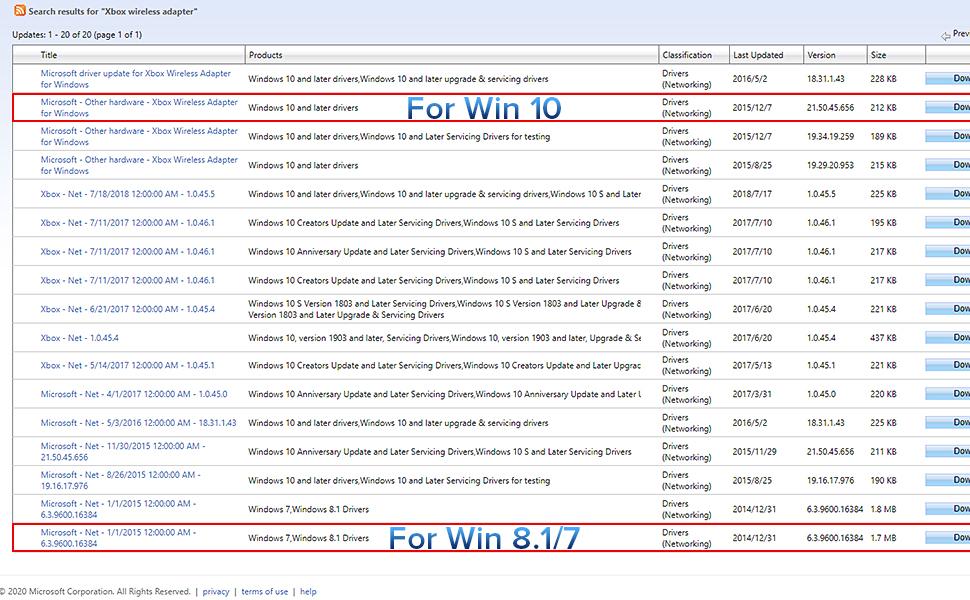
This review is for the Cipon Wireless Adapter: This adapter is indeed compatible with Windows 7 and works quite well with an Xbox 1 controller. There are however a few things to note that have either changed, or don't appear in the otherwise comprehensive description. Searching for "Xb Wireless Adapter" no longer brings up relevant results for the Windows 7 driver. Search for "Microsoft - Net - 1/1/2015 12:00:00 AM - 6.3.9600.16384" instead, and download either the X86 or X64 update that matches the operating system on your computer and install it per the directions in the description. When installed correctly and operating wirelessly, only the wireless adapter, and not the Xbox controller will appear in Devices and Printers, however the receiver is functioning correctly and you can verify if the controller is working properly by using the test setting of the built in "Set up USB Controllers" Windows 7 program. The adapter is much larger than it appears in the picture (about 4 times the size of a typical flash drive) and at least on the computers available to me, installs with the Bluetooth connection button facing down and the connection light behind adjacent cables making it hard to access. Overall the Cipon Wireless Adapter is definitely worth getting if you want to use an Xbox controller with Windows 7. P.S. Make sure your controller has batteries installed before you start cussing out the Cipon receiver for not working. :-)
M**S
Wireless is better
The Cipon Wireless Adapter for Xbox One Controller has completely transformed my gaming experience, offering unparalleled convenience and freedom without sacrificing performance. Here's why I'm thrilled with this accessory: Wireless Freedom: The most significant advantage of this adapter is the freedom it provides. No longer tethered by a cumbersome cable, I can game from the comfort of my couch or bed without worrying about the limitations of a wired connection. It's liberating to move around without restriction, enhancing immersion and comfort during extended gaming sessions. Seamless Connectivity: Setting up the adapter is a breeze. With simple plug-and-play functionality, I was up and running in minutes. The adapter seamlessly syncs with my Xbox One controller, providing reliable wireless connectivity without any lag or interference. Whether I'm playing fast-paced action games or competitive multiplayer matches, I can count on the adapter for responsive and uninterrupted gameplay. Compact and Portable: The compact design of the adapter makes it highly portable and convenient to use. Its small footprint ensures that it doesn't clutter my gaming setup, while its lightweight construction makes it easy to transport for gaming on the go. Whether I'm gaming at home or at a friend's house, the adapter is always ready to enhance my gaming experience. Compatibility: I appreciate the wide compatibility of this adapter, which is designed to work with Xbox One controllers across various models and generations. Whether I'm using a standard Xbox One controller, an Elite controller, or a third-party variant, the adapter ensures seamless compatibility, allowing me to use my preferred controller without limitations. Reliable Performance: The adapter delivers consistent and reliable performance, even in challenging gaming environments. Its advanced technology minimizes latency and ensures stable connection, providing a responsive gaming experience without dropouts or interruptions. Whether I'm gaming online or offline, I can rely on the adapter to deliver optimal performance every time. Cost-Effective Solution: The Cipon Wireless Adapter offers excellent value for money, providing the convenience of wireless gaming without the need for expensive proprietary accessories. Its affordable price point makes it accessible to gamers of all budgets, offering a cost-effective solution for those seeking wireless freedom without breaking the bank. Conclusion: In conclusion, the Cipon Wireless Adapter Compatible with Xbox One Controller has exceeded my expectations in terms of convenience, performance, and value. Its wireless functionality, seamless connectivity, compact design, compatibility, reliability, and affordability make it a must-have accessory for any Xbox One gamer seeking to eliminate cable clutter and enhance their gaming experience. Whether you're a casual gamer or a hardcore enthusiast, this adapter is sure to elevate your gaming setup. Highly recommended!
S**H
Save your money - get the OEM dongle
You'll think you're saving a bit of money or maybe getting faster shipping by buying this, but it does not work the same as the OEM adapter. With this, when you disconnect, walk away and return to your computer later and try to reconnect the controller it won't work until the device is power cycled (unplugged and replugged) It's very inconsistent, I'd say I'm able to reconnect without unplug/replug maybe 20 percent of the time. It's also much larger than the OEM xbox one and gets quite hot which makes me question the longevity of the device. Another thing I noticed is the OEM adapter connects much quicker, almost instantly. This one would take several seconds to connect every time. Tried all the usual fixes like disabling power saving options for USB and selective suspend, no difference.
J**.
No issues so far - decent generic version of the Microsoft Adapter
I purchased an Xbox Elite 2 wireless controller for use with my PC a couple of months back. However, reception from the on-board Bluetooth built into my motherboard was atrocious, and to use the controller I needed to plug it in, defeating the purpose of having a wireless controller. For those that aren't aware, newer xbox controllers can use either Bluetooth or a proprietary wireless protocol developed by Microsoft. Older xbox controllers can only use the proprietary protocol. However, not all Bluetooth implementations are created equal, and generally a Bluetooth signal isn't as strong as and is higher latency than a wi-fi-based signal like the Microsoft protocol. For many/most people, Bluetooth is probably just fine. However, for me, the signal was constantly dropping, the controller would duplicate inputs, and if I were to lean back in my desk chair the controller would lose connection entirely. While you can get a new Microsoft controller with a brand-name version of the wireless adapter if you buy a pack including a new controller, for whatever reason Microsoft does not include an adapter with the Elite 2. They have also discontinued sales of the adapter as a standalone. You can find official MS-branded adapters on the secondary market at a significant markup (though good luck proving their authenticity), but I decided to take a chance on this adapter which is a generic, presumably of Chinese or other east-Asian manufacture. This saved me roughly $50 over buying an extra controller + adapter pack, or $40 over sourcing an official MS adapter on the secondary market. I am pleased to report that after some initial testing, this adapter works just fine. The signal is much stronger than the Bluetooth baked into my motherboard, and the latency/duplicate inputs I was experiencing appears to be nonexistent. The adapter installed easily on my Windows 11 system, without having to manually locate any drivers, and the controller communicated with the adapter right away within the "Xbox Accessories" app after I unpaired it from Bluetooth and paired with the wireless adapter. I've only had the adapter a little while so I reserve the right to update this review if it fails on me, but so far it was easy to configure and solved my connectivity problem at a fraction of the price of an "official" Microsoft adapter. Rating 5 stars unless/until there are any reliability issues.
Y**R
Solid Wireless Adapter – Plug & Play and Reliable
I bought this CIPON wireless adapter as a simple upgrade for my PC, and it’s been doing exactly what it’s supposed to do. Setup was extremely easy — plugged it in, drivers installed automatically, and I was connected within minutes. No headaches, no extra software required. Connection has been stable so far. I use it for gaming, streaming, and general browsing, and I haven’t experienced random drops or lag spikes. Speeds are solid for its size, and latency feels noticeably better than my previous cheap adapter. The compact design is a plus. It doesn’t stick out awkwardly from the USB port and doesn’t block nearby ports. Build quality feels decent, especially for the price. If you’re looking for an affordable, no-nonsense wireless adapter that just works, this is a good buy. I’d recommend it for anyone who wants a quick and reliable Wi-Fi solution without spending extra money on big-name brands. ✔ Easy setup ✔ Stable connection ✔ Compact design ✔ Good value for the price Would definitely buy again.
A**6
Worked Perfectly
Bought this for a friend because no matter what we tried Bluetooth just wasn't working right with his Xbox controller. He'd suffer from random disconnects and extreme input lag, but nothing else connected via Bluetooth to the same device had issues so I looked into 2.4 ghz dongles to get around the issue. This adapter has been put to the test for about half a day and I haven't experienced a single issue. It's not the "official" one, but it works identically without having to deal with eBay second hand nonsense/prices.
C**N
Parfait
J’ai une manette Xbox élite 1 et j’avais besoin d’un adaptateur pour jouer sans fil et celui ci fait le travail ! Facile d’utilisation, on le Connecte , la procédure d’association est la même qu’avec la console ! Et si vous voulez juste éteindre la manette rester appuyer sur le bouton Xbox de la manette pendant 7-10seconde . Rappuyer et c’est reparti . Bon jeu à vous ! Juste la clé qui est excessivement grosse pour pas grand chose . Mais bon pour la moitié du prix de l’officiel on va pas s’en plaindre .
M**K
Functionally identical to official adaptor
Works exactly the same as the official adapter. Audio through 3.5mm jack works and can update controller software through xbox accessories app. Tested on W10 and W11
Y**I
ممتاز
الادابتر ذا راح يحل لك كل مشاكلك مع البلوتوث وتأخير الاستجابة.
M**N
Works perfectly with my PC and Xbox elite controller
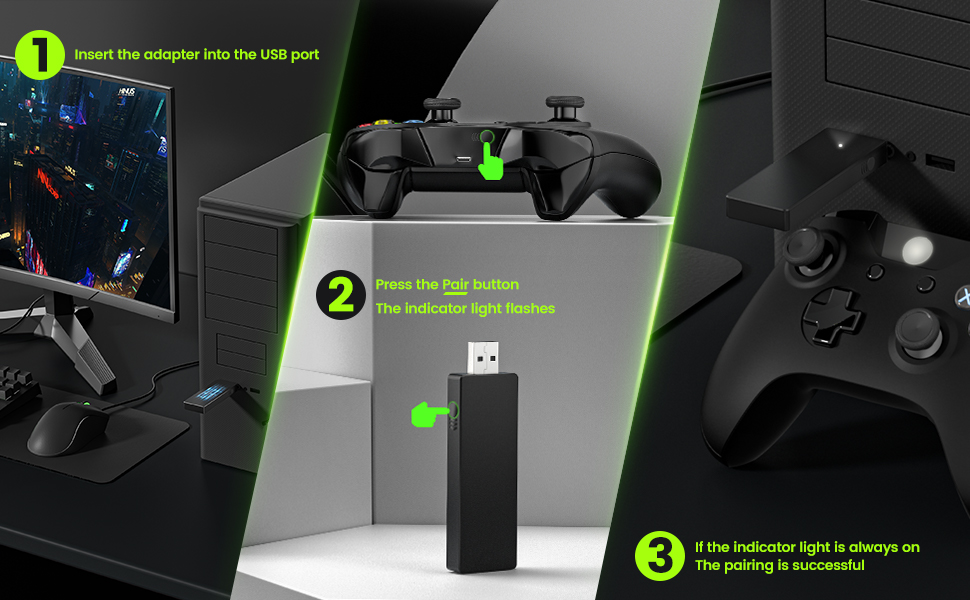
I bought an Xbox elite series 2 controller which I had been using for my Xbox and loved it, the new features were brilliant. However, when I wanted to use the controller with my PC it just didn't work properly. I would connect but then have a horrible input delay and not disconnect within a minute or so. This Wireless adaptor completely fixed all that! You just plug it into the USB port on your computer and press the little pairing button on the device and your controller, like when connecting a controller to a new Xbox, and it connects immediately. The connection is solid, with no input delay, and no dropped inputs, I have been able to play PC games with the controller while sitting 3-4 meters away from the computer. Really happy with the product, simple to use and it just works!
A**A
Muy bueno
Lo uso para cascos y mando de xbox y muy agradecido de haberlo encontrado, sin cortes y va súper bien!
Trustpilot
1 month ago
2 months ago