We remain fully operational. Our teams are working around the clock to ensure your deliveries continue safely.

DOWNLOAD THE APP


Copyright © 2025 Desertcart Holdings Limited
DOWNLOAD THE APP
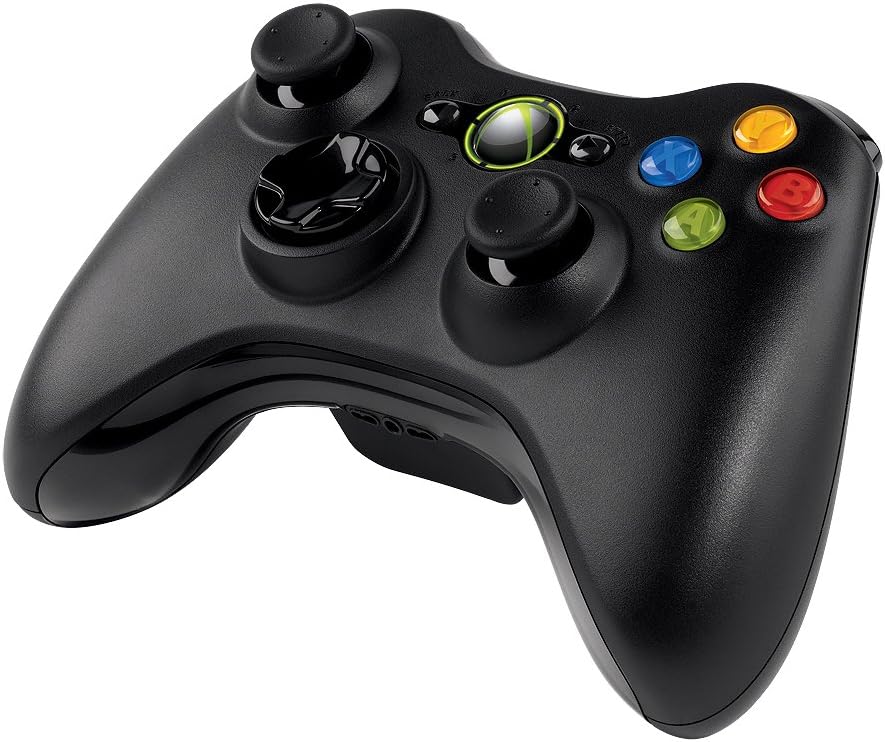

🎯 Level up your game with wireless freedom and pro-grade precision!
The Microsoft Xbox 360 Wireless Controller delivers a premium gaming experience with a 30-foot wireless range, universal compatibility across Windows PCs and Xbox 360, and immersive vibration feedback. Its ergonomic design ensures comfort during extended sessions, while easy plug-and-play setup makes it the go-to controller for serious gamers seeking freedom and precision.


| ASIN | B004QRKWKQ |
| Additional Features | Wireless |
| Best Sellers Rank | #3,619 in Video Games ( See Top 100 in Video Games ) #11 in Xbox 360 Gamepads & Standard Controllers #73 in PC Gamepads & Standard Controllers |
| Brand | Microsoft |
| Brand Name | Microsoft |
| Button Quantity | 14 |
| Color | Black |
| Compatible Devices | Windows |
| Connectivity Technology | Wireless |
| Controller Type | Gamepad |
| Customer Reviews | 4.2 out of 5 stars 2,751 Reviews |
| Hardware Platform | PC |
| Item Dimensions | 9.09 x 5.51 x 2.56 inches |
| Item Weight | 8.13 Ounces |
| Manufacturer | Microsoft |
| Model Name | NSF-00023 |
| Package Quantity | 1 |
| Power Source | Battery Powered |
| UPC | 617407459043 795327759563 031112677972 088021328778 041114204687 712131667587 080000576941 045555998884 667562773423 971478062657 151903583814 021111967686 885370114867 071021020391 885370239430 885370239423 031112082998 012305150830 |
C**Y
Best gamepad I've used on a PC
I've went through a number of gamepads over the years, dating back to when they connected to the PC via an analogue gameport. I've had pads from the likes of Thrustmaster, Saitek and a few others, most recently using a PS2 controller via a USB Adapter , which was far from ideal. Over time, the layout of the Xbox 360 controller has become something of a standard for PC games that use a joypad. Many games already include mappings for the controller, and Steam's big picture mode more or less assumes that you're using one. I was looking for a new controller, so with all this in mind I decided to go for the wireless version of the gamepad for windows. The last time I used an Xbox controller was on the original Xbox with one of the original humongous controllers. I don't have the smallest hands in the world, but that thing made them ache after an hour or so. Not so here; the controller is a nice size, the analogue sticks are positioned well in range of my thumbs, and the overall balance of the gamepad feels good. It also doesn't resort to any of that nasty grippy rubber paint that was all the rage not that long ago. That stuff doesn't last in a tropical climate, tuning into a sticky, messy goop that then has to be removed. As others have mentioned, the Windows version of the pad uses AA batteries. Myself, I see this as a bonus. Instead of relying on a LiPo pack that may or may not survive more than a year's worth of use (I've heard really bad things about the kit that adds a Lithium battery to the controller) NiMh rechargeable AA's tend to be quite robust, and they're dirt cheap. If they were ever to die, replacements these days are about $1.50 apiece. Ever since low self-discharge cells became the norm, having them go flat by themselves is no longer an issue. Thank you Sanyo for your Eneloops and Amazon for your Amazon Basics AA's; I have a pile of both types at home. The integration of the gamepad into Steam's big picture interface is impressive. Having it mapped to the Xbox 360 controller layout was a smart move on Valve's part as they were able to concentrate on the on-screen prompts being consistent, etc. It makes me wonder how SteamOS will be once it launches. Software-wise, the gamepad ships with next to nothing. A driver CD is supplied, which installs drivers and little else. This is the source of the controller's greatest failing; unless you're playing a Games for Windows Live game (hereby referred to as GfWL), there is no way supplied to turn the controller off once you're done. It supposedly turns itself off after a short period of inactivity, but I've heard that can be unreliable (I'm testing this at the moment, and it's yet to turn itself off since I started writing this review). Many resort to disconnecting the batteries once they're done to turn the controller off, which is a workable (if clunky) solution. If this were what we were stuck with, I'd have docked a star, perhaps 2 for this alone. It doesn't detract from the gamepad while in use, but it's an annoyance that seems doubly odd given a mechanism exists to explicitly turn the gamepad off from software, but that software isn't provided with the gamepad to cover all eventualities. Only the abomination that is GfWL gets that level of control. Thankfully, the community at large had a bit of a poke about, and the "Xbox360 Controller Manager" was born. This is a little tool that sits quietly in your system tray and responds to a long press of the guide button (the silver button in the middle) with a prompt to turn that controller off. The tool itself takes single-digits of MB of memory, which is background noise in this day and age. For those of you that haven't already discovered this essential little piece of software, you can get it here: http://pety.me/XboxExt/ Save it wherever, add a shortcut in your "Startup" start menu folder, and then forget about it. Using it will become second nature, and you'll forget that it's a 3rd-party application. Honestly, this utility removes the one problem I had with the gamepad, and does it so effectively that I can't help but wonder why Microsoft didn't ship it with something similar. Overall, I highly recommend this. The biggest niggle I had with it was solved by its users, and if you're looking for a wireless controller for Windows, there really isn't any reason not to get one. P.S. I'm done with this review, and the controller still hasn't turned itself off. Thankfully, there's an app for that...
M**C
I was hesitant, but the controller is great
I was pretty hesitant on getting this controller. I'm NOT a Microsoft or Xbox fan so this was actually my third choice for a PC controller. First I had a wired Logitech controller which worked great but had minor issues... And was wired. Then I set up my PS3 controller to work with my PC. It had some technical issues but overall worked pretty good. I decided to stop however since I had to resync it to the ps3/PC when I went back and forth. But I can honestly say that I am happy I went with this wireless controller. Pros: -easy to setup and use. Basically just plug it in and push the center button when you want to turn it on. -great response and most games nowadays are designed to have a controller option. I've played 5-6 games on Steam with it and they've all worked fine. -I've only been about 5-7 feet away, but I've had no connectivity issues at all. That includes changing positions and going back and forth with the m/kb. -battery life appears to be pretty good. I've used it for probably 10-15 hours and the double A batteries that came with it still say they're full. Cons: -the left stick appears to get "stuck" on occasion and the character will sort of just drift to the left. It fixes itself as soon as I move the stick again but it is noticeable and has happened in every game I've played. Unsure if this is the controller or some sort of software issue. It's not too frequent so it doesn't bother me too much. -kind of an uncomfortable controller. Anyone who plays xbox won't have an issue but I've been using a Playstation for years so it's kind of awkward for me. Also, using the dpad just feels unnatural. Menu navigation or for action buttons it's fine, but using it as the primary directional keys in a 2D game is just weird. Doesn't feel right to me at all. -no way to program the buttons for third party usage. For example, the Logitech one I have included a program to basically allow you to map whatever keys you want to the controller. This made it possible to use it with emulators or other games that don't support controllers. No such luck here. Not surprising, this is part of the reason why I don't like Microsoft. Overall 5/5, all things considered. Definitely recommend to any PC gamer. I've been playing Dark Souls and Titanfall with it and can't imagine going back to another controller or m/kb.
K**P
Great controller
I am first and foremost primarily a PC gamer. I do own a Xbox and PS3 but they largely gather dust unless a new game only on that system comes out and I go that route. There are a handful of titles both new and old that just work better with a controller rather than a mouse and keyboard. That being said, I purchased the Xbox controller for use on those games. It is the exact same as the controller for the Xbox 360 so no surprises there. The controller setup is great, looks and feels solid and responds quickly. The controller is plug and play and the wireless adapter is small and easily sit out of the way. I liked having the option to go wireless for the simple fact of cords being so damn annoying. Nobody likes being tethered to a PC if it doesn't hamper performance and thus far I have not experienced any lag or delay in button responses. Now on to the negative. Microsoft has overlooked the fact of creating a way in which the controller can be powered down. If u hold the guide button like on a Xbox 360 nothing happens, and the included software does not address this. The only manner in which I can find to power down the controller itself is to manually pop the battery pack out enough to disconnect the flow of power, thus shutting the controller off. I do not like to do this, both due to annoyance and possible damage to the battery pack eventually so the only other option is to leave the controller on and eventually it will shut itself off after a few minutes. That is the only reason I knocked a star off, if they fix this than I would gladly bump it up to a 5 star rating. No complaints with the functionality of the controller, I actually really love it and would definitely recommend it to anyone who is a PC gamer. If the listed problems are a concern to you it may be a better option to go with the wired controller.
C**R
Former Logitech F### series fan
Just FYI: I have big hands, but skinny fingers. For the past two years I have been using a Logitech F310. It's a good series of controllers (F310, F510, F710). It was very functional and had old fashioned DInput and also Xinput for newer games based on the XBox 360 controller. That said, it didn't really fit my hands correctly. If I held it naturally, the joint in my thumb would be touching the buttons and sticks, not the tip. I didn't really mind, it wasn't that big a deal. Just made my hand cramp after an hour or two. There was also the issue of the very "stiff" joysticks. I recently converted an old "gaming" laptop into a Steambox and wanted a wireless controller to use with it. I was considering this or the Logitech F710 (wireless version of the F310). I decided to go with this since it included a dongle that supported up to 4 controllers at once, and the Logitech doesn't have anything like that (apparently it doesn't use the Unifying receiver Logitech is known for.) I am VERY happy with my choice. The XBox controller is extremely comfortable. My fingertips rest on the buttons and joypad. I was a bit hesitant about the "asymmetrical" joystick location, but let me tell you: you don't really notice. No, really. It seems like you would be annoyed by that but, no, it feels as natural and as fine as the traditional Playstation joystick placement. Maybe even a little better. Joysticks are smooth and responsive and sensitive. Also feels much sturdier and better quality than the Logitech. I installed the drivers using the included CD. I have had no problems. I use Windows 7 Home Premium 64 bit. Plan on picking up another controller instead of foisting my F310 on guests, I'm that satisfied with it! (will get a --regular Xbox 360 controller--, not this package, as you don't need another Microsoft controller dongle! Standard XBox 360 controllers will work on this too!)
M**M
Ok, I have it in my hands...how do I get it to work?
Apparently, very recently (it seems) Microsoft [EDIT: Not Microsoft, it seems from several other people who experienced the same thing its GPStock that has not included the receiver] stopped including the USB receiver dongle with these controllers. It is not clear at all from the product description that you would need to get a separate (non-existing) usb receiver. In fact, when you go to the answered questions portion, the top one is whether it comes with the receiver or not. The top answer is "Yes!" and so is the next few answers. Do I really need to go any further down to confirm? There were two people who answered "no" only about 2 or 3 days ago. I had this item in my wish list for a little while until it was in my budget. It seems the ONLY option available to me is buying a $20 receiver that is made to work with 4 controllers! Effectively making my 1 controller $60+. That would be great...if you needed that functionality. I don't have anyone to play games with me in my room, if anything they would be online. I just want the regular single receiver, you know, like every other wireless peripheral. How am I supposed to do anything? I would really like to give this more than 1 star, because I have a feeling this is a great controller. Many, many reviewers have said so! I feel like I shouldn't cut out 4 stars just because one small part is missing that is not the controller itself. But you know what? I can't test it out because it has no wireless function right now. I can't tell you if it's any good. When I start up my games...my guy in the game just stands there waiting for a command from my hands via the controller. I push the buttons and the joystick, yet nothing happens...because in case you didn't figure it out, there's no wireless receiver to pick up my commands. I can probably hang it up on the wall as an art piece. You know a Duchamp-esque found object. It would probably have more function as an aesthetic piece than a game controller. The fact that the product page is misleading is not even the biggest problem. It's simply that I don't really have a way to buy the USB receiver. It just doesn't exist. I must drop a ridiculous $20 for a 4-controller receiver that is not subtle at all. It has a 6-foot cable from USB port to the actual receiver. Why? WHHYYYYYYYYYYYYYYYYYY???!!!!
W**O
What's up with all the 5 star reviews?
Already had a Sony PS3 (DS3) controller that I've been using with my PC but bought this 1) to not have to use MotionJoy 2) for the better ergonomics. I'm really surprised that this controller has so many 5 star reviews and here's why: Although the ergonomics are better in some respects (no sharp edges), it's heavier than the ps3 controller and the directional pad is horrendous. The D-pad can give you a response that's 90 degrees from your intended direction. For example, I can put my thumb on the left portion of the D-pad, but if I happen to be applying some up or down pressure at the same time, which is easy to do in a gaming session, it can actually end up going full up, full down, diagonal left-up, or diagonal left-down. That's a 180 degree window!!! I've also had it stick completely right on one occasion during its first 2 hour gaming session. The centering on the two analog sticks are much worse than for the PS3 controller. Depending on which direction I've moved the stick last it can end up "centering" anywhere within a 35% (estimated) window of the total travel area (as per the standard windows test/calibration tool). Also, I'm not a fan of the concave tops of the analog sticks. You'd have to have some really long thumbs to be able to keep your thumbs directly on top and "in" the sticks. I like the PS3 thumb stick design better. I also find the "select" and "start" buttons much easier to hit without looking on the PS3 controller vs. this one. The setup was really easy in Windows 7. It found and automatically installed the drivers. I don't have an issue with not being able to immediately turn off the controller as it conveniently uses AA batteries (I have a ton of rechargable Sanyo Eneloops). The receiver seems to work fine and have good range. I'll give this a few more hours of gaming to see if it improves but it will likely be going back and I'll keep putting up with using MothionJoy and the sharp edges of the PS3 controller. It's just not worth the precision trade-off in my opinion. If you must have a hassle-free plug-and-play solution then this might be the way to go, but if you value precision and don't mind having to do some manual driver installation then stick with the PS3 controller, compatible bluetooth dongle, and motionjoy drivers.
T**T
One silly flaw in an otherwise great controller
This package is an XBox 360 controller with a wireless USB adapter that transmits a signal so you can play wirelessly. In other words, while it comes with an XBox 360 controller, you can also use any other XBox 360 controller as well. Using the simple setup poster and included software CD, you install the software, connect the USB adapter, and you're ready to play. The good news is, the adapter for this Wireless Controller will not only let you connect up to FOUR XBox 360 controllers at the same time, it will also let you connect other devices, such as XBox wireless headsets. The bad news is, there is one fundamental flaw that seems to have been completely ignored by the people who developed the software to support the XBox 360 Wireless Controller for Windows: You can't easily turn it off. On an XBox, you press and hold the controller's center button. The software launches a menu and one option you can choose is "Turn off Controller." The documentation and the software's help files say nothing about turning off the controller. Digging through forums uncovers that you can either set the controller down for 20 minutes and wait for it to turn itself off, or most people disconnect the battery pack every time they want to turn it off (which will eventually loosen it). The center button does nothing if you're not in a game (and if you are, it doesn't give you a "turn off controller" option). You can't "eject" the controller in Windows, and if you disconnect the USB adapter or turn off your PC while the controller is still on, the controller will continue to look for a connection until the battery runs down. There is one sure-fire way that works: you have to be playing a Games for Windows Live game, logged into your Games for Windows Live account, and when you're ready to quit, press and hold the center button for 4 seconds. You will get a menu that will ask, "Do you want to turn off the wireless controller?" Choose Yes, and you can continue exiting the game using the keyboard and mouse. UPDATE: Amazon customer "Kitten" posts in the comments below that there is a system tray utility that will allow you to turn off the controller if you forget to do the steps above. I haven't tested it yet but when I do I will come back here and update my review accordingly--her link is in the comments. That said, there is a reason I bought this controller, and that reason is that I really have come to enjoy the XBox 360 Controller. I've also had some very annoying compatibility failures over the years with PCs and "game pad" controllers. The XBox 360 controller--wired or wireless--has been the best. It's literally plug and play and thus far I haven't had any button problems, or had the sticks fall out of calibration like some other controllers do. If you love PC gaming, but you need to use a console-style controller for some of your games, this is your best bet. You can go with a wired controller and save yourself the power-down headaches, but if you really want wireless in Windows, the XBox 360 Wireless Controller for Windows is the best. Maybe one day they'll finish the software--I strongly suggest they put a tray icon in with a menu to manually handle this.
F**C
Buyers Beware, lack of product quality control
I want to start out by stating that this review is for the genuine Microsoft Xbox 360 Wireless Controller shipped and sold by Amazon.com. I recently finished building a new gaming rig, and since I use my Xbox 360 and Xbox One the most out of all my gaming consoles I decided it would be best for me to stick with an Xbox controller for my PC. I currently own several Xbox One controllers, but in my opinion the Xbox One controllers just aren't as sturdy as the 360 controllers. To my dismay, I quickly realized that using a 360 controller on the PC wasn't as simple as the Xbox One controller which comes with a plug and play option for Windows. Since I wouldn't be able to use any of my existing 360 controllers, I decided to look into my available options. I am a person that prefers genuine products over generic counterparts, so I was left with either purchasing a wired 360 controller or purchasing the regular wireless Xbox 360 controller that comes with a USB wireless receiver. I decided to go with the wireless option since during the time of my purchase it was only $8 more than the wired version, which I am more than willing to pay for the convenience factor it comes with. As much as I like the Xbox 360 controller, I am very disappointed with the declining quality control over at Microsoft. Perhaps I have just gotten unlucky a few times, but I think it's beyond unacceptable for a company to be shipping out products labeled as new that arrive damaged. In the case of my Xbox 360 Wireless Controller for Windows purchase, the controller came with several deep cuts on the front of the controller. If I had to describe the damage, I would say it looks like someone took a power saw and made a few precision cuts on it. Neither the actual product packaging nor the Amazon box it was shipped in had any kind of damage, which clearly indicates that the damage occurred prior to the product being packaged. Seeing how the product packaging features a large clear plastic surface in the front that acts as a showcase window for the controller, it's obvious that there is a quality control issue at the manufacturing plant if products are able to depart the facility in such a condition, as the damage can be easily seen without ever having to open the packaging. It appears that the damage on my controller is only superficial, but when you are purchasing a product labeled as "brand new", you don't exactly expect it to arrive with any sort of damage period. The Xbox 360 controllers themselves are pretty amazing, I prefer their shape and overall quality (assuming they come without any damage) over all my other controllers. So I do recommend the controller, but keep in mind that if you order this product, you may end up receiving a damaged one. Another thing to mention is that a lot of people have complained about the actual USB receiver breaking after a few weeks of use, so if you don't want to risk getting a product that may come with manufacture defects or that may stop working, I recommend you go with the Xbox One controller instead. If you do end up getting this controller and the USB receiver stops working, I recommend you contact Microsoft to see if they have replacements available (They may need to verify the serial number on your device, replacements are only free of charge as long as the warranty is still valid). It appears that the software has still not been updated to support Windows 8/8.1, so keep that in mind if that's the OS you are currently using. If it wasn't for the lack of quality control over at Microsoft and the issues with the USB receiver and its software, I would have probably given this product a 5 star rating. Granted, the people who receive a damaged product may be in the minority, but after reading a bunch of reviews it seems that there are multiple people citing the exact same issue in their reviews. And as much as I prefer the Xbox over my other consoles, I have never had my other consoles or console accessories arrive with any kind of damage. Whereas this now makes the 5th time since the release of the Xbox One that I have received a brand new Xbox product that came with damage that clearly occurred in the manufacturing plant. Short summary: I will gladly recommend the controller, assuming that it doesn't come with any superficial manufacture defects, however, with the lack of Windows 8 software support and the short lifespan of the USB receiver I am not sure if I could recommend this specific package. It may be safer purchasing either the Xbox One controller or the Wired Xbox 360 controller as you won't have to worry about a receiver breaking which would render your ability to connect to your PC. But in the case you do decide to go with the wireless controller for windows and receive a damaged one (which you will be able to see without having to open the actual product packaging), I am sure that Amazon will be more than willing to fix the order assuming the item is shipped and sold / fulfilled by Amazon.
Trustpilot
3 weeks ago
2 weeks ago