Desertcart purchases this item on your behalf and handles shipping, customs, and support to Thailand.
🚀 Elevate Your Workspace WiFi Game with TP-Link EAP225!
The TP-Link EAP225 is a business-grade dual-band wireless access point delivering up to 1350 Mbps with MU-MIMO technology. It supports seamless roaming, mesh networking, and flexible PoE power options, all managed centrally via the Omada SDN cloud platform and app. Designed for professional environments, it ensures robust, secure, and scalable WiFi coverage backed by a limited lifetime warranty.


| ASIN | B0781YXFBT |
| Antenna Location | Business, Office |
| Antenna Type | Internal |
| Best Sellers Rank | #715 in Computers ( See Top 100 in Computers ) #2 in Wireless Access Points |
| Brand | TP-Link |
| Built-In Media | AC1350 Wireless MU-MIMO Gigabit Ceiling Mount Access Point EAP225 Power Adapter Mounting Kits Installation Guide |
| Color | White |
| Compatible Devices | Personal Computer |
| Compatible devices | Personal Computer |
| Connectivity Protocol | Wi-Fi |
| Connectivity Technology | Wi-Fi |
| Control Method | App |
| Controller Type | Switch |
| Coverage | Indoor |
| Customer Reviews | 4.6 out of 5 stars 3,196 Reviews |
| Data Transfer Rate | 1350 Megabits Per Second |
| EU Spare Part Availability Duration | 5 Years |
| Frequency | 2.4 GHz |
| Frequency Band Class | Dual-Band |
| Frequency band class | Dual-Band |
| Global Trade Identification Number | 00845973093006 |
| Has Internet Connectivity | Yes |
| Has Security Updates | Yes |
| Is Modem Compatible | No |
| Item Dimensions L x W x H | 20.5L x 18.2W x 3.7H centimeters |
| Item Type Name | access point |
| Item Weight | 1.1 Pounds |
| LAN Port Bandwidth | 1350 megabits per second |
| Manufacturer | TP-Link |
| Maximum Upstream Data Transfer Rate | 1350 Megabits Per Second |
| Mfr Part Number | EAP225 V3 |
| Model Name | EAP225 |
| Model Number | EAP225 |
| Model name | EAP225 |
| Number of Antennas | 2 |
| Number of Ports | 1 |
| Operating System | Linux |
| Other Special Features of the Product | Access Point Mode |
| RAM Memory Installed | 64 MB |
| Router Network Type | hybrid |
| Security Protocol | wpa2-enterprise, wpa-enterprise |
| Special features | Access Point Mode |
| UPC | 840460602310 845973093006 |
| Voltage | 12 Volts (DC) |
| Warranty Description | Limited Life Time Warranty |
| Wi-Fi Generation | Wi-Fi 5 |
| Wireless Compability | 802.11ac |
| Wireless communication standard | 802.11ac |
R**Y
Love it
I have 8 of those at my hotel, they are the perfect solution for SME, easy to deploy and manage, very reasonably priced. Bought this item this week, it is V4, in the US and europe they are now selling V5+. V4 is still compatible with the latest controller versions.
J**C
Fast & easy
I don't know the brand TP-LINK very well but decided to try a couple of these. VERY impressed. Easy to set-up/update/config and excellent throughput and range. So far zero complaints. Will buy again.
V**R
Best WiFi AP
I was struggling to find a better access point which would give max speed and best coverage. I now have zero issues with WiFi. It’s as good as wired network. Go for it without doubt.
M**D
ممتاز
التغطية ممتازة جدا سعره رخيص جدا مقارنتا بالشركات الثانية جودة التصنيع لابأس بها التثبيت للنوع ذا بس للسقف بتواجه صعوبه لو بتثبته بالجدار الجانبي
S**Y
Excellent
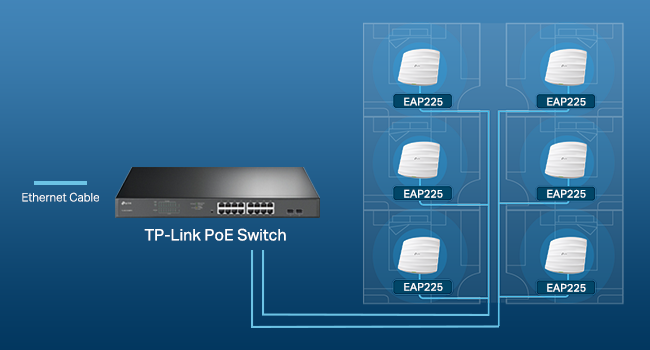
I already had two of these and got this one to replace the Telstra modem Wi-Fi as I replaced the modem with a TP-link router (Er605) but they don’t have Wi-Fi. I connected this unit to a TP-link PoE switch (TL-SG2008P) to provide power to the unit. My other two units are using the PoE injectors that are included. I have my network managed using the Tp-link Omada controller and it was seamless, was able to easy firmware updates and configure SSID’s etc simply. I would recommend the units as they seem extremely stable and give very good coverage.
C**C
Pretty Much As Perfect As It Gets!!
First of all, let's get this out of the way. There's a review that states: "You can’t program this device (create and ssid and password protect your WiFi) without downloading their app that logs all the sites you visit TP Link shares this information with their 'partners' per their privacy policy..." Let me explain what I did and let you be the judge. I installed one. (I ordered two and they're both installed now.) Then I discovered its IP address using Advanced IP Scanner. (I also could have used IPScan or looked at a status page on my router.) At no time did I use a mobile device for anything, let alone download an app. From there, I its (really GOOD) GUI interface, turned off its DHCP and set the IP address I wanted it to be, using Firefox (I could also have used Chrome, Opera, or K-Meleon, all of which I have installed. I then went back in and set everything else the way I wanted it. If the reviewer was talking about the Omada software (which I don't use), he should have stated that. I hope this will allow you to make it past that review and read some "real" reviews. There are no cons that I can think of except those dictated by the limits on WiFi imposed by the FCC. The range is not miraculous, but it's VERY good. Really nice 360 degree coverage!! (When mounted on the ceiling, anyway!) It's extremely competent and secure, with lots of settings. Guest networks with lots of settings. Pretty much each and every setting can be set for each band (2.14 or 5GHz) and for the guest networks - separately. I have a 10 foot ceiling throughout, with ceiling tiles. I can't tell you how pleased I was that long, thin screws, "fender" washers and wingnuts were included just for that!! I can almost say it's a tool less installation, but you do have to cut a hole in the ceiling tile. I used my Swiss Army Knife. They look really nice. The power LED is very bright and visible and can be turned on or off in the settings, too. Two of them have been running flawlessly for almost two months now. It's a 3000 square foot building and it's notorious for "eating" RF. It's cider block and it even has some cinder block wall on the inside. The best cordless phones made can barely make it from one end to the other and die almost as soon as one walks outside. These two EAP's cover it completely and even reach outside! There is nowhere I can go where the signal strength isn't at least "Good". In most places, it's "Excellent". Now there's WiFi outside, too, as long as one doesn't stray too far. One is powered by the PoE adapter that came with it, and the other is powered by a PoE gigabit switch. They work great either way. And they're as fast as gigabit Ethernet, anyway! I can't think of anything I've ordered from Amazon that I like more than these things! I'd be happy if I'd spent twice the money for them; just to avoid the "junk" out there! I'm starting to have all kinds of faith in TP-Link - especially when it comes to WiFi!!
Trustpilot
3 days ago
1 week ago