🚀 Elevate your mobile workspace with power, style, and unbeatable battery life!
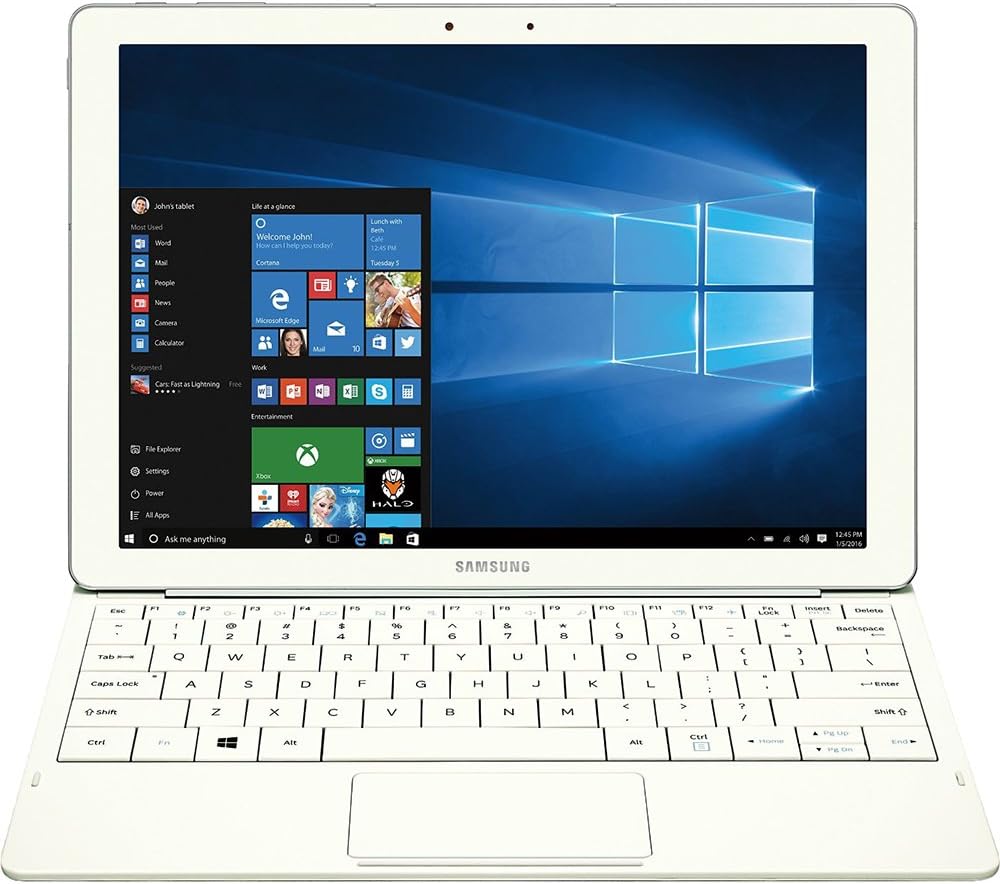
The Samsung Tab Pro S 12" is a sleek, lightweight Windows 10 tablet featuring a vibrant AMOLED display, Intel Core m processor at 2.2 GHz, 4GB RAM, and 128GB SSD storage. Designed for professionals and gamers alike, it offers up to 10 hours of battery life with fast charging, making it a versatile alternative to pricier competitors like the Surface Pro and iPad Pro.


| ASIN | B01AZ7LXTE |
| Age Range Description | Adult |
| Aspect Ratio | 16:9 |
| Battery Average Life | 10 Hours |
| Battery Cell Type | Lithium Ion |
| Best Sellers Rank | #945,484 in Electronics ( See Top 100 in Electronics ) #7,660 in Computer Tablets |
| Brand | Samsung |
| Built-In Media | Travel Adapter^Keyboard Cover^Galaxy TabPro S^Quick Start Guide^Health and Safety^Customer Experience Brochure |
| CPU Model Number | Celeron M |
| Camera Description | Front, Rear |
| Cellular Technology | 4G |
| Color | White |
| Compatible Devices | Keyboard |
| Connectivity Technology | Wireless |
| Customer Reviews | 3.8 out of 5 stars 176 Reviews |
| Display Resolution Maximum | 2160x1440 Pixels |
| Display Type | LED |
| Generation | 1st Generation |
| Global Trade Identification Number | 00887276135571 |
| Graphics Description | Integrated |
| Hardware Interface | Solid State Drive |
| Human-Interface Input | Touchscreen with Stylus Support |
| Item Weight | 1.53 Pounds |
| Lithium-Battery Energy Content | 39.5 Watt Hours |
| Manufacturer | Samsung IT |
| Memory Slots Available | 1 |
| Memory Storage Capacity | 128 GB |
| Model Name | TabPro |
| Model Number | SM-W700NZWAXAR |
| Model Year | 2016 |
| Native Resolution | 1920 x 1080 |
| Operating System | Windows 10 Home |
| Other Special Features of the Product | Fast Charging |
| Photo Sensor Resolution | 5 MP |
| Processor Brand | Intel |
| Processor Description | Intel Core |
| Processor Speed | 2.2 GHz |
| RAM Memory Installed | 4 GB |
| Screen Size | 12 Inches |
| Specific Uses For Product | personal, gaming, business |
| Total Usb Ports | 1 |
| UPC | 887276135571 |
| Video Capture Resolution | FHD 1080p |
| Video Processor | Intel |
| Warranty Description | 1 year coverage for labor, 1 year coverage for parts, 6 months coverage for the battery |
| Warranty Type | 12 |
| Wireless Compability | 802.11abg |
| Wireless Technology | Wi-Fi |
R**S
Fantastic alternative for Surface Tablet Shoppers
I was anxious to get this, as I had been thinking about getting a Surface Pro for a while. I'd also been reading a lot of pro reviews about this, and I have to say, I'm very impressed by this tablet/laptop in its entirety. It's sleek, lightweight, solidly built, and runs everything I need it to quite well. I was also surprised that it does a decent job in some of the games I play, like Guild Wars 2, Tomb Raider, and Bioshock: Infinite. While it may not allow you to run these on anything much higher than low settings, the frame rates are well above 30 fps, which is good enough for me, and the OLED screen makes up for the trade off in graphics settings. It's a gorgeous display, as you've no doubt heard, or perhaps seen on Samsung's other S series tablets. Battery life FAR exceeds anything any Surface tablet offers, and recharge is FAST. My only complaints are the choice of a USB C port, but I do appreciate that Samsung wanted the latest and greatest, and that's remedied easily enough with an adapter. My other complaint, which is also minor, is in the keyboard build. I would gladly have paid an extra 20 bucks for something a little more robust in build quality. It works perfectly fine, as does the trackpad, but an excellent tablet like this should have an excellent keyboard as well. I'm more than happy with the price, performance, build, weight, battery life, and of course, that screen! So despite the complaints, I still feel compelled to give this 5 stars, and I recommend this highly if you're in the market.
S**N
Review for the Galaxy TabPro S 10" Tablet in White.
Light and thin. Okay keyboard Very affordable compared to the competition It has a gorgeous if over saturated display that can be toned down in display settings. If you want a super thin windows tablet with a great screen and exceptional battery life on the cheap this is it. Just remember with a core m 3 and 4 gigs of ram it's not a computing powerhouse but overall a good tablet. The combined cover and keyboard can be tough to fold correctly the first few times, but once you’re over the learning curve, you can easily rest the device on your lap and get to it. Hint the keyboard attachment isn't the only magnetic part of the cover. Align the camera hole and press firmly and magnets should do the rest. May need some manual alignment. The keyboard sits so close to the touch screen. Time and again, I’d reach to adjust the volume and use an F-key, I would instead accidentally move the cursor or click out of a program with my fat fingers. You get used to it and don't do that anymore after the first few hours but it's definitely something you should know about. The keys themselves are great, but not perfect. They’re large with a minuscule gap between them. That can lead to some accidental presses. They’ve got a satisfying click to them, and the typos due to space issues aren’t so bad just irritating. the keyboard is like the surface three keyboard. There's been major improvements in the surface line keyboards but this is what you have. The Galaxy TabPro S has a gorgeous amoled display. Which is a fancy word way of saying it’s got an OLED display, each pixel in the display is controlled individually for better contrast and lower energy consumption. In the last few years OLED displays haven’t really appeared in anything larger than a phone or smaller than a TV because of power restraints. The colors it outputs are rich/saturated a very particular kind of color saturation. Samsung mobile devices default settings tend to prefer pretty, saturated colors to accurate colors and the Galaxy TabPro S isn’t any different if you want accuracy your going to mess with the display settings default is saturated. It makes the windows 10 default background look incredible if nothing else. The Galaxy TabPro S costs $899. That’s cheaper than Apple’s Core M product, the MacBook ($1299), and the 12.9-inch iPad Pro with keyboard cover ($968). It’s even cheaper than the Core M version of the Surface 4 with keyboard cover ($1028).
J**F
A better iPad Pro than the iPad Pro
Finally a quality Windows tablet that does everything I cannot do on my iPad Pro (which I also love). The TabPro S is the perfect size for travel and will replace my Windows laptop, Macbook 12, and iPad Pro when I hit the road to visit with clients. The TabPro S keyboard will take a little bit to get used to, but I find it works very well after a few hours of break in period. For the next version of the TabPro S, I would like to see backlit keys and a microSD card slot. Update now that I have had some more time to use it: Battery life is good - consistently lasts at least 8 hours mixed usage of Chrome, MS Office, and media streaming. Charging is slow when the machine is in a sleep or hibernate state. It seems to only quick charge when completely shutdown. Holding the tablet from the bottom can be uncomfortable for long periods due to the keyboard attachment ridge digging into your fingers. The graphics driver that it ships with has some trouble with heavy flash pages and using the Netflix Windows 10 app causes the machine to blue screen every time. I am sure this can be solved via a driver update, but as of now, Windows update or Samsung update do not have any updates for the Intel driver (ships with a January driver date even though there is a March driver update). The touchpad area is quite small compared to a standard touchpad. Adjusting the sensitivity of the touchpad will go along way to making it a bit more usable. Waking up from lock has been a bit inconsistent in tablet mode. Sometimes the screen does not respond and the fix is to attach the keyboard and use CTRL+ALT+DEL to show the login prompt. This is pretty much the same experience I have had with other Windows tablet/hybrids which were eventually solved (like the Surface Pro/Book). The keyboard cover picks up dust very easily but is easy to clean. The magnet for the keyboard connection is quite strong, but I am not a fan of the U-type cover. I greatly prefer a silicone case/tear away keyboard like the iPad Pro combo so the tablet has some protection when the keyboard is not in use. The Apple USB-C HDMI and VGA adapters are not compatible with the TabPro S. USB and charging pass-through work, but the video output does not (bummer as they worked fine with an XPS 13). Still quite pleased with the performance and battery. It handles web/office apps just fine. I was able to get League of Legends to run at 60FPS with native resolution and all graphics turned to lowest settings. World of Warcraft runs at native resolution with lowest graphics settings at 20-50FPS depending on what is going on. I am curious to see what the Huawei MateBook ends up being like as that is probably the closest competition for this type of device. This is still a good device and hopefully the software issues can be worked out soon via driver updates.
F**A
Samsung found that sweet-spot...
Let me start off by saying that when it comes to a purchase like this I research everything, and probably could be thrown into the category of someone who just has issues pulling the trigger on some things. I defend that by saying that I’m someone who doesn’t have deep pockets…I can’t afford to chase technology and constantly upgrade to the next best thing. What I do buy I expect to last. Built-in obsolescence infuriates me… Take it from a father who’s purchased one too many iPhones for his daughter simply because “there’s no more room on my phone”. As great as Apple is at what they do, I simply cannot allow myself to become part of their flock. I started researching tablets about 9 months ago. The most important factors for me were a large beautiful screen and quick responsiveness. I’ve played around with my son’s Samsung Galaxy Note Pro 10.1 that he uses for college, and I was very impressed with it…sharp and responsive. As much as I liked it, for media consumption I wanted something with a larger screen. I read every review I could find on the Galaxy Note Pro 12.2, with its big high-resolution screen…but for me there were too many concerns about all the (non-removable) Samsung bloat-ware that was included, and a few too many comments of the lag it caused. During the fall I heard rumblings of this new tablet, so I waited to see what would be revealed at CES 2016…and I’m glad I did. There’s one tremendously important question that you need to ask yourself before making a purchase. Do you want a laptop that offers the portability of a tablet, or do you want a tablet that offers the productivity of a laptop? It’s important to be honest with yourself when answering this because it will make your decision a lot easier. If you’re primarily looking for a laptop, at this price point there are far too many better choices. There are traditional laptops (as well as 2 in 1’s) with 1080P or better resolution, lots of RAM & storage, and more built-in ports than you’ll ever need. These are intended to be productivity tools and that’s what their built for. If you’re primarily looking for a tablet that can second as a productivity tool, then I believe Samsung has gotten close to that sweet-spot with the TabPro S. I’ve only had this tablet for just a little over a week and I haven’t had too much time to play, but so far I really like what I see. I’ll try not to restate what’s already been said in all the other reviews, so here are just a few observations… -The screen puts a smile on my face every time I boot the thing up! (Sorry…everyone has said that already, but I couldn’t resist). -If you have any concerns about screen brightness, lay them to rest. Even for my aging eyes it’s plenty bright. Under normal indoor/daylight conditions while web-surfing I’ve been using a brightness level of 50%. I don’t anticipate any issues using this outdoors. -Almost no Samsung bloat-ware, but one of the items they did add I feel is very useful. If you’re not a power-user that needs 100% charge each and every day, there’s a setting that will limit the battery recharge to 85%. All lithium-ion cell batteries will degrade over time…There’s no stopping that. As long as it doesn’t interfere with your day-to-day usage, an 85% charge is a great setting to have to extend the overall life of the battery (and your tablet). -The charging is incredibly fast and takes away any anxiety that you may get when the battery gets low. -Since I haven’t had the unit for very long I can’t comment too much on the quoted 10 hours of performance. From what I’ve seen so far I don’t believe I’ll see that mark, but that’s okay. Since I bought a tablet for the beautiful display…I want to see it! I don’t get overly concerned with battery saving modes unless I see the charge dropping like a rock (which I haven’t seen happen). -Because it’s Windows 10, it pretty much works with everything. Although to be honest, when I first heard that it was a Windows tablet I was not all that thrilled. I had it in my mind that I’d always end up with an android tablet. In addition, when I saw that it was housed with just 4GB of RAM…well for a while I thought that Samsung had missed the mark. However, the more I thought about the versatility of a full Windows tablet the more my concerns faded. Other than the occasional critical updates, Windows (like Android) allows you to control everything…You chose every program and app that is housed on your tablet, which ones run in the background and which ones don’t, and zero bloat ware to slow down the system. This point gets back to that question I mentioned earlier. Shouldn’t 4GB of RAM be sufficient for a tablet? Time will tell if these 4 Gigs will hold up, but I’m cautiously optimistic that this will remain a smooth running device for quite some time. -Speakers are solid and provide good volume for YouTube, Netflix, or Amazon Prime, but when I’m planning on watching a favorite show or movie…I’m putting on a quality set of headphones to get the best experience. -As with any device with zero ports (shame on you Samsung), I did invest in about $75 worth of accessories in the form of a screen protector, various adapters & dongles, Bluetooth mouse and wireless keypad…hoping to make my life a bit easier when I occasionally plan on using the tablet for productivity. I didn’t wait for Samsung’s official adapter. Instead I went with tried and true (highly rated) third-party tablet accessories. All have worked fine without exception. Well that’s about it. A five-star item for now because I’m still infatuated with it, but I won’t hesitate to knock it down if it doesn’t continue to impress. I hope this was at least a little helpful to you. Enjoy!
A**R
Product is not worth the money or servicerablity from Samsung - would definitely buy another brand.
Great Tablet until the keyboard quit working. Worked with Samsung rep online to ensure that no software issues existed. Then shipped the device to Samsung repair department. They returned not fixed and charged me $249.00 again this process went back and forth two more times. The last time was mid-February and Samsung service held device and when I called they reported that the device wasn't repairable and I was eligible for a compatible replacement which I chose a refurbished white device same as my model. However, Samsung exchange department was supposed to have shipped within a couple days.Long story short after 12 follow-up phone calls no one can tell me if and when the revised device will be shipped. I have repeatedly requested my original unit be returned as the tablet worked great only the attaching keyboard would not work. Unable to get a reply from Samsung to date. Hope my other Samsung products don't go on the blink as Samsungs repairs are a joke. Still out my original device - be warned in dealing with Samsung warranty department.
M**N
Beautiful Device...But not "Pro"-worthy.
It's a beautiful tablet. I loved the screen quality, weight, and how well it processed through my tasks quickly. It is a very well built device! I really wanted to love it, but, a few things keep this from really a "pro" device. 1) no place for an SD card. If you are only going to give us 100GB of free disk space, we've gotta have the ability to add more ourselves. 2) I really disliked the keyboard cover. Very hard to type on for me. And it only holds the tablet in 2 different angles. Neither of which felt right to me. If I'm using this for any length of time, then I'm going to have to purchase a bluetooth keyboard to take it's place. Which, to be fair, is also my complaint with the Surface Pros. 3) No ports, no stylus. Want to plug in a USB microphone, jump drive, or external monitor? No love for us, unless we want to haul along extra adapters/dongles everywhere we go. And you'll have to bring your own stylus if you love working in OneNote and drawing apps. This would be an outstanding $500 entertainment and lightweight working device (i.e. like the iPad). No way to justify $900 price tag. Hopefully there will be a more well-rounded model coming from Samsung - something more worthy of the "pro" title. Give me some ports, more memory, and a better keyboard, and I'll be back!
D**N
Amazing machine, especially for people on the go
Wow. Samsung outdid themselves this time. Absolutely amazing for work, ended up replacing my laptop Didn't think I would use the keyboard, but now cant picture life without it. You can use the keyboard at 2 angles, didnt realize that for the first couple days, big bonus. Works great for daily stuff, ms office, web, remote desktop, photo editing. Basically everything but video editing and gaming. So for me that 95% of my usage Space hasn't been a problem because all my files are stored on a nas. I use netdrive. So it basically gives me access to all my storage at home no matter where I am. I was also worried about lte, but my hotspot works fine, still wish I had it though. Huge bonus being usb-c, unlike surface and lenovo, which I was considering, I can use any external battery to charge no need for proprietary charging port or special batteries. Also no need to carry around a brick to charge the device. Battery lasts about 8-8.5 hours with decent workload, but I use an anker battery and I can quadruple that. When I am working the battery will charge super slow or it will just slow down the discharge dramatically depending on the load. When Im not using it, it charges just fine. Screen is gorgeous for watching movies in HD, but wish the aspect ratio was 16:9 so I could get the full experience. I dont like the shift to 3:4 or 3:2 like this one is. I use 50% brightness indoors and 75 to 100 outside. Basically its a amazing machine, I cant wait for the next gen, where I could get a little more power to play games.
K**K
Disappointed
While I am sure this tablet hybrid is a good peoduct, the one I received seems to have been defective. The attachable keyboard did not work no matter what I tried. While trying to get it to work, I would tap the keys every once in a while. With just gentle tapping, one of the keys fell off and would not go back on. Even the online keyboard did not seem great. I may have had a setting turned on wrong, but instead of automatically popping up when you go to type in a field, I always had to touch the keyboard on the Taskbar which was somewhat annoying. I assume it would have made a good tablet hybrid had it worked. The screen was beautiful.
Trustpilot
1 week ago
1 month ago