We remain fully operational. Our teams are working around the clock to ensure your deliveries continue safely.

DOWNLOAD THE APP


Copyright © 2025 Desertcart Holdings Limited
DOWNLOAD THE APP

Buy anything from 5,000+ international stores. One checkout price. No surprise fees. Join 2M+ shoppers on Desertcart.
Desertcart purchases this item on your behalf and handles shipping, customs, and support to Thailand.
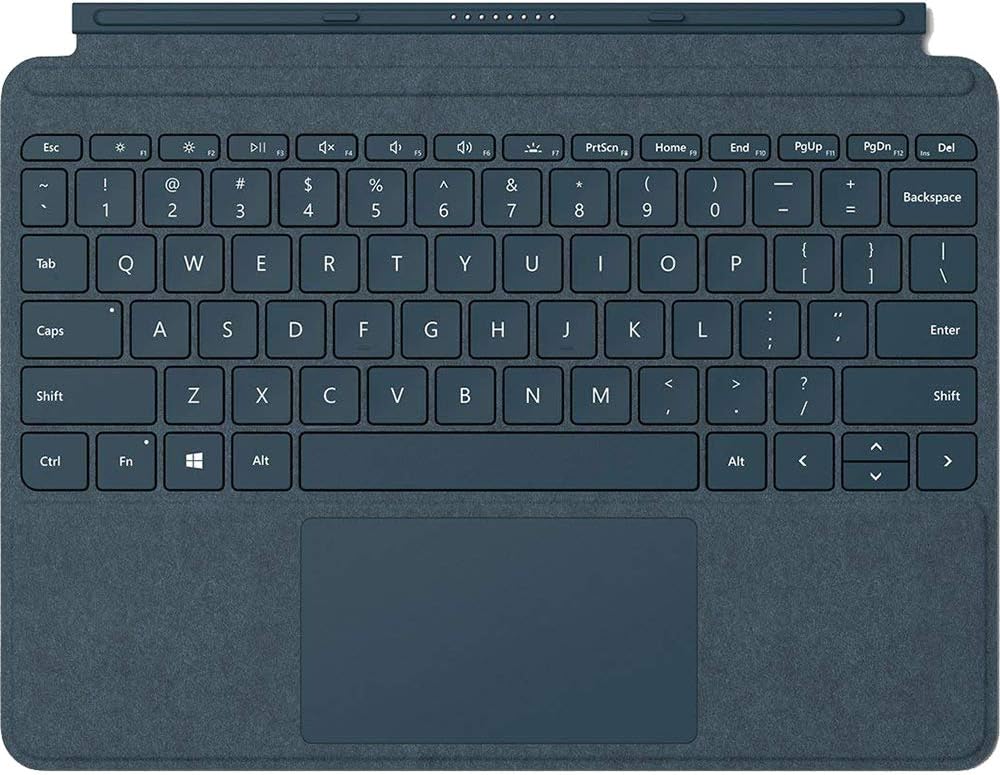
⌨️ Elevate your Surface Go game with style and precision — because your work deserves the best.
The Microsoft Surface Go Alcantara Signature Type Cover in Cobalt Blue combines a full mechanical keyboard with backlit keys and an extra-large glass trackpad, wrapped in luxurious, durable Alcantara fabric. Designed for seamless integration with Surface Go devices, it offers a slim, lightweight profile and instant attachment for a premium laptop experience anywhere.
| ASIN | B07FDJQR2B |
| Additional Features | Lighting |
| Antenna Location | Office |
| Best Sellers Rank | #76,889 in Computers ( See Top 100 in Computers ) #7,654 in Tablet Cases |
| Brand | Microsoft |
| Button Quantity | 77 |
| Color | Cobalt Blue |
| Compatible Devices | Surface Go 3 Surface Go 2 Surface Go |
| Connectivity Technology | Bluetooth |
| Customer Reviews | 4.6 4.6 out of 5 stars (1,323) |
| Enclosure Material | Alcantara |
| Generation | 3rd Generation |
| Global Trade Identification Number | 00889842289244 |
| Hand Orientation | Ambidextrous |
| Item Dimensions L x W x H | 19L x 24.8W x 0.5H centimeters |
| Item Weight | 245 Grams |
| Keyboard Backlighting Color Support | Single Color |
| Keyboard Description | qwerty |
| Keyboard Layout | QWERTY |
| Manufacturer | Microsoft |
| Mechanical Keyboard Switch Model | Cherry MX |
| Model Name | KCS-00021 |
| Model Number | KCS-00021 |
| Number of Keys | 18 |
| Number of Sections | 4 |
| Power Source | USB power |
| Processor Count | 1 |
| Style Name | Cobalt Blue Type Cover |
| Switch Type | Membrane or Rubber Dome |
| Theme | Tablet Accessories, Surface Go Accessories, Keyboards, Computing |
| UPC | 889842289244 |
| Water Resistance Level | Not Water Resistant |
Y**A
Elegant
Nice material and nice build, the keyboard is small and it takes time to get used to it but this was my expectation
A**D
Comfortable and nice to type on
Bit cramped but very nice to type on and very comfortable
Z**I
Very good
Excellent
V**N
Microsoft Surface Go Signature Type Cover
good quality product
R**S
Awesome product for Microsoft surface go laptop.. Technology at it's best.. great looks & sleek design.
S**C
Ordered a Surface Go Cover, got a Pro cover with a tag saying it's a Go cover. It's incompatible with my device and has zero use
L**E
Should have guessed it was a US layout as it was coming from the USA. My bad. Works fine, great quality.
A**ー
surfaceシリーズでUSキーボードは ほとんど売ってないので 大変ありがたく購入しました。 この薄さなので簡易的な使用になりますが 扱いやすいしUSキーボードならではの 変なサイズのキーが無いのも良いです。 キーストロークもそこそこあり打鍵感も しっかり感じるのでこの点は良いですね。 トラックパッドの反応も良いです。
M**N
I did not get a Type Cover when I bought my Surface Go, because I was concerned about the price, somewhat, and then also I wanted to try a folding Bluetooth keyboard instead. Amazon's discount on this vs. the list price (the Silver one for $80 instead of $130) was somewhat offset by the mistake of buying the folding keyboard, but I am so glad I did get the Type cover. The fabric is nice, and so far it does seem reasonably stain resistant. It is luxurious to the touch, somewhere in between suede, felt, and microfiber. The weight is nice, the keyboard is excellent with only a tiny amount of flex, and the trackpad is also excellent. The one minor design flaw is that it does not quite flip around (so that you can flip it back for tablet mode and have the keys concealed on the inside) - the dock on the Surface Go is just slightly asymmetric. It is close enough that you can basically do this, though. Overall, I strongly recommend this, it really ups the ante with the Surface Go and pushes it much closer to being a full replacement for my very good 13" notebook. Edit: Oh, I forgot to mention - the backlight has multiple levels (it cycles through them with the key) and I am also particularly impressed that the Fn key has a lock with a LED indicator - you can change the mode of the function keys from F1-12 to the brightness/volume/etc controls (and Fn-Fx does the other one) directly from the keyboard, for instance if you need to be able to do a one-handed Alt-F4.
Trustpilot
2 weeks ago
1 month ago