


Buy anything from 5,000+ international stores. One checkout price. No surprise fees. Join 2M+ shoppers on Desertcart.
Desertcart purchases this item on your behalf and handles shipping, customs, and support to Thailand.
🚀 Elevate your POS game with lightning-fast, wireless printing that means business!
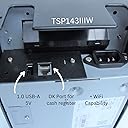
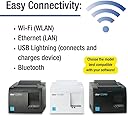
The Star Micronics TSP143IIIW is a high-speed Wi-Fi thermal receipt printer delivering 43 receipts per minute at 203x203 DPI resolution. Its compact design includes an internal power supply and a patented De-Curl paper system for flawless, flat receipts. Compatible with iOS, Android, and Windows, it features easy wireless setup via WPS and a USB port to power mobile devices, making it the ultimate space-saving, reliable solution for modern point-of-sale environments.





| ASIN | B01BJOFPNM |
| Additional Printer Functions | Print Only |
| B&W Pages per Minute | 43 ppm |
| Best Sellers Rank | #6,058 in Office Products ( See Top 100 in Office Products ) #2 in Receipt Printers |
| Brand | Star Micronics |
| Built-In Media | 1 |
| Color | Gray |
| Color Depth | 1 bits_per_pixel |
| Color Pages per Minute | 250 ppm |
| Compatible Devices | Laptops, PC |
| Connectivity Technology | Wi-Fi (WLAN) |
| Control Method | App |
| Controller Type | Push Button |
| Customer Reviews | 3.7 out of 5 stars 410 Reviews |
| Dual-sided printing | Yes |
| Duplex | Automatic, Manual |
| Global Trade Identification Number | 00088047255102 |
| Hardware Interface | Unknown |
| Ink Color | black |
| Item Dimensions D x W x H | 5.6"D x 8"W x 5.2"H |
| Item Type Name | Thermal Printer |
| Item Weight | 1.1 Pounds |
| Manufacturer | Star Micronics |
| Maximum Copy Resolution Black and White | 203 dpi |
| Maximum Copy Speed Black and White | 43 ppm |
| Maximum Media Size | 83 mm |
| Maximum Print Resolution Black and White | 203 x 203 DPI |
| Maximum Sheet Capacity | 43 |
| Model Name | TSP143IIIW |
| Model Number | TSP143IIIW |
| Model Series | TSP143 |
| Number of Trays | 1 |
| Other Special Features of the Product | Wireless |
| Output sheet capacity | 43 |
| Paper Size | 80 |
| Print media | Paper (plain) |
| Printer Connectivity Type | Wi-Fi (WLAN) |
| Printer Output Type | Monochrome |
| Printer Type | Thermal |
| Printing Technology | Thermal |
| Processor Count | 1 |
| Resolution | 203 x 203 DPI |
| Scanner Type | Bar Code, Photo, Receipt |
| Series Number | 143 |
| Special Feature | Wireless |
| Specific Uses For Product | Commercial use in retail, hospitality, and cannabis industries |
| Total USB 2.0 Ports | 1 |
| Total Usb Ports | 1 |
| UPC | 088047255485 088047255492 088047255102 |
| Unit Count | 1.0 Count |
| Warranty Description | 1 |
| Warranty Type | Limited |
P**O
Not the most intuitive thing in the world... GRUBHUB/SEAMLESS compatible!
So like many restaurants who are forced to offer as many take out and delivery services out there we've recently had to sign up for multiple delivery services. But if you're just relying on the old regular printer ink and paper (using a B/W Laser printer). Its not the cost its the time and space these things take up. Especially if you need to stock up. Since we use a wired LAN order ticketing system - the 3 1/8 thermal rolls are already in use (which this printer uses). So win win - we have the consumables - now we just need the printer that WORKS with the kiosk locked tablets supplied by <<insert your delivery service here>>. So I have 3 tablets Service Is it compatible? Seamless/Grubhub Yes DoorDash No UberEats No Setup: Its straight forward: 1. Load the thermal roll 2. Plug in power 3. Start the installation process Installation/Setup: This is the WIFI model. Standard setup is to set the printer into "connect" mode and you click the WPS button on your WiFi Router and Bam you should be connected ( this is true for MOST setups ). We installed a more robust and secure enterprise setup (Ubiquiti Access Points if anyone cares) and being enterprise doesnt have a WPS option (security and all). So to set this up manually: 1. GET your WiFi Network info. SSID (exact case sensitivity name) and Password and security type. 2. Download the printer APP to the phone (IOS and Android Avail) 3. Connect to the PRINTER as it defaults out of box as a Access Point (go to wifi settings on your phone etc etc) 4. Start up the printer specific App, select the printer you want to edit, click settings and look for WLAN settings. 5. Change printer WLAN from ADHOC access point to Infrastructure mode and fill in with details gathered in step 1 6. Save and Send commits to the printer 7. Printer should flash and if you view printers from a computer on the network you should see this printer available as a network printer if everything worked. 8. Go to Seamless tablet and click on settings 9. Add printer and a PRINTER will show up now 10. Set auto print and the # of tickets you want to print. 11. Voila when a delivery order comes in it auto prints and front end just needs to keep a ticket and 2nd copy goes to kitchen. My difficulties in setup is due in part to my pre-existing setup. But once it got it going boy was it a time money and reputation (team members kept forgetting to check the app to manually PRINT on the pc) saver. Oh what about the other two delivery services? I had to order the BLUETOOTH thermal printer... Its arriving shortly and ill update if that is compatible with all three tablets once I get it :).
G**G
WiFi will not consistently work
Printer works fine when it will stay connected to WiFi. Goes offline all the time. We have fiber internet and nothing else in the building goes offline like this printer. It randomly seems to work. Would like to be able to exchange for usb printer.
R**J
Clean, crisp,dependable. A must have!
Superb quality and ease of use. Can link to multiple devices allowing you to print from different devices/stations. Been using only for a few months, but the quality is easily appreciated. Prints very clearly, and perforates the paper as well. A must have !! Bought a 2nd one for other location.. if anyone out there is having issues with connectivity over wifi, especially using the square App and specifically In cases where you get frequent disconnects (printer doesn’t show up or respond in app) every time you reopen the app or awaken the device; you will benefit from using a quality brand router. Doesn’t have to be dual band because the WiFi version of this printer only supports 2.4 ghz. I Struggled with daily disconnects and failures to reconnect. After trying different channels and all manner of configurations I ditched the crappy modem/router provided from isp and switched back to my Motorola and viola! Running perfect ever since.
S**A
The perfect companion for any POS.
As a small business owner heavily reliant on streamlined transactions and efficient operations, investing in the Star Micronics TSP143IIIW Wi-Fi Thermal Receipt Printer was an absolute game-changer. The printer, which is equipped with wireless connectivity and a host of features, has significantly enhanced my point-of-sale experience. This printer has exceeded my expectations in every aspect. Its seamless wireless connectivity, rapid printing speed, and superb print quality have revolutionized my point-of-sale operations, enhancing efficiency and customer satisfaction. I would recommend it to anyone who is looking to use a variety of devices to print orders.
S**N
Pricey. It's a little slow to print being it's on a wifi connection and it disconnects all the time
It's pricey but I had to have it to use Shopify. I don't know why they can't be normal and use USB like other systems. So if you don't know: Shopify register systems use an Ipad and you only have 2 usb connections. I could not get any other device to work on the usb ports either. Your system options when ordering from them are few. So the card reader works on bluetooth. It disconnects ALL THE TIME it's annoying! So we went with WIFI instead of bluetooth for the printer. While it does work better, it still disconnects all the time. Like you can ring up something and it may take a few seconds for the receipt to start printing. We switched from Square (which all usb stuff worked with) and it was fast. We switched due to using the shopify website and also having a retail store, so it syncs inventory. I preferred the USB of Square and it was way cheaper..and way faster.
A**R
Life changing for small business
Works flawless once your able to connect haven't had any issues im very satisfied with this purchase.
G**S
IMPOSSIBLE TO SET UP, very long LAG TIME, and BAD PRINTING QUALITY
This was painful to set up, I had to get someone who knows networks and he could barely figure out. Very very unintuative, and impossible to set up unless you are extremely network saavy. The lag time from when the print receipt is hit to when the receipt prints is at least a minute. Much much too long. Lastly, the print quality is very bad, much too light and spotty, the receipts look like the ink is gone (this is a thermal printer).
S**I
Not worth it
Does not suppoort multiple device
C**S
Buen producto, pero si tienes problemas con el internet no te imprime tickets
Importante: 1.- Si se va el internet no imprime los tickets aunque este en intranet 2.- Ocacionalmente imprime unos micro tickets como si tuviera un error De ahy en mas resistente, buen material
K**O
God dang powerful and fast, unlike the fedex shipment...
Sweet jeebus is this thing powerful. Hooked it up wifi to the same router as 10 iphones all running square and printing off customised receipts like a chanpion. Love it. Haaaaated the fedex shipping. Twice they left a sticker without hitting my buzzer, which goes to my cell phone anywhere i am. Fedex sucks in proportion with how wickedly awesome this printer is
M**N
Doesn't work as advertised / non-responsive seller for returns
This product does not integrate with Square as advertised by the seller. Initiated several return requests with no response from the seller. No "final sale" warning is given upon purchase. Scam, do not purchase.
A**L
Printer wasn’t working
Printer didn’t worked at all
J**N
Wifi drops but when it works it works well
I found the setup a little difficult. Also printing using chrome is not very good as there is no way to adjust the font on your printed receipt. It’s set up using different scheduling software is also difficult on your own, but with phone assistance from the scheduling software (booker) the process became quite easy. Overall a good printer but you sometimes loose your up IP address, which then requires your to reprogram for wifi connection
Trustpilot
1 month ago
2 days ago