Buy anything from 5,000+ international stores. One checkout price. No surprise fees. Join 2M+ shoppers on Desertcart.
Desertcart purchases this item on your behalf and handles shipping, customs, and support to Thailand.
🖤 Cool your tech in style, silence, and control — because your setup deserves the best.
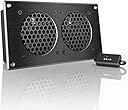
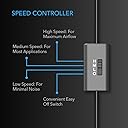
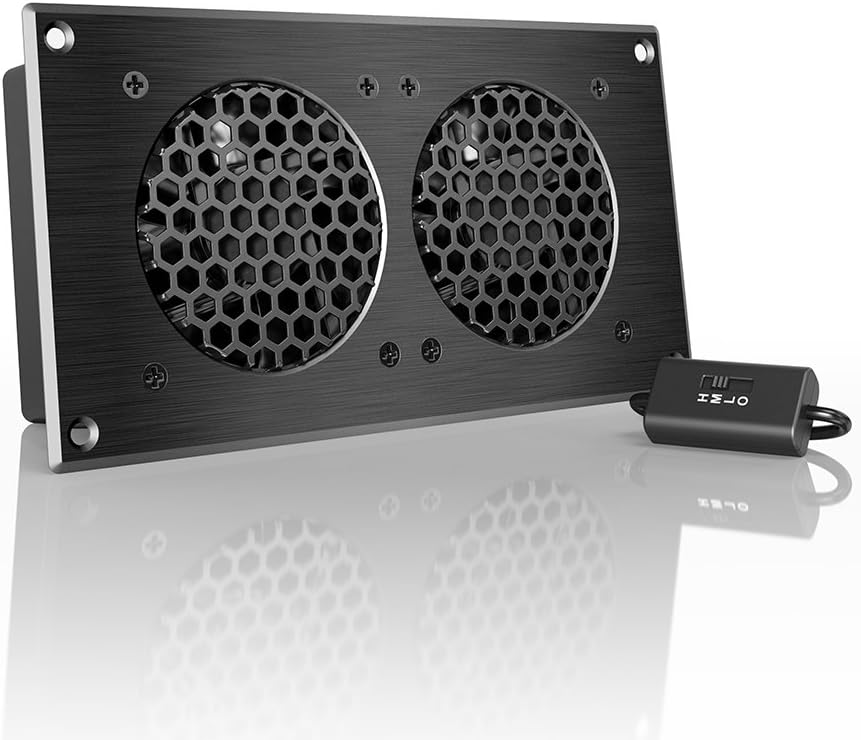
The AC Infinity AIRPLATE S5 is an 8-inch ultra-quiet, UL-certified cooling fan designed specifically for home theater and AV cabinets. It delivers 52 CFM airflow at a whisper-quiet 18 dBa noise level, featuring a multi-speed controller for customizable cooling. Crafted from CNC machined aluminum with a sleek brushed black finish, it powers via USB or wall outlet, with a Turbo Adapter boosting performance by 25%. Compact and easy to install, it’s perfect for maintaining optimal temperatures in enclosed electronics setups.


| ASIN | B009CNR0I6 |
| Air Flow Capacity | 52 Cubic Feet Per Minute |
| Best Sellers Rank | #10 in Computer Case Fans |
| Brand | AC Infinity |
| Brand Name | AC Infinity |
| Compatible Devices | AV Cabinets, Desktop, Gaming Console, Receiver |
| Cooling Method | Air |
| Customer Reviews | 4.7 out of 5 stars 1,405 Reviews |
| Global Trade Identification Number | 00854759004105 |
| Included Components | AIRPLATE S5 |
| Item Dimensions L x W x H | 8.5"L x 1.3"W x 4.4"H |
| Item Weight | 1 Pounds |
| Manufacturer | AC Infinity |
| Material Type | Metal |
| Maximum Rotational Speed | 2000 RPM |
| Model | AI-CFD80BA |
| Noise Level | 18 Decibels |
| Number of Items | 1 |
| Part Number | AI-CFD80BA |
| Power Connector Type | 2-Pin |
| Product Dimensions | 8.5"L x 1.3"W x 4.4"H |
| UPC | 854759004105 |
| Unit Count | 1 Count |
| Voltage | 240 Volts |
| Warranty Description | 1 year warranty covers all defects |
| Wattage | 1.9 watts |
D**R
Works great!
I have a floating media center which has 3 cabinet spaces and 2 sliding doors (see photos). All the cabinet spaces have walls in between but there’s gaps in the rear walls so air and heat transfers between them. The right cabinet is just storage, no electronics. The center cabinet has a PS5 and xBox. In the left cabinet, I have my router, modem, Apple TV and a Synology NAS Diskstation for cloud storage. I know my setup is much less than ideal for electronics but it’s what I have. The sliding doors on the cabinet only allow me to have 1 area open to free air at a time. The electronics in the left cabinet are stable with the door closed, until I fire up the PS5. The PS5 would exhaust hot air into the back and the Synology Diskstation would shut down after reaching 140 degrees. After installing this fan, the temp in the left cabinet dropped to 120 degrees while running the PS5 and 110 degrees with it off. The internal temp of the PS5 also dropped 15 degrees because the fan helped draw in cold air from the front. The fan switch is a great option so you can control fan speed. It does run very quiet, less noise than the vibration noise on my Diskstation from the drives spinning. Powering options are great with the attached USB and included 110 v power outlet plug if wanted. You can plug it into a constant USB source if you want it to run non stop or you can plug it into a switched on/off source if it’s only needed when a specific device is powered on. Since I only had overheating issues when the PS5 was on, I chose to plug it into the PS5 USB port and set it up to shut off 3 hours after the PS5 powers down. Quiet, good quality, easily expandable to add more fans, powering options and fan speed control definitely make this recommended.
J**S
Easy to install, very quiet.
I installed this under my desk to cool a full-AT case computer inside an enclosed box. It works great. They included in a plastic template which I used to trace the hole. I like that the template is semi-rigid so I could use painter's tape to secure it to the vertical surface and place a small bubble level on it. Far superior to a paper template (or no template at all). I used a 1/8th inch drill to mark the corners and a vibrating multi-tool to precisely cut the lines. I dry fit it first and it was very close, but it went in with a gentle tap. Then I put a thin layer of silicone calk around the hole to reduce air leakage and dampen vibration (which I later learned was unnecessary). Then I pre-drilled the holes for the screws and drove them in. A very easy installation and the unit is extremely quiet. The USB power cord is long enough to easily reach the back of the PC and has a female USB for daisy-chaining another unit if necessary. I did not install a supplemental controller since I want it to run all the time. And it looks great, like a unit that would cost twice as much. I was pleasantly surprised.
S**N
Keeping things Cool & Quiet
Well, let me begin by saying that I typically try buy things from companies that I have had good experience with in the past. This is another example that where I’ve acquired this AC Infinity controller to install in my A/V media component cabinet to improve ventilation. I recently installed a few expensive A/V components and a media sever (NAS) in my cabinet. With the new arrangement, I noticed my NAS was reporting temps in mid-50 degrees Celsius, which was warmer than I had hoped. I then decided to install AC Infinity Fan controller and fans in the cabinet hoping the results would yield improved air flow. It looks very professional and worked very well. but not as much as I would like. I purchased the fan controller and 4 dual intake/exhaust fans. Positioned the two dual exhaust fans near the bottom on each side of the A/V media cabinet and two dual intake fans near the top on each side of the cabinet. I installed the controller on the top of the cabinet on the right side. This setup worked perfectly. Have a look at the pictures for the installation as well as at the temperature monitoring results of the NAS, which runs throughout the day and night. I am very please with the look and the performance.
N**D
Nice quality all around for the price
I hate reviews for custom installation items like these that don't list their use case. I have a TV stand for my home theater setup that has enclosed cabinets. Cabinets are fairly well sealed everywhere except the backs, where it has an oval pass through for wires about 15" long. In one cabinet I house a home theater PC that runs 24/7 for DVR services. It tends to run fairly cool due to going overkill on the video card and CPU, but still adds some noticeable heat to the cabinet, about 15 degrees above ambient at rest. On the 2nd shelf I have an Xbox One S, which when it is running, heats the cabinet up pretty severly. Though no failures, it is concerning. Solution was this fan. Install is straight forward. A cutting template is included, which made the install super easy. I used my Dremel instead of a saw to cut the hole and just left the template in place when cutting (and when drilling my 4 holes). Unit popped right in, secured with nuts/screws. Packaging was nicer than expected for the product/price point. Quality is very presentable. I didn't not opt for the temp controller (yet), but may consider it in the future. The unit is plenty quiet on USB power, even at a high setting. I didn't feel the wall plug was necessary for my application and use my PC to power the fan. Overall, a nice quality product. I just installed it and haven't put it through its paces yet, but it appears this will be a worth while product. I will update after a few days using it.
T**E
A solid easy to use unit
I put this fan on the back of my entertainment console since the receiver and Xbox within generate a ton of heat with nowhere to go. The install couldn't have been easier. I used the template that came with it to mark where to cut and simply cut the pattern from the back panel, inserted the fan - which comes assembled - into the hole, plugged it into my receiver, and turned the fan to the medium setting. Now when the receiver is turned on the fan turns on with it and there are no cables to be seen anywhere for the fan. If you have a small to medium size cabinet for your components this fan will work great. Even at the medium setting it moves enough hot air out of the cabinet to cool it down 20 degrees or so. If you have a large area, you may have to use the higher setting or simply get a fan that moves more air. This fan doesn't move a ton of air, but really it doesn't need to. You will probably be surprised at how little it takes to cool down 9 or 10 cu feet of entertainment console. I will say that you will hear this fan on anything but the low setting. It's not annoying by any means, and probably could be a bit quieter, but it's there. Less noise than my refrigerator fan, and certainly less noise than the Xbox fan once that unit gets hot, which is the whole point of using the AIRPLATE in the first place. Also, assuming my receiver is on, there's more than enough noise from the speakers that I'll never notice the fan anyway. For the price I think this is a fine fan and I'm happy to recommend it.
H**R
Works perfectly!
This fan works great! Super easy to install and looks great. I used an oscillating multi tool to cut the hole in my entertainment center and it was a breeze. Took more time to mark and measure than to install. I attached it to my Ps5 so that when it runs it turns the fan on and pulls the hot air out. It used to be so hot in the entertainment center I had to open the doors and it still got hot. Now there’s no difference in temperature after playing for hours with the doors closed.
J**C
Set it up and forget it.
I bought two of the AC Infinity AIRPLATE S5, Quiet Cooling Fan System 8" with Speed Control, and the AC Infinity Controller 2, Fan Thermostat and Speed Controller after a friend bought a similar setup for his home. Years ago I had installed four computer case fans with an adjustable voltage DC transformer. I adjusted the voltage down until the noise was tolerable and functionally it did the job. The initial setup worked well because there was an AC outlet on the stereo receiver so I plugged in there and they came on automatically when the system was turned on. Two fans in the bottom of the cabinet blowing in and two fans at the top of the cabinet blowing out. After replacing the receiver the new one did not have AC out so I had to install a wall switch that required remembering to manually turn on when in use, and remembering to turn off when not. Not to mention realizing your equipment was cooking when you forgot to turn it on. That's all solved now. The pictures are of the fans installed in the lower part of the cabinet. The top set look just like the unfiltered picture. When I removed my old fan setup there was a lot of lint build up over time so I cut a piece of nylon scrub pad to make a filter. As before, the bottom set blows in and the upper set blows out so I filtered the bottom set. Since the controller has two inputs you can actually set the bottom set just slightly higher than the top set as the filter may slightly slow the air flow. There is a slide switch fan speed control on the power cord for each set of fans and an electronic speed controller in the control box. Then I just set the controller to turn them on at 85 degrees and set the fan speeds at the slowest speed to cool the cabinet and it works beautifully and it is quieter than the make-shift setup I had before. If it needs a bit more air in the summer it's a snap to set one speed faster on the electronic controller. I did not install the controller in the cabinet as this was not necessary. It sets on the shelf with the receiver just inside the glass door at easy access height. Very pleased I found this product.
J**G
High quality item. Quiet operation. Ok air movement
The quality is top notch Air movement is so-so. Noise level is very quiet. Fans are reversible to change direction of air flow. I am using it to vent my solar charge controller area since mppt performance degrades at 40C. Buy I did have to add a 12v -> USB port so I can plug it in and power it. Using a simple temperature switch to turn it on and off.
S**P
Great quality product much recommended for theater cabinet
Great product price is bit High but worth spending. Work silently when on full speed too. Quality of fan is top class.
G**E
Fantastic cupboard ventilation solution
Extremely quiet & great airflow & CFM. You can reverse the airflow if you need (read the manual). AC infinity is a great and reliable brand.
N**Y
great
works like a charm .. have coupled 2 of these with Infinity Controller for my music system cabinet ... much needed
S**O
Quiet. Low power. Awesomw
Fiddly to rearrange configuration , but it works great!
H**N
Guter Lüfter!
Habe den Lüfter für meine Playstation in ein IKEA-TV Board verbaut. Mit der beiliegenden Schablone ist das Anzeichnen und Sägen ziemlich idiotensicher. In Verbindung mit dem AC-Infinity Controller 2 lässt sich die Temperatur sehr gut einstellen und die Lüfter springen nur an, wenn eine gewisse Temperatur erreicht wird. Ich wollte eine Zirkulation innerhalb des Schrankes errechen, weshalb ich einen Doppellüfter am Boden und einen in der Außenwand des Boardes verbaut habe. Hierfür muss man natürlich die Lüfterrichtung eines Lüfters ändern. Gefühlt muss man hierfür 30 Schrauben lösen und relativ umständlich den Lüfter drehen. Einen Wutanfall später waren die Lüfter aber verbaut und arbeiteten zu meiner vollsten Zufriedenheit. Zur Lautstärke kann ich sagen: Wenn der Ton des Fernsehers nebenher läuft hört man sie in der jetzigen Einstellung überhaupt nicht. Im Schlafzimmer würde ich sie aber nicht verbauen, da man bei kompletter Stille im Raum schon ein unterschwelliges Geräusch vernimmt. Aber das geht auf jeden Fall in Ordnung. Genau das, was ich gesucht habe. Aber aufgrund der umständlichen Richtungsänderung 4/5 Sterne!
Trustpilot
4 days ago
1 month ago