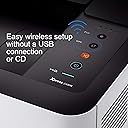
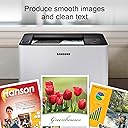
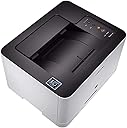
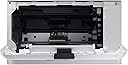
๐ Elevate your home office print game with wireless speed and pro-quality color!
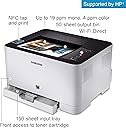
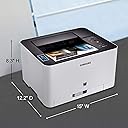
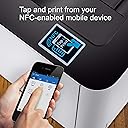
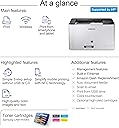
The HP Samsung Xpress C430W is a wireless color laser printer designed for home offices, featuring NFC and WiFi connectivity for effortless mobile printing. It delivers professional-quality prints at up to 19 ppm black and 4 ppm color, with sharp 2400 x 600 dpi resolution. Its versatile media support and built-in Ethernet make it a reliable, stylish, and efficient choice for modern professionals seeking quality and convenience.


| ASIN | B0196HHDV6 |
| Additional Printer Functions | Print Only |
| B&W Pages per Minute | 18 ppm |
| Best Sellers Rank | #617,087 in Office Products ( See Top 100 in Office Products ) #843 in Laser Computer Printers |
| Brand | Samsung |
| Built-In Media | Set / Toner Cartridge / Imaging Unit / Power Cable / Quick setup guide / Manual User's Guide / Wireless Manual / S/W CD ROM |
| Color | White |
| Color Pages per Minute | 4 ppm |
| Compatible Cartridge | CLT-C404S, CLT-M404S, CLT-Y404S, CLT-K404S |
| Compatible Devices | Laptops, PC, Smartphones |
| Connectivity Technology | USB, Wi-Fi |
| Control Method | App |
| Controller Type | Android, Vera |
| Customer Reviews | 3.8 out of 5 stars 255 Reviews |
| Dual-sided printing | Yes |
| Duplex | Automatic |
| Global Trade Identification Number | 00191628384617, 00887276110264 |
| Hardware Interface | Ethernet |
| Ink Color | Color |
| Item Type Name | Laser Printer |
| Item Weight | 21.96 Pounds |
| Manufacturer | HP |
| Maximum Copy Resolution Black and White | 1200 dpi |
| Maximum Copy Speed Black and White | 19 ppm |
| Maximum Media Size | 8.5 x 14 inch |
| Maximum Print Resolution Black and White | 1200 dpi |
| Maximum Sheet Capacity | 150 |
| Maximum print Resolution Color | 2400 x 600 dpi |
| Model Name | SS230G#BGJ |
| Model Number | SS230G#BGJ |
| Model Series | SS230 |
| Number of Ethernet Ports | 1 |
| Number of Trays | 1 |
| Other Special Features of the Product | Wireless |
| Output sheet capacity | 150 |
| Paper Size | 8.5 inch x 14 Inches |
| Power Consumption | 290 Watts |
| Print media | Paper (plain) |
| Printer Connectivity Type | USB, Wi-Fi |
| Printer Output Type | Color |
| Printer Type | Laser |
| Printing Technology | Laser |
| Processor Count | 1 |
| Resolution | 2400 x 600 |
| Scanner Type | document |
| Special Feature | Wireless |
| Specific Uses For Product | Home, home office |
| Total USB 2.0 Ports | 1 |
| Total Usb Ports | 1 |
| UPC | 779184060079 887276110264 191628384617 191628506217 |
| Unit Count | 1.0 Count |
| Warranty Type | Limited Warranty |
| Wattage | 290 watts |
P**T
Quality color laser printer at reasonable price
Literally, with the CD provided, took me under 10 minutes to set the printer up with my laptop using Wi-Fi. So easy, then another 5 minutes to download the Samsung Mobile Printer app on my iPhone and iPad and print using Wi-Fi on those devices. Crisp, dark B&W and rich color for graphics and photos. Am using Hammermill paper at 100% bright. As other reviewers have noted the color printing is not fast, but the quality end product is well worth the wait. Not the printer for you if you are trying to print at commercial speeds. A set of replacement cartridges cost $221 vs the $139 for the printer, but they supposedly produce 1000 copies. This printer comes with cartridges and they look like the regular ones vs starter, but we will find out. Before this I had a Samsung Express m2020 B&W, which I loved. Enjoying the upgrade a lot, good printer, good purchase.
T**.
Nice output for the price. Not a speed demon
I was surprised when I received a used printer from Amazon, despite ordering new. I guess every so often a return slips through the cracks and goes out as new. Cartridges were still mostly full, but came installed so I knew something wasn't right from the get-go. Color photographs had a line going down them, and I could not get rid of it. I ended up exchanging the printer, and currently waiting for a new one. I would say the slowest part of the printing is waiting for the documents to spool to the printer. The actual time per page is not that bad. Certainly not some 30 page a minute laser printer, but for average home use I think it's fine. Quality to me looks outstanding! Crisp Blacks and colors are vibrant. I would not really use for photographs, but it produces a pretty nice image. Looks like you can create custom color profiles for it as well if you have proper equipment (I do), so this is an added plus. Most color laser printers are hundreds of dollars minimum, so I would say this represents a pretty good value, and appears there are third-party options available for cartridges. A bit disappointed that my first one was used, but considering the huge amount of orders Amazon processes and ease at which you can exchange items, all is good. Just have to wait an extra week or so to get a printer. Update: New printer arrived (cartridges do come installed, which seem a bit strange to me). Wireless is slow, but works quite fast on USB. Output is outstanding, even in eco mode. Nice driver with plenty of options. Very happy with this printer, especially at $129 I paid for it. For wireless it is quite slow, and trying to use from smart phone gave plenty of errors. Best on USB.
M**K
Another solid Samsung laser printer
I only had it for a few days but I expect it to be just as good as my Samsung monochrome laser I bought back in 2012 which still runs good. Only had to replace the toner once on it. I don't print very often so I assume the toners on this printer will last for a while. I printed a 8x10 photo and a resume on it and both looked good. Not sure if this printer was pre or post HP acquisition of Samsung's laser printer division but hope quality doesn't drop. Setting up this printer went flawlessly. I can print from all my devices fine. Printed a document from my smartphone ok. It does take a few seconds longer then my monochrome printer but doesn't bother me. Overall I think I got a good deal from the seller I bought it from. Bought it in like new with limited page count. When I got it looked brand new to me.
P**K
Wireless setup is brutal
Setup is brutal for Google Cloud Print on this Samsung printer. Despite being advertised as being easy to use w/ Google Cloud Print, you can't setup this printer with even a Samsung Google Chromebook because this device requires you to install via a CD ROM (what year is it?!). I eventually found a 6 y.o. computer that had a CD drive and many, many steps later was finally able to setup Google Cloud Print. Less annoying, but annoying nonetheless, the giant advertising sticker ("easy mobile printing" "sharp text, clean image" etc etc) on the device is horribly weak so it took me over 30 minutes to get every piece of the sticker off (eventually using goo gone to get it off). Another unexpected "feature" is that when regular letter paper is in the paper tray, the tray will always stick out in front of the device - something that the photos of this printer seem to purposefully avoid showing (since it doesn't look as attractive with a door sticking open - at first I thought it was broken until I saw user photos). Other than that, it prints well. But so do many other smarter, less annoying printers. Update: Dropping from 2 stars to 1 star, the Amazon Dash Replenishment Services (DRS) feature, which purports to automatically order toner when depleted, instead automatically orders yellow toner every 3-5 days (despite successfully installing and using the first yellow toner sent) and will not automatically order black toner (despite the device showing that black is empty). I've called Amazon Customer Support and been sent to 7 different CS reps and literally zero of them know what Amazon Dash Replacement Services or DRS is (so I've had to explain it 7 times) and none have been able to begin to help. I'm now left with a printer that requires me to call Amazon CS every 3-5 days to have the automatic yellow toner orders canceled. To say the Amazon Customer Service experience has been frustrating would be a massive understatement. How can no Amazon CS rep know what Amazon's own digital service is, or at least know enough to transfer me to someone who does?
B**T
Nice wireless printer that smokes when you print
For a laser printer at this price point, I decided why the heck not? There were no real manuals, you just plug it into a computer and start the setup process. We went completely wireless โ setup had a couple hiccups but overall got it running within 15 minutes. When adding paper to the tray, the tray doesn't ever go completely back in and sort of sticks out like a little nub but it's not that big as deal, just wishes they showed that in the photos. The quality and detail of the print is just slightly better than a cheap inkjet; registration is slightly off and text does not seem all that sharp. One huge thing we discovered, when the printer is spitting out pages, a visible smoke comes out with each print and has quite an electronic/chemical smell. When googling the issue, it seems like this is pretty common with Samsung laser printers. I guess you get what you pay for...
A**E
Great Printer & Super Easy Set Up!
First off, the set up was extremely easy. The single sheet of instructions provided in the box was really all you needed. Go to the website, when instructed, and the computer & printer does the rest. I was able to start printing within 5 minutes of unpacking everything and setting it up. I mainly use it to print postage labels for my small business, so this has definitely saved me a ton of money from purchasing new ink cartridges every 2-3 weeks depending on how much I print. Overall, it's been 2 weeks since I've had this printer, and I definitely recommend it :).
A**R
Got it at very good price at $139, Compact, light with built-in ethernet port.
I bought Brother printer before this one and returned it cause it was bulky, Heavy and color of the printed page was bland, no matter how I adjusted it. The color printing on Samsung is more accurate and vibrant. My Mac picked up the printer right away, I printed from my Android Note 8 phone and my Ipad with no problem. Highly recommended. If the price ever come down again. Get it.
P**A
Limitations on Photo Paper, Glossy or High Quality Paper
This seems okay for basic printing of text on a plain white piece of paper. It does not take glossy paper, or photo paper -- any thickness will cause it to jam, sometimes badly. Getting a jammed piece of photo paper out of the thing is very difficult, and is not covered by warranty should doing so cause any damage. So if you have any thought of printing out a photo, or some other quality paper image, this is not the printer for you. You can get cheaper printers for just printing text though. The picture of the printer is misleading too -- it has the paper tray jut out in front as its normal look, so it is not as small, compact as the picture seems. I dislike products which show it in one fashion, but then it looks different set up on your desk, or wherever.
A**E
Does what it says on the box
This is my third one so that probably says it all
C**)
If you don't compromise on quality, then this is the printer for you.
This printer is amazing. Print your stuff on "Best Quality" & the result is super. The letters & pictures stand out beautifully. It looks as if the letters (font) are engraved & stand out. The print out is second to none in this range & little above it. Be sure not to use less then 80gsm paper because it will curl with the heat within the printer while printing. If you want quality & don't compromise on it, then this is THE printer for you. I had bought this printer for less then Rs 20,000/ but surprises of surprises.... the cost has escalated to almost Rs 30,000/- Calvert Gonsalves (Goa)
A**.
Useless
Worst ever product. Never ever recommend to buy.
Trustpilot
2 weeks ago
2 months ago