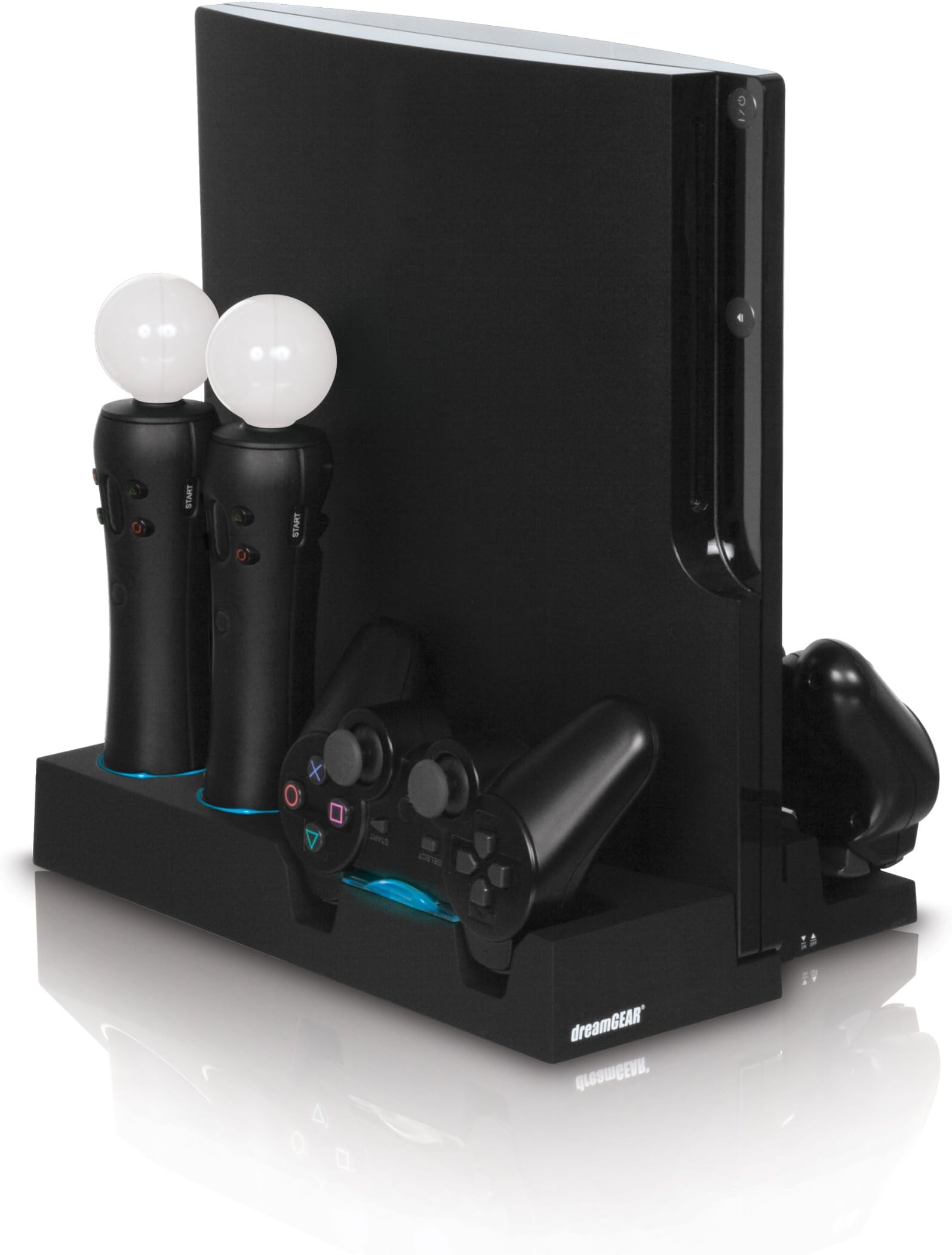

PS3 Move Power Stand
Product ID: 267154
🔋LED indicators for real-time charging status
🔌Charges up to 10 devices simultaneously
🕹️Dedicated slots for 6 controllers & accessories
🎮 Power your play, charge your way — the ultimate PS3 command center!
The PS3 Move Power Stand is a robust vertical charging station designed exclusively for the PS3 Slim. It simultaneously charges up to 2 Sixaxis or DualShock3 controllers, 2 PlayStation Move motion controllers, and 2 navigation controllers, while adding 4 additional USB ports to your console. Featuring LED charge indicators, a rubberized finish for stability, and a powerful 110/240V AC adapter delivering 5 amps, it supports charging up to 10 devices at once. This sleek accessory streamlines your gaming setup, eliminates cable clutter, and ensures your controllers and peripherals are always ready to go.
| ASIN | B0041S1MVI |
| Customer Reviews | 4.4 4.4 out of 5 stars (509) |
| Date First Available | September 1, 2010 |
| Is Discontinued By Manufacturer | No |
| Item Weight | 1.83 pounds |
| Item model number | DGPS3-3809 |
| Manufacturer | DreamGEAR |
| Product Dimensions | 12.6 x 8.5 x 2.2 inches; 1.83 Pounds |
| Release date | October 15, 2010 |
| Type of item | Video Game |
M**9
Great product! 3x USB ports (powered), and holds everything
Up until last month, I had an original 60gb launch-model PS3. I used it primarily for gaming, but about 40% of its use was for media/blu-ray. It had a good run, but eventually succumbed to the dreaded YLOD. So I went out and got a new 320gb slim model PS3, and wouldn't you know it - aside from the fact that I lost 2 usb ports and the card reader (I used MS Pro-duo to watch stuff between the PS3 and PSP) the darn thing's USB ports don't put out enough power to run my external 2.5" HDD. So in searching for a powered USB hub, I came across this product. Like usual, I perused the reviews, and decided to get it. When it arrived, it was packaged box-in-a-box, so no damage there. Set it all up, plugged everything in, and viola! I have my HDD back! All in all, this is a pretty great product. The PS3 mounts very securely, and it holds all the controllers pretty good too. As a plus, the PS3 I bought came with the Move kit, and the Move and Navigation controllers fit really well into their slots, as do the Sixaxis controllers. Best of all, I now have 5 open USB ports. The stand comes with a usb cable that conveniently tucks away underneath it when not in use, but I leave it plugged in all the time to the PS3, and use the ports on the stand. PS3 Eye camera works well off of the stand's USB ports, no loss of functionality there. Even better - I plugged in my Logitech G27 into the stand's USB port, played a couple of hours of GT5, and all's good there too. It worked perfectly. The only minutely bad thing about the stand is the lack of a smart-charging system. If you leave it on, and leave your controller plugged into it's cradle, it'll constantly send charging power to it. How do you get around this? Well, once the light changes from red to blue (to indicate charging complete) you can remove your controller OR you can get off your lazy behind and just hit the power switch in front of the stand. So it's not really an issue. If you're too lazy to hit a switch, then you got a different set of problems altogether. I think the fact that you can charge your controllers without having to have the PS3 on overrides the aforementioned small negative trait. Overall this is an excellent product, and fits my needs. I recommend it.
J**R
Ultimate Accessory
The is the ultimate accessory for your Playstation 3. The material is of a really sturdy plastic. I have no fear of it breaking during a move or anything. Your Playstation 3 slides easily into the middle slot- there is no 'snapping' or 'pressing' that could damage or scratch it. The slot is made perfectly for the slim, there is no wiggle room and no worries it would tip over. I live close to a train track and have no worries. There is a small USB cord that has a special compartment on the bottom of the base, which I thought was a nice touch. You simply plug that into your lowest USB port your good. The controller bases are extremely nice and the main reason I got this product. No more banging around controllers for me! The base fits two move and two navigation controllers- you can't switch and swap because the openings are special made for them. I have one move controller with a wrist band that I placed in it's slot. It isn't hard to get it plugged in to the charger. I also have an official Playstation controller I have plugged in. The controller plug-ins are nice since they have a clear plastic shell around the base to cradle them easier. All the slots are sturdy and there's no worries your controllers will fall out, as well as being easy to pull out and put back in. There is also five USB plug-ins on the side of the stand. I use these for my Playstation eye and Turtlebeach headphones. My headphones also have a wire running from the USB to the back of the Playstation, so I can use them even when the stand isn't turned on. Some people complained about the chargers not being 'smart', but I really found no issue with it. There is an accessible on/off button on the front of the Playstation that turns the stand on and off. I use this mostly at night since I can't sleep with light and the stand lights up red on each controller that's charging. For less-used controllers, you can just not push them into the charger and they will still be safe in their slot. One thing I did not realize is that the stand has to be plugged into the wall. It totally makes sense thinking about it, but it was never mentioned on any other reviews. There is a two-plug fat plug that plugs into the back of the stand. It's not a huge problem since it fits into surge strips easy, but still something to think about if you live in an older home with few plug-ins. Overall this was probably one of the best accessories I bought for my Playstation. It looks sleek, keeps my controllers off the ground, keeps me from tripping over charging wires, and stops the grind of switching plug-ins when I want to play move. I highly recommend this product.
S**L
Almost perfect for a moved-up PS3 slim
I preordered this stand because it seemed like the best option available for me. My issue is I've got two dualshocks, two move and two navigation controllers, plus an eye camera...but only two USB ports on my PS3 slim. This powered stand (it has it's own AC adapter) allows me to charge all 6 controllers at the same time. The charging docks use colored LED lights to inform you of each controller's status. Red means charging, alternating red/blue indicates it's 95% done, and blue lets you know it's 100%. There are three pairs of docks, each specifically designed to fit one of the three types of controllers. This means you can't charge more than two dualshocks in the docks at the same time, for example, though. On the other hand, while two controllers charge in the docks, you could attach 5 more via USB. Yep, this stand also adds a net 3 additional USB ports to a PS3 system. The stand has 4 USB ports on the bottom right side, and there's a short cable which comes out of the bottom front of the stand and plugs into one of the PS3 console's two USB ports. So, you end up with a total of 5 usable USB ports -- 4 on the stand, and one on the PS3. I'll keep my eye camera plugged in all the time and still have 4 other ports free for use. For example, I can plug in all the Guitar Hero instruments when I want, and not have to unplug the eye and/or not be able to charge my controllers. One can also use these ports to charge other USB devices, like cell phones, MP3 players, and bluetooth headset. The instructions specifically state, however, the USB ports will NOT charge Apple products, like iPod and iPhone. I'd knock this product down half a star, if I could, because the charging docks are not "smart;" you can't store controllers in the docks indefinitely. This is why I said "almost perfect" in the review's title. The user manual says you should remove controllers after they are fully charged. It also states you should power off the stand when not in use (there's an on/off buttom on the front of the stand, but the USB ports are always active). I have to assume the controllers' batteries will get damaged if you leave them in the charging docks too long. I sure would be happy if that weren't the case, though. One other minor quibble is that controllers don't exactly slide right in to the docks -- you usually have to wiggle 'em around a bit to get them to properly align with the mini-USB plug on the controller port. Because the stand requires the PS3 console be vertical, I've opened up some room on the top shelf of my home theater component rack. Much of this extra room gets used up, though, because the fully charged controllers can't stay in the stand's docks all the time. If I were able to keep all the controllers docked up, and not have to bother powering down the stand when not charging, this product would indeed be perfect, IMHO. Overall, though, the flexibility in charging lots of gear at the same time, plus adding three more USB ports to the console, make this stand a really handy upgrade for someone with a PS3 slim and new move controllers (the stand's not compatible with the old PS3 fat consoles, btw). I haven't found a better option, and, for what you get, the stand's a decent value.
P**2
Love it!!!
This product is perfect for the ps3 slim! It allows you to charge up to 6 controllers at once (2 Dualshock 3/sixaxis, 2 move, 2 move nav.) and uses its own power supply so you dont have to put any unnecassary stress on your ps3 console. The stand keeps the ps3 slim snug in a vertical position which allows better air flow for your console and has a usb connector so you can sync all of your controllers to your console at once. The stand also includes 4 extra usb ports on the side so right now I have move camera and ps3 bluetooth headset connected all the time. The stand itself is very visually pleasing as it hides all the chords and keeps everything nice and organized. The controllers slide in and out of the docking stations easy enough, so if you are a careful person you need not worry about breaking off any connection points (like some of the other reviews stated.) I personally LOVE the colored lights in the docking station that tell you when the controllers are charging and have had mine now for over 2 months and ALL of the lights work just fine. The stand itself seems very well built and very durable. The one tiny problem with the unit is that once the controllers are charged the directions tell you to unplug them to prevent overcharging. I get around this problem by simply turning the unit off (unit has its own on/off switch) when all of my controllers are charged so I can still use the unit to dock my controllers when not in use. Overall, this product is great and for the price I would reccomend it to anyone that has a ps3 slim with multiple controllers.
T**L
what a waste
I was so excited to get this product, I was waiting for the preorder date to finally come up so it could ship to me, I got the item, and i was anything but satisfied, first off, let me say that as a multi charging base for 2 dual shock controllers, to navigation controllers, and 2 move controllers, it does great. I love the look of the item and how the blue lighted base under the charging area lights up when a controller is getting charged. beyond that its a pile of crap. first off, it was bowled at the bottom center, so it wouldnt lay flat on the table it rocked side to side and back to back. I had to take off the bottom center pad thingy (you know the rubber sticker thing normally in corners of devices that are there to lift the item off the table and keep the unit from scratching your surface?) anyway, I had to take it off just to somewhat make it level enough to stay firm on the table. then, and let me tell you, before you add in, I take very good care of my stuff, and was in no way abusive or rough with my unit in any way. but after placing (carefully) my ps3 slim model into the vertical unit, it did something to my ps3 where now whenever I start it up, it roars like the gripping mechanism that catches the game disk or spins it is off balance. it makes some sort of annoying whirling sound. and I would have to tip the ps3 unit side to side to gently till it calms down and quiets. and of course cause the base is not a sony product, it does not cover my unit under the warranty. so getting it serviced on sucks. I dont think that due to my experience that the ps3 slim model was ever meant to be in a vertical position, it is too delicate of a machine to chance being put in a product like this. so I am using my ps3 slim in a flat position now, but still permanently suffer the noise. as it is handicapped in that aspect ever since put in the vertical stand. and now my charging base stand i bought im writing about today is nothing more than a multi charging base if i need to charge them all up. I'd refrain from purchasing this product, as it has been the absolute worse experience Ive ever had here at amazon, and i shop here all the time. not blaming amazon for it though at all, but the manufacturer is the one to blame. UPDATE!!!! I sincerely apologize for the review I have made above, after checking things over, the noise addition i have mentioned was 100% not the ps3 nor was it due to the base, it was the stupid fan you connect to the back of it, I forget the brand, but you all should know which one im talking about its the only one they carry to fit the back of the ps3 slim now. after detaching it, my unit doesnt make a peep. so i apologize to anyone who used that noise instance I mentioned to deture them from getting this product soley on that discription. but everything else stays in my opinion.
A**I
Essential accessory for any Move owner
The PS3 Move Power Stand was the only accessory I purchased with my new PS3, aside from a BlueRigger HDMI Cable and the PlayStation Move Starter Bundle itself. Although I thought that any other accessories could wait for me to procure them over time, the Move Power Stand was critical to happy and functional use of my PS3. With room to charge two DualShock3 controllers, two Move Motion Controllers, and two Move Navigation Controllers, in a form factor that is compact and space-saving, this stand provides all my charging needs for the controllers I use. What's more, though, with four USB ports, I can also charge my phone, BlueTooth headset, and anything else that has a BlueTooth-enabled charger. Perhaps I haven't looked into it closely enough, but the one thing I think it is missing is data connectivity to the PS3. Although there is a USB cable leading from the stand to the PS3's own USB port, it isn't clear to me why. When I tried to perform an initial pairing of my controller while connected to the stand, the PS3 didn't seem to see the controller. Still, though, I can't help from loving this device. The console is a nice, snug fit (but not too snug), and although a power button may seem unnecessary, it is a nice addition. Charging is fast, and status indicator lights can be seen from across the room (or even in another room in my case), making it convenient to know when charging has completed. This is a great accessory, and all that remains to be seen is the test of time.
K**7
Potential to be great product but not there yet
I ordered this product from convenience point of view so keep this in mind when reading this review. The charger has everything that one could desire: single stand that houses PS3, charge plugs for two controllers of every type, USB port extension, and stand alone power operation. But I found the following inconveniences with almost all of these features that made me return it and not worth dealing with it: - The stand does not lay flat so one would have to do tinker with it to make it stay level; - The charger uses USB plugs for the move controllers and not the contacts. This can induce unnecessary wear and tear and you have to spend time aligning the controllers so that they fit into the charges. Sometimes this goes quickly and sometimes it does not. From convenience point of view, I don't want to deal with it when I can simply slide it in with other chargers; - My understanding is that the charger does not shut off automatically when the controller is fully charged but only provides an indication of. If that is true, this also can put unnecessary wear and tear onto your controller so one has to check on the charge progress. These inconveniences combined with two bad units that I received made me give up on this products at this time and go with Sony's move charger which presents to me less problems than this one. I still believe that the idea behind it is great and if the improvements in the design are made, I will consider it in the future.
T**L
Everything In One Spot
It is a very nice design. It saves you a lot of space for your console and other hardware periphials. It's mostly beneficial for those that have Move controllers, but if you really want to save space regardless it may work for you. The charge indicator lights make the stand look really cool. While charging the indicators are red and when they are done charging becomes blue. Each port has an indicator that you can keep an eye on. It also has additional usb ports that you can use. The Playstation Eye is recognized when plugged into either slot. Not just with the PS3 usb slot. A couple drawbacks are that I believe that it only charges one item at a time. It doesn't take terribly long for everything to charge. It would be nice if everything were able to charge at once, but I assume it conserves power better that way. Sometimes it's a little hard to position the controller into its slot. It's not major, but it can be annoying at times. I guess it's something that you have to get used to. Still it would be better if controllers were easier to maneuver into their charge slots. It's a solid product. I would recommend it to others looking for a multicharger for their PS3s.
H**.
Still working great and is way more convenient than plugging into the
Using it for a long while now.. Still working great and is way more convenient than plugging into the ps3
E**C
Ahorra espacio y carga los accesorios
Cómodo y práctico , ahorra espacio para colocar el ps4 a un lado. Todo a muy buen precio. Muy estable.
C**N
最強のPS3スタンド
薄型PS3の縦置きスタンドとなります。PS Moveもしくはナビゲーションコントローラーが4本、ワイヤレスコントローラー2つを設置することができます。本体から伸びたACアダプタから給電できるので、PS3の電源がオフになっている時でも各コントローラーを充電することが可能です。給電のオン・オフは、前面のボタンでワンタッチで切り替えることができます。また、右側面に4つのUSBポートを備えており、USBでPS3本体と繋ぐことでUSBハブとしての機能を持たせることも可能……とまさに至れり尽くせりの最強仕様。見た目もガジェオタ心をくすぐるゴツさで、コントローラー充電時のLED照明もなかなかにカッコヨイ。 問題はコントローラーを差し込み辛いという点。デュアルショック3の形状にフィットするスタンドの中央にminiUSBポートがにょきっと生えており、コントローラーを逆さにして突き刺す形になるので、セットには多少気を遣う必要があるかもしれません。Move用のスタンドも、向きをしっかりあわせて差し込まなければいけないので、たとえば純正の充電スタンドなどと比べると手軽さは薄れてしまいます。 PS3の電源が入っていない時でもコントローラーを充電したい!できれば全部ひとまとめにしてコンパクトに!という需要を満たす上ではこれ以上ない商品だと思います。海外製品なのでレビューがなく不安でしたが、買ってよかったです。
D**N
Material nefasto, pegajoso, dinero tirado.
El material con el que está hecho el producto es pegajoso, es una goma que se pega todo y a todo lo que toca, inservible. Muy descontento, he tirado el dinero.
A**A
Liked it once, now high price is making me think twice.
Bought, then it got auto canceled. Now prices got double.
Trustpilot
4 days ago
2 weeks ago