We remain fully operational. Our teams are working around the clock to ensure your deliveries continue safely.

DOWNLOAD THE APP


Customer Services
Copyright © 2025 Desertcart Holdings Limited
DOWNLOAD THE APP


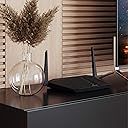

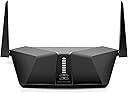


⚡ Upgrade to the future of WiFi — fast, secure, and unstoppable!
The NETGEAR Nighthawk AX4 (RAX40) is a WiFi 6 router delivering ultra-fast AX3000 speeds up to 3 Gbps and reliable coverage for up to 1500 sq ft. Equipped with advanced features like Beamforming+, OFDMA, and WPA3 security, it supports seamless streaming, gaming, and smart home connectivity. Easy to set up and manage via the Nighthawk app, it also offers wired Ethernet ports and USB 3.0 for versatile device connections, making it the perfect upgrade for modern homes and professionals demanding speed and security.


| ASIN | B07PCMG75T |
| Antenna Location | Home |
| Antenna Type | Internal |
| Best Sellers Rank | #7,535 in Computers ( See Top 100 in Computers ) #145 in Routers |
| Brand | NETGEAR |
| Built-In Media | Nighthawk AX4/4-stream AX3000 WiFi Router (RAX40); Ethernet cable; Quick start guide; Power adapter |
| Color | Black |
| Compatible Devices | Gaming Console, Laptop, Smartphone |
| Connectivity Protocol | ethernet |
| Connectivity Technology | Ethernet, Wi-Fi |
| Control Method | Voice |
| Controller Type | App Control |
| Coverage | 1,500 square feet |
| Customer Reviews | 3.8 3.8 out of 5 stars (1,567) |
| Data Transfer Rate | 3000 Megabits Per Second |
| Frequency | 5 GHz |
| Frequency Band Class | Dual-Band |
| Global Trade Identification Number | 00606449139747 |
| Has Internet Connectivity | Yes |
| Has Security Updates | Yes |
| Is Modem Compatible | Yes |
| Item Dimensions L x W x H | 20.6L x 5.6W x 33.8H centimeters |
| Item Weight | 1.36 Pounds |
| LAN Port Bandwidth | 1000 Mbps |
| Manufacturer | NETGEAR |
| Maximum Upstream Data Transfer Rate | 1500 Megabits Per Second |
| Mfr Part Number | RAX40-100NAS |
| Model Name | RAX40 |
| Model Number | RAX40-100NAS |
| Number of Antennas | 4 |
| Number of Ports | 6 |
| Operating System | Microsoft® Windows 7, 8, 10, Vista®, XP®, 2000, Mac OS®, UNIX®, or Linux® |
| Other Special Features of the Product | Up to 3 Gb/s Total Wi-Fi Throughput; 2.5 GHz/5 GHz Dual-Band |
| Router Firewall Security Level | Basic |
| Router Network Type | wireless |
| Security Protocol | WPA2-PSK |
| UPC | 606449139747 |
| Unit Count | 1 Count |
| Voltage | 100240 Volts |
| Wi-Fi Generation | Wi-Fi 6 |
| Wireless Compability | 802.11ax |
P**M
The most economical Netgear AX router is a great value with a large number of features to make all your WiFi powered devices work with the speed you expect. Setup was super easy with the Nighthawk app, coverage is likely overkill for my 600 sq. ft. single apartment. It is the number of data hungry devices I have and use which prompted me to buy this after my last Netgear router stopped working after several years and the AX4 has performed flawlessly. 11 MONTH UPDATE: The AX4 continuously provides solid signal throughout my apartment and to my Ring cameras outside of the apartment. One of them is downstairs and would often lose signal with my previous router so I'm quite pleased with this router. It downloads and streams video on my desktops that are plugged into it quickly and playback is lag free with no timed out messages. It downloads and casts to my tv in the same way and the same goes for my handheld devices. Video calls are clear and problem free. I can't say anything bad about this workhorse and it delivers outstanding performance on a daily basis. I would buy this router again and again. Nice job, Netgear!
C**N
Quería un router estable para la casa y tengo que resetearlo manualmente 2 veces al día por que se queda sin wifi y no regresa automáticamente, una porquería no se puede confiar
H**G
As I spent some time doing research, I have learned that Netgear has quietly released version 2 of the RAX40 router last year. This new version uses a tri-core Broadcom CPU to replace the original dual-core Intel CPU, which is a significant upgrade, while keeping the price the same. I was happy to find that the router I bought happened to be this new version. After testing it for a couple of weeks, my conclusion is that this is a pretty good deal. As a comparison, I also bought a TP-Link AX50, a rival product in term of the tech spec (like original RAX40, it uses Intel CPU) and the price. I found that RAX40v2 is a better fit for my particular use case, so I returned that one and kept this. Here are my observations: 1. RAX40 is a much larger device than AX50, so the heat dissipation is better. For a device that runs 24/7, this is important for longevity. I uses a small USB desk fan in the equipment cabinet to cool down my modem and router. RAX40 barely got any warm while AX50 still felt some warmth on the touch. 2. RAX40 has two antenna while AX50 has four, but I find that the former has wider signal coverage. In particular, it works much better with my Netgear EX8000 wifi extender. I need an extender to give my backyard office good wifi signal in order to work from home. With RAX40, I can reliably get 110MB/s on 5G there, whereas the signal strength fluctuates wildly with AX50, sometimes the connection could even be dropped. Granted, AX50 has better speed at close range than RAX40. However, it is more important for me to have wider coverage. The poor performance of AX50 working with my wifi extender is a deal breaker for me.
S**S
No me agrada que en repetidas ocasiones se cae las redes de 2.4 y 5Mhz aun cuando se cambio de canal y realizo troubleshooting y se auto actulizó el firmware.
M**O
I have been using Netgear wifi routers for years and have always been happy with them. They have been easy to set up, easy to use and work well within the parameters of their use. I purchased this because I moved into a bigger home and could not use Ethernet cables for my workstation. I decided to upgrade to wifi 6 and bought a wifi 6 card for my workstation to connect via within instead. We have a couple of smart TVs, Echo devices and fire sticks. I figured it would be a good time to upgrade. The first one I purchased worked fine and set up easily via the iphone app. I was able to get my usb storage connected again, though it wanted I now have to map the drive with the admin password were before I had it accessible to everyone. Unfortunately, we are renovating our house and the breaker for the router was tripped. When the power was restored, the power light just blinked now. A quick google showed that perhaps my router had corrupt firmware as it may have been updating when the power hit. I but it back in the box and shipped it back as I was not in the mood to troubleshoot and Netgear does not make it easy to find the files necessary to manually update the firmware. Why would it automatically be enabled? Got the new installed and everything again worked fine and I made sure the firmware update was set to manual now. However, I was not able to map a drive to my usb device. It kept saying the password is not correct though I know it is. Also the web admin tool would not update some of the readyshare settings. Opened a ticket with netgear and they replied with update our firmware standard response. I guess they did not read the ticket as I mentioned the firmware version which was the latest. Frustrated, I turned to Google and found I was not the only one who had this and again netgear responses were decidedly unhelpful to these issues. It turns out all I needed to do was use MS Edge instead of chrome and the settings were applied. Also, i had to just change the wifi password and the drive map worked. The only thing annoying is that I have to still map the drive with the admin account and password even though it is set to all no password. According to the docs, I shouldn't have use the admin account. It worked on my old... maybe a firmware update will fix this... Operation is good the dual bands work like they should and have great through put. I have not seem a big lag on any of the devices scattered around the place. The 5G does have range limitations. I had to switch an Echo device to the lower band at one end of the house. The 2.4G signal is strong will the 5G was weak and spotty. This is a limitation of 5G which while faster has worse range. I will probably need repeaters for 5G to cover the house (about 2000 square feet). Update... 4/6/2021 Wifi radios have stopped working 1 month after warranty ended. I won’t ever by a net gear product again.
Trustpilot
1 month ago
4 days ago