

Buy anything from 5,000+ international stores. One checkout price. No surprise fees. Join 2M+ shoppers on Desertcart.
Desertcart purchases this item on your behalf and handles shipping, customs, and support to Thailand.
🚀 Double your screens, double your hustle — stay ahead in the productivity game!
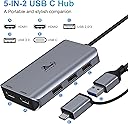
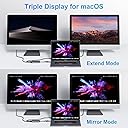
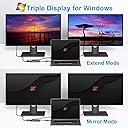
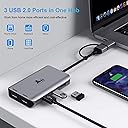
The LIONWEI USB 3.0 to Dual HDMI Docking Station transforms a single USB-C or USB 3.0 port into a powerful 5-in-1 hub featuring dual HDMI outputs (4K@30Hz + 1080P@60Hz) and three USB 2.0 ports. Compatible with MacBook Air/Pro (M1/M2 & Intel), Windows laptops, and more, it supports both mirror and extended display modes. Certified safe and backed by an 18-month warranty, this docking station is designed to elevate your multi-monitor setup and streamline connectivity for professional and creative workflows.


| ASIN | B08PV132WJ |
| Additional Features | Powered |
| Best Sellers Rank | #4,846 in Electronics ( See Top 100 in Electronics ) #11 in Laptop Docking Stations |
| Brand | LIONWEI |
| Color | Space Gray |
| Compatible Devices | Dell Latitude, HP EliteBook, Laptops, MacBook Air, MacBook Pro |
| Customer Reviews | 4.1 4.1 out of 5 stars (10,300) |
| Data Transfer Rate | 480 Megabits Per Second |
| Enclosure Material | Aluminum |
| Hardware Interface | HDMI, USB |
| Item Dimensions L x W x H | 3.9"L x 2.24"W x 0.7"H |
| Item Weight | 0.21 Pounds |
| Manufacturer | LIONWEI |
| Mfr Part Number | UC0228 |
| Minimum Required Operating System Version | Windows 7 |
| Model Number | LIUC0228 |
| Number of Ports | 5 |
| Operating System | Chrome OS, M1/M1 pro/M2 MacBook, Mac OS, MacBook Pro/Air, Windows |
| Total Usb Ports | 3 |
| UPC | 779139580355 |
| Warranty Description | 30 days to try out and 18 month's warranty |
L**A
Reliable and versatile docking station for everyday productivity
This docking station has been a great addition to my setup. It offers a wide variety of ports, making it easy to connect multiple devices at once without needing extra adapters. I especially appreciate the dual monitor support, which helps improve productivity when working with multiple screens. The connection is stable, and the overall performance has been consistent during daily use. It also works well with both my MacBook and Windows laptop, which is very convenient. The build feels solid, and the cable length is practical for desk setups. Overall, it’s a reliable and functional dock that covers all the essential needs for work or home use.
T**.
Does what it says at a reasonable price
All functionality seems to work fine under Linux. The Ethernet device uses the r8153_ecm driver. The audio jack is wired for TRRS, mic+stereo. A USB audio device is added to/removed from the bus when a plug is inserted into/removed from the 3.5mm jack. The monitor mode button simply sends Win+P as keyboard presses to the host computer. Able to drive 4k@60 over HDMI without issue. I am not using this for multi-monitor setups. If a PD source is added or removed, the dock and all of its peripherals continue to work without any issues or interruptions. If a PD source is attached, it does provide pass-through charging to the host machine. With an appropriate 100W adapter, and a host machine that can support 100W in, I'm able to exceed 70W through the dock (though I have not, even with the host system under load and with low battery, been able to reach or exceed 80W).
K**E
Works Fine, But May Not Be Powerful Enough For Your Setup
I bought this to allow me to extend my laptop display onto two external monitors and plug in peripherals for when I am home and able to sit at a desk to do my work. It is light weight and easy to travel with, but due to my laptop's USB-C port limitations (this hub only plugs into your device via USB-C), the hub is not able to display my second monitor. After doing a little digging with the help of Gemini, I realized that I would need to acquire a hub that would support all of the functions I want it to and step in for my laptop's limited bandwidth USB-C ports. Technically, I have encountered nothing wrong with this hub. The only downside is that the setup I had in mind is not compatible with my laptop without the help of a more powerful USB hub. I will be returning this as I have no real need for it when I am out and about, but I appreciate the learning experience it has given me.
F**N
Excellent Docking Bar for connecting 3 monitors (provided your laptop has a graphics card)
Very easy to use docking bar. Testing Devices - One 3840x2160, one 2560x1440, and one 1920x1080 monitors. - Two laptops. Home laptop is an ASUS ProArt laptop with NVIDIA graphics card. Work laptop is a Dell laptop with Intel(R) UHD Graphics. HOME LAPTOP WITH 3 SCREENS: Three screens connected to the home laptop (ASUS with NVIDIA graphics card): All three screens worked perfectly with full resolution (3840x2160, 2561x1440, 1920x1080) and my laptop screen worked at full resolution (3840x2400). I used the two HDMI outputs and the one Display Port output from the docking bar connected to a USB-c port into my laptop. WORK LAPTOP CONNECTED TO TWO SCREENS: Two screens connected to the work laptop (DELL with Intel(R) UHD Graphics): Both screens worked fine connected to HDMI. But the HDMI displayed at low resolution when I used the Display Port. They both worked fine with the HDMI plugged directly into the laptop and the DP plugged into the docking bar. My laptop screen was also working and visible at 1920x1200 under all test conditions. Fourth screen connection: I would suspect a fourth screen could be connected via the HDMI output of the ASUS ProArt laptop. Has anyone tried this? Comments Be sure to plug into a "full function" USB-C (look for the lightning bolt symbol on the port) Added advantages of this docking bar: 3MM Head phone jack is great since it provides a better location for the head phone cable One-USB3.1, Three-USB3.0, Two-USB2.0, plus two PD/Data ports (USB-C) provides plenty of expansion One-Ethernet port provides input. There is a button on the top of the docking bar which allows you to switch between extended and duplicated modes. I paid $55.99 1/5/2025 but is now (1/9/2025) sells for $44.79. For me, the price I paid was fair and provided good value. I'd recommend jumping on the discounted price while you can!
T**M
TL;DR Great USB C hub for Macbook Pro 16. It has all the necessary adaptors and it has a good low profile shape which can be integrated smoothly with the MBP 16. (See uploaded video) I will highly recommend this hub. Pros: 1. I purchased this usb c hub to convert the my MBP16 usb c to USB-A and sd card reader. And it works great, every usb converting function is working as expected. In the meantime, the hub won't get extremely hot (my previous adaptor does). It will keep in a warm temperature which is acceptable. 2. I occasionally use its HDMI adaptor to connect my MBP to a 1080P monitor, and the monitor can work smoothly in 60HZ. 3. I really like its low profile design and it can be connected/integrated with my MBP smoothly. The hub is tightly connected with my mac and they are almost in the same level, I can put my mac on the desk and do not need to worry if the hub has bump or create uneven point. Cons: 1. The hub's power light won't turn off, even I shutoff my laptop. It maybe because I have my mac's power cable always connected, but I think it makes more sensor to shutdown the hub if the laptop is in sleep mode or shutdown. 2. It lacks DP adaptor. I think this "Con" belongs to Apple. I cannot find a usb c to hdmi adaptor that support 4k 60Hz output. So to use mac with 4K 60Hz monitor, it needs to be "usbc to usbc" or "usbc to dp". In general, I think a DP adaptor is more preferable than a HDMI for a Mac.
M**F
When updated from my 2014 MacBook, I ended up with four thunderbolt micro usb-c ports and no USB ports at all. This gadget is a must and not realising I already had a smaller version and thought I had lost it have ended up with two but I use both with one each side of my MacBook, unfortunately the one on the right covers my headphone socket but not really a big problem (nobody's fault) but in the daytime I use all the sockets to drive my extra monitors each side of my computer giving three screens to use for my music pro midi software - brilliant product
A**N
Able to link 2 monitors to my laptop and have extra usb ports
L**I
Works like a charm with more ports than needed. Very compact. Love it!
M**D
This was a great hub for setting up my dual display and other peripherals with my laptop. Very clean and works very well. I would buy again.
Trustpilot
1 week ago
4 days ago