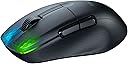
🎮 Elevate your game with featherlight precision and unstoppable wireless power!
The ROCCAT Kone Pro Air is a cutting-edge wireless gaming mouse featuring a 19,000 DPI Owl-Eye optical sensor, ultra-light 75g ergonomic design, and dual wireless connectivity (2.4GHz + Bluetooth). It boasts a 100+ hour battery life with rapid charging, Titan Switch Optical buttons rated for 100 million clicks, and premium aluminum scroll wheel. NVIDIA Reflex compatibility ensures ultra-low latency, making it the ultimate tool for competitive gamers and professionals seeking precision and comfort.


| ASIN | B091BJB6B6 |
| Additional Features | Wireless |
| Antenna Location | Gaming |
| Are Batteries Included | Yes |
| Are Batteries Required | Yes |
| Battery Average Life | 100 Hours |
| Best Sellers Rank | #50,500 in Video Games ( See Top 100 in Video Games ) #1,551 in PC Gaming Mice #4,479 in Computer Keyboards |
| Brand | ROCCAT |
| Built-In Media | PhantomFlex USB-C charging cable |
| Button Quantity | 2 |
| Color | Black |
| Compatible Devices | Windows 7, 8, 10 & 11 (software support) |
| Connectivity Technology | USB 2.0 (or higher) Internet connection (for driver software) |
| Customer Reviews | 4.0 4.0 out of 5 stars (456) |
| Enclosure Material | Aluminum,Ptfe |
| Global Trade Identification Number | 00731855504114 |
| Hand Orientation | Right |
| Item Dimensions L x W | 4.94"L x 2.83"W |
| Item Weight | 200 Grams |
| Manufacturer | Roccat |
| Model Number | ROC-11-410-01 |
| Mouse Maximum Sensitivity | 19000 Dots per Inch |
| Movement Detection | Optical |
| Number of Batteries | 1 Lithium Polymer batteries required. (included) |
| Operating System | Windows 10, Windows 11, Windows 7, Windows 8 |
| Power Source | Battery Powered |
| Range | 10.0 meters |
| Style Name | Ergonomic |
| UPC | 731855504114 731855504107 |
| Unit Count | 1.0 Count |
A**M
The Perfect Balance Between Comfort and Lightweight
I wish I could be exaggerating with the title, but this mouse is absolutely incredible. I've tried every popular gaming/office mouse under the sun and my by far favorite has been the Logitech G502. However, I was recently introduced to lightweight mice and the Logitech G PRO Superlight had gotten my attention for a bit. However, I always had to swap between these as the superlight was ultimately uncomfortable and had poor skates. The G502 has always been the most comfortable, but its too heavy for quick-flick gaming. Here comes the ROCCAT Kone Pro Air. At only $30 on black friday, I didn't think too much of this mouse initially. Once I received it, I was hooked. There was no "break in" period, it just worked. It was amazing, I still cannot believe a mouse this comfortable and lightweight existed, I thought it was impossible. The build quality is absolutely phenomenal too. I don't think there is any mouse on the market that can beat this level of comfort + lightweight form factor. One issue however, like many reviews have mentioned, is the software. It's dog water. Let me tell you how to get it working though: 1. Set the mouse setting to the center option, non-bluetooth or receiver mode. Plug it in via usb cable 2. Download the software, its called Roccat Swarm. 3. Plug in the receiver as well and update the firmware of the mouse. It might bug out so make sure the USB cable is plugged in first, THEN plug in the wireless transmitter. 4. Once updated, then you can change your DPI. The way I did this is by making sure "auto apply" was selected. This is a slow process. The software is SLOW to update. There are 5 DPI options, uncheck them all except #3, that's the one it used for me. If not, just set them all to the DPI you want, such as 1600. 5. Save settings. That's really it! This mouse is END GAME. If you're trying to find the balance between comfort and lightweight, this is it.
A**N
Very customizable mouse.
This mouse was well worth the price. It’s extremely light and has long battery life, as well as being able to use a usb c cable and not worry about charging if you want wired mode. The lights are controlled, and the roccat software allows you to change every detail about it, including the clicking pressure. If you want a mouse for Minecraft, it’s perfect as you can drag click and do all the fancy speed clicking with it.
D**D
Scroll wheel has defects and stops working after a few months
The mouse itself is a great shape/design, feels very comfortable and works seamlessly. However, the scroll wheel has major defects. You can see it documented in lots of other reviews. Mine started malfunctioning after only a few months, at which point I contacted support and they told me it was a software issue. I followed their instructions and it worked as a bandaid fix for a bit. After about 6 months it started malfunctioning again and nothing I did would fix it. Seems like it's just inevitable. Avoid this mouse unless you're willing to take it apart and fix it yourself.
B**E
Too Good
Ergonomics are Excellent: Thumb Shelf, Big Side Buttons Best Scroll Wheel Ever: tactile scroll with perfect resistance, great texture, flat face (is way better than rounded) Fast Optical Switches with Great Clicks. I run with 0-debounce, and never get false double-clicks. (After a couple years of use, a slight rattle developed in one of my switch assemblies.) Forget jitter-clicking, which is probably just for kids cheating anyway. Yes kids, faking extra clicks with low debounce on non-optical switches is cheating. OK Software: The software install is relatively small, especially compared to Logitech or Viper. The software features are not-quite bug- and funk-free, but it works well enough. Best feature: Easy to run the LEDs off. Other best feature: Price, especially compared to over-priced alternatives.
J**K
I loved it until it started skipping on me.
When I first got it I loved it, it's lightweight, and fits in my hand great, but after many months of using it the mouse started to have the mouse cursor skip at certain spots on my mouse pad. I do have a lot of electronics on my desk but I have a cheaper mouse that doesn't skip at all like this mouse did. I did love using it but as soon as it started skipping there was no way to play my games or even search the web when its always skipping the cursor. I went back to my cheaper mouse and that's still working fine with no skips.
C**N
Wireless connectivity was intermittent
I was excited to try this mouse, as I had a Kone Pure Optical years ago and loved it. I finally retired that one after it wore out from several years of use. This mouse was disappointing right out of the box. The material the mouse is made of felt cheap, not as nice as my Kone from years ago. Eh, not a huge deal as long as it works and doesn't get slippery with use... Plugged it in to charge and use it for a little bit, felt nice and seemed to work good (keep in mind, using it WIRED) Installed the software (which was a major pain, because their website's certificate was down, so I had to download thru my phone and send to my PC...) The software is pretty terrible (as expected with most of these gaming companies) but it did seem to work kinda. After fiddling with it for a while and saving multiple times, updating the firmware and driver a few times - I finally got the RGB to turn off (saves battery, after all, wireless is the main attraction) Upon unplugging the mouse and trying it in Wireless mode (2.4ghz, not bluetooth) it was immediately apparent that it was stuttering around my cursor on the desktop... Ok, not great, but I decided to reboot and see if maybe there was just a glitch... Upon reboot, same issue. Tried 2 different usb ports (thought maybe there was some interference) but no, same issue. No software conflicts, just steam and discord running and nothing else... Decided to return the mouse, as it was questionable already even without the wireless issue, but being totally unusable wireless, makes it a deal breaker. Dissapointed in Roccat, seems their quality has dropped just like Razer did years ago. Do companies make anything good anymore?
S**K
Great low latency, good CPI range, it can be used wirelessly or Bluetooth connection, can be used for office and casual browsing as well. The charging cable is flexible and overall, the build quality of the mouse is good. The click sound is mild and the mouse glides well on all surfaces. Using it for almost a year now and overall satisfied. Update: The scroll wheel does not work after 1.5-year use, universal scroll still works though, scroll up and down will work randomly but seems like it has given up scroll up and down function
C**W
I was first very skeptical about buying from ROCCAT a brand I have never heard of before but after making the purchase and receiving my package I was only blown away. The mouse feels great in hand and i love the scroll wheel and the minimal yet cool rgb at the front of the mouse long with coming with a awesome braided charging cable I had to leave a review.
V**.
Sehr leicht, liegt gut in der Hand. Mausklicks etwas laut und Akkulaufzeit in Ordnung. Hält bei mir ca eine Woche intensive Benutzung aus.
M**D
Poor quality from a well known brand. The scroll wheel has problems and the left button automatically starts to click. Many other users facing same issues. Very disappointed. Returning........
K**M
軽くて良い。大体1週間くらいは持つので電池も良い 専用ソフトがないと電池残量が見れないのは少し減点ポイント。現状は残量に従って色が変わるだけなので,電池切れ直前のみ赤く点滅などしてほしい。
Trustpilot
2 weeks ago
2 days ago