We remain fully operational. Our teams are working around the clock to ensure your deliveries continue safely.

DOWNLOAD THE APP


Copyright © 2025 Desertcart Holdings Limited
DOWNLOAD THE APP


Buy anything from 5,000+ international stores. One checkout price. No surprise fees. Join 2M+ shoppers on Desertcart.
Desertcart purchases this item on your behalf and handles shipping, customs, and support to Thailand.
🎬 Connect Classic Displays to Cutting-Edge Pi Tech—No HDMI? No Problem!
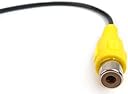
This 16.5cm 2-pin RCA female jack cable adapter by MakerSpot enables Raspberry Pi Zero and Pi 3 users to output composite video and audio to legacy RCA-compatible displays. Featuring universal RCA compatibility for video, audio, and coaxial S/PDIF signals, it offers a compact, tangle-free solution for connecting your Pi without HDMI monitors, ideal for professionals integrating modern computing with classic AV equipment.
| ASIN | B01J9LSJJO |
| Brand Name | MakerSpot |
| Cable Type | Composite |
| Color | Black |
| Compatible Devices | Monitor |
| Compatible Phone Models | No Compatible Phone Models |
| Connector Gender | Male-to-Female |
| Connector Type | Coaxial, HDMI, RCA |
| Customer Reviews | 4.5 4.5 out of 5 stars (24) |
| Indoor Outdoor Usage | Indoor |
| Item Shape | Round |
| Item Weight | 0.02 Kilograms |
| Manufacturer | MakerSpot |
| Model | 8541612059 |
| Model Name | 8541612059 |
| Number of Pins | 2 |
| Other Special Features of the Product | Tangle Free |
| Recommended Uses For Product | connecting the Raspberry Pi Zero to a display without HDMI input |
| Unit Count | 1.0 Count |
N**R
Used with a pi 5 model B (debian v12 bookworm 64-bit). Soldered in the included headers and slid on the connectors. For anyone using a pi 5 - Once soldered in, the pin closest to the edge of the board is the Ground pin. Attach the black wire here. You can select composite output in raspi-config under the display option. You cannot use composite + HDMI at the same time.
I**E
Worked, but connectors were super loose. Just moving the Pi5 around caused the ground pin to pop off the provided pin headers. Used kapton tape to hold it down in the end. Best to just crimp new ones or solder directly to the pins. For $7, whatever
T**M
I used this to use the S/PDIF connections on the ASUS Tinker Board. If you have a Tinker Board and want to use it for high end audio, there are two holes on the printed circuit board between the Ethernet port and the USB ports, the two pins that come with this cable fit perfectly. Just solder those two pins in and hook red wire to the pin closest to the edge and the black wire on pin 40 of the Tinker Boards GPIO, Works perfectly.
L**U
I used a few of these to add an hdmi input to my car radio. I bought a replacement wiring harness, pulled a few of the pins out, soldered them to these adapters, then placed into my radio harness, then used an RCA to HDMI converter to get the signal. No issues.
A**R
I used this cable to connect a backup camera to my head unit. I had to creat my own harness due to the age of my head unit, and I needed a composite cable that split the video + and the ground. I connected the wires to the appropriate pins and it’s been working out very well. I could have bought a long video cable and cut it to get the same result, but the price is right, and the work is already done. Recommended!
Trustpilot
1 week ago
2 weeks ago