Buy anything from 5,000+ international stores. One checkout price. No surprise fees. Join 2M+ shoppers on Desertcart.
Desertcart purchases this item on your behalf and handles shipping, customs, and support to Thailand.
🖱️ Game light, last long, click strong — the Orochi V2 is your ultimate mobile weapon.
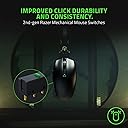
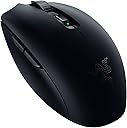
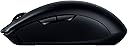
The Razer Orochi V2 is an ultra-lightweight, ambidextrous mobile wireless gaming mouse featuring up to 950 hours of battery life on Bluetooth, 2nd-gen mechanical switches rated for 60 million clicks, and dual wireless modes (HyperSpeed and Bluetooth). Designed for gamers and professionals on the go, it supports both AA and AAA batteries for balanced weight and convenience, delivering precision and durability in a compact form factor.


| ASIN | B08TJZCL5Q |
| Antenna Location | Gaming, Office |
| Are Batteries Included? | No |
| Are Batteries Required | Yes |
| Battery Average Life | 687.5 Hours |
| Best Sellers Rank | 9,545 in Computers & Accessories ( See Top 100 in Computers & Accessories ) 67 in PC Gaming Mice 265 in Mice |
| Box Contents | Manual, Razer Orochi V2 |
| Brand | Razer |
| Brand Name | Razer |
| Button Quantity | 6 |
| Colour | Black |
| Compatible Devices | Laptop, Personal Computer |
| Connectivity technology | Bluetooth, Radio Frequency |
| Country of Origin | China |
| Customer Reviews | 4.3 out of 5 stars 1,525 Reviews |
| Enclosure Material | Plastic |
| Global Trade Identification Number | 08886419333241 |
| Hand Orientation | Ambidextrous |
| Hardware Platform | 108mm x 60mm x 38mm |
| Item Dimensions L x W | 10.8L x 6W centimetres |
| Item Type Name | OROCHI V2 |
| Item Weight | 60 Grams |
| Manufacturer | Razer |
| Manufacturer Part Number | RZ01-03730100-R3G1 |
| Model Name | Orochi V2 |
| Model Number | RZ01-03730100-R3G1 |
| Mouse Maximum Sensitivity | 18000 Dots per Inch |
| Movement Detection | Optical |
| Movement detection technology | Optical |
| Network Connectivity Technology | Bluetooth, Radio Frequency |
| Number of Batteries | 1 AA batteries required. |
| Number of buttons | 6 |
| Operating System | Windows |
| Pattern | Single |
| Power Source | Battery Powered |
| Product Features | Lightweight, Wireless |
| Product Finish Type | Matte |
| Product Warranty | 1 |
| Range | 10 |
| Special feature | Lightweight, Wireless |
| Style Name | Orochi V2 |
| Theme | Video Games |
| Unit Count | 1.0 count |
C**N
All-round, an excellent - and very subtle - wireless gaming mouse.
I recently purchased myself a shiny new gaming laptop so, as is customary when I get myself a new slab of hardware, I decided to get myself a whole load of new gear to go with it, including a new mouse. Having used a wired one for a while now, I wanted a wireless one this time around - so I narrowed it down to this, the Razer Orochi v2 after reading about its epic battery life and features. I've been using it for a few days now, so let's get cracking with some blurb about how it’s resonating with me so far... >>>WHAT'S IN THE BOX? In the nice (and, yay, mostly cardboard) retail packaging, you'll find the mouse itself, a single AA battery, some instructions and some stickers. Because we all need stickers. >>>FIRST IMPRESSIONS? When I popped it out of its box, the first thing that struck me about the Orochi v2 was how unbelievably light it was. Seriously, it's probably about the same weight as a packet of salt'n'vinegar crisps. The second thing that struck me was that I wasn't immediately enamoured with the material that the mouse is made from; although it feels well-constructed, the plastic isn’t very premium-feeling - and I'm assuming that this material was chosen for its featherlight weight rather than its aesthetic appeal. Rather thankfully however, the mouse is very comfortable to hold, and I find that my fingers and thumb reach all of the buttons nicely. Design-wise, it's very subtle - there's very little about this mouse that gives any clue that it's a £70 gaming mouse, rather unlike many of it's RGB-adorned brethren - and this is something that I find very appealing, so brownie points go to Razer for this. >>>CONNECTIVIY & SETUP An interesting thing about this squeaker is that there are two ways to connect it to your computer; you can use the supplied USB receiver (found inside the mouse) or you can connect it via Bluetooth - and this duality in connection is something I’ve never seen on a mouse before. You're best off connecting it via USB for the first time to get it set up, as once you pop the USB receiver into your computer, the Razer Cortex/Synapse installer runs automatically and is very straightforward to install and get things up and running. More on the software in a bit. >>>CLICKS AND MOVEMENT All of the buttons on the mouse have very positive-feeling microswitches, with the exception of the scroll-wheel, which feels a little less positive - but it feels nice and clicky nonetheless. The left-click on my Orochi v2 is pretty loud and took a little while to get used to as my previous mouse was pretty quiet, but it’s by no means a deal breaker. I’ve done some testing to see if I can detect any difference between the mouse when it’s connected via USB and Bluetooth, and I have to say that there is indeed a bit of a difference. When connected via USB, the movement is precise and smooth, but when connected via Bluetooth, things move slightly less smoothly, but this might be down to the fact that I've got a 165Hz screen and it might look less obvious on screens with a lower refresh rate. In any case, you can easily switch between both of them, but it would definitely be advantageous to use the USB connection when playing games in which precision is required. Taking a look at the underside of the mouse, you’ll see that it has two large (somewhat oversized!) gliding pads at its front and rear, and an additional ring of the same gliding material around its optical sensor - which means that it moves incredibly smoothly; possibly more smoothly than any mouse I’ve ever used. I’m using it on my Steelseries QcK polycarbonate pad and the pointer moves in a silky-smooth manner even when moving the mouse incredibly slowly. When gaming, this translates to equally silky-smooth movement. It also feels very precise and there are options to fully customise the DPI settings in the software, which is up next... >>>SOFTWARE As mentioned before, when you plug the Orochi v2’s USB receiver into your computer, it will automatically launch the Razer software installer. This installs two separate apps; ‘Razer Cortex’ and ‘Razer Synapse’. ‘Razer Cortex’ is a multi-function app which has a game boosting mode that does some cool things with optimisation, as it kills unimportant tasks to free up memory and system resources when you launch a game, can show your FPS count, has a system optimisation function, offers on games and a rewards system. I’ve not explored much of it yet, but it looks very good. ‘Razer Synapse’ is the app that controls the Orochi v2’s functions however, as you can use it to edit the function of the mouse’s buttons and set them to individual keys, media launchers and all sorts of stuff, which is pretty cool. Importantly, it allows you to adjust the DPI settings from a lowly 100DPI (very slow) to 18000DPI (impossibly fast), and allows you to set up to five different DPI settings which can be changed quickly by pressing the button on the top of the mouse. You can also save separate profiles if you want to assign game-specific settings to your buttons, and there are other options in there that allow you to control various other gadgets from the software, such as Philips Hue lighting, and there’s Amazon Alexa options and all sorts of other things. All in all, the software is excellent and rather more fully-featured than I expected - so it’s definitely an excellent bonus on top of a great piece of hardware. >>>BATTERY LIFE I'm writing this bit a couple of months after buying this mouse, and so far I have to say that its battery life has been fantastic; but I was marred by a collection of out-of-date AA batteries (which have now been chucked!) that at least allowed me to see if there was any difference in battery life when connected via USB versus connecting via Bluetooth, and... Well, there's a huge difference! It would seem that the battery life when connecting via USB is considerably shorter than it is when connecting via Bluetooth; I can't quantify this with figures as I wasn't timing it, but I would say that you get roughly a third extra period of battery life when connecting via Bluetooth. This is, of course, served with the caveat that the movement is more precise and smooth when connecting via USB, but if you're all about preserving battery life, I'd recommend connecting via Bluetooth when you're doing everything other than gaming. >>>CONCLUSION The Razer Orochi v2 is an excellent all-rounder of a mouse, which offers more connectivity and customisation options than most, is very comfortable and precise to use, and comes with an excellent bundle of software. It’s definitely a winner.
A**R
A seriously special mouse
I basically think the G305 is the greatest mouse of all time so I've been sat here waiting for a lightweight version for a long time. When I first saw the Orochi V2 I had high hopes. I've waited a while to make sure any kinks are knocked out, it was worth the wait. I did have a problem with the first one in the fact it wobbled from side to side, that was the black model so I tried the white and it's perfectly flat. The mouse comes with a AAA lithium battery which is a great touch, it keeps the weight down. You can choose between AA and AAA in the mouse which is great. I put the AAA in a converter and in the AA spot for better weight distribution. It feels great. I connected the mouse and it got picked up by synapse straight away, the firmware updated automatically. I calibrated the surface as well so it's running tip top. The stock skates are excellent, really slippy, had no problem with my aim in apex or cod. In the hand it feels fantastic, it's smaller than the g305 but fills my hand well. There's a slight groove to the left of the mouse for the thumb and it feels really comfortable. The clicks are snappy, not oo spongey. Overall this is probably going to be my new main, until a lightweight g305 comes out anyway!
C**E
Quality feel, sleek design, great in hand
Now, let's get the most important point out of the way: - This mouse is not great if you have large hands. If you have big hands, see if you can try it out somewhere or just don't buy it. The points why you should buy it: - It feels nice in your hand, fits like a glove. - Beautiful sleek design. - High built quality, NO loose parts, crackling or bending anywhere (actually surprised, I have had mice from other big brands and this is the first that has no poor gaps, or moving plastic). - Option to use it with Bluetooth only (convenient not to have to use a dongle and works with many mobile devices) or with 2.4 GHZ dongle (can be stored inside mouse, better for latency). - Powered with AA or AAA battery (either/or, NOT both at once). Lithium batteries are more harmful to the environment and less recyclable. You can obviously also replace the battery. If a Lithium battery dies, the whole mouse can be thrown away.
A**Y
Great on 2.4GHz; BT has a few issues
So to get started - if you're planning on using this using the 2.4 dongle - stop reading; buy away. Great mouse, very comfortable and battery life is great - you can use AA / AAA battery (or mixture of both). On the other hand, the BT side of it is very problematic - I have about 45 "default" profiles that get made by Synapse for every time the mouse goes on sleep. Lately it has even stopped reconnecting straight away; I have to mess around with it to trigger the BT to reconnect. (Before you say it might be device-related; I've tested this using 3 different machines with the same outcome - quite easy to reproduce).
S**.
Finally a Razer mouse I can use on Mac!
As a PC gamer you take decent Mice for granted. But as soon as you step into the world of Mac, its a issue. Its mainly an issue on Mac M1 which for hardware contraints only has 2 USB-C Ports. One port for monitor and the other for a charger leaves nothing for wired mouse (or wireless adapter). The Logi Anywhere 3 should be perfect, but it lag issues (I'm sure firmware will sort it eventually). The Magic Mouse 2 is fine, just not pleasant to use. So Razer Orochi, works well on Mac OS, has the Razer build quality. It has a switch between Wireless (whish is prefered when gaming) and Blutooth. I personally think that not having a rechargable battery is a plus, it means it has longer life than if it had a built in battery. I didn't think that this mouse would work well on Mac as well as it does and replace my Razer Viper Ultimate on PC. I think I might sell my Viper Ultimate as nice as it is, the Orochi feels as nice to use, I prefer the smaller size, bettery battery life I only forego the RGB lighting.
R**C
Scroll wheel stops working
Really lovely mouse to use, light and smooth and responsive. However, the scroll wheel just stopped working after about 7 months, and after some further online research I found this is a common problem with this model, so I'd steer clear. There are plenty of similarly good mouse options out there that won't break after half a year whilst claiming to be a top-quality product, I've got a wired Microsoft mouse that is still going fine after 20 years.
J**J
Good weight balance, great battery life, phenomenal mouse.
Can't really say much more. I was looking for a small, portable mouse for my laptop with which I could game with when travelling, as I didn't want to drag my DM1 FPS along with me (old SS Sensei clone). It weighs nearly 10g less, which initially threw off my muscle memory, but I readjusted after a couple of hours. Honestly, this mouse could easily replace my main - there's no pre-travel on the buttons, clicks are crisp, absolutely no issues with the sensor, no RGB (which these days is a godsent, especially in a wireless mouse), really good stock skates and it's pretty much plug&play if you're fine with the stock DPI settings. Not a huge fan of the Razer software though, but it's a small price to pay. So far, I probably clocked about 50 hours of game time on the battery they provided, so I can't exactly comment on the it's battery life. The shape is quite comfy, unless you've got giant hands - mine are slightly above average and I did feel some fatigue after some time (though it could be because of the different grip style I had to use, since i could BARELY claw-grip it). All in all, great mouse, would recommend.
�**�
Really nice and comfortable mouse.
I absolutely love this mouse, the extra buttons on the side are perfect for switching music ( or whatever you want them for) and the mouse feels nice and comfortable, its wireless mode is flawless. As with lots of mice you can easily toggle the sensitivity and it has an app where you can basically change any function you want. It’s fairly quiet but still has a nice click to it, I use this every day for gaming and business. Colour is gorgeous! I have quite small hands and sometimes mice can be uncomfortable or too big but this fits perfectly! Definitely recommend!
S**E
Non lasciatevi ingannare dal suo aspetto…
Piccolo, leggero e rosa ma nella sua silenziosità veloce e preciso con un design adatto ad ogni tipo di impugnatura. Si può alimentare con una pila AA o AAA garantendo tanti giorni di autonomia prima di doverla cambiare, personalmente consiglio di usare delle buone pile AA ricaricabili. Non è dotato di illuminazione e neanche rivestimenti in gomma nei lati (preferisco così, nel tempo diventano inguardabili consumandosi). Si può collegare via 2.4 GHz con il dongle USB, dimezzando però l’autonomia rispetto al Bluetooth, in modo da avere fino a 1000 Hz di polling rate e 18000 DPI. Sono presenti due tasti laterali a sinistra.
C**N
sesi fazla
rengi çok güzel ama sesi çok ince tiz fazla
S**M
Perfect for work
I’m using it for my work’s provided laptop. The side buttons and the onboard memory are the main reason I bought it, as I set some functions that help me work quicker and comfortably without the need for Razer Synapse on the work provided laptop.
A**O
Un mouse perfetto per il gaming e non solo
Ho atteso di poter testare al meglio il suddetto mouse, prima di recensirlo. Devo dire che è il secondo mouse uguale che acquisto a distanza di un anno poiché il primo presentava un problema al tasto centrale, ma grazie alla perfetta assistenza di Amazon ho avuto un cambio rapido e senza problemi. Razer sempre una garanzia in ambito gaming, la scelta dell'acquisto è dipesa dalla volontà di avere un mouse leggero e estremamente preciso per il gaming ma che allo stesso tempo avesse la possibilità di un collegamento Bluetooth nel momento in cui lo avessi voluto collegare con altre periferiche. Già dalla scelta dei materiali e dalla cura del packaging il prodotto si configura come top. Il mouse è solamente wireless, che sia con il proprio ricevitore (latenza stimata 3.9 ms) che con il Bluetooth (possibilità di connettersi a più dispositivi senza utilizzare il ricevitore usb a costo di una latenza di 11.4 ms), quindi fan sfegatati della latenza 0 dovrete ancora cercare la versione con il filo. Ma per i gamer meno fissati, i 3.9 ms di latenza in wireless sono perfetti e non percepibili. Presenta 6 pulsanti, i due classici più la rotellina nella parte superiore, 2 laterali programmabili dall'app dedicata, e infine nella parte superiore un pulsante per switchare nelle varie sensibilità di dpi preimpostate (potete anche personalizzarle dall'applicazione). Andiamo al design e al comfort, è un mouse piccolo con schema a guscio, che avvolge perfettamente la mano, quindi si adatta perfettamente alla tipologia di gioco in Palm Grip o Claw Grip. e si consiglia l'utilizzo su un mousepad per un miglior controllo. Non presenta una batteria integrata interna, al suo posto due slot per stilo o mini stilo (si consiglia l'uso di batterie a litio e non alcalina, per diminuire il peso) nella confezione è inclusa una stilo alcalina della energizer, in base alle vostre preferenze potreste diminuire ulteriormente il peso con una mini stilo. nella parte interna è inoltre presente lo slot dove riporre la usb nel caso non fosse utilizzata, utile per non perderla. Il design mi fa impazzire, minimal e senza rgb (maggior risparmio di batteria) vi è la possibilità di cambiare il guscio scegliendo tra i molti design presenti sul sito o con dei loghi personalizzati, io personalmente ho mantenuto il nero standard. prodotto pienamente approvato.
M**.
Quality
I love it so far. Feels quality. It is a little small, not rechargable, but for the price, i would buy it again.
Trustpilot
1 month ago
3 days ago