Buy anything from 5,000+ international stores. One checkout price. No surprise fees. Join 2M+ shoppers on Desertcart.
Desertcart purchases this item on your behalf and handles shipping, customs, and support to Thailand.
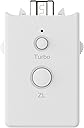
🎮 Level up your retro gaming with turbocharged precision!
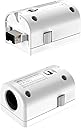
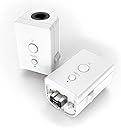
The MAYFLASH Adapter Dual Pack connects GameCube controllers to Wii and Wii U consoles, featuring an integrated Turbo function and broad compatibility with all Wii Classic Controller-supported games, including top titles like Mario Kart and Super Smash Bros, enabling enhanced multiplayer experiences.


| ASIN | B00YH3NWTW |
| Brand | MAYFLASH |
| Color | white |
| Colour | white |
| Compatible Devices | Gaming Console |
| Compatible devices | Gaming Console |
| Connector Type | built in |
| Connector type | built in |
| Customer Reviews | 4.3 out of 5 stars 335 Reviews |
| Finish | Matte |
| Item Dimensions | 9 x 3.5 x 7 centimeters |
| Item Weight | 0.07 Kilograms |
| Item dimensions L x W x H | 9 x 3.5 x 7 centimeters |
| Manufacturer | MAYFLASH LIMITED |
| Mfr Part Number | W0142 |
| Model Number | W0142 |
| Number of Items | 2 |
| Number of Ports | 2 |
| Package Quantity | 1 |
| Power Plug Type | No Plug |
| Smart Home Compatibility | Not Smart Home Compatible |
| Specific Uses For Product | GameCube controller connectivity with Wii and U systems |
| UPC | 717520922902 |
| Unit Count | 1.0 Count |
| Warranty Type | Limited |
ج**د
جيد
جيد
G**R
Funktioniert! (Auch mit Wave-Bird)
Also beide Adapter funktionieren tadellos und es ist kein Input-Lag oder andere Fehler zu erkennen. Gerade für Leute, die den GameCube-Controller als den besten Controller aller Zeiten ansehen, ist dieser Adapter ein Muss. Da der GameCube-Controller als Classic Controller eingesetzt wird, kann man ihn nun bei sehr vielen Spielen einsetzen (z.B. Mario Kart 8). In der Beschreibung steht, dass keine WaveBirds unterstützt werden, jedoch funktionierten auch diese, als ich den Empfänger an den Adapter angeschlossen haben, problemlos. Man sollte aber beachten, dass man die Schutzhülle der Wii-Remotes nicht benutzen kann, da der Adapter direkt unter die Fernbedienung gesetzt wird, was die ganze Konstruktion aber auch kompakt macht. Ich werde später die Rezension updaten, wenn die Adapter mal über längere Zeit in Anspruch genommen worden. Bisher aber einfach super. PS: Wer wirklich nur Smash Bros. mit GameCube-Controllern spielen möchte, der sollte jedoch zum offiziellen (kabelgebundenen) Adapter greifen, denn dort werden direkt vier Slots unterstützt.
M**O
ESTA MUY BIEN
FUNCIONA PERFECTO
I**N
Non lavorano bene in modalità vWii di WiiU
Funzionano benissimo per i giochi Virtual console di WiiU ma purtroppo andando in modalità vWii con alcuni emulatori funziona e con altri no ma questo lo si potrebbe imputare ad una mancanza dei software non dell'adattatore in questione, quello che mi lascia perplesso però è che alcune volte (non sono riuscito a isolare la causa) fa impazzire il WiiMote plus, rendendo impossibile controllare la vWii. In pratica conviene in base all'utilizzo che se ne vuole fare...
H**R
Great little adaptes
Bought these for my lad to play Smash bros on Wii U with a GC controller. Works perfectly and MUCH cheaper than the official adapter. Also works with quite a lot of other games too. No problems at all.
D**Y
These are pretty neat and worked well for my purpose
I always seems to try using devices like this in ways they aren't intended. I really had no interest in using this on a Wii or Wii U, I wanted to use them on my PC with Dolphin. Luckily for me they did indeed work for this. It took a few attempts to find a working solution but in the end I did come up with something that works fairly well. At first I tried syncing the wiimotes with an 8bitdo USB adapter. This does somewhat work, but the triggers are not analog this way and only trigger as the left and right bumpers once they're fully pressed in. I then tried connecting them to some Mayflash Magic-NS adapters, and to my surprise the triggers were actually fully analog where they acted as the triggers and then once they were fully pressed in, they trigger the bumpers. However, using them this way, now the z button doesn't work. Well I had one more idea to try and this actually fully works. Using a Windows program called Touchmote, I'm able to sync the wiimote and then full customize the controls. So like before, the triggers are fully analog and become the bumpers when pressed in, and then I mapped the z button to the select button since a GameCube controller doesn't have a select button. From there it's just a matter of mapping the controller in Dolphin and now I have semi wireless GameCube controllers
Trustpilot
3 weeks ago
1 month ago