🎧 Elevate your audio game—because your voice deserves the spotlight!
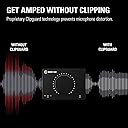
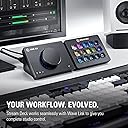
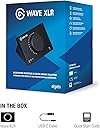
The Elgato Wave XLR is a premium audio interface designed for professional streamers, podcasters, and content creators. Featuring a studio-grade 75 dB ultra-low-noise preamp, seamless XLR to USB-C connectivity, and 48V phantom power, it ensures crystal-clear sound capture. Integrated with the Wave Link app for advanced digital mixing and equipped with Clipguard technology to prevent distortion, this compact and stylish device transforms your microphone setup into a powerhouse of pristine audio quality.


| ASIN | B09738CKKX |
| Audio Input | XLR |
| Best Sellers Rank | 16,589 in Musical Instruments & DJ ( See Top 100 in Musical Instruments & DJ ) 34 in Live Mixers |
| Brand | Elgato |
| Brand Name | Elgato |
| Compatible Devices | Personal Computer |
| Compatible devices | Personal Computer |
| Connectivity Technology | USB |
| Connectivity technology | USB |
| Customer Reviews | 4.6 out of 5 stars 2,535 Reviews |
| Frequency Response | 20 KHz |
| Frequency response | 20 KHz |
| Included Components | Elgato Wave XLR |
| Item Dimensions D x W x H | 8.8D x 11.8W x 8.4H centimetres |
| Item Type Name | Corsair Elgato Wave XLR Microphone Interface |
| Item Weight | 300 Grams |
| Manufacturer | Corsair |
| Manufacturer Part Number | 10MAG9901 |
| Maximum Sample Rate | 96 KHz |
| Model Number | 10MAG9901 |
| Number of Channels | 1 |
| Number of channels | 1 |
| Operating System | Mac |
| Product Warranty | 2 year manufacturer. |
| Supported Software | Wave Link |
| Supported software | Wave Link |
| UPC | 840006642886 |
| Unit Count | 1.0 count |
A**N
Perfect upgrade for the streaming setup
Got this after deciding I wanted to upgrade to an XLR microphone for the streaming setup, and I made the right choice. I wanted something simple, but still high quality like other Elgato products I have used. It is simple, looks very good, and it has given me no issues thus far with audio, sound, or anything like that. Plus, the dial is super fun to use and feels great.
A**6
five star!
brilliant, elgato quality, great sound, awesome software, what is not to love, the feel of the big knob is great too!
J**H
Works as expected. Very useful
Easy to use, I almost deafened my friend because I accidentally put the mic volume on max. It is good for lowering your headphone volume and mic volume. Works as well as I expected
C**E
Good
The build quality on this product is outstanding. It was a necessary addition to pair with my Elgato Wave DX microphone, and it complements the setup seamlessly. Highly recommended if you have the same mic.
E**D
Really useful, but not perfect
My main use case for this mixer is to split audio channels in Windows, so I can have system sounds divided into more than one channel. For example: game sound on 1 channel and chat sound on another. I'm not a streamer, but I record gameplay videos that are much easier to edit if I'm able to independently change the volume of the game and voice chat in post. This device allows you to have multiple channels within Windows via their software, which is great. These are recognised by recording programs like OBS too, so it works how you'd imagine: you can add each respective channel as an audio source, just making sure they're recorded to individual tracks. I'd personally much prefer it if this multiple channel system wasn't totally based on the software, because I have had it randomly stop working mid session and ruin my capture. My previous method of making system sounds divide into more than one channel was hardware based, via a mixer that had both USB and optical ports - each of these providing an individual channel in Windows. This never failed because it was literally the cables and device that gave me the 2 channels, and not software that can crash or have driver issues. Overall, the Elgato is probably better than my previous hardware solution, because you can have more than 2 channels for your system sound and it also takes an XLR input - so currently this mixer replaces two things in my setup which is a bonus. Aside from some random issues like I described with the software, the main thing about this mixer that bothers me is the 3.5 output. It's totally adequate if you're using desktop speakers and not doing anything serious in regards to audio production - but when used with earbuds or headphones the noise flaw is very noticeable. A constant hiss that doesn't go away when you turn down the volume. That bugs me to no end, but I put up with it because of how useful I find the other main features. I think with some updates to the software to make it more reliable, and perhaps a change to the output situation this would be a device every content creator needs. Right now, I'm constantly wondering if the software is working properly and while it usually does, it only takes one ruined recording for it to constantly be on your mind. As for the hiss, it doesn't impact recordings because it's the output, so I suppose you have to live with that until they do a mark 2.
L**L
Simple controls and great quality
So far I've had great results from this thing. It has a nice small footprint and is the same size as the Stream Deck Mk2 if you have one of those, making it fit perfectly if you have other Elgato products. The headphone output of up to 250 Ohms is perfect as well, as I use Sennheiser HD58X headphones and these provide enough power for my to not need a seperate amp/dac. The software is where this shines, as it provides amazing control and great functionality that works well with the product.
H**.
Good minimal option
I livestream as a hobby. I prefer to have less equipment for a more minimal setup. A good alternative to a GoXLR mini which is what I had before. The mute button on the back is really simple, and the Wave software is very smart.
D**5
Great product excellent customer service
I bought this but couldn't get it working. The email based customer service provided was superb, and had me up and running in very acceptable time.
S**K
Buena interfaz, pero hay alternativas
Llevo bastante tiempo utilizándola y la experiencia en general ha sido muy positiva. La instalación es sencilla, la configuración es intuitiva y la aplicación de Elgato es probablemente uno de sus puntos más fuertes. Permite ajustar todo de forma muy cómoda y ofrece una integración excelente con otros productos de la marca. La compré principalmente para utilizarla junto a un Shure SM7B y el resultado ha sido muy bueno. La calidad de audio es excelente y no he tenido problemas de funcionamiento ni estabilidad durante el uso diario. También me gusta el diseño compacto y el control físico que incorpora, ya que facilita ajustar parámetros rápidamente sin tener que abrir software constantemente. Como punto menos positivo, el precio es algo elevado. Actualmente existen interfaces similares que ofrecen prestaciones muy parecidas por menos dinero. En mi caso, el prestigio de la marca, la calidad del software y la integración con el ecosistema Elgato fueron factores importantes para decidirme.
L**E
Changed everything for me (in a good way)
I purchased because you can set up mic filters up on the device, and they then apply to any application you use. I know there is software that can do this without the Elgato ecosystem but this makes it so much easier for me to understand. Additionally I now have separate volume controls for every category of use on my PC which I can adjust for both myself and any audio being output to a stream. Everything can be backed up and restored when needed. Works reliably. Couldn't ask for more.
O**G
A great interface
I love having an interface for my sounds, it is great to have more control over the sound of my streams. BUT, the software is complicated and not very clearly written and provided. The online ‘manuals’ are made for ppl who know what this device. After using it for 2 weeks I am enjoying the device.
J**F
A Great GoXLR Mini Alternative!
The Elgato Wave XLR is a great piece of equipment for your sound setup. While deciding whether or not to get this, I had to look at the benefits and drawbacks this device had in comparison to the GoXLR Mini. A drawback of this device is that, compared to the GoXLR Mini, the Elgato Wave XLR isn't as convenient because it lacks physical faders (the sliders for different sound sources). This could be a deal-breaker for some people, but it wasn't enough for me to ditch the option. In my opinion, the Wave XLR has many more benefits than the GoXLR Mini. The compact design of the Wave XLR makes my setup nice and tidy compared to the size of the GoXLR Mini. It fits perfectly on top of my computer, and its cable management is perfectly fine since all its ports are coming off the back. The Elgato Wave Link software is incredibly intuitive. It separates the audio into two potentially identical tracks: the monitor track and the stream track. Because of this, you can adjust your sound levels for your stream track (what the stream may hear or what an audience might hear) separately from what you hear (the monitor track). You can also switch between what track is currently playing through your headphones right on the software so that you can properly adjust the sound levels. The Wave XLR has VSTs for all audio sources, so you can add limiters, equalizers, noise gates, etc. to your microphone or any other sound. It also allows you to use your microphone with the VSTs on any program, so you can speak to your friends through Discord for example with your VSTs. There is a knob on the front of the device that lets you adjust the gain for the microphone you have plugged in. Fortunately, the Wave XLR has enough gain to power power-hungry microphones such as the Shure SM7B, so there is no need to worry about whether your microphone will ever be too quiet. You can push the knob to switch it from adjusting your microphone to your headphone level, and you can push it again to adjust how much of your microphone you hear back and how much of your system you hear back. Keep in mind that monitoring your microphone directly through the Wave XLR and NOT through the Wave Link software will NOT have any of the VSTs you put on. Overall, this is an amazing device, and for $40 cheaper than the GoXLR Mini, you are definitely getting enough bank for your buck. It has everything the GoXLR Mini has except the physical faders (sliders), and more. I would recommend this to any streamer who is looking for an audio interface that is compact and powerful enough to power a microphone like the Shure SM7B.
C**C
Simple and Practical XLR Interface
This is the ideal XLR interface for getting microphone audio on a PC for streaming, podcasting, voice overs, or just discord/skype/teams. Works great with an ElectroVoice RE20 even without a cloudlifter. Also works well with the AT2035 with phantom power. The most noteworthy features that set it apart from other audio interfaces are the Wave Link app and the capacitive mute button on top. Wave Link is incredibly useful for mixes, and close integrations with stream deck mean controlling it can be simple too. Adding VSTs directly to the audio to do compression, EQ, de-essing, and notably noise suppression is much simpler than with other apps like Voicemeeter, and having the effects apply to the output directly instead of through OBS let's apps like discord hear the same audio. The inbuilt Noise Suppression plugin is surprisingly good, while I would not recommend using it if avoidable as it does definitely affect audio quality, it works well to make noisy backgrounds (such as with an air conditioner or fan on) bearable for people on the receiving end of voip calls. I've tried a number of other audio interfaces like the Scarlett 2i2, Komplete Audio 2, and Line 6 UX2, and the WaveXLR is simply the best for a desktop mic. The others have its roots in recording instruments in addition to vocals and it shows. Out of those 3 the only one that comes close is the classic Line 6 UX2 which had a great selection of preamps and effects that were built in to the Pod Farm app, but the WaveXLR definitely has a cleaner interface and more features. Capacitive mute is a simple feature but is very convenient once you use it. It avoids having the loud 'pop' that using the phantom power switch as your mute button leads to, and is both quieter and easier to press than a virtual button. While it does not have the same mixing capabilities out of the box as the GoXLR (which I do not recommend as TC helicon has basically stopped software support for it), nor does it have the number of inputs that more instrument-minded interfaces have, the Wave XLR is designed simply to have one mic hooked up to it with a bunch of features available for that mic, and it does its job very well.
Trustpilot
1 month ago
5 days ago