We remain fully operational. Our teams are working around the clock to ensure your deliveries continue safely.

DOWNLOAD THE APP


Copyright © 2025 Desertcart Holdings Limited
DOWNLOAD THE APP


Buy anything from 5,000+ international stores. One checkout price. No surprise fees. Join 2M+ shoppers on Desertcart.
Desertcart purchases this item on your behalf and handles shipping, customs, and support to Thailand.
🔗 Unlock your display’s full potential—connect, game, and work in stunning 4K clarity!
This active HDMI to Mini DisplayPort adapter delivers crisp 4K UHD resolution at 30Hz and supports 2K@60Hz and 1080P@120Hz, enabling seamless connection from HDMI devices like Xbox consoles and Mac Mini to Mini DP monitors. It requires no drivers, is plug-and-play, and is designed for professionals seeking high-quality, reliable video output with broad device compatibility.


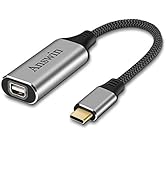
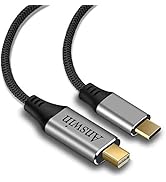


| ASIN | B099Z3P12J |
| Best Sellers Rank | #94 in DVI-HDMI Adapters |
| Brand | Answin |
| Color | Deep Grey |
| Compatible Devices | Laptop, Monitor, PC |
| Connector Type | HDMI to Mini Display Port |
| Current Rating | 1.5 Amps |
| Customer Reviews | 4.1 4.1 out of 5 stars (493) |
| Finish | Hdmi,Projector |
| Item Weight | 0.06 Kilograms |
| Manufacturer | Answin |
| Model Number | CA048 |
| Number of Items | 1 |
| Number of Ports | 1 |
| Package Quantity | 1 |
| Power Plug Type | No Plug |
| Specific Uses For Product | Monitor |
| Unit Count | 1 Count |
| Warranty Description | 1 year |
| Warranty Type | Extended |
M**K
Good.
Works as described
D**S
I had to "pay the Pipper" (if anyone still remembers what that means)
IT WORKS ! I, for the life of me, cant figure out why this "active" adapter cost so much more then just about any other kind of PC cables. Even active 4k or 8k Mini DP TO HDMI out cost a mere $10 or less actually. I just dont understand and VERY VERY few companies manufacture this particular cable arrangment. BUT! I paid the price and it works well. My situation is that I simply didnt want the thick seemingly unbendable HDMI cables running from Laptop to 2 other displays. My "desk"/ "workstation" is actually my livingroom coffee table. I put 6" risers on the legs to elevate everything and Im trying my best to hide ALL Cables. I drilled a 2" hole in the floor years ago so I could run must of the cables and power supplies in the basement. It works, I have a fairly "clean" work surface and my wife doesnt complain too much. LoL. Check out the pics. I will/have to buy this again when needed.
R**L
Poor quality -- does NOT work with Apple 24" LED Cinema Display
I intended to use this Answin HDMI-to-MiniDP adapter to run my Apple 24" LED Cinema Display off of my M1 Mac mini's HDMI port. This adapter is advertised as supporting this specific monitor, and so I felt confident that it would work easily. Lo and behold, it didn't work. The monitor remained black. After fiddling with the HDMI connector a bit in the M1 Mac mini's HDMI port, I started to suspect that the adapter was at fault. I tested the adapter on three other machines that have both HDMI and Thunderbolt2/MiniDP ports: a 2013 Mac Pro, a 2014 MacBook Pro 15", and a 2015 MacBook Pro 15". On all of these machines, the monitor worked properly when connected directly to their Thunderbolt2 ports, but failed to work through their HDMI ports via the Answin adapter. Just to make sure that the HDMI ports actually worked on all of my Macs, I tested all of them on some old Acer monitor with an HDMI port. As expected, the HDMI ports on all of my Macs worked just fine. I've had enough. I simply returned the Answin adapter to my nearest UPS Store and bought myself a StarTech HDMI-to-DisplayPort adapter along with a StarTech DisplayPort-to-MiniDP adapter. And sure enough, the StarTech adapters worked for ALL of my Macs. I am now happily using my old Apple 24" LED Cinema Display with my not-as-old M1 Mac mini using StarTech's adapters via the Mac mini's HDMI port. After reading some of the success stories in other Amazon reviews about people connecting their Apple LED Cinema Displays to their PCs and Macs, it is possible that I got unlucky and got shipped a lemon adapter. Admittedly, I didn't request any sort of exchange with Answin to troubleshoot this further. But for an adapter that cost me nearly $50, I expected more out of Answin's quality control. After being sorely disappointed with another Answin adapter product, their 3-in-1 MagSafe-to-USBC charging adapter, I've found that their advertising seems to overpromise and underdeliver, forcing me to distrust Answin as a company. My recommendation for people needing adapters for older equipment is to spend a little more money on StarTech products. StarTech is an established brand for this kind of thing, and I have never went wrong with any of their cables or adapters. All of my StarTech cables and adapters have served me for years and are found to be reliable. Save yourself the headaches, and resist the urge to try saving a few bucks on generic brand products like Answin!
C**H
Works great. I had a little trouble at first but figure it out.
I had a hiccup when I first tried this adapter, and I was literally typing a bad review when I made an adjustment and realized it was a problem with my cable, not this adapter. The connection to my monitor only worked when I physically and firmly pressed my mini display port cable into the adapter cable. When I released the pressure, the connection was lost. I have had a little trouble with my cable before this, so I tried switching cable ends so the computer end was now plugged into the back of my monitor, and the monitor end was now plugged into my new adapter. And then it worked great. This cable adapter seems like it has great physical build quality. I'm using this to connect my new M2 MacBook Pro to my old 2010 27" iMac, which I'm using as a monitor.
U**I
Thunderbolt is not MiniDP
You cannot plug a Thunderball cable into a mini DP cable. They are not compatible. This product will not work with any new MacBook that is thunderbolt driven. You have to understand the difference between thunderbolt and minidp. The Apple LED cinema displays are mini DP driven. They are not compatible with thunderbolt driven components. The individual that has the video where he ends with this product sucks. He does not know the difference between Thunderbolt and mini DP. But what he did do that was great was when he plugged it in and it recognized the controller and displayed it on the LED cinema display. Is the reason why I bought this product.
A**R
Solution to connecting PC to Apple Cinema Display
I had an old Apple Cinema Display that I wanted to repurpose to use with a new micro PC. The PC had a Display Port and the Cinema Display has a Mini Display Port cable, so I bought a simple Display Port-to-Mini Display Port adapter. That didn't work because life always has to be more complicated than that, particularly when mixing Apple and PC ecosystems. So, after consulting Google, which I should have done beforehand, I bought this to connect between the HDMI port on the PC and the Mini Display Port on the Cinema Display. Works like a charm. That said, it's a lot more expensive (active components?). The Display Port to Mini Display Port adapter was $9, all-in, and this is $54. But it works, so who's counting (though with 4K monitors going for < $400 now, it does make one pause).
M**O
Handy adapter
Adapter works just perfect on Apple cinema monitor using it as display on windows laptop or desktop as display great ..
J**.
Works with M2 & 27" Apple Cinema Display!
Mac mini M2 Pro & 27" Apple Cinema Display (miniDisplayPort, not the Thunderbolt version). Add Lunar.fyi to control screen brightness and speaker volume from the keyboard. I tried several USB-C solutions in an effort to save some money over this $50 adapter. The USB-C solutions worked for me, but occasionally, once or twice a week, max resolution would drop from 1440p to 720p when waking from sleep. After trying several adapters, I finally broke down and gave this a try. Display lit right up, and controls retained through Lunar.fyi. This HDMI solution has been solid for the last couple of days.
A**R
Work well - I did read some reviews saying it does not work with an apple led cinema monitor. Apple made 2 types of monitor one with mini display port and another with thunderbolt. You need to make sure the monitor is a display port not a thunderbolt port. If the connector on the monitor has a lighting bolt on it it will not work.
S**S
Infelizmente não funcionou e abri devolução, porém o vendedor não me pediu o produto de volta. Fiquei mas pra mim não tem utilidade.
T**U
This item was useless for me. I have a 2008 monitor. I'm using a mini displayport cable (which worked fine with my older laptop). My new laptop only has an HDMI port so I bought this to plug into my laptop and adapt to the mini displayport. Didn't work. According the their diagrams, it should work. It's unclear what exactly this is intended for. Also I'm confused because when I received this adapter, the HDMI end of the adapter has a female usb-c port on the side and it came with a short usb-c cable... Nothing on the packaging or on this product page (or in the reviews??) mentions anything about the usb-c port and what it's for... Does anyone know? I have no idea what this cable is for, but it's apparently not for adapting to a mini displayport cable from your computer to your monitor.
S**I
we needed to connect a MAC monitor to our PC and the monitor had a cable that was attached internally and not a cable we could swap. getting this miniDP to displayport was the perfect way for us to use that older mac monitor on our pc
B**N
It works with the LED cinema display but only with a non-mac OS like Windows. Connected directly to an HDMI port, and going into MacOS I get a green tint. HOWEVER when connected to a USB-C dock with HDMI it works correctly. My only guess is the monitor doesnt properly ID itself in MacOS with this connector as the direct input. Best stick to a DP or USB-C adaptor if you only use Macs on that monitor and don't have a hub.
Trustpilot
2 days ago
2 months ago