

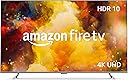
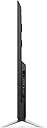
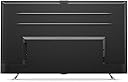


Amazon Fire TV 75" Omni Series, 4K UHD smart TV with Dolby Vision, hands-free with Alexa
Product ID: 356286662
📺4K UHD resolution 3840x2160
🔌3 HDMI ports + eARC for premium connectivity
🎙️Hands-free Alexa voice control
Buy anything from 5,000+ international stores. One checkout price. No surprise fees. Join 2M+ shoppers on Desertcart.
Desertcart purchases this item on your behalf and handles shipping, customs, and support to Thailand.
🔥 Elevate your living room with Alexa-powered 4K brilliance!
The Amazon Fire TV 43" Omni Series delivers stunning 4K UHD visuals with HDR10, HLG, and Dolby Vision support, combined with hands-free Alexa voice control for effortless navigation. Featuring 3 HDMI ports including eARC, it seamlessly integrates with your gaming consoles and audio systems. Stream over 1.8 million movies and shows from top platforms, enjoy live TV, and control your smart home—all while maintaining privacy with an electronic mic disconnect. A perfect blend of cutting-edge tech and smart convenience for the modern connected home.
| Resolution | 3840 x 2160 |
| Display resolution | 4K UHD |
| High Dynamic Range (HDR) format | HDR 10, HLG, Dolby Vision |
| Backlight type | Direct LED |
| Refresh rate | 60 Hz |
| Screen size | 75” |
| Viewable display screen | 74.5” |
| HDMI ports | 3 HDMI 2.0 + 1 HDMI 2.1 with eARC |
| Ethernet | 1 Ethernet port |
| USB | 1 USB port |
| IR device control with included Fire TV Alexa Voice Remote | The included Fire TV Alexa Voice Remote can certain functions, such as power and volume, on a wide range of compatible IR-enabled devices, soundbars, and A/V receivers. Note: Certain functions may not be available on some IR-enabled devices. |
| Voice support | Yes, hands-free with Alexa, press and ask Alexa with the Fire TV Voice Remote or the free Fire TV app (available for download on Fire OS, Android, and iOS). |
| Audio support | Dolby Digital Plus with passthrough of Dolby-encoded audio |
| Audio power | 8W + 8W |
| OS | Fire TV OS |
| Product size without stand | 65.9” x 38.2” x 3.0” |
| Weight (without stand) | 62.2 (lb) |
| Bezel size (mm) | 1.1 mm |
| Front finish | Gray metal |
| Distance between TV legs | 52” |
| SKU number | 4K75M600A |
| VESA Wall Mount Standard | 400 mm x 300 mm |
| Accessibility features | VoiceView screen reader enables access to the vast majority of Fire TV features for users who are blind or visually impaired. Screen magnifier enables viewers to zoom in and out, and pan around the screen. Text Banner consolidates onscreen text into a compact, customizable banner that appears on the screen. Watch videos and TV shows with closed captioning displayed. Use Audio Description for verbal descriptions of what is happening on the screen, including physical actions, facial expressions and scene changes. Captions and audio descriptions are not available for all content. Fire TV 2-Series, Fire TV 4-Series, Fire TV Omni Series, and Fire TV Omni QLED Series support audio streaming for select compatible Bluetooth hearing aids and devices for a private listening experience. You can also listen to Fire TV with compatible Bluetooth headphones. Learn more about accessibility for Fire TV. Note: “Hearing aids” refers to compatible Bluetooth hearing devices such as traditional hearing aids, cochlear implants, and bone conduction hearing devices. |
| Content availability | Certain apps and services are subject to change or withdrawal at any time, may not be available in all areas and languages, and may require separate subscriptions. |
| Connectivity | Wifi or Ethernet |
| Digital Optical Audio Output | 1 Digital Optical Audio Port |
| Warranty and service | 1-year limited warranty and service included. Optional 3-Year and 4-Year Extended Warranty available for U.S. customers sold separately. Use of Fire TV is subject to the terms found here. |
| Included in the box | Fire TV Omni Series 75”, Fire TV Alexa Voice Remote, power cord, 2 AAA batteries, IR emitter cable, 4 screws, TV stand (2 legs), Quick Start Guide. |
| Software security updates | Learn more about these software security updates. If you already own a Fire TV, visit Manage Your Content and Devices for information specific to your device. |
| Support | Explore the User Manual to view more information about Fire TV Omni Series. |
| Size | 38.2 x 157.7 x 17.1 mm |
| Weight | 51 g (without batteries) |
| Batteries | 2 AAA required (included) |
| Technology | Bluetooth 5.0 |
| Compatibility | Compatible with Amazon Fire TV smart TVs: Fire TV 2-Series, Fire TV 4-Series, Fire TV Omni Series, Fire TV Omni QLED Series, Fire TV Cube (3rd Gen) |
V**L
Absolutely amazing and smart TV
Received my 75inches Amazon fire omini TV today and my first impression is absolutely fantastic. Amazon has not shared much technical information like panel type is IPS or VA but since it supports enhanced dolby vision I assume hardware is high end and supports 12 bit depth at panel and graphics/processor level. I have watched so far SDR and HDR 4k contents and performance is absolutely amazing out of box settings. YouTube, Netflix, Amazon prime videos, Pluto tv, Peacock are my frequently used apps and all worked flawlessly. I will return to my updates after spending some more time with various types of contents, specially enhanced dolby vision. Update Oct 30th- watched squid games on Netflix in Dolby vision. When source contents are in DV mode this Tv senses the format automatically and DV logo appears on playback. I watched at night time keeping lights off in room and paid attention to all kinds of scenes that were being presented like day light, night times, indoor, outdoor etc. It scored absolutely 100% movie theater level presentation which I thought was never possible on LCD Tv. Color clarity to the extent no detail missed. Issues- yes I noticed 1 issue too in case Amazon technical team wants to know. 1. Video playback turned absolutely black occasionally with just audio sound going on. This happened while watching episodes of LOST season 2, episodes 16 to 20. It happened consistently when commercials that interrupt automatically in between and absolutely after last commercial is complete, episodes playback resumes with only audio and no video. Exiting episode and returning back to resume play manually always resolved this issue. I assume it to be a software glitch either of IMDB TV or Amazon prime. Dec 5th update: Installed Ring door bell, Amazon thermostat, Myq garage door opener and camera. All added as a device on Alexa application. Found that Tv gets integrated to Ring door bell and thermostat automatically. Nothing impressed my wife so far but the ease of announcing to Fire Tv straight from bed even when TV is powered off “Alexa set thermostat to xx temperature “ . Just this one smart feature turned out to be biggest winner. Tv continues to perform fantastic so far! Update Feb 16th,2022 - purchased Amazon studio to enhance dolby atmos sound experience and it made amazing difference. I placed it in center below my bed, found this to be best for room full of sound. Connecting to TV was a piece of cake through Alexa application. Tv continues to perform well till date and seems like Amazon is pushing automated software updates too. Happy customer!
J**N
Great display, but needs some upgrades
My wife sent me the listing for this TV when she received it as a special sale item and even though my current old TV was still working fine, I decided that it was a good enough deal that I would upgrade to 4K finally. I liked that it had a lot of potentially beneficial connectivity between other devices, like cameras and other smart home stuff. I already had a TV wall mount from my old TV. The only problem was the mounting holes on the back of this TV were different and I didn't have the leftovers from the mounting hardware, so I had to wait until the next morning to run to the hardware store and get what I needed. After that, it was up on the wall within minutes. Another problem: the mounting of the bracket on the back on the TV is much lower than my old one, so the TV sits about 8-10" higher than before. I will need to take down the TV and move the entire wall bracket down so it sits at the right height. Setup is pretty easy, getting through the general stuff, the WiFi connection, updates, and scanning through the TV channels...yes, I still use antenna for a couple local channels I can't get through streaming. That all went fine. I connected my existing in-wall HDMI cable to the ARC port and set my receiver to the Roku input. I had great picture and audio. I decided that I should also try using the TV with its built-in Fire TV capabilities. That's where things went off the rails. The ARC was working fine for all of a few minutes, and then after changing a couple unrelated settings and rebooting the TV, I had no more sound over ARC. I messed with settings on the TV and my receiver for 10-15 minutes before turning to the internet for help. I found an answer that said to unplug the TV for a few minutes and then it should work again. Great. Did that and I did indeed have sound over the ARC channel, but it would cut out every 5-7 seconds. I tried messing with all sorts of settings but eventually gave up and just connected an optical cable between the TV and receiver to get sound working properly. I might have to try a newer HDMI cable to see if that makes any difference. With that working, I was able to use the native Fire TV apps. I've been using the native Fire TV system now for a couple months and I have to say, it needs work. When the apps work, they work. But every once in a while, and it's happening almost daily now, I'll load an app and it won't respond. I'll have to reboot the TV and then the apps will start working most of the time. Sometimes even a reboot won't work and I just have to wait for the app to eventually load. I don't think its an internet or WiFi issue, since nothing else seems to have any problems. I just think the Fire TV environment is slow. I don't know if it's because of the hardware or the software, but the instant I started using it, I could tell how much slower it was to respond to anything compared to the Roku box I have. Needless to say, as a display, this thing works great. The picture is clear and bright, the details are amazing. I haven't played much with the picture settings, as out-of-box, it was already good. I like that it integrates the OTA TV channels right into the menu so I don't have to change the input. I also like the on-screen notifications from Alexa for specific things that I have set up. I haven't played much with the integration of the Ring doorbell and the picture-in-picture display for it. I also plugged a web camera into the USB port on the TV and it recognized it, but I haven't tried to use Zoom yet with it. I gave it 5 stars, despite the issues with ARC, as that may not necessarily be the fault of the manufacturer, but more an issue with my cable, or the setup between the TV and my receiver...maybe they just don't work well together. I've read that Yamaha's receivers all tend to be finicky with ARC, so it may just be that. I'm also not dropping any stars, despite the speed issues, as it could potentially be related to my network, or might work fine after an update. Either way, I could use it as just a display with my Roku and it would be a 5-star display at that point. But then I'd lose any capabilities with the integrated Alexa and smart features.
C**H
Great TV - Great price
Just purchased the Fire TV 50" Omni. Everything went very well. Prime delivery was fast and the TV was placed at the front door by UPS. Packaging is solid but TV is easy to unbox. Setup was simple. We just attached the feet, connected the cables (power and ethernet), plugged it in and hit the power button...after several software updates, it was ready to go. App setup and installation was very easy compared to another TVs I am familiar with. Picture quality with default settings is excellent. TV speakers also sound really good as compared to other similar / larger TVs. The remote is small (Amazon style) but it works well. The built-in Alexa also works flawlessly with no setup if you already have an Amazon account and use Alexa devices. We have used the TV Alexa to turn on / off the TV, select APPS, and set a thermostat - it works just like an Echo device. The Alexa module at the front bottom of the TV has an on-off switch if you don't want it listening. Only issue we had was that the HDMI ARC audio (through the receiver) did not work for Netflix with the default "auto" detection feature in audio settings. The "auto" setting is supposed to optimize the HDMI ARC output to the source. This HDMI ARC setting did not work for Netflix. The audio was choppy...made a sound like tapping on a table...really strange... Netflix audio through TV speakers was fine and HDMI ARC audio for other APPS (Amazon Prime Video, HBO Max) all worked as well. I couldn't find information on this problem online so experimented with settings. FIX - found that changing the audio output for the HDMI ARC to Dolby Digital solved the problem, and now Netflix sounds perfect. Not sure why the "auto" setting is not compatible with Netflix but am happy that it could be resolved so easily. I wonder if others are having that problem too... Overall, this is a great TV and Amazon is selling it at a terrific price. We are happy with the purchase and would buy it again.
J**L
Pretty Good
I wanted a cheaper option for a large TV that I could mount in my garage for watching football and shows while I do work. I stumbled across this Amazon Fire TV. I found that being able to do monthly payments was convenient, especially with no interest. It's Amazon's way of making you want to purchase their product, and I gotta say, it's a great selling tactic. The TV itself has pretty good visuals for the price range. Normally I stream in 1080p, however, if you're looking for an HDR option for a home theater, I'd recommend a different product. The streaming in 1080p is good with no buffering. This leads me to write why I gave the TV only 4 stars instead of 5. I find that every once in awhile the TV will freeze momentarily like its buffering, but then catch back up after a second or so. At first I did think this was lag/buffering due to my TV being in my detached garage. A close friend of mine had liked the TV as well and purchased the exact same one. 1 week after I had. His is in his living room 2 feet from his WiFi source, and yet he's experiencing the same momentarily freezing spells. So it seems to be a TV related issue. For context we both have 400 GB + speeds for our internet, so again, seems hardware related. It doesn't bother me a lot since it catches up so quick, but it'd be nicer if the TV didn't have this problem. Overall it's a good purchase and pretty decent for the price point. Would consider getting another one for my living room.
A**N
Wait about 2-3 years on this platform...
Bought this for a bedroom as my son took a smart tv to school with him. So we thought this was a perfect time to try this tv! First the good. Great price, and actually has a fantastic picture. It is so nice it almost forced me to keep this. They also gave a full refund quickly.** The bad. Their app store is horribly under stocked. This is amazon...this should have been done before launch. They don't have an app for one of the biggest cable companies in the country (really?). Support told me that it could be side loaded, but they can't tell me how. (What!?). Can't connect a hard drive and watch downloads. External drives are not supported at this time. So you need to also connect a device/laptop to run an external ssd???? This is extremely odd Mine couldn't scan any cable channels. The Alexa light stays on nearly constantly. Even if you turn it off.. and if you do, you also have a red LED that stays on permanently. So no sleeping in a dark room even with alexa on or off. This tv is always listening thru the remote...which is a horrible remote. Casting turned into a multistep process. Other tvs alert you a device is connecting, you approve, done. This one you have to tell to look for a connecting device . Every time. This tv is not intuitive and barely meets the mark of "smart" I wasn't going to buy a first generation tv, but this is from Amazon and their products are usually right up there with the best. But...the tv/platform is about 2-3 years away. I will try again down the line once they build out the functionality and app store. Great picture though! For the record, we have 8 smart tvs in the house from 3 different companies. And we still felt we needed to return this and go with a different brand that is more mature. **Editing my review down to 1 star due to Amazon sending me a return label with tracking number that I used to return the tv, UPS tracked the return as delivered on Nov 10, and yesterday (12/12) they recharged my card claiming it was never returned. Loss of one star for blaming your warehouse workers for not scanning it back into the system and Amazon being too lazy to check the tracking number THEY issued. 45mins of my life BACK on the phone with support to teach them how to use a tracking number. Smh this has become a horrible experience in laziness
P**Y
Worth the Buy!
I bought this TV during a sale and, truthfully, was quite nervous on the quality. I waited a few years before making this review. I have to say, this has easily been one of my best purchases! I routinely play video games and spend a lot of time staring at a screen. This TV has survived a cross-country move (wrapped only in quilts), has held up on picture quality and continues to be a sturdy staple. The setup has been easy every time and overall, I think the value has been worth it. The TV has a number of different built in apps and makes controlling for child safety in viewing very convenient! My only complaint is that sometimes the "Alexa" wake feature gets triggered overly easily. Nobody will be talking at times and it will randomly appear. It's easy enough to tell it "nevermind" and the lag-time on that is quick enough that it isn't overly disruptive. The brightness and color quality are both vivid to provide great viewing experience but not overly harsh so as to cause headaches or eye strain.
K**S
Great while it lasts
One of the best quality tvs ive bought over the years. TV was great while it lasted. Here we are 4 years later or so. It has finally died of natural causes no damage or anything one day it just kinda burned out.
E**O
Big Screen Without Big Money 😄
When you want a big TV without spending a fortune, this Amazon TV is a great choice. The picture quality is very good, the image looks great, and the 65-inch size was perfect for our living room. We have been very happy with it and it was exactly what we were looking for.
Trustpilot
3 weeks ago
1 month ago