💡 Light up your workspace, level up your focus!
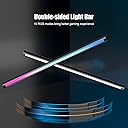
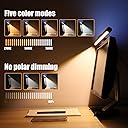
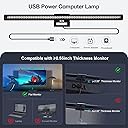
The CURUK RGB Monitor Light Bar is a dual-sided, USB-powered LED lamp designed for professional home offices and gaming setups. Featuring 10 RGB colors, asymmetrical 45° lighting to reduce eye strain, stepless dimming, and touch controls, it magnetically mounts on monitors thicker than 0.55 inches without blocking cameras. With anti-blue light technology, flicker-free illumination, and memory function, it ensures optimal comfort and convenience for extended productivity and immersive experiences.


| ASIN | B09BMV6XCK |
| Additional Features | Double-sided led lights, Anti-blue Light, Asymmetrical 45° Light Design, 5 Switchable Light Color Modes(2700K-7500K), Sensitive Touch Control, Glare-Free, Flicker-Free, Reflection Free, Memory Function, Stepless Dimming, Magnetic Base - not block the camera |
| Age Range Description | Adult |
| Base Material | Aluminum |
| Best Sellers Rank | #233 in USB Reading Lamps |
| Brand Name | CURUK |
| Bulb Base | Prong |
| Bulb Shape Size | A19 |
| Color | Black |
| Connectivity Protocol | USB |
| Connectivity Technology | USB |
| Control Method | Touch |
| Controller Type | Touch Control |
| Customer Reviews | 4.1 out of 5 stars 336 Reviews |
| Efficiency | Moderately Efficient |
| Finish Type | Unfinished |
| Finish Types | Unfinished |
| Included Components | Light kit inlcuded |
| Indoor Outdoor Usage | Indoor |
| Installation Type | Tabletop |
| Is Product Cordless | No |
| Is Waterproof | False |
| Item Dimensions D x W x H | 17.6"D x 2.32"W x 1.38"H |
| Lamp Type | Desk Lamp |
| Light Source Type | LED |
| Lighting Method | Adjustable |
| Manufacturer | CURUK |
| Material Type | Aluminum |
| Model Number | LLF006-US |
| Mounting Type | Tabletop |
| Number of Items | 1 |
| Number of Light Sources | 2 |
| Number of Pieces | 1 |
| Power Source | USB Cable Powerd |
| Product Dimensions | 17.6"D x 2.32"W x 1.38"H |
| Recommended Uses For Product | Reading |
| Room Type | Office |
| Shade Color | black |
| Shade Height | 1.38 Inches |
| Shade Material | Aluminum |
| Shape | Straight |
| Specific Uses For Product | Reading, Studying, Design, Office Working, Gaming, Entertainment |
| Style Name | Video Conference Lighting, Gaming, Office Working, reading, Studying, Design, Entertainment |
| Switch Type | Touch |
| Unit Count | 1.0 Count |
| Voltage | 5 Volts (DC) |
| Water Resistance Level | Not Water Resistant |
| Wattage | 5 watts |
S**E
easy installation. Helps relieve eyestrain
my teenage daughter is now permanently enrolled in distance-learning. I have been looking for ways to make the experience more comfortable for her. I decided to order this light bar when she began to complain daily about headaches. convinced it was due to the long hours of staring at her computer screen. I decided to order this with the hopes that it would help reduce the strain on her eyes. I am genuinely happy with both the performance, design, quality, and price of This light bar. it’s been installed and in use now for over 2 months. The touch sensors are appropriately responsive and I find it to be the ideal size for any monitor (including her 34" ultrawide). it interestingly seems to reflect the light down towards the desk rather than at her face and has definitely improved her comfort level. Installation couldn’t have been easier it took less than 5 minutes. clear instructions. it’s extremely lightweight. there’s no way it would leave any long-term damage to the computer as was one of my concerns before ordering it. terrific Value. I would definitely buy it again if need be.
E**G
I've had this light bar for all of four hours, and I'm an almost happy camper.
Revisions five weeks later (Nov. 16, 2023): After 24 years of writing reviews, I should have learned to wait at least three weeks - so that whatever it is can be returned and the review is more accurate - before posting a review. I was mostly satisfied with this out of the box. I'd never even heard of a light bar for monitors and it is one of the greatest "after market" gizmos for computing. Before going further, I'll say that the reviews stays at four stars. I have a desktop all-in-one computer and that means that the monitor will be slightly (wider) deeper where the light bar attaches. The magnet is simply not strong enough, and I wish that they had had some sort of adjustment bar as you get with more expensive models. When turning the light on and off, the light bar slips and sometimes falls off. That's issue #1. Second, though we're told that to turn it on or off or to adjust the brighteness, just hold the button in. Well, that takes two hands, one to make the adjustment and one to keep the bar on the monitor. It's very sensitive in that area. Third, the ambient lights do not "work" as advertised. There are five colors ranging from green to orange to red, but the width of the light that is behind the computer is no more than 12" while the computer is 18". In other words, there isn't much ambient light. I have stayed with the light orange and, once in a while, switch to the blue white. Great. Now all I would need it to do is to change colors by holding my finger on the button. It doesn't work that way. You have to tap, tap, tap ... tap to get the color to change. Fourth: My new keyboard has a black shiny "bar" across the entire top. The light just happens to reflect on that plastic (Logitech keyboard K350). I wish - oh, how I wish! - that I had not taken off that piece of protective plastic that most electronics come with on screens and other things that might glare. Remote: I didn't even note that this doesn't have a remote. Do you need one? Truth be told, and I've got a whole lot of truths behind me, once you find the setting you like, it's rare that you will change settings. The extra cost for a remote isn't prohibitive, but in these days of high inflation, I could save my money for other doo-dads. I use the next to the brightest "white" setting that has a bit of yellow in iut to make it warmer. Yes, sometimes, when it's really overcast out my window, I'll go to the brightest white, but I do find that tiring. Story: Last year, we switched every light bulb in the house to LEDs. Those of you who have gone that route will understand this. There must be 64 combinations of light, warmth, cool, yellow etc. And if you're in a kicthen with six bulbs, you have to make sure that all the bulbs have the same rating. (Note: there is a new adjustable LED with four or five settings. Anyone want to buy 30 bulbs (we bought six adjustable ones which could have saved us hours not to mention getting on an off a ladder that has as many stability proiblems as I do). SO, do keep in mind that oncve you find the setting that is most pleasing and easiest on the eyes, I doubt that you will change settings that often. If you do, then I would recommend a light bar with a remote (but read the reviews of the remote which has taken many people by surprise on light that are over $35. Overall, I'd love to have had this light bar 30 years ago when I moved back into a dimmer office and with little light from outside, but I haven't and I'm basically happy with this CURUK. I'm about to use two drops of SuperGlue to hold the *bracket* for the light to the back of the monitor. Thanks to this light, I am noit back to my 65 wpm typing even if my brain is working at 80. It's not just the light, it's the whole light/monitor/keyboard that works well together. For two weeks, I had the light tilted just a half-inch to far out from the monitor but when I found the sweet spot, all worked well. Would I recommend this? If you can cope with these annoyances, then yes! Would I recommend something "better?" Well, I don't know what's better. I'm glad that this was the first one I tried. I might come back and tell you how the Superglue worked. It seems to be the biggest bugaboo about this light bar. **** First, I am retired after 37 years in business. I've had more PCs and keyboards than I'd care to count (but I can if you want). My first PC was a Dell and I bought it in 1983 from ... Mike Dell. Nine Dells later, and my issues are not with the computers but with the keyboards and minor things that can drive you nuts. Don't rush me: I'm getting there. I have been a professional, then an amateur nature photographer so my monitor and keyboard are essential and must meet my visual requirements. So, here goes: I bought a new keyboard with lights of every color and from very warm (yellow) to very cool (blue white). But the keyboard's space bar didn't work, so I went to my "go-to Logitech." I've had that for five days, and with my desk lights on, the glare is either terrible or the best setting doesn't give enough light. The keyboard is comfortable. How do I get it so that it's useable? Buy a light bar, and that's what I did, a CURUK Monitor Light Bar. The "manual" is microscopic and when I found a video, it was still microscopic and I needed a magnifier to get it to at least a 10-12 pitch font. However, I found two settings where the glare was no longer a problem. Issue #1: My desktop is an all-in-one, and I had a great deal of trouble getting the bar to fit on the monitor as shown, but finally used the adhesive strips and the magnets on the bottom. It was either that or return it. It's now on the monitor and is stable with no movement. Issue #1.5: Will it stay that way? Tme will tell, and by then, I should have solutions for all the minor issues. Issue #2: To change the warmth of the light from bright (blue) white to warm (yellow), supposedly you have to press the button on the LEFT side of the bar. Like most people, I am right-handed, and this is inconvenient. Not a deal-breaker, but inconvenient. Issue #3: After four hours I have not figured out how to get to my preferred settings quickly. Pressing the leftr button does turn the bar off ... usually. Also, there are times, especially when using software for editing my photos, when I need a light that is in-between the normal three or four settings. I noted on a YT video, that there is something called a wireless Puck light that gives you total control from warm to cold. That could well solve any of the issues that I've run to so far. Not expensive. Add $9 plus batteries for the puck and batteries. I think what bothers me is that I *know* I will come to one or two setting that will be perfect for what I need. It will be one more thing on my desk that could have been alleviated if the light had four "switches" that I could start with in the morning and just leave. Issue #4: There are supposedly 10 (maybe it was 5) colors on the top of the bar. They can automatically alternate from blue to green to yellow to red, and a few shades in between. The red is annoying as is the rotation of colors while I'm trying to use software. Further, I'm not 10 years old. I don't need lights of every color lighting up the wall behind the computer or the ceiling. Believe me: I am not kid. I am not impressed with light strips that keep my 15 year old grandson happy. Even he doesn't use them while gaming. I do find a light blue back light somewhat pleasing, but unnecessary. However, I don't know how many times to push the RIGHT button to get to blue or the other colors. Summary: I neded a light that would eliminate keyboard glare. I found it. Was it worth $23? Well, I don't have glare, so yes. The instructions could have been better (mentioned on all the YT videos); the buttons could have been switched; the brightness of the lights could have been on a slider to getr exactly what we need. Why is it that almost every computer I've ever had has cost me $30-350 more than what it started out as advertised? Would I recommend this? Yes, but I'm old enough to add a disclaimer to every review I've every written: email me in a month or, with luck, before the warranty has run its course. It's amazing what can happen in 31 days . There are also times when - as with my battery charger - you just have to take a chance. Sure enough, after a four or five star review, the battery in my car died ... three times. One of my best purchases. Charged enough to get me from home to a doctor appointment. Then took enough of a charge to get me to my dealer (car dealer). Unfortunately, I need a new alternator. You can't have everything.
P**S
Amazing Product!
I use this everyday. My office is in the basement so it gets pretty dark down here even if I have the shades open. I've been looking around trying to find lighting for my workspace. I ended up buying a desk lamp which really doesn't help since the light only covers a small portion of the desk area. The beauty of this light bar is that it has two different lighting features. RGB lights and the standard led light that shines down from the top of your monitor. The light is really bright and you can adjust it to 5 different hues and shades of light. The RGB lights are a plus if I am in the mood to wind down
M**U
Purple ambience light, adjustable, easy on/off
I found the purple ambience color effortlessly. Love the soft touch power buttons. Different light modes are different, some of these lights adjust the warm but don't really have much difference. This one does have noticeable lighting options. Lighting direction is adjustable so far as i can light my face for conference call, but then i look like a criminal in an interrogation spot light. Still, doable. The magnet holds well, and i like i can remove it briefly to see under my desk or focus on something small. I love this light because of the detailed execution of the features.
R**B
Some quality control issue but overall great value for the price.
I originally ordered this with a bit of apprehension since other reviews said that they received a non working unit or one of the lights did not work. I ordered and this happened to me. The working space light was not working. I emailed customer support and they had another one in the mail that day. The new one works perfectly!! I really like how the light works with the 5 shades of "white" light. I dont use the RGB side much but it has a bunch of static colors and a rotating RGB.
P**N
Won't stay on monitor
EDIT: I give up. I followed the directions and the magnets won't hold it on my monitor. Then I double sided taped it with the magnets, no luck. Then I Gorilla double sided tape- nope. So after the light has fallen off more than a dozen times, with me gasping and hoping a $25 light doesn't ding my monitor, I have decided it needs more than I can give. I may try a counter weight or something. DON'T WASTE YOUR MONEY ON THIS. Get a more expensive one that has a better design with the counter weight or at least like a webcam folding extension in the back. Original review: After several months of playing with the magnets, and watching it fall off my monitor at random, I am taking extreme steps. I ordered some Gorilla Glue double sided tape and attached it to my monitor tonight. Now we will see if it stays. The magnets aren't strong enough to hold it in place, and yes, I have it put on exactly as instructed. Don't know if I got a defective light, or what. But this is my last ditch attempt to keep the light on the monitor. Also, I don't like how you change the light colors with a button on the side of the light. However, it provides great light (when it stays on the monitor) and I like the accent lighting it provides in the back.
K**E
A good light but won’t last long
Pros: The light itself is great. I love that it has a regular white light on one side and RGB lights on the other. It definitely helps create a fun atmosphere in my office space. There are also a lot of options for the lighting such as warmth or color. The lamp attaches via a sticker and magnet so this is great if you don’t want to clamp anything to your monitor. Cons: The light attaches to your monitor via a sticker and an adhesive magnet. Yes they send two sets of each but this isn’t practical in the long run. I’ve had it for about 3 months and the adhesive on the sticker and magnet have already started to give out. I had to remove the sticker and use packing tape. In the end, I would get a lamp that clips onto your monitor.
J**.
Great product, but a longer cord would have been nice
I am a work from home individual, and in the winter months, my desk is just too dim to be fully useful. I purchased a backlit keyboard to help with typing, but that only solved on problem. I saw this light and how it was designed to stick to a monitor, and thought I could use it on the hutch portion of my desk to light things up. And it works great. The multiple color temperatures are great for a variety of work, and the colored upwared facing lighting adds some mood at night time. The only thing I wish was that it had a longer USB power cord. At 6 feet, its just a little too short to reach from where I have it to the floor where I have a USB power brick, so I had to get a USB extension cable to make my setup work. For its intended purpose (over a monitor) its probably fine. The fact you can tilt this light is a huge feature, as angle adjustment means you can light up exactly what you need to, and not get glare on your screen. Great product, would buy again.
N**A
No queda MAC
Lo regresé porque no queda en la Mac, esta muy ancha la base y no trae adaptador
P**S
No recomendable. Pésimo producto.
Ilumina muy poco. El retroiluminado multicolor apenas y es perceptible aunque la pared sea blanca y estés a oscuras. Las luces led frontales no pueden ajustarse lo suficiente para iluminar el teclado, no puedes girar la barra lo suficiente y te da practicamente en la cara. No la recomiendo, demasiado cara y mala funcionalidad.
A**L
no sirvio
La luz RGB no alumbra tanto pero pues igual no hay tanto problema sin embargo en mi caso la luz principal llego sin servir, se mira que ha de ser un problema comun por como se siente el producto
Trustpilot
1 month ago
3 weeks ago