We remain fully operational. Our teams are working around the clock to ensure your deliveries continue safely.

DOWNLOAD THE APP


Copyright © 2025 Desertcart Holdings Limited
DOWNLOAD THE APP
Buy anything from 5,000+ international stores. One checkout price. No surprise fees. Join 2M+ shoppers on Desertcart.
Desertcart purchases this item on your behalf and handles shipping, customs, and support to Thailand.
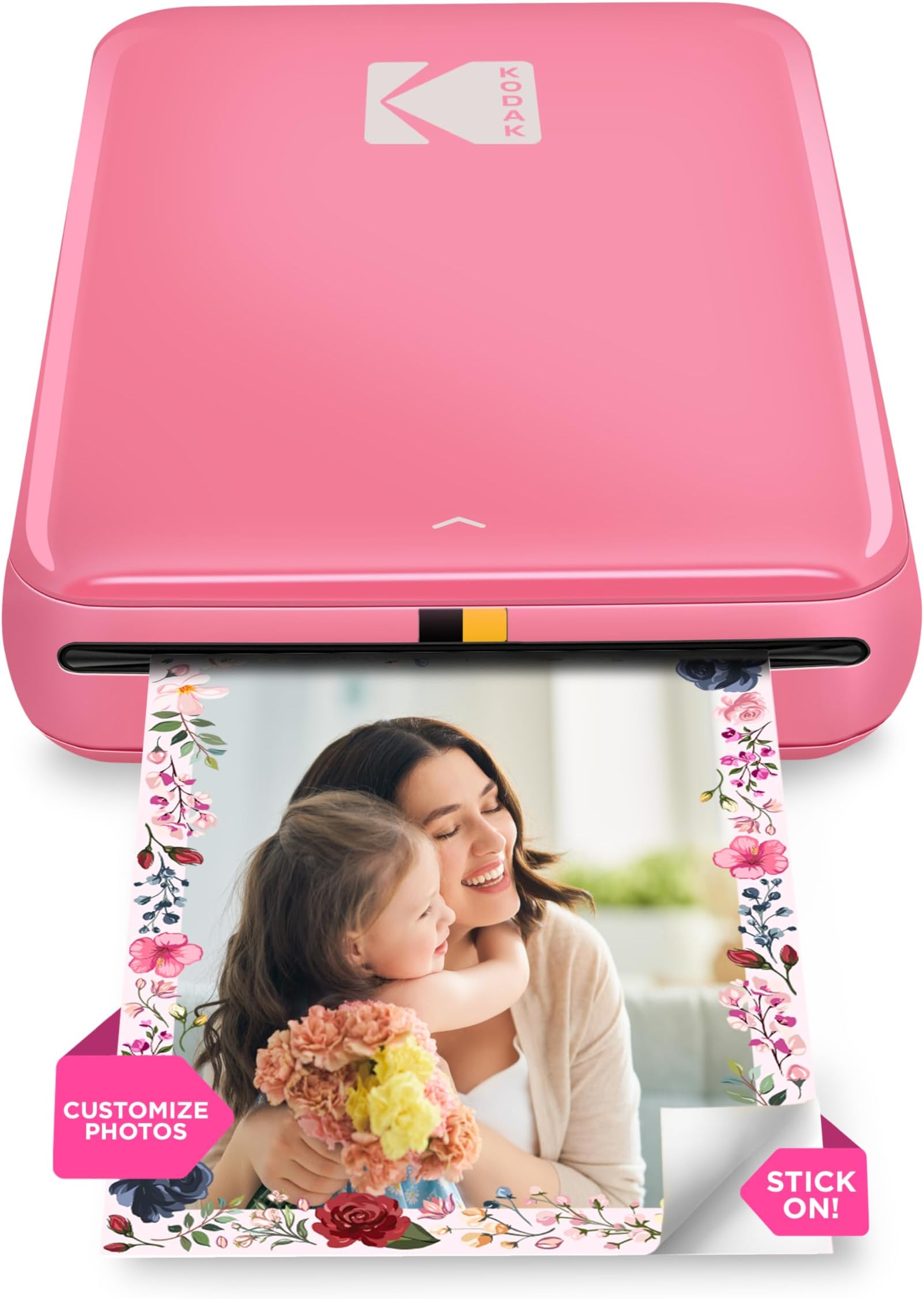
📸 Print Your Moments, Stick Your Story!
The KODAK Step Instant Smartphone Photo Printer is a portable, wireless mini printer that uses ZINK zero-ink technology to produce durable, vibrant 2x3 inch sticky-back photos. Compatible with iOS and Android devices via Bluetooth or NFC, it features a rechargeable battery supporting up to 25 prints per charge and a robust editing app for creative customization. Lightweight and compact, it’s ideal for professionals and influencers who want quick, stylish physical prints on the go.


| ASIN | B08YFJR71D |
| Additional Printer Functions | Print Only |
| B&W Pages per Minute | 1 ppm |
| Best Sellers Rank | 1,668 in Computers & Accessories ( See Top 100 in Computers & Accessories ) 5 in Portable Photo Printers |
| Box Contents | Printer and accessories |
| Brand | KODAK |
| Brand Name | KODAK |
| Color Depth | 24 bpp |
| Color Pages per Minute | 1 ppm |
| Colour | Pink |
| Compatible Devices | Mobile devices, Smartphones, Tablets |
| Connectivity technology | Bluetooth |
| Control Method | App |
| Controller Type | Mobile application |
| Country of Origin | Vietnam |
| Customer Reviews | 4.3 out of 5 stars 21,954 Reviews |
| Dual-sided printing | No |
| Duplex | Simplex |
| Global Trade Identification Number | 00843812154383 |
| Hardware Interface | Bluetooth |
| Ink Colour | black, cyan, magenta, yellow |
| Is Electric | No |
| Item Dimensions D x W x H | 12.7D x 7.6W x 2.5H centimetres |
| Item Type Name | KODAK Step Instant Photo Printer |
| Item Weight | 0.07 Kilograms |
| Manufacturer | Kodak |
| Maximum Copies Per Run | 1 |
| Maximum Copy Resolution Black and White | 600 dpi |
| Maximum Copy Resolution Color | 400 dpi |
| Maximum Copy Speed Black and White | 1 ppm |
| Maximum Print Resolution Black and White | 313 dpi |
| Maximum Sheet Capacity | 10 |
| Maximum Supported Paper Size | 2x3 inches |
| Maximum print Resolution Color | 300 dpi |
| Model Name | KODAK Step Instant Photo Printer |
| Model Number | RODMP20AMZP |
| Model Series | Step |
| Model name | KODAK Step Instant Photo Printer |
| Network Connectivity Technology | Bluetooth |
| Number of Trays | 1 |
| Other Special Features of the Product | Portable |
| Output sheet capacity | 10 |
| Paper Size | 2x3 |
| Print media | Glossy photo paper |
| Printer Output Type | Colour |
| Printer Type | Zink Technology |
| Printing technology | Zink Technology |
| Product Warranty | 1 year limited warranty |
| Resolution | 313 x 400 dpi |
| Scanner Type | Portable |
| Special feature | Portable |
| Specific Uses For Product | Family Events, Parties, Social Media Sharing, Travel |
| UPC | 843812154383 |
| Warranty Type | limited warranty |
E**.
Easy to use, picture quality not brilliant but perfectly fine
Easy to use and connect to mobile app. It’s about the same size as a small portable hard-drive, and lightweight. Picture quality is great, not brilliant but perfectly fine for a relatively cheap mini photo printer. If you’re looking for something that prints top quality photographs, then a printer that uses non-zinc paper, like ones made by Canon would be better, though they are pricier. To place the photo paper in: Slide back off the printer and place the paper in with the blue calibration card first facing down and then the photo paper on top (back facing down - ie. plain white side facing up) App is downloadable on the AppStore using the QR code found in the quick start guide. There are several other Kodak apps, so make sure it’s the Kodak Step Prints app. NB: if you don’t have the QR code to hand, then simply connect to the printer via Bluetooth via your mobile settings (press and hold power button on the side of printer until white light shows) and it will take you to the AppStore link. Charges via USB, but no plug adapter is included, so will either need to plug directly into a USB charge socket, or use any other plug adapter (phone, camera etc) that has a USB port. Can’t speak for Android, but have had no problems connecting to the app using iOS. There size of the photos are 2x3, so may need to edit photos, but can do so easily in the app which has a useful indicator of what will be printed. There are other editing tools within the app and the ability to add borders too. Also included with the pack are five sticky borders that you can stick onto the photo. Very pleased with this so far! Only downside is that there are only five photos sheets included so will need to purchase more! Edited to add more info: Still going strong several months later - occasionally a thin line will appear on the prints. If this happens, just recalibrate the device with the calibration card. Also, the printer will take any 2x3 zinc paper so it doesn’t have to be the Kodak stuff. Only thing to note here is that you’ll need to keep the original blue Kodak calibration card as the other cards (i.e. Canon do not work).
M**N
Perfect portable printer
Prints really cute photos and easy to set up! I love it for scrap booking and special memories. So easy to add stickers and frame the picture
S**G
Great Print Quality, Easy Connection and Solid Build Running Costs Are Fair
This Kodak instant colour phone printer has been great so far. It feels well built with a solid, premium finish, and the connection to my phone has been easy and completely reliable every time. Prints come out with good colour and clarity, and the whole process is quick and straightforward. Running costs aren’t the cheapest, but they’re also not the most expensive compared to similar instant printers. For the convenience and print quality, the cost per print feels reasonable. Overall, a very user-friendly and reliable little printer that delivers consistently good results. ✅ Pros Good build quality Easy and reliable phone connection Strong colour and image quality Quick and simple to use Compact and portable Running costs are fair for an instant printer ❌ Cons Not the cheapest per print (normal for instant printers) Small print size (expected but worth noting)
F**A
Early indications are great !
Just received this a couple of hours ago and got to working with it to see if it met my hopes and expectations as a sticker printer for my journaling practice. It’s so very easy to download the app and get started, I’d printed some pics in minutes and I’m very happy with the quality of the pics and the thickness of the sticky paper. Neat little thing that will hopefully see me through many journal entries :)
M**E
Fun, easy to use on the go!
Bought for granddaughter for her 11th birthday; she loves to make scrap books so this is brilliant Quality of print is good with depth in colours also the ability to peel and stick photos is ideal. It was straight forward to set up via Bluetooth with no issues.
S**Z
Great until..
The printer was great until after printing 80 pages. The printer started to jam. When it eventually got working again, the print quality was so bad, lines through the picture. Picture not as detailed as before. The other con I notice, is when the battery gets to roughly 15%, the printer refuses to print. Had to keep the printer plugged in everytime I was using it. Cause the battery goes down pretty quickly and also the kodak app not the best and needs improvement. Put off from getting kodak printers after this experience. Had to return this printer and very lucky I was still within the return period when the issues started.
S**N
Good little printer for travelling
Great little printer, especially if you like to scrap book and journal. The colour quality is good but not the same as a standard picture, but you can play around with it and can alter the hues and do boarders, stickers, etc. It's a good size for travel and the connection works well. It is value for money, especially if you can buy it as part of a bundle.
C**J
Good for price pics not too ntch
Edit I’ve had to come back and edit my review after printing only ten pics over a six month period the printer developed a jab it of putting a line down every photo in the same place and not printing the top 5 mm of photo leaving a white line at the top, no amount of trouble shooting fixed it, the Color scale also was off after only a few prints Kodak is unable to be contacted Amazon kindly refunded and allowed me to return due to this so I do t recomend anymore So for the price I didn’t expect miracles but I did my research and this was rated higher than the sprocket and ivy. The size is small a little cheap feeling being all plastic. Is easy to use and the apps simple uses micro usb to charge which is a bit annoying as it’s another cable to store, comes with only 5 prints in box so order extra paper. Prints fairly quick only down side is whites look yellow due to the glossy film the prints are a little on the dull or dark side so play with the Color’s and settings to brighten up, the clarity isn’t as sharp as I’d like but this isn’t a top end printer it’s fine for what I want for making labels for Yoto cards and printing little pics, Running costs are fairly cheap approx 45 to 50p a print so cheaper than the sublimation printers by Polaroid. I previously had a pogo that I loved but it died fairly after a year or so of use this is better prints and a lighter model and smaller
Trustpilot
1 month ago
1 month ago